
TL;DR:
- A data center redundancy workflow is a structured set of procedures for deploying, monitoring, switching, and restoring duplicate infrastructure components across all layers to ensure continuous uptime. Proper implementation and testing of these workflows, combined with automation tools like VMware NSX-T and Veeam, are essential for achieving genuine operational resilience and reducing human error during failures. Most SMBs fail not from hardware shortages but from untested, undocumented operational processes and lack of control plane automation.
A data center redundancy workflow is the structured process of duplicating critical infrastructure components and managing failover procedures to maintain continuous uptime during failures or planned maintenance. For IT managers at small to medium-sized businesses, getting this process right separates a recoverable incident from a costly outage. This article covers the core redundancy architectures, a step-by-step implementation workflow, testing best practices, and automation tools including VMware NSX-T and Veeam that reduce human error and cut failover times. You will leave with a practical framework you can apply to your own environment, regardless of budget.
What is a data center redundancy workflow?
A data center redundancy workflow is the formalized set of procedures that governs how duplicate systems are deployed, monitored, switched, and restored across power, cooling, networking, and compute layers. The industry term for the broader discipline is high availability architecture, and the workflow is the operational layer that makes that architecture function in practice. Without the workflow, hardware redundancy is just expensive insurance that has never been tested.
The Uptime Institute's Tier classification system is the most widely used framework for categorizing redundancy levels. Tier II provides basic redundancy with a single path for power and cooling. Tier III data centers are concurrently maintainable, meaning maintenance can occur on any component without interrupting operations, targeting 99.982% uptime. That figure translates to less than 1.6 hours of downtime per year, which is the threshold most SMB service-level agreements should be designed around.
Tier IV data centers are fault tolerant with fully independent, redundant distribution paths for both power and cooling, targeting 99.995% uptime. The jump from Tier III to Tier IV roughly doubles infrastructure cost, so most SMBs land at Tier III or use colocation facilities that already meet that standard. Understanding where your environment sits on this scale is the first step in any redundancy planning effort.
What are the levels and types of data center redundancy architectures?
Redundancy architectures are defined by the ratio of active components to spare capacity. The four primary models are N, N+1, 2N, and 2N+1, and each carries distinct cost and reliability trade-offs.
| Architecture | Description | Typical Use Case | Relative Cost |
|---|---|---|---|
| N | Exactly the capacity needed, no spares | Dev/test environments | Lowest |
| N+1 | One spare component per critical system | SMB production workloads | Moderate |
| 2N | Full duplicate of every active system | Mission-critical applications | High |
| 2N+1 | Full duplicate plus one additional spare | Tier IV, financial or healthcare | Highest |
For most SMBs, N+1 is the practical starting point. Mission-critical power systems use N+1 generator capacity with bypass-isolation transfer switches, which allows safe transfer switch testing without dropping load. This design pattern applies equally to UPS systems, cooling units, and network switches.
A critical nuance that many SMB deployments miss: redundancy is not resilience by itself. Oversizing entire redundant chains leads to underutilized components and higher costs without proportionate reliability gains. Block redundancy, where spare capacity is shared across a pool of systems rather than dedicated to each one, achieves resilience without the capital waste of full 2N deployments at every layer.
The practical implication for IT managers is straightforward. Audit each system layer independently and apply the redundancy level that matches the actual business risk of that layer failing. Your DNS infrastructure may warrant 2N. Your backup monitoring dashboard probably does not.
How to design and implement an effective data center redundancy workflow
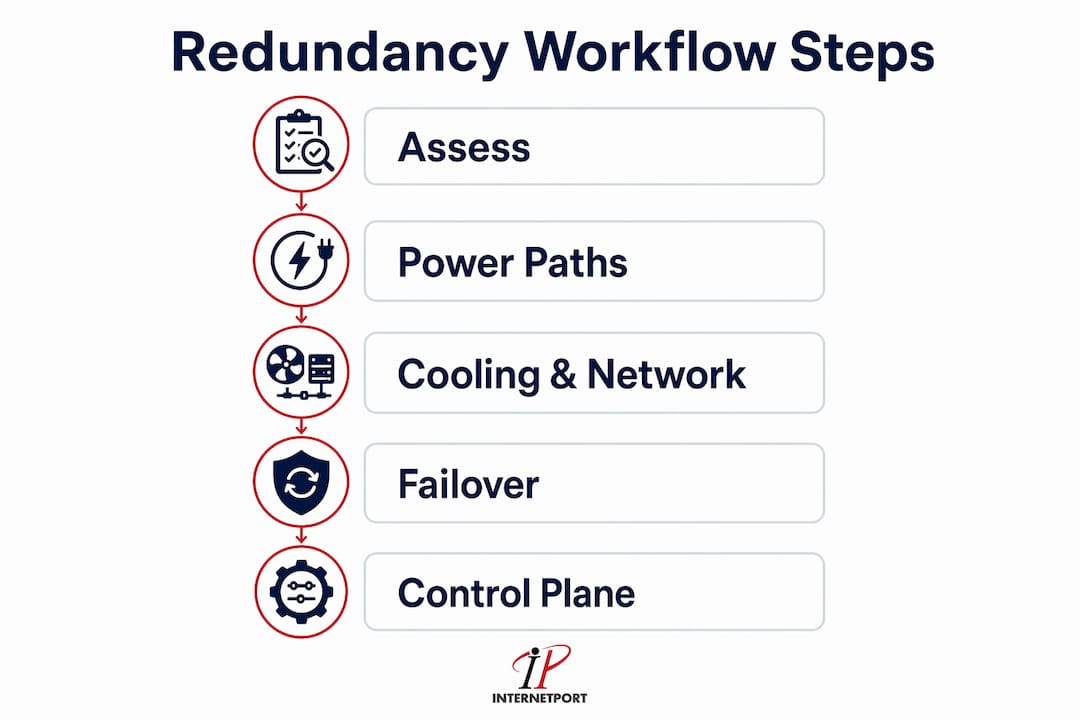
Designing a redundancy workflow requires more than drawing a diagram with duplicate components. The workflow must cover four layers: power, cooling, networking, and control systems. Each layer needs its own failover path, dependency map, and documented switching procedure.
Step 1: Infrastructure assessment and tier selection
Start by cataloging every critical component and mapping its dependencies. Identify single points of failure by asking: if this component fails at 2 a.m. on a Saturday, what stops working and in what order? This dependency map becomes the backbone of your failover runbook. Select a target Tier level based on your SLA commitments and budget, then design each layer to meet that standard.

Step 2: Design redundant power paths
Deploy dual power feeds from separate utility sources where possible. Install UPS systems in N+1 configuration with automatic transfer switches. Connect servers to two separate PDUs fed from independent UPS units. Documenting test results and training staff on emergency power procedures is as important as the hardware itself. A generator that has never been tested under full load is not a redundant system. It is a hypothesis.
Step 3: Design redundant cooling and network paths
Cooling redundancy follows the same N+1 logic. Deploy CRAC or CRAH units with one spare per zone, and configure hot-aisle/cold-aisle containment to reduce thermal dependencies. For networking, deploy dual top-of-rack switches with LACP bonding or MLAG configurations. Run fiber paths through physically separate conduits. A single cable tray fire has taken down networks that looked fully redundant on paper.
Step 4: Define failover and failback procedures
Failover procedures must specify the exact sequence in which systems switch. Failover workflows must sequence dependent services properly, starting foundational services like DNS before application servers and databases. Encode this order explicitly in your runbooks and automation scripts. Failback procedures are equally critical and are frequently omitted from initial designs. Define the conditions under which you return to primary systems and the validation checks required before doing so.
Step 5: Implement control plane redundancy
Control plane redundancy is the layer most SMBs overlook. Your hypervisor management cluster, network controllers, and monitoring systems all need their own redundant paths. Hardware redundancy without redundant control and automation layers undermines five-nines uptime targets. A failed vCenter server that cannot orchestrate VM failover renders your compute redundancy useless.
Pro Tip: For Tier III concurrent maintainability, sequence your maintenance windows by switching the active path to standby, confirming standby is carrying load, then performing maintenance on the now-idle primary path. This three-step sequence is the operational procedure that Tier III certification actually requires, and many teams skip the confirmation step.
What are best practices for testing and validating data center redundancy workflows?
Redundancy testing and failover testing are not the same thing, and conflating them is one of the most common mistakes SMB IT teams make. Redundancy testing confirms that duplicate components exist and are functional. Failover testing validates that the process of switching to those components works correctly under realistic conditions.
Redundancy is theoretical until tested. Scheduled UPS load testing, generator testing under full load, transfer switch timing verification, and temperature monitoring under simulated failure conditions are all required to confirm that your design actually performs as intended. This is not a one-time exercise.
A complete failover test covers five areas:
- Standby system validation: Confirm that standby components are powered, configured, and reachable before the test begins.
- Replication correctness: Verify that data replicated to standby systems matches the primary, with no lag or corruption.
- Failover automation: Trigger the automated failover sequence and confirm that each step executes in the correct order and within the expected time window.
- Monitoring visibility: Confirm that your monitoring platform detects the failover event, generates the correct alerts, and shows accurate status for standby systems.
- Failback exercise: Failover testing must include failback procedures and monitoring validation, not just the switch to standby. Return to primary systems and confirm application integrity after the failback completes.
The most dangerous gap in SMB redundancy programs is not missing hardware. It is the untested failback procedure that has never been run in a non-emergency context. When you need it most, you will be running it for the first time.
Document every test result with timestamps, observed behavior, and any deviations from expected outcomes. Run full failover tests at least twice per year. Run component-level tests quarterly. Review your data center outage prevention data after each test to identify patterns before they become incidents.
Pro Tip: Avoid testing your entire environment simultaneously. Stagger tests by system layer so that a test-induced failure in one layer does not cascade into a real outage in another.
How can automation and advanced tools optimize redundancy workflows?
Automation reduces the two biggest risks in any failover event: human error and response time. Manual failover procedures that depend on an on-call engineer reading a runbook at 3 a.m. introduce variability that no amount of hardware redundancy can compensate for.
VMware NSX-T multisite deployments enable automatic failover of both management and data planes within approximately 10 minutes when a primary site fails. Edge node grouping by failure domain activates standby gateways automatically, removing the need for manual intervention during the most time-sensitive phase of an outage. For SMBs running VMware-based environments, this is one of the highest-value automation investments available.
Veeam cloud failover plans define VM replica processing order and time delays between steps, encoding dependency awareness directly into the failover sequence. This means DNS starts before application servers, and application servers start before databases are promoted. The plan also supports undo, permanent failover, and failback as distinct operations, which gives IT teams precise control over recovery state.
The following table shows how automation tools map to specific workflow stages:
| Workflow Stage | Tool | Function |
|---|---|---|
| Network failover | VMware NSX-T | Automatic data/control plane switchover |
| VM replica failover | Veeam Backup & Replication | Dependency-ordered VM startup |
| Power monitoring | DCIM platforms (e.g., Schneider EcoStruxure) | Real-time UPS and generator status |
| Configuration drift detection | Ansible, Puppet | Automated compliance checks against baseline |
| Incident response | PagerDuty, Opsgenie | Alert routing and escalation automation |
Beyond tool selection, the workflow documentation itself must be machine-readable where possible. Runbooks stored as plain text in a wiki are better than nothing. Runbooks encoded as Ansible playbooks or Terraform configurations that can be executed directly are significantly better. The goal is to reduce the gap between "we have a procedure" and "the procedure executes reliably under pressure."
For high availability hosting architectures, the step-by-step availability workflow that covers load balancing, DNS failover, and health check configuration complements the infrastructure-level redundancy covered here.
Key takeaways
A data center redundancy workflow requires hardware duplication, dependency-aware failover sequencing, and validated failback procedures to deliver genuine operational resilience.
| Point | Details |
|---|---|
| Match architecture to risk | Apply N+1 for most SMB layers; reserve 2N for genuinely mission-critical systems to avoid cost waste. |
| Sequence dependencies explicitly | Encode DNS-before-application startup order in runbooks and automation tools like Veeam. |
| Test failback, not just failover | Failback procedures are the most commonly skipped and most frequently needed part of any recovery workflow. |
| Automate the control plane | Tools like VMware NSX-T reduce failover time to roughly 10 minutes and eliminate manual error during incidents. |
| Document and train | Hardware readiness without trained staff and tested procedures does not constitute a redundant system. |
Where most SMB redundancy programs actually break down
Most SMB redundancy programs I have reviewed share the same failure pattern. The hardware is there. The diagrams look correct. But the operational layer, the actual workflow that governs how humans and systems respond when something fails, is either undocumented, untested, or both.
The instinct to solve reliability problems by adding hardware is understandable. It is concrete, it is purchasable, and it shows up on an asset register. But a second UPS that has never been tested under load, connected to a transfer switch that has never been exercised, managed by a team that has never run a failover drill, is not a redundant system. It is a liability with a warranty.
The SMBs that achieve genuine operational continuity treat their redundancy workflow as a living document. They run failover drills on a schedule, not just after incidents. They test failback explicitly, because that is where the subtle configuration errors hide. They invest in control plane automation before they invest in a third cooling unit, because resilient automation systems are critical to five-nines uptime in a way that passive hardware duplication simply is not.
My practical advice: start with your dependency map. If you cannot draw the startup sequence for your critical applications from scratch, your failover runbook is incomplete. Fix that before you buy anything else. Then run a tabletop exercise with your team using a realistic failure scenario. You will find the gaps faster than any audit will.
For SMBs considering colocation as part of their resiliency strategy, the colocation setup workflow guide covers how to integrate a colo facility into your existing redundancy architecture without duplicating effort.
— Peter
How Internetport supports your redundancy strategy
Building a reliable redundancy workflow is only as strong as the infrastructure underneath it. Internetport's data centers in Sweden and internationally are designed with the power, cooling, and network redundancy that SMB IT teams need without requiring you to build it from scratch.

Internetport offers dedicated servers with hardware redundancy built in, PCI DSS compliance, and technical support that understands failover architecture. For teams that want to house their own equipment in a certified facility, colocation services provide access to Tier-grade infrastructure with private networking options. Whether you are running a failover-tested VM cluster or need reliable web hosting with high availability, Internetport's infrastructure is designed to support the redundancy workflows you are building.
FAQ
What is a data center redundancy workflow?
A data center redundancy workflow is the documented set of procedures for deploying, switching, and restoring duplicate infrastructure components to maintain uptime during failures or maintenance. It covers power, cooling, networking, and control systems, along with the failover and failback sequences that govern each layer.
What is the difference between N+1 and 2N redundancy?
N+1 provides one spare component per critical system, while 2N provides a complete duplicate of every active system. N+1 is the standard for most SMB production environments; 2N is reserved for mission-critical workloads where any single failure must have zero impact on operations.
How often should you test data center failover procedures?
Full failover and failback tests should run at least twice per year, with component-level tests conducted quarterly. Failover testing must validate standby systems, replication correctness, monitoring visibility, and failback procedures, not just the initial switch to standby.
What tools automate data center failover workflows?
VMware NSX-T automates multisite network failover within approximately 10 minutes. Veeam Backup & Replication orchestrates VM replica startup in dependency order. Ansible and Puppet handle configuration compliance, while PagerDuty and Opsgenie manage alert routing and escalation during incidents.
Why does control plane redundancy matter for high availability?
Hardware redundancy without redundant control layers cannot achieve five-nines uptime because a failed management or automation system prevents orchestrated failover from executing. Redundant control planes, including hypervisor management clusters and network controllers, are the layer that activates all other redundancy when a failure occurs.