
TL;DR:
- High availability relies on redundancy automation and continuous monitoring to prevent service outages.
- Preparing infrastructure with proper tools, configuration, and testing ensures reliable failover performance.
- Regular testing and a disciplined operational approach are crucial for maintaining true high availability.
Unplanned downtime costs businesses an average of thousands of dollars per minute, and for enterprises running mission-critical applications, even a brief outage can permanently damage customer relationships. A well-designed high availability (HA) hosting workflow is the most reliable defense against that risk. This guide walks IT decision-makers through the core concepts, infrastructure requirements, deployment steps, and ongoing validation practices needed to build a workflow that keeps services online, protects revenue, and meets modern reliability expectations.
Table of Contents
- Understand key concepts and requirements for high availability
- Prepare your infrastructure: Tools and configuration essentials
- Step-by-step: Implement a high availability hosting workflow
- Test, monitor, and troubleshoot your HA workflow
- Why high availability succeeds or fails: Lessons from the field
- Elevate your hosting with proven high availability solutions
- Frequently asked questions
Key Takeaways
| Point | Details |
|---|---|
| Downtime costs real money | Implementing a solid high availability workflow minimizes outages and protects your bottom line. |
| Benchmark your failover | Use empirical RTO/RPO data to select the right setup for your business needs. |
| Preparation is key | A rigorous HA checklist and comprehensive testing ensure readiness for failure scenarios. |
| Continuous improvement matters | Ongoing monitoring and refinement are essential for sustained high availability. |
Understand key concepts and requirements for high availability
Before touching a single server configuration, your team needs a shared vocabulary and a clear picture of what "high availability" actually requires in practice. HA means designing your system so that a single component failure does not cause a service outage. It is not just redundancy; it is the combination of redundancy, automation, and continuous monitoring.
Two metrics define your HA targets:
- RPO (Recovery Point Objective): The maximum amount of data loss your business can tolerate after a failure, measured in time. An RPO of zero means no data loss is acceptable.
- RTO (Recovery Time Objective): The maximum time your system can remain unavailable before the outage causes unacceptable business impact.
These two numbers should drive every architecture decision you make.
HA patterns and their trade-offs
There are three dominant HA patterns, each with distinct cost and performance profiles. Understanding them before you commit to a design will save significant rework later.
| Pattern | RTO | RPO | Relative cost |
|---|---|---|---|
| Active-passive (async) | 30 to 120 seconds | Seconds to minutes | ~2x baseline |
| Active-passive (sync) | 15 to 60 seconds | Zero | ~2 to 2.5x baseline |
| Multi-region active-active | Under 30 seconds | Near zero | ~6 to 10x baseline |
These figures reflect real-world HA pattern benchmarks across production deployments. Active-passive async is the most affordable entry point, but the RPO of seconds to minutes is unacceptable for financial transactions or healthcare records. Synchronous replication eliminates data loss at a modest cost premium. Multi-region active-active delivers the fastest failover and near-zero data loss, but the 6 to 10x cost multiplier means it is typically reserved for the most critical workloads.
Your infrastructure prerequisites checklist before any deployment:
- Redundant network paths with no single point of failure
- Automated failover capable of triggering without human intervention
- Real-time health monitoring with alerting thresholds defined
- A tested disaster recovery plan, not just a documented one
- Clear ownership: who acts when an alert fires at 2 a.m.
Review your web hosting checklist to confirm your current setup addresses each of these areas before moving forward. If you are evaluating providers, the enterprise hosting guide outlines what a production-grade environment should include.
Pro Tip: If your budget allows only one upgrade, prioritize synchronous replication. The RPO=0 guarantee it provides is worth the 2 to 2.5x cost increase for any workload where data integrity is non-negotiable.
Prepare your infrastructure: Tools and configuration essentials
Having clarified your end goals and requirements, the next step is to assemble and configure your infrastructure tools. This phase is where many teams underestimate the effort involved. Getting the tools right before deployment prevents the most painful class of HA failures: the ones you only discover during an actual outage.
Core infrastructure components
Every HA setup requires these building blocks:
- Load balancer: Distributes traffic across nodes and reroutes instantly when a node fails. Options include HAProxy for on-premises setups and cloud-native load balancers for managed environments.
- Database cluster manager: Automates primary election and replication management. Patroni is the standard choice for PostgreSQL environments.
- Distributed storage or replication layer: Ensures data written to one node is available on others. This is where your RPO is actually determined.
- Health check and monitoring stack: Tools like Prometheus, Grafana, or cloud-native equivalents give you real-time visibility into node status, replication lag, and failover events.
- Orchestration layer: Kubernetes or similar platforms manage container restarts, node scheduling, and self-healing behavior automatically.
Empirical benchmarks to set realistic expectations
When planning your configuration, use real performance data rather than vendor marketing claims. Empirical HA benchmarks show that Patroni for PostgreSQL achieves an average RTO of 23 to 24 seconds with synchronous replication and RPO=0. Cosmos DB recovers write availability in under 2 minutes during per-partition failover events lasting up to 30 minutes. YugabyteDB elects a new leader node in approximately 3 seconds after a node failure.

These numbers matter because they let you set realistic SLA commitments with your stakeholders before you go live.
Infrastructure requirements table
| Component | Purpose | Minimum requirement |
|---|---|---|
| Primary and replica nodes | Redundancy | At least 2 nodes in separate failure zones |
| Load balancer | Traffic distribution and failover | Active with health check interval under 5 seconds |
| Replication | Data synchronization | Synchronous for RPO=0, async for cost-sensitive setups |
| Monitoring | Visibility and alerting | Real-time with sub-minute alert latency |
| Backup storage | Point-in-time recovery | Offsite or cross-region, tested weekly |
For teams evaluating infrastructure options, scalable hosting solutions covers how different architectures scale under load. If you are building from the ground up, cloud infrastructure basics provides a practical foundation for understanding what each layer does.
One step that teams consistently skip: test your failover before going live. Simulate a primary node failure in a staging environment that mirrors production. Measure actual RTO and RPO against your targets. If the numbers do not match, fix the configuration now, not during a live incident.
Step-by-step: Implement a high availability hosting workflow
With your infrastructure ready, you can now implement the workflow step by step, with an emphasis on proven benchmarks. The sequence below applies broadly across most HA architectures, whether you are running bare-metal clusters, cloud VPS, or a hybrid setup.
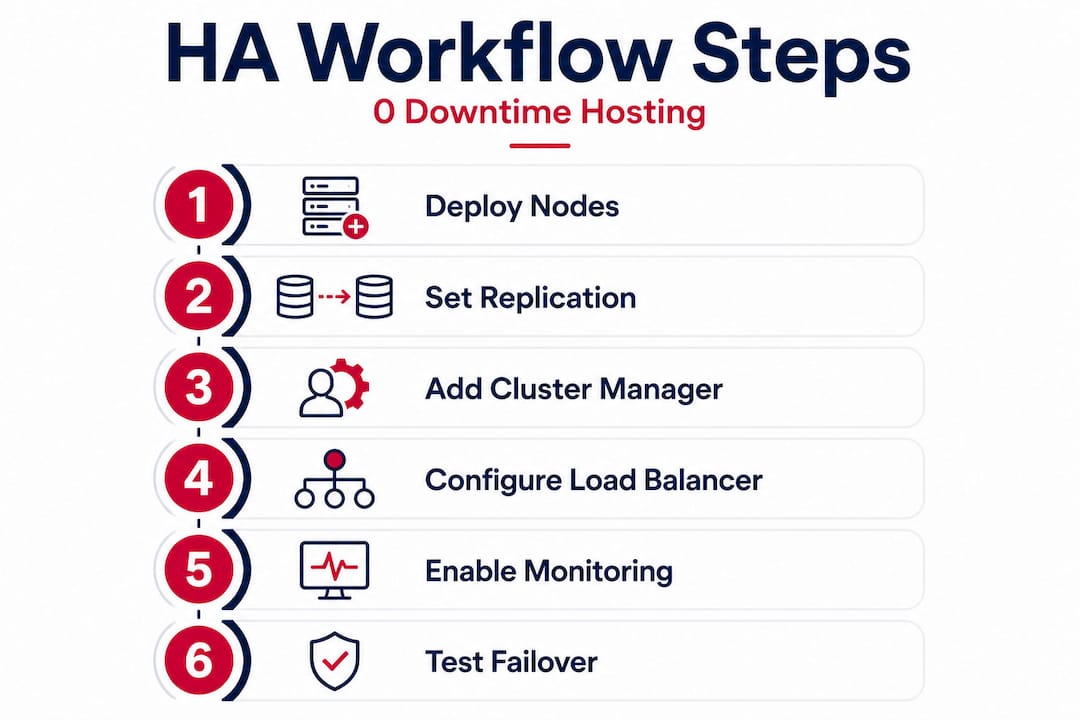
Step 1: Deploy and configure your primary and replica nodes. Set up your primary node first, then bring replica nodes online in separate availability zones or data centers. Confirm network connectivity between nodes and verify that replication is running before proceeding. Never treat two nodes in the same physical rack as genuinely redundant.
Step 2: Configure your replication mode. Choose synchronous or asynchronous replication based on your RPO target. For synchronous, the primary waits for at least one replica to confirm a write before acknowledging success to the application. This is what delivers RPO=0 and RTO ~24 seconds in Patroni-managed PostgreSQL clusters. For asynchronous, writes are faster but the replica may lag by seconds or minutes.
Step 3: Deploy and configure your cluster manager. Install Patroni (or your chosen cluster manager) on each node. Configure the distributed configuration store (etcd or Consul) that Patroni uses to track cluster state and coordinate leader election. Set your health check intervals and failover thresholds explicitly. Default values are rarely appropriate for production workloads.
Step 4: Set up your load balancer. Configure the load balancer to route read and write traffic appropriately. Writes go to the primary; reads can be distributed across replicas to reduce load. Set health check intervals to 5 seconds or less so the load balancer detects a failed node quickly.
Step 5: Implement health monitoring and alerting. Deploy your monitoring stack and define alert thresholds for replication lag, node availability, and response time. Alerts should fire before a problem becomes an outage. Set escalation paths so the right person is notified immediately.
Step 6: Automate failover and validate it. Confirm that your cluster manager will promote a replica to primary automatically when the primary fails. Do not rely on manual intervention for the initial failover. Human response time adds minutes to your RTO. After configuration, trigger a controlled failover and measure the actual recovery time.
Step 7: Document and rehearse. Write down the exact sequence of events during a failover: what fires, what promotes, what the load balancer does, and what your monitoring shows. Share this with your team. A documented process that nobody has read is not a process.
Before considering the workflow complete, verify each of these checkpoints:
- Replication lag is consistently under your RPO threshold
- Automated failover completes within your RTO target
- Load balancer health checks are active and tested
- Monitoring alerts reach the right people within 60 seconds
- Backup restoration has been tested end-to-end
Pro Tip: Automate health checks at every layer, not just the database. Application-level checks that verify actual query responses catch a wider class of failures than simple TCP port checks.
For teams evaluating which architecture fits their workload, the hosting solution selection guide covers how to match HA requirements to provider capabilities. If you are still deciding between hosting types, web hosting types breaks down the trade-offs clearly.
Test, monitor, and troubleshoot your HA workflow
Implementation is only as valuable as the ability to verify uptime and recoverability through systematic testing and monitoring. Many teams treat deployment as the finish line. It is not. The real work is the ongoing discipline of proving the system works.
Failover testing best practices
Run a scheduled failover drill at least once per quarter. Simulate different failure scenarios: primary node crash, network partition, storage failure, and full data center loss if your architecture supports multi-region. Each drill should produce a written record of actual RTO and RPO, compared against your targets.
Key testing and monitoring practices:
- Chaos testing: Randomly kill nodes or introduce latency in a staging environment to expose weaknesses before they appear in production.
- Backup restoration drills: Restore from backup to a clean environment and verify data integrity. A backup you have never restored is a backup you cannot trust.
- Replication lag monitoring: Track lag continuously, not just during drills. Spikes in replication lag are early warnings of a degrading HA setup.
- Alert validation: Periodically confirm that alerts actually reach their recipients. Alert pipelines break silently.
- Log review: After every failover event, review logs to understand exactly what happened and how long each step took.
Critical reminder: Routine failover drills are not optional maintenance. They are the only way to verify that your HA investment will perform when it matters. A system that has never been tested under failure conditions should not be trusted to protect production workloads.
Common mistakes that undermine HA
The most frequent failure pattern we see is teams that build a solid HA architecture and then stop testing it. Configuration drift, software updates, and workload changes all erode HA guarantees over time. A setup that passed its initial test may fail 18 months later because a dependency was updated and nobody checked the replication configuration.
Insufficient alerting is the second most common problem. Teams configure alerts for obvious failures but miss the subtle early warnings: rising replication lag, increasing query latency, or growing disk usage on replica nodes. Preventable outages are almost always preceded by warning signs that went unnoticed.
Real-world benchmarks reinforce why speed matters here. Per-partition failover data shows Cosmos DB recovers write availability in under 2 minutes and YugabyteDB elects a new leader in about 3 seconds. If your monitoring takes 5 minutes to detect a failure, those fast failover times are irrelevant. Detection speed is part of your effective RTO.
For teams managing multiple clients or complex environments, reliable hosting for SMBs covers how to maintain HA discipline at scale without overwhelming your operations team.
Why high availability succeeds or fails: Lessons from the field
After working with organizations across industries on HA deployments, the pattern is clear: technical architecture rarely causes HA failures. Organizational behavior does.
The most dangerous misconception is treating HA as a project with a completion date. Teams invest in the right tools, configure them correctly, pass the initial tests, and then move on. Six months later, a routine deployment changes a network policy, replication silently breaks, and the next real failure exposes an HA system that stopped working months ago. High availability is a continuous operational discipline, not a one-time configuration.
Overconfidence in automation is the second failure mode. Automated failover is essential, but it is not infallible. Automation can fail, produce unexpected behavior during novel failure scenarios, or take actions that make a situation worse. Human oversight remains necessary. The goal is to use automation to handle the first 60 seconds of a failure response while humans assess the broader situation.
The teams that maintain genuine high availability share one habit: they build a feedback loop between their monitoring data and their infrastructure decisions. Every alert, every failover event, and every near-miss feeds back into configuration reviews and architecture updates. They treat their secure, scalable hosting environment as a living system that requires ongoing attention, not a static asset.
The uncomfortable truth is that most HA failures are predictable. The warning signs were in the monitoring data. The configuration gap was known but deprioritized. The drill was skipped because the team was busy. Building a culture where HA validation is non-negotiable is harder than configuring Patroni, but it is what separates organizations with genuine resilience from those with the appearance of it.
Elevate your hosting with proven high availability solutions
Building a robust HA workflow requires an infrastructure partner that can match your reliability requirements at every layer, from redundant data centers to high-throughput networking.

Internetport provides enterprise-grade web hosting backed by redundant Swedish data centers, SSD storage, and network capacity up to 10 Gbps, giving your HA architecture the physical foundation it needs. For organizations that need full control over hardware placement and network configuration, colocation services let you house your own equipment in a carrier-grade facility with the connectivity and power redundancy that HA demands. Teams that need flexible, scalable compute can deploy cloud VPS instances that scale with workload changes without compromising availability. Contact Internetport to discuss a workflow health check or a migration plan tailored to your uptime requirements.
Frequently asked questions
What does RPO and RTO mean in high availability hosting?
RPO is the maximum acceptable amount of data loss after a failure, while RTO is the maximum acceptable time to restore service. In practice, HA pattern benchmarks show that synchronous replication achieves RPO=0 while active-passive async setups typically carry an RPO of seconds to minutes.
How fast can high availability systems fail over?
Failover speed varies significantly by technology. Empirical benchmarks show Patroni PostgreSQL recovers in under 30 seconds on average, Cosmos DB returns write availability in under 2 minutes, and YugabyteDB elects a new leader node in approximately 3 seconds.
Is high availability worth the extra cost for small businesses?
For most businesses, the cost of even a brief outage in lost revenue and damaged customer trust outweighs the investment in HA infrastructure, making it a sound business decision at almost any scale.
How can I minimize data loss in my hosting workflow?
Use synchronous replication, which delivers RPO=0 at roughly 2 to 2.5x the cost of a single-node setup, ensuring no committed data is lost during a failover event.
What's the difference between active-passive and active-active HA setups?
Active-passive runs one active node with standby replicas ready to promote, while active-active runs multiple nodes simultaneously handling traffic. Active-active delivers faster failover and near-zero RPO but costs 6 to 10 times more than a baseline single-node deployment.