

Most businesses treat web hosting as a commodity, something you pick once, forget about, and only notice when things break. That mindset is expensive. Your hosting environment directly controls how fast pages load, whether your site stays online during a traffic spike, and how well your data is protected from attacks. This guide walks you through everything you need to know: what web hosting actually is, how the technology works under the hood, which hosting type fits your situation, and how to make a smart decision that supports real business growth.
Table of Contents
- Understanding web hosting: The basics
- Types of web hosting: Which model fits your needs?
- How web hosting works: Mechanics and infrastructure
- Web hosting security: Protecting your site and data
- How to choose the right web hosting for your business
- Enhance your online presence with expert web hosting solutions
- Frequently asked questions
Key Takeaways
| Point | Details |
|---|---|
| Web hosting powers websites | Reliable web hosting makes your site accessible, fast, and secure for visitors. |
| Choose the right hosting type | Match your needs to shared, VPS, dedicated, or cloud hosting for the best balance of cost, control, and scalability. |
| Performance and security matter | High uptime, quick load times, and strong security features are essential for business websites. |
| Managed solutions help non-experts | Managed hosting handles updates and security, easing the workload for those without IT support. |
| Plan for business growth | Pick scalable hosting to support spikes in traffic and future expansion. |
Understanding web hosting: The basics
Web hosting is the foundation your entire online presence sits on. At its core, web hosting provides server space so organizations can make their websites accessible to anyone on the internet. That server stores your website files, databases, images, and application code. When someone types your domain into a browser, their device sends an HTTP or HTTPS request to that server, which responds by delivering your site.
For SMBs and IT professionals, hosting is not just about storage. It determines your uptime, your page load speed, your ability to scale during busy periods, and your exposure to security threats. A poorly chosen host can quietly drain revenue through slow load times and unexpected downtime. Our overview of webhosting breaks down what a modern hosting package should include.
Here is what a solid hosting environment covers:
- Server resources: CPU, RAM, and storage allocated to your site
- Connectivity: High-speed bandwidth and network redundancy
- Security layers: Firewalls, SSL certificates, and malware scanning
- Control tools: Panels like Plesk or cPanel for managing files and domains
- Support and SLAs: Guaranteed uptime and response times
Before you sign any contract, run through a web hosting uptime checklist to confirm the provider meets your reliability standards.
Types of web hosting: Which model fits your needs?
With hosting defined, the next logical step is understanding your options. Each model trades off cost, control, and performance differently.
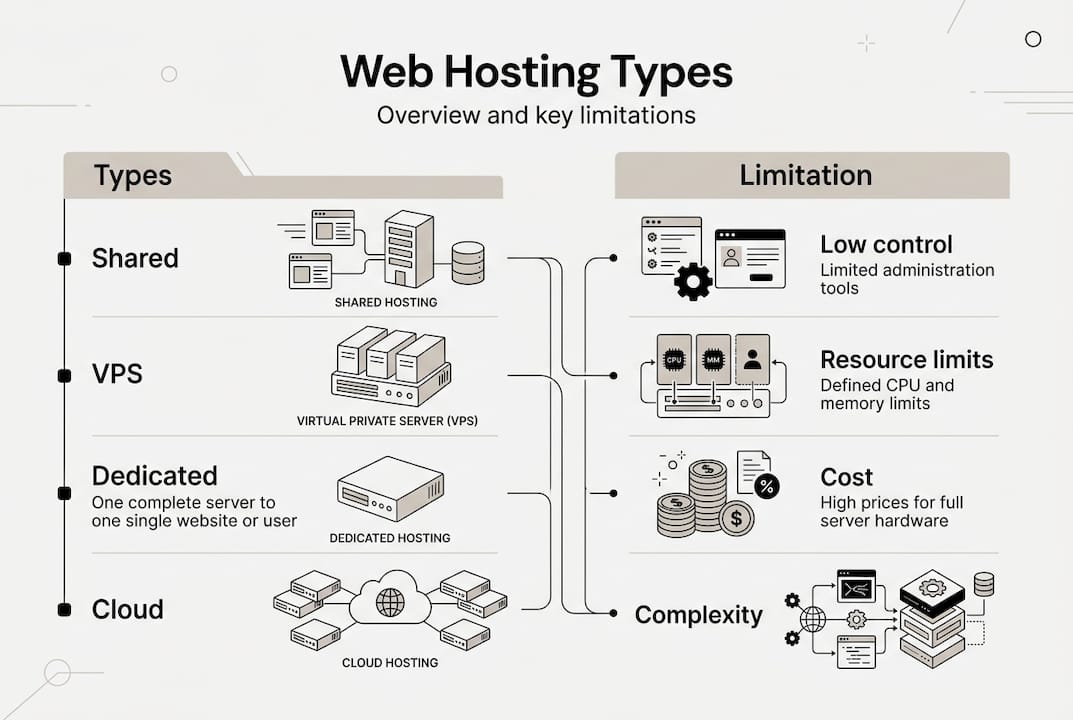
Shared hosting puts your site on a server alongside hundreds of others. It is cheap, typically $2 to $10 per month, and easy to set up. The downside is that shared is cheap but inconsistent, and a spike in traffic from a neighboring site can slow yours down. It works for simple brochure sites or early-stage startups with minimal traffic.
VPS (Virtual Private Server) hosting gives you isolated resources on a shared physical machine. Pricing runs $20 to $80 per month, and you get dedicated CPU and RAM that other users cannot touch. This is the sweet spot for growing SMBs. Learn more about VPS benefits for SMBs if you are evaluating this option.

Dedicated hosting means the entire physical server is yours. Costs range from $80 to $300 or more per month. You get maximum performance and control, which suits high-traffic applications, e-commerce platforms, or compliance-heavy environments.
Cloud hosting distributes your site across multiple servers, making it elastic. Pricing starts around $5 per month but can climb unpredictably with usage. It handles traffic spikes well and offers strong redundancy. Primary hosting types each serve different workloads, and cloud is best when demand is variable.
| Hosting type | Typical cost/month | Best for | Key limitation |
|---|---|---|---|
| Shared | $2 to $10 | Small sites, low traffic | Resource contention |
| VPS | $20 to $80 | Growing SMBs, dev environments | Requires some technical skill |
| Dedicated | $80 to $300+ | High-traffic, compliance needs | Higher cost, fixed capacity |
| Cloud | $5 to $100+ | Variable traffic, scalability | Unpredictable billing |
| Managed | Varies | Non-technical teams | Premium pricing |
Managed vs. unmanaged is a separate but critical choice. Managed hosting means the provider handles updates, patches, and security monitoring. Unmanaged gives you full control but full responsibility. Managed solutions are preferred by a significant share of enterprise teams for exactly that reason.
Pro Tip: If your team does not include a dedicated sysadmin, managed hosting almost always pays for itself in avoided downtime and security incidents.
How web hosting works: Mechanics and infrastructure
Knowing the types, let's look deeper at the technology that powers web hosting and what makes some platforms excel.
When a visitor loads your site, their browser sends a DNS query to resolve your domain to an IP address. That request hits your web server, which processes it and returns the appropriate files. Modern servers use name-based virtual hosting via SNI to serve multiple domains from a single IP address, which is how shared and VPS environments host many sites efficiently.
Two web server platforms dominate the market: Apache and Nginx. Apache handles requests with a process-per-connection model, which works well for low-to-medium traffic. Nginx uses an event-driven architecture better for high-concurrency environments, making it the stronger choice for multi-tenant VPS or cloud setups with many simultaneous users.
Performance metrics you should track:
- TTFB (Time to First Byte): How fast the server starts responding. Under 200ms is the target.
- Uptime: Cloud hosting can sustain 99.99% uptime and handle 500 or more concurrent users with zero errors under proper configuration.
- Concurrent load capacity: How many simultaneous visitors your server handles without degrading.
- Caching: Reverse proxies and CDNs dramatically reduce server load. Immutable cache headers can boost repeat-visit performance by up to 48%.
CDNs (Content Delivery Networks) like Cloudflare cache your static assets at edge locations worldwide, cutting latency for international visitors. Pair that with a well-configured reverse proxy and your server handles far more traffic without additional hardware. Our guide on web hosting uptime boosts covers these configurations in practical detail.
For IT professionals evaluating infrastructure, also consider hosting solution selection frameworks that align server architecture with your application stack.
Web hosting security: Protecting your site and data
Even with performance and reliability established, security is non-negotiable. Let's break down what you must know.
Shared hosting carries a specific risk: cross-site contamination. If one site on your shared server gets compromised, malware can potentially spread to neighboring accounts. Shared hosting risks noisy neighbors and malware, while VPS, dedicated, and cloud environments offer isolation that prevents this kind of lateral movement.
Key security features to demand from any host:
- WAF (Web Application Firewall): Filters malicious HTTP traffic before it reaches your application
- DDoS protection: Absorbs volumetric attacks that would otherwise take your site offline
- Automated backups: Daily snapshots so you can recover quickly from ransomware or accidental deletion
- SSL/TLS certificates: Encrypts data in transit; free certificates are now standard on quality hosts
- Resource isolation: Prevents one account from consuming another's CPU or memory
"Managed hosting is preferred by 60% of enterprises for updates, security, and backups, precisely because the operational burden is handled by experts."
For non-technical teams, managed hosting removes the guesswork. For sysadmins who want granular control, unmanaged VPS or dedicated servers let you configure eBPF monitoring, custom firewall rules, and immutable file systems. The right choice depends on your team's capabilities, not just your budget. Explore webhost security options to see what protections come standard versus what you need to add.
Pro Tip: Always verify that your host provides daily automated backups stored off-server. On-server backups are useless if the server itself is compromised.
How to choose the right web hosting for your business
Understanding hosting's security and technical details highlights one last, crucial step: choosing the best fit for your business goals.
Follow this process:
- Assess your current traffic and growth trajectory. A site averaging 5,000 monthly visitors has very different needs than one expecting 500,000.
- Define your budget range. Include not just the monthly fee but also the cost of downtime, support, and migration if you outgrow the plan.
- Identify your technical resources. Do you have a sysadmin? If not, managed hosting is almost always the smarter path. Managed hosting outscores unmanaged for non-experts, while sysadmins may prefer the control of unmanaged VPS.
- Map your security and compliance requirements. PCI DSS, GDPR, or HIPAA obligations narrow your options significantly.
- Plan for traffic spikes. Resource limits prevent OOM errors and throttling, and cloud or scalable VPS environments handle sudden surges far better than fixed shared plans.
| Business scenario | Recommended hosting | Why |
|---|---|---|
| New small business site | Shared or entry VPS | Low cost, easy setup |
| Growing e-commerce store | VPS or managed cloud | Reliability, isolation, scalability |
| High-traffic SaaS platform | Dedicated or cloud | Performance, compliance, control |
| Dev/staging environments | VPS | Cost-effective, isolated testing |
Common mistakes to avoid: underestimating traffic growth, skipping backup verification, and choosing the cheapest plan without checking uptime SLAs. Our guide on selecting hosting solutions walks through enterprise-grade evaluation criteria that SMBs can adapt. And if VPS is on your shortlist, the breakdown of VPS for business applications gives you a clear comparison against alternatives.
Pro Tip: Run a load test before launch. Tools like k6 or Locust simulate concurrent users and reveal whether your hosting plan can handle real-world demand before it matters.
Enhance your online presence with expert web hosting solutions
You now have a clear picture of how hosting works, what separates the options, and how to match a solution to your actual business needs. The next step is finding a provider that delivers on all of it.

Internetport has been building reliable hosting infrastructure for SMBs and IT professionals since 2008. Our professional web hosting plans include free SSL certificates, daily backups, and Plesk control panel access out of the box. Need more control and performance? Our VPS options run on SSD storage with full resource isolation. For teams that need elastic scalability, explore our cloud hosting services backed by two redundant data centers with PCI DSS certification. Whatever your stage of growth, we have a hosting environment built to support it.
Frequently asked questions
What is web hosting and who needs it?
Web hosting provides server space so websites are accessible online. Any business, organization, or individual running a website needs it, from a one-page portfolio to a large-scale e-commerce platform.
What's the difference between shared, VPS, and cloud hosting?
Primary hosting types differ in resource allocation: shared splits server resources among many sites, VPS gives you isolated resources on a shared machine, and cloud hosting scales dynamically across multiple servers for maximum reliability.
How does web hosting affect website performance?
Hosting directly controls TTFB, uptime, and concurrent load capacity. Cloud hosting handles 500+ concurrent users with 99.99% uptime under proper configuration, while shared hosting can degrade under moderate traffic.
What security features should I look for in web hosting?
Prioritize WAF, DDoS protection, automated daily backups, SSL certificates, and resource isolation. Managed hosting is preferred by enterprises specifically because security and updates are handled by the provider.
How do I choose the right hosting for my business?
Start by assessing traffic volume, budget, team technical skills, and compliance requirements. Managed hosting outscores unmanaged for non-experts, while VPS or cloud suits teams that need scalability and direct infrastructure control.