

Choosing the wrong hosting environment for an enterprise workload is not a minor inconvenience. It can mean hours of downtime, a 50%+ traffic drop after a botched migration, or a DDoS attack that overwhelms infrastructure requiring up to 2Tbps mitigation capacity. IT leaders and system administrators carry the weight of those decisions every day. This guide walks you through the full process: assessing your requirements, comparing hosting models with real benchmark data, locking down security, and navigating edge cases like compliance, traffic spikes, and hybrid cloud setups.
Table of Contents
- Assessing your enterprise hosting needs
- Comparing enterprise hosting solutions: Dedicated, VPS, cloud, managed
- Security best practices for enterprise hosting
- Edge cases: Migration, spikes, compliance, and hybrid cloud
- Reliable enterprise hosting solutions from Internetport
- Frequently asked questions
Key Takeaways
| Point | Details |
|---|---|
| Match hosting to business needs | Choose the hosting model based on workload, performance benchmarks, and organizational structure. |
| Benchmark for performance and cost | Use empirical data on CPU, RAM, and web performance to guide decisions for scalable and cost-effective enterprise hosting. |
| Build security into every layer | Integrate defense-in-depth, encryption, least privilege, and vulnerability scans to protect enterprise environments. |
| Prepare for edge cases | Plan for migration, compliance, high-traffic spikes, and hybrid/multi-cloud with targeted checklists and expert practices. |
| Partner with trusted providers | Select hosting partners with proven expertise and compliance to keep enterprise infrastructure reliable and future-ready. |
Assessing your enterprise hosting needs
Before you evaluate a single vendor, you need a clear picture of what your infrastructure actually demands. Vague requirements lead to over-provisioned budgets or, worse, under-powered environments that buckle under production load.
Start by categorizing your workloads. Not every application has the same criticality or resource profile. A customer-facing e-commerce platform has very different uptime and latency requirements than an internal HR portal. Map each workload to a tier based on revenue impact, user volume, and recovery time objectives.
Performance benchmarks matter here. Define minimum acceptable thresholds for CPU utilization, RAM headroom, and web response times before you start comparing providers. A web hosting checklist can help you formalize these requirements so nothing gets missed during vendor evaluation.
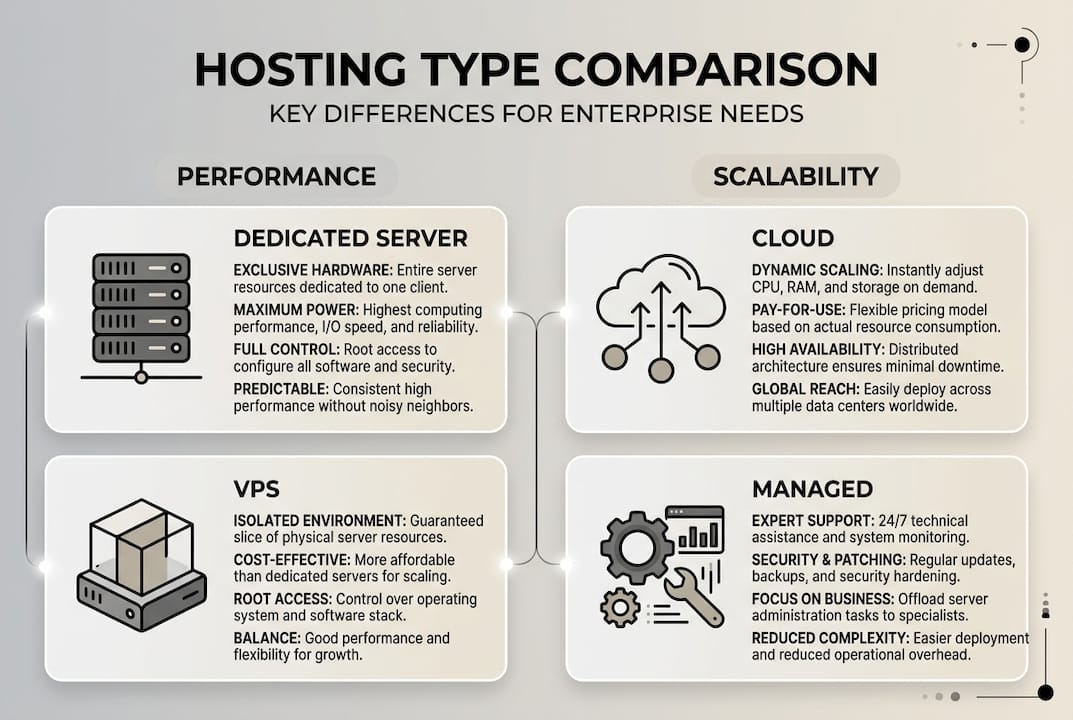
Hosting models each serve a distinct operational profile:
- Dedicated servers give you full hardware control, predictable performance, and strong isolation. Best for regulated workloads and high-throughput databases.
- VPS hosting balances cost and flexibility. Ideal for mid-tier applications that need root access without the overhead of a full dedicated machine.
- Cloud hosting offers elastic scalability. Use it when traffic patterns are unpredictable or when you need rapid provisioning.
- Managed hosting reduces operational burden by offloading patching, monitoring, and backups. Best when your team lacks dedicated ops capacity.
For a deeper breakdown of how these models compare in practice, the web hosting options explained resource covers the mechanics behind each type. Key hosting types for enterprises confirm this split: dedicated for control, cloud and VPS for scalability, and managed to reduce ops burden.
Application architecture also shapes your hosting decision. Modular monoliths deliver faster delivery and lower cost for teams under 15 developers, while microservices only make sense when you genuinely need independent scaling across services. Adopting microservices prematurely adds complexity without proportional benefit.
| Architecture | Best for | Team size | Hosting fit |
|---|---|---|---|
| Modular monolith | Faster delivery, lower cost | Under 15 devs | VPS or managed |
| Microservices | Independent scaling | 15+ devs, multiple teams | Cloud or hybrid |
| Legacy monolith | Stability, minimal change | Any | Dedicated server |
Pro Tip: Map your hosting model to your software development team structure. A small dev team managing a monolith will waste money and time on a multi-region cloud setup designed for microservices. Match infrastructure complexity to organizational capacity.
For a structured approach to the full selection process, the hosting solution selection framework covers enterprise-specific decision criteria in detail.
Comparing enterprise hosting solutions: Dedicated, VPS, cloud, managed
Once requirements are mapped, compare hosting solutions using real-world data and strategic priorities. Gut instinct and vendor marketing are not enough. You need empirical benchmarks.
In 2026, AWS Graviton4 delivers 40% better price-to-performance than previous generations, GCP TPU v5 achieves 3x ML training speed improvements, and Azure EPYC processors hold a 15% multi-thread lead for compute-heavy workloads. For a standard web application workload, AWS reserved instances run approximately $1,945 per month versus GCP at $2,215 per month. These numbers shift depending on region, commitment term, and workload type, so always model your specific scenario.

Here is a direct comparison across the four primary enterprise hosting models:
| Hosting type | Performance ceiling | Scalability | Operational overhead | Best use case |
|---|---|---|---|---|
| Dedicated server | Highest, predictable | Low, manual | High | Regulated, high-throughput apps |
| VPS | Medium to high | Moderate | Medium | Mid-tier apps, dev environments |
| Cloud (public) | Variable, elastic | Very high | Low to medium | Variable traffic, ML workloads |
| Managed hosting | Medium | Provider-limited | Very low | WordPress agencies, content sites |
Managed hosting platforms like WP Engine and Kinsta excel in performance and security for WordPress-focused agencies but offer significantly less flexibility than VPS or cloud for custom application stacks. If your team runs proprietary software or needs kernel-level access, managed hosting will frustrate you quickly.
For enterprises evaluating VPS hosting advantages, the key benefit is the balance between isolation and cost. You get dedicated resources without paying for an entire physical machine. For workloads requiring full hardware control, enterprise-grade hardware like Dell PowerEdge servers provides the raw performance and reliability that shared environments simply cannot match.
Organizations with strict data sovereignty requirements or complex internal networking often benefit from private cloud advantages, particularly when public cloud compliance documentation falls short of internal audit requirements.
Here is a practical decision sequence:
- Define your workload tier and SLA requirements.
- Identify compliance obligations (GDPR, HIPAA, PCI DSS).
- Model expected traffic patterns over a 12-month horizon.
- Run benchmark comparisons using your actual application stack, not synthetic tests.
- Calculate total cost of ownership including ops labor, not just compute costs.
Pro Tip: Never rely solely on vendor-published benchmarks. Use tools like Geekbench, Phoronix Test Suite, or your own load testing scripts against a trial environment. Real workload modeling beats spec sheets every time.
For broader context on what leading web hosting providers currently offer, independent reviews can supplement your internal benchmarking.
Security best practices for enterprise hosting
With the hosting model chosen, security and compliance must be woven into every layer. A single misconfigured access policy or unencrypted data store can expose your organization to regulatory penalties and reputational damage that no SLA will cover.
Defense-in-depth with encryption at rest and in transit, least-privilege IAM, zero-trust architecture, CIS benchmarks, and continuous vulnerability scanning form the foundation of a mature enterprise security posture. These are not optional extras. They are baseline requirements for any environment handling sensitive data.
Key security controls to implement across your hosting environment:
- Encryption at rest and in transit: Use TLS 1.3 for all data in transit. Encrypt storage volumes using AES-256. Never store credentials in plaintext.
- Identity and access management (IAM): Apply the principle of least privilege. Use multi-factor authentication (MFA) for all administrative access. Implement role-based access control (RBAC) or attribute-based access control (ABAC) depending on your complexity.
- Zero-trust architecture: Treat every request as untrusted by default. Verify identity, device health, and context before granting access, even for internal traffic.
- Compliance alignment: Map your controls to NIST CSF, ISO 27001, or SOC 2 depending on your industry and customer requirements.
- Continuous monitoring: Deploy intrusion detection systems (IDS), log aggregation, and automated alerting. Passive monitoring is not enough.
"Security is not a product you buy. It is a process you build into every layer of your infrastructure from day one."
The hosting security checklist provides a structured walkthrough of these controls in a hosting-specific context, which is useful for audit preparation.
Pro Tip: Automate vulnerability scanning using tools like OpenVAS or Tenable Nessus on a weekly schedule. Cross-reference findings against CIS benchmarks for your specific OS and application stack. Manual reviews alone will not keep pace with the threat landscape.
Edge cases: Migration, spikes, compliance, and hybrid cloud
For enterprises with evolving needs, specific edge cases require dedicated planning and execution. These scenarios are where well-designed hosting strategies either prove their worth or fall apart.
Migration is the most common source of preventable disasters. Migration pitfalls like URL preservation and improper DNS cutover cause traffic drops that can exceed 50%. A structured migration checklist prevents most of these failures.
Migration checklist:
- Audit all existing URLs and map redirects before touching DNS.
- Clone the production environment to the new host and run parallel testing.
- Use shadow traffic routing to validate the new environment under real load.
- Set DNS TTL to 300 seconds at least 48 hours before cutover.
- Monitor error rates, response times, and crawl coverage for 72 hours post-migration.
- Keep the old environment live for at least two weeks as a rollback option.
"The most expensive migration mistake is assuming it went well before the monitoring data confirms it."
For traffic spikes, auto-scaling policies and pre-provisioned burst capacity are your primary tools. Define thresholds that trigger horizontal scaling before performance degrades, not after users start experiencing errors. Enterprise-grade hosting environments should support burst capacity without manual intervention.
Compliance in multi-tenant or cloud environments requires explicit documentation. GDPR mandates data residency controls and breach notification timelines. HIPAA requires audit logging and business associate agreements with your hosting provider. Do not assume compliance is inherited from your provider's certifications.
| Regulation | Key hosting requirement | Verification method |
|---|---|---|
| GDPR | Data residency, encryption, breach notification | DPA with provider, audit logs |
| HIPAA | BAA, audit logging, access controls | Signed BAA, log review |
| PCI DSS | Network segmentation, encryption, vulnerability scans | QSA audit, ASV scans |
For hybrid and multi-cloud setups, the primary challenge is consistent policy enforcement across environments. Use a centralized identity provider and apply the same IAM policies across cloud and on-premises resources. Dedicated server best practices cover the operational side of managing physical infrastructure within a hybrid architecture.
Pro Tip: Before any production cutover, run shadow traffic through the new environment for at least 24 hours. Shadow testing catches configuration mismatches and performance regressions that staging environments routinely miss.
Reliable enterprise hosting solutions from Internetport
Internetport has been building hosting infrastructure for organizations that cannot afford to compromise on reliability or security since 2008. The frameworks in this guide map directly to what a well-architected hosting environment should deliver: isolation, performance, compliance readiness, and operational simplicity.

Whether you need enterprise web hosting for high-traffic applications, dedicated server options with full hardware control and PCI DSS-certified data center infrastructure, or flexible VPS hosting with SSD storage, Plesk control panel, and daily backups, Internetport provides the technical foundation your team needs. Both data centers operate with redundant systems and high-speed connectivity, so the uptime and security standards covered in this guide are built into the infrastructure from the ground up.
Frequently asked questions
What is the most secure enterprise hosting type?
Dedicated hosting offers the highest level of hardware isolation and control, making it the default choice for regulated workloads. Cloud environments can reach equivalent security levels when zero-trust and IAM controls are properly implemented.
How do I prevent downtime during enterprise hosting migration?
Build a migration checklist that preserves all URLs, use shadow traffic testing before cutover, and keep the original environment live as a fallback. Poor migrations cause 50%+ traffic drops, so structured validation is non-negotiable.
What benchmarks should I use for enterprise hosting comparison?
Evaluate CPU, RAM, and web performance using real workload tests, not just synthetic scores. AWS Graviton4 delivers 40% better price-to-performance in 2026, but your specific application stack may favor a different provider.
When should an enterprise use microservices vs monolith architecture?
Use microservices only when you need independent scaling across multiple development teams. Modular monoliths deliver faster delivery and lower costs for teams under 15 developers, making them the practical default for most mid-sized enterprises.
How can I ensure compliance with GDPR and HIPAA for hosting?
Select providers with documented ISO 27001 or SOC 2 certifications, sign the required data processing agreements, and implement CIS benchmarks and vulnerability scanning across your entire hosting environment.