

TL;DR:
- Dedicated resources offer superior performance and security with exclusive hardware access and full control. Shared resources are suitable for low-traffic applications but carry risks of performance degradation and security exposure. Choosing between them depends on workload size, compliance needs, and cost considerations, with VPS serving as a flexible middle ground.
Dedicated resources are defined as IT infrastructure components allocated exclusively to a single user, project, or organization, while shared resources are distributed concurrently across multiple users or workloads. This distinction sits at the center of every infrastructure decision an IT team makes, from web hosting to application deployment. The dedicated vs shared resources question directly shapes your performance ceiling, security exposure, and monthly spend. Get it wrong, and you either overpay for capacity you never use or watch your application crawl under load. This guide gives you the framework to get it right.
How do dedicated and shared resources compare in performance and security?
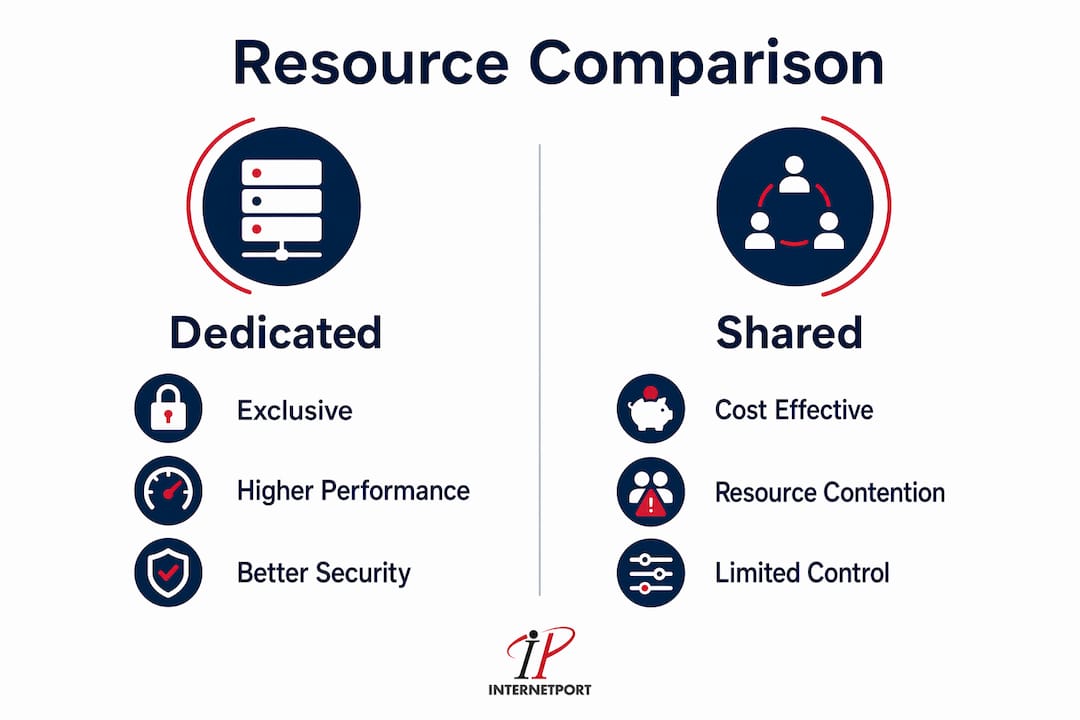
Performance is where the gap between these two models becomes impossible to ignore. Dedicated hosting delivers TTFB benchmarks of 80–180ms compared to 270–450ms for shared hosting, and supports 500–1,000+ concurrent visitors versus just 50–75 on shared tiers. That difference is not a rounding error. It means a shared environment can collapse under a moderate traffic spike that a dedicated server handles without breaking a sweat.

The reason for that gap is resource ownership. On a shared server, your application competes with every other tenant for CPU cycles, RAM, and disk I/O. This is the "noisy neighbor" problem: shared resources introduce performance degradation when a neighboring workload spikes, and you have no control over when that happens. Dedicated resources eliminate that variable entirely.
Security follows the same logic. Dedicated resources provide exclusive hardware access and root control, which means you configure the firewall, choose the kernel, and decide what software runs on the machine. Shared environments expose a larger attack surface because a vulnerability in one tenant's application can, under certain configurations, affect others on the same host. IP reputation is another real concern: on shared hosting, a neighbor sending spam can blacklist the IP address your application uses.
The table below summarizes the key differences across the metrics that matter most to IT decision-makers.
| Metric | Dedicated resources | Shared resources |
|---|---|---|
| TTFB (typical range) | 80–180ms | 270–450ms |
| Concurrent visitor capacity | 500–1,000+ | 50–75 |
| Root/admin access | Full | None |
| IP isolation | Dedicated IP | Shared IP pool |
| Security configuration | Custom | Provider-controlled |
| Cost entry point | Higher | Lower |
Pro Tip: Never evaluate hosting performance using only the provider's marketing benchmarks. Run your own TTFB tests using tools like GTmetrix or WebPageTest against a staging environment before committing to a plan.
What workload characteristics determine the best choice?
The right model depends on what your workload actually does, not on what sounds more professional. Dedicated resources suit projects with predictable, high-intensity workloads, compliance requirements, or deep customization needs. Shared resources fit smaller applications, maintenance environments, and cost-sensitive tasks where traffic is light and predictable.
Workloads that belong on dedicated resources
- E-commerce platforms processing payment card data under PCI DSS compliance requirements
- Applications with consistent traffic above 500 concurrent users
- Environments requiring custom kernel parameters, specific software stacks, or proprietary security configurations
- Databases handling sensitive personal data under GDPR or HIPAA frameworks
- CPU-bound workloads such as video transcoding, machine learning inference, or large-scale data processing
Workloads that fit shared resources well
- Company blogs, brochure sites, and marketing landing pages with modest traffic
- Development and staging environments used by small internal teams
- Small web applications with fewer than 50 concurrent users at peak
- Short-term projects where infrastructure cost must stay minimal
- Applications managed by teams without dedicated server administration skills
The middle ground is worth naming directly. Virtual private servers (VPS) offer dedicated resource benefits at reduced cost and complexity. A VPS gives you an isolated slice of a physical server with guaranteed CPU and RAM allocations, root access, and a dedicated IP, without the full cost of owning the entire machine. For many SMBs, a cloud VPS vs dedicated server comparison reveals that VPS hits the sweet spot between performance and budget.
A common misconception is that shared hosting is always the starting point and dedicated is always the destination. That linear thinking leads to poor decisions. Infrastructure architects note that cloud or VPS can deliver the required isolation and performance more cost-effectively than a full dedicated server for many SMB workloads. The decision should be driven by workload nature, not by a sense of progression up a hosting ladder.
Pro Tip: Before choosing a resource model, map your peak concurrent user count and your compliance obligations. Those two data points eliminate most of the ambiguity in the dedicated versus shared decision.
For a deeper look at how shared hosting compares to VPS across resource allocation models, Internetport's comparison covers the key trade-offs in plain terms.
What are the hidden costs and scalability considerations?
Sticker price is the least reliable number in this decision. Hidden costs of dedicated resources include management overhead and potentially underutilized capacity. A dedicated server sitting at 15% average CPU utilization is not a bargain, regardless of its raw specifications. You are paying for headroom that your workload may never actually consume.
The direct costs of dedicated infrastructure include hardware procurement or monthly rental fees, operating system licensing (where applicable), and management fees if you choose a managed service. Indirect costs are harder to see. Unmanaged dedicated servers require internal expertise for patching, security hardening, and incident response. If your team lacks that expertise, the cost of a security breach or extended downtime far exceeds the savings from choosing unmanaged over managed hosting.
Shared resources carry their own hidden costs. Inconsistent performance during peak periods can translate directly into lost revenue for transactional applications. Shared resources lower upfront costs but introduce the risk of inconsistent quality and responsiveness. For a site processing orders, a 3-second delay caused by a noisy neighbor is a business problem, not just a technical one. Understanding how to optimize hosting costs without sacrificing reliability is a discipline in itself.
Scalability works differently across both models. Shared hosting scales by upgrading your plan, which is fast but limited by the provider's tier structure. Dedicated servers scale by adding hardware, which takes time and planning. Dedicated environments can suffer from resource stagnation where allocated hardware sits underused most of the time, unlike cloud models that dynamically adjust to demand. Cloud and VPS platforms address this by letting you scale CPU and RAM on demand, often within minutes.
Pro Tip: Calculate your actual average utilization before provisioning dedicated hardware. If your workload runs below 40% CPU utilization on average, a VPS or cloud instance will almost certainly deliver better cost efficiency without sacrificing meaningful performance.
How do you implement and manage these environments effectively?
Getting the resource model right is only half the work. Managing it well is the other half.
Managing dedicated server environments
- Choose managed or unmanaged based on your team's capacity. Managed dedicated hosting reduces technical skill requirements but costs more. Unmanaged gives you full control and lower fees, but your team owns every patch, update, and security configuration.
- Establish a patching schedule from day one. Unpatched operating systems are the most common entry point for server compromises. Weekly patch reviews and monthly full updates are a reasonable baseline for most SMB environments.
- Configure monitoring before you go live. Tools like Prometheus, Grafana, or provider-native dashboards should alert on CPU, memory, disk I/O, and network throughput thresholds before they become incidents.
- Define your SLA requirements in writing. Before signing with any provider, confirm uptime guarantees, support response times, and what compensation applies when those commitments are missed.
- Document your configuration. A dedicated server with undocumented custom configurations becomes a liability the moment the person who built it leaves the team.
Managing shared resource environments
- Understand what the provider controls. On shared hosting, the provider manages the server, the firewall, and the software stack. Your responsibility is your application code and your data.
- Monitor application-level performance, not server metrics. You cannot see server CPU on shared hosting. Use application performance monitoring (APM) tools to track response times and error rates from your application's perspective.
- Isolate sensitive data. Never store payment card data or regulated personal data on shared hosting. The lack of network isolation makes compliance with PCI DSS or HIPAA effectively impossible on a standard shared plan.
- Test under realistic load before launch. Shared environments behave differently under load than in development. Use load testing tools to simulate your expected peak traffic before going live.
- Know your upgrade path. Shared hosting plans have hard limits. Identify the threshold at which you will need to migrate to a VPS or dedicated environment, and plan that migration before you hit the wall.
For high-traffic website hosting that needs to hold up under pressure, the management practices above become non-negotiable rather than optional.
Understanding resource sharing hosting from a small business perspective also helps clarify where shared models genuinely serve well and where they create risk.
Key takeaways
Dedicated resources outperform shared resources on latency, security isolation, and control, while shared resources win on cost and simplicity for low-traffic, non-regulated workloads.
| Point | Details |
|---|---|
| Performance gap is measurable | Dedicated hosting delivers TTFB of 80–180ms versus 270–450ms for shared, with far higher concurrent user capacity. |
| Security isolation is structural | Dedicated resources eliminate noisy neighbor risk and give you full control over firewall, IP, and software configuration. |
| Workload type drives the decision | High-traffic, compliance-bound, or CPU-intensive workloads belong on dedicated infrastructure; light or variable workloads fit shared or VPS. |
| Hidden costs cut both ways | Dedicated servers risk underutilization; shared hosting risks performance inconsistency that costs revenue during peak periods. |
| VPS is a legitimate middle ground | For many SMBs, a VPS delivers the isolation and performance of dedicated resources at a fraction of the cost. |
What I've learned from watching SMBs get this decision wrong
The most expensive mistake I see SMB IT teams make is treating this as a binary choice. They read a comparison, decide dedicated sounds more serious, and provision a full dedicated server for a workload that peaks at 30 concurrent users twice a month. The hardware sits at 12% utilization, the management overhead strains a small team, and the budget that could have funded better monitoring or security tooling goes to idle CPU cycles.
The opposite mistake is just as common. A growing e-commerce business stays on shared hosting because it started there, and the team is reluctant to migrate. Then a product launch drives 400 concurrent users to the site, the shared server buckles, and the business loses orders during its best sales window of the year.
IT decision-makers often overlook the importance of aligning infrastructure choice with business goals, and that misalignment is where the real cost lives. The technical specs are the easy part. The harder question is: what does this workload actually need in six months, not just today?
My honest advice is to start with a VPS if you are uncertain. It gives you root access, dedicated resource allocations, and a clear upgrade path to a full dedicated server when your workload genuinely justifies it. Resource model decisions should prioritize workload nature over default assumptions, and a VPS forces you to measure actual utilization before committing to more expensive hardware. That discipline alone saves most SMBs significant money.
— Peter
Internetport's hosting options for SMB infrastructure
Internetport offers a range of hosting solutions built for SMBs that need reliable infrastructure without enterprise-level complexity.
For teams ready to move beyond shared hosting, Internetport's dedicated server plans provide exclusive hardware access, PCI DSS compliance support, and expert technical guidance from Swedish data centers with international reach. Teams that want the isolation of dedicated resources at lower cost can start with Internetport's VPS hosting, which delivers guaranteed CPU and RAM allocations with root access and a dedicated IP. For budget-conscious SMBs still on shared infrastructure, Internetport's web hosting plans offer a reliable starting point with a clear upgrade path as your workload grows.
FAQ
What is the main difference between dedicated and shared resources?
Dedicated resources give a single user or organization exclusive access to infrastructure components, including CPU, RAM, and storage. Shared resources distribute those same components across multiple users simultaneously, which lowers cost but reduces performance predictability and security isolation.
When should an SMB choose dedicated over shared hosting?
An SMB should choose dedicated resources when its workload exceeds 500 concurrent users, requires compliance with standards like PCI DSS or HIPAA, or needs custom server configurations that shared environments cannot support.
What is the noisy neighbor problem in shared hosting?
The noisy neighbor problem occurs when one tenant on a shared server consumes a disproportionate share of CPU or memory, degrading performance for all other tenants on the same host. Dedicated resources eliminate this risk entirely.
Is VPS a good alternative to dedicated hosting for SMBs?
VPS hosting delivers isolated resource allocations and root access at a lower cost than a full dedicated server. For most SMBs with moderate traffic and basic compliance needs, VPS is the most cost-effective path between shared and dedicated infrastructure.
How does dedicated hosting affect security compliance?
Dedicated hosting provides the network isolation, custom firewall configuration, and root-level control required by standards like PCI DSS. Shared hosting cannot meet these requirements because the underlying infrastructure is not isolated at the hardware level.