

TL;DR:
- Slow load times and downtime can lead to lost revenue and damaged customer trust for SMBs.
- Choosing the right scalable hosting plan with high uptime and support is essential for reliability.
- Regular performance testing, backups, and proactive upgrades help maintain website stability and growth.
Slow load times and unexpected downtime are not just technical annoyances. For small and medium-sized businesses, they translate directly into lost revenue, damaged credibility, and customers who never come back. Research consistently shows that even a one-second delay in page load time can reduce conversions significantly. The good news is that a well-planned hosting setup eliminates most of these risks before they start. This guide walks you through every practical step, from choosing the right plan to verifying performance, so your website runs reliably and scales with your business.
Table of Contents
- Key requirements and planning for SMB web hosting
- Step-by-step web hosting setup process
- Verification and performance tuning: Ensuring reliability
- Common mistakes and troubleshooting tips
- What most web hosting guides miss: Adaptability and hands-on support
- Ready to scale? Discover flexible hosting options
- Frequently asked questions
Key Takeaways
| Point | Details |
|---|---|
| Assess traffic and needs | Choose a hosting plan based on expected visitor volume and site complexity. |
| Prioritize uptime and performance | Providers offering 99.9%+ uptime and low TTFB ensure reliability and speed. |
| Follow structured setup steps | Register domain, activate SSL, upload files, and configure backups and CDN. |
| Monitor and optimize | Test site speed and uptime regularly, tune for performance, and back up data. |
| Seek hands-on support | Choose hosts with responsive, personalized support for SMB-specific challenges. |
Key requirements and planning for SMB web hosting
Before you sign up for any hosting plan, you need an honest assessment of where your business stands today and where it's headed. The biggest mistake SMBs make is picking a plan based on price alone, without considering their actual traffic, storage, and security needs.
Start with your expected monthly visitors. Shared or WordPress hosting works well for sites under 10,000 monthly visitors, but you should plan to upgrade to VPS or cloud as traffic grows. Shared hosting pools resources among many users, which keeps costs low but limits performance headroom. A VPS gives you dedicated resources, better isolation, and room to grow.
Core hosting requirements every SMB should check:
- Domain name registered and pointed to your hosting provider
- SSL certificate (free Let's Encrypt or a paid option) for security and SEO
- Daily automated backups stored offsite or in a separate environment
- CDN (Content Delivery Network) to serve files faster to global visitors
- Control panel access (like Plesk or cPanel) for easy management
- Scalable resources so you can upgrade RAM, CPU, or storage without migrating
When it comes to uptime, the numbers matter more than most people realize. Top providers achieve 99.99% uptime, which translates to less than five minutes of downtime every 90 days. That is the standard you should hold your provider to. Anything below 99.9% is a red flag.
| Hosting type | Best for | Avg. monthly cost | Uptime reliability |
|---|---|---|---|
| Shared hosting | Under 10k visitors/month | $3 to $10 | Moderate |
| VPS hosting | Growing SMBs, dev environments | $20 to $80 | High |
| Cloud hosting | Variable traffic, scalability | $30 to $150+ | Very high |
| Dedicated server | High traffic, compliance needs | $100 to $400+ | Very high |
Personalized support is often overlooked during the planning phase. If your team is not deeply technical, a host with 24/7 live chat or phone support is not a luxury. It is a necessity. Review the hosting checklist to make sure you cover every requirement before committing to a provider.
Step-by-step web hosting setup process
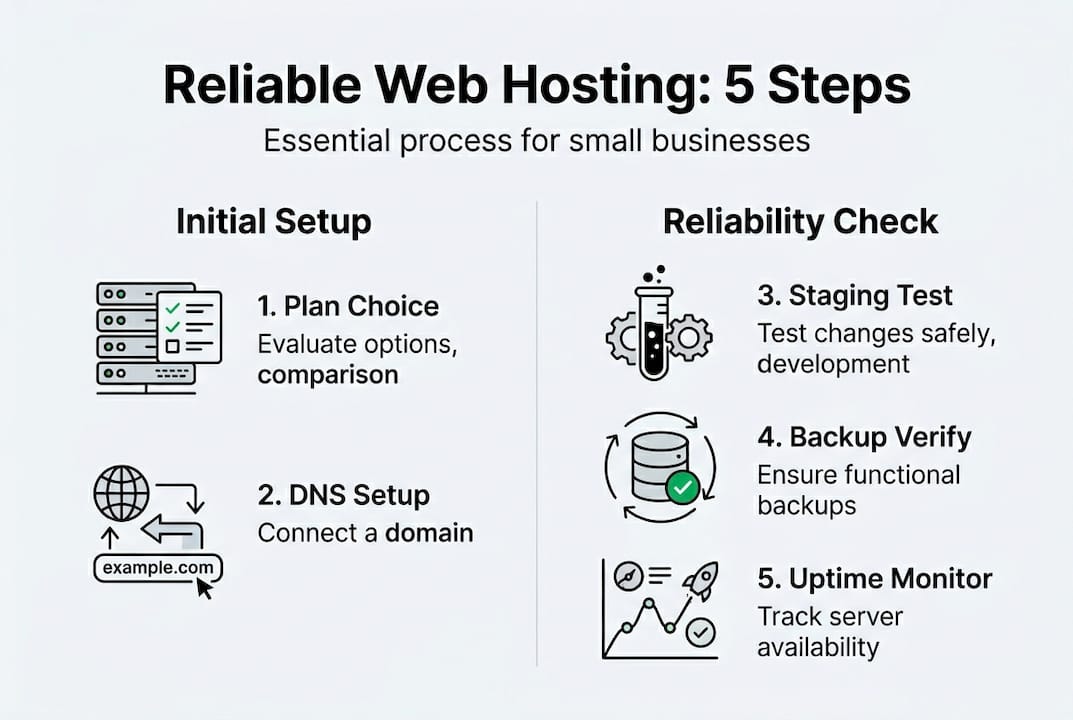
With your requirements mapped out, here is how to move from planning to a live, secure website.
-
Choose your hosting plan. Match the plan to your traffic and resource needs. VPS hosting for SMBs offers the best balance of performance and cost for growing businesses. For budget-conscious teams, providers like AccuWeb or Hostinger are solid starting points. For performance and support, SiteGround or Cloudways are consistently recommended.
-
Register or connect your domain. If you already have a domain, update your DNS (Domain Name System) records to point to your new host's nameservers. DNS changes typically propagate within 24 to 48 hours.
-
Install your SSL certificate. Most quality hosts provide free SSL through Let's Encrypt. Activate it immediately. An essential setup step is getting SSL live before you publish any content, not after.
-
Upload your site files or install a CMS. Use your control panel's file manager or an FTP client to upload existing files. If you're starting fresh, a one-click WordPress install is the fastest path to a working site.
-
Configure automated backups and connect a CDN. Set backups to run daily and store copies in a separate location. Connect a CDN like Cloudflare (free tier available) to reduce load times for visitors outside your server's region.
| Setup step | Tool/method | Time to complete |
|---|---|---|
| Plan selection | Provider dashboard | 30 minutes |
| DNS configuration | Domain registrar panel | 10 minutes (+ propagation) |
| SSL installation | Let's Encrypt / host panel | 15 minutes |
| CMS install | One-click installer | 20 minutes |
| Backup configuration | Host control panel | 15 minutes |
| CDN setup | Cloudflare or host CDN | 30 minutes |
Pro Tip: Before going live, test your site on a staging environment. Many managed hosts offer this feature. It lets you catch broken links, plugin conflicts, or layout issues without affecting real visitors. The managed hosting benefits go well beyond convenience, especially for teams without a dedicated IT department.
Verification and performance tuning: Ensuring reliability
Launching your site is only half the job. Verifying that it performs well and stays up is what separates a reliable business website from one that quietly costs you customers.
Tools to test and monitor your hosting performance:
- Google PageSpeed Insights for load time analysis and improvement suggestions
- GTmetrix for detailed performance reports including TTFB (Time to First Byte)
- UptimeRobot (free) for real-time uptime monitoring with email or SMS alerts
- Pingdom for global speed testing from multiple server locations
- WebPageTest for advanced diagnostics including waterfall charts
TTFB is one of the most telling performance metrics. It measures how long your server takes to respond to a browser's first request. Aim for TTFB under 250ms; in 2026 benchmarks, Kinsta leads at 89 to 245ms, Cloudways at 130 to 185ms, and Hostinger at 198 to 245ms. If your TTFB is consistently above 500ms, your server configuration or hosting plan needs attention.
Once you identify bottlenecks, apply these tuning steps:
- Enable server-side caching (Redis or Memcached) to reduce database queries
- Use a caching plugin like WP Rocket or W3 Total Cache for WordPress sites
- Optimize images before uploading, and use lazy loading for below-the-fold content
- Minimize CSS and JavaScript files to reduce page weight
- Review your database regularly and remove unused tables, drafts, and spam comments
Pro Tip: Set up UptimeRobot to check your site every five minutes and alert you via email or Slack the moment downtime is detected. Most outages go unnoticed for hours without this kind of monitoring. The enterprise hosting guide covers advanced monitoring strategies if your infrastructure needs go beyond a single site.
Also verify that your backups are actually working. Schedule a test restore every quarter. Many businesses discover their backups were misconfigured only when they need them most. The hosting checklist includes a backup verification step that is easy to overlook but critical to your recovery plan.

Common mistakes and troubleshooting tips
Even a well-planned setup can run into problems. Knowing what to watch for saves you hours of frustration and protects your site's reputation.
The most common SMB hosting mistakes:
- Incorrect DNS configuration. Pointing your domain to the wrong nameservers or forgetting to update MX records for email is a frequent issue after migration. Always double-check DNS settings 24 hours after any change.
- Missing or expired SSL certificates. An expired SSL turns your site into a browser warning page. Set a calendar reminder 30 days before expiry, or use a host that auto-renews SSL.
- Weak backup routines. Daily backups stored only on the same server as your site offer no real protection. Offsite or cloud-based backup storage is non-negotiable.
- Choosing hosts with poor support. Personalized 24/7 support via phone or chat is critical for SMBs. Email-only support can leave you waiting hours during an outage. Managed hosts are strongly favored for non-technical teams.
- Forgetting to monitor uptime. Without monitoring, you are the last to know when your site goes down.
"The host you choose should feel like a partner, not just a vendor. When something breaks at 2 a.m., you want someone who picks up the phone."
If you run into a specific issue, start with the basics. Clear your browser cache and test from a different device or network. Check your host's status page for any ongoing incidents. Review your error logs through your control panel. For DNS issues, use a tool like MXToolbox to verify records are propagating correctly.
The hosting selection process matters more than most guides admit. A host with strong infrastructure but poor support will frustrate you the moment something goes wrong. The VPS hosting advantages become most apparent when you have a support team that knows your environment and can act fast.
What most web hosting guides miss: Adaptability and hands-on support
Most hosting guides focus heavily on specs: uptime percentages, TTFB numbers, storage limits. Those metrics matter, but they tell only part of the story. What actually separates businesses that thrive online from those that constantly struggle is adaptability and the quality of support behind their hosting.
Here is the uncomfortable reality. Many SMBs wait until their site is already breaking under traffic before they consider upgrading. Shared hosting scales poorly during traffic spikes, and migrating under pressure is expensive, stressful, and risky. The smarter move is to monitor your growth trends and migrate to VPS or cloud proactively, before you hit the wall.
We also see businesses choose the cheapest plan available and then spend far more on developer time fixing performance issues that better hosting options would have prevented. Budget hosting trades speed and reliability for cost. That tradeoff is acceptable when you are just starting out, but it becomes a liability as your business grows.
The most underrated feature in any hosting plan is not a technical spec. It is a knowledgeable human being available when you need help. Managed hosting gives non-technical teams peace of mind and frees them to focus on running their business instead of troubleshooting servers.
Ready to scale? Discover flexible hosting options
If this guide helped clarify what your business actually needs from a hosting setup, the next step is finding a provider that delivers on all of it without making you manage it alone.

At Internetport, we have been building reliable, secure hosting infrastructure since 2008. Our SMB web hosting solutions include free SSL, daily backups, and Plesk control panel access out of the box. If your traffic is growing and you need dedicated resources, our affordable VPS hosting gives you SSD performance with full scalability. For businesses with their own hardware, our colocation server options let you house equipment in our PCI DSS-certified data centers with redundant connectivity. Every plan comes with personalized support from a team that knows your environment.
Frequently asked questions
What hosting type should a small business start with?
Shared or WordPress hosting is the right starting point for businesses under 10,000 monthly visitors. Move to VPS or cloud hosting as your traffic and resource needs grow.
How can I measure hosting reliability?
Look for providers with 99.9%+ uptime guarantees and use free tools like UptimeRobot to track your site's availability and response times in real time.
Does my business need SSL right away?
Yes. Installing SSL immediately protects user data, improves your Google search ranking, and is required for PCI compliance if you process any payments online.
What are signs I should upgrade from shared hosting?
If your site slows down during traffic spikes or you experience frequent downtime, it is time to act. Shared hosting scales poorly under load, and waiting too long to migrate creates unnecessary risk.
How important is support in web hosting?
For SMBs, support quality is just as important as server specs. Prioritize 24/7 live support via phone or chat, and consider managed hosting if your team does not have dedicated IT staff.