

TL;DR:
- Plesk simplifies web hosting management with user-friendly tools and security features.
- It supports multi-tenant setups, resource control, and cross-OS management for SMBs and agencies.
- Proper maintenance, including updates and patches, is essential for Plesk’s security and optimal performance.
Choosing the wrong web hosting control panel costs more than just time. It affects security, scalability, and how confidently your team can manage day-to-day operations without calling in a specialist for every small task. Many SMBs and IT managers focus almost entirely on server specs and pricing when evaluating hosting, and largely overlook the control panel. That's a mistake. Plesk quietly powers thousands of high-performing, secure hosting environments worldwide, yet its role is often misunderstood or underappreciated. This guide breaks down what Plesk actually does, how it protects and simplifies your hosting setup, and what you need to consider before committing to a Plesk-based platform.
Table of Contents
- What is Plesk? Core functions and features explained
- How Plesk simplifies and secures web hosting management
- Multi-tenant and resource management: Why SMBs and agencies choose Plesk
- Performance, pitfalls, and real-world reviews of Plesk hosting
- Why Plesk remains the top choice for flexible, secure SMB hosting
- Next steps: Experience reliable Plesk hosting with Internetport
- Frequently asked questions
Key Takeaways
| Point | Details |
|---|---|
| Plesk streamlines site management | Its intuitive interface and automation tools simplify everyday hosting, even for non-experts. |
| Strong security out of the box | Integrated firewalls, auto-SSL, and malware scanning protect against common threats and vulnerabilities. |
| Flexible for growth | Multi-tenant features and resource controls make Plesk ideal for agencies and expanding SMBs. |
| Know your resource needs | Plesk uses more resources than minimal panels, so test before choosing for lean environments. |
What is Plesk? Core functions and features explained
Plesk is not just a dashboard you log into once and forget. It is the operational center of your entire hosting environment. Plesk is a commercial web hosting control panel that provides a graphical user interface for managing servers, websites, domains, emails, databases, and applications on both Linux and Windows servers. That cross-platform flexibility alone separates it from many competitors.
For SMBs and IT managers, the practical implication is significant. You do not need a dedicated Linux administrator or a developer on call every time you need to add a domain, configure email, or push a site update. The GUI is clean, logically organized, and accessible to team members with varying technical backgrounds.
Here is what Plesk handles out of the box:
- Website and application deployment: Launch sites, WordPress installs, and web apps with a few clicks
- File management: Browse, upload, and edit server files directly without needing FTP access
- Email configuration: Set up mailboxes, spam filters, and email authentication (DKIM, SPF) without touching the command line
- DNS management: Control zone records, subdomains, and redirects from one interface
- Backup and restore: Schedule automatic backups and restore individual files or entire sites on demand
- Automation and extensions: Key mechanics include website deployment, file management, backups, DNS, and automation via a growing library of extensions
"The difference between a control panel that empowers your team and one that frustrates them is often the difference between fast growth and wasted IT budget."
For an SMB running five to twenty websites, or an IT manager responsible for multiple clients or departments, that range of tools means fewer tickets, fewer late-night emergencies, and faster onboarding for new team members. You can explore the full scope of Plesk hosting features to see how they map to real business needs.
Plesk also supports multi-PHP version management, letting you run legacy apps and modern frameworks on the same server without conflict. That kind of flexibility is easy to undervalue until you actually need it.
How Plesk simplifies and secures web hosting management
Knowing what Plesk is only gets you halfway there. What actually matters is what it saves you from dealing with every week. Plesk turns complex, multi-step server tasks into guided workflows that reduce both the time spent and the risk of a misconfiguration causing an outage or breach.
Here is how a typical day-to-day hosting workflow looks with Plesk in place:
- Add a new domain or client site: Create a subscription, assign a service plan, and the server configures itself automatically
- Deploy a WordPress site: Use the WordPress Toolkit to install, stage, clone, and harden sites without touching the file system manually
- Manage user access: Set role-based permissions so clients or junior staff only see what they need to
- Run updates: Push PHP, CMS, and plugin updates from a single screen with rollback options
- Monitor and respond to threats: Review firewall logs, whitelist trusted IPs, and get alerts when anomalies appear
On the security side, Plesk's built-in protections are not superficial. Security features include a built-in firewall, Fail2Ban, ModSecurity WAF, SSL/TLS auto-issuance, malware scanning via ImunifyAV, and self-repair tools. That layered approach means attacks are blocked at multiple points, not just the perimeter.

Automated SSL issuance via Let's Encrypt means every domain you add can have a valid certificate within minutes. No manual renewal. No forgotten expiry dates causing browser warnings that erode customer trust.
Studies consistently show that human error causes a significant share of data breaches. Automating repetitive tasks like backups, updates, and certificate renewals directly reduces that exposure.
Pro Tip: Enable auto-update for Plesk and its extensions, and activate extended validation for SSL certificates on any domain handling customer payments or sensitive data. It takes five minutes to configure and removes an entire category of risk from your operations.
Pairing Plesk with a solid web hosting with Plesk environment ensures these security defaults are already tuned at the server level before you even log in.
Multi-tenant and resource management: Why SMBs and agencies choose Plesk
Scalability is where Plesk genuinely earns its place in a business environment. If you are managing hosting for multiple clients, departments, or projects, the ability to control who gets what resources is not optional, it is essential.
Plesk supports multi-tenant hosting with service plans, user roles, and resource limits including CPU, RAM, and I/O, making it well suited for SMB shared hosting and agency environments. You define a plan, set the limits, and Plesk enforces them automatically. No manual monitoring required.
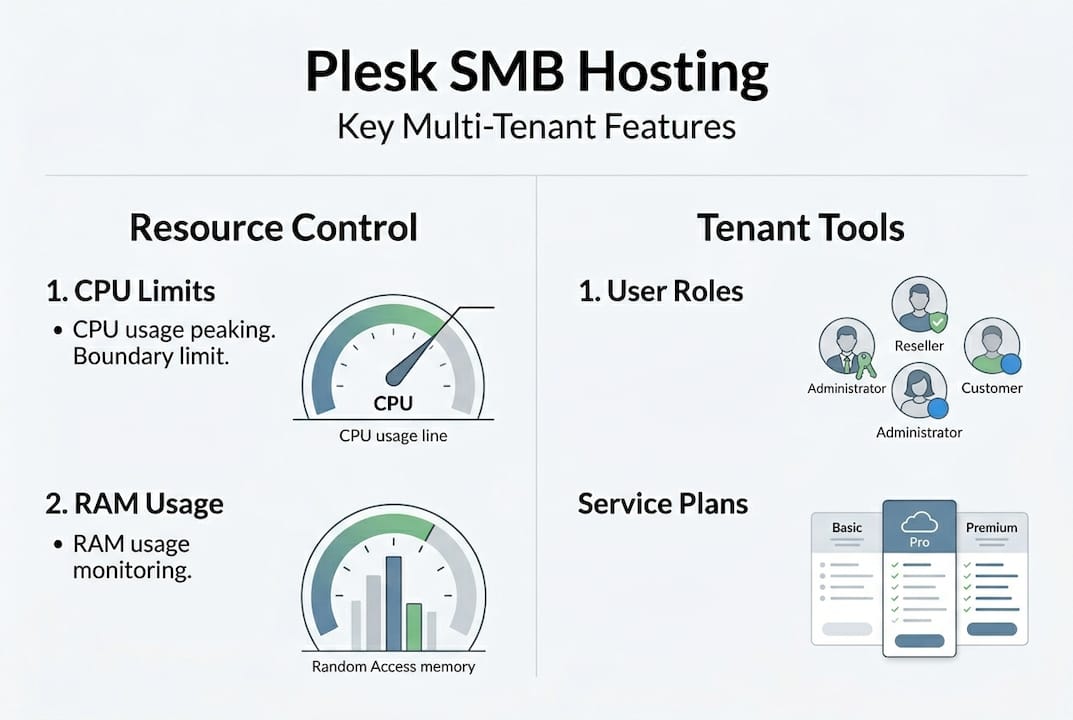
This matters for two reasons. First, it protects your other clients or sites when one subscription has a traffic spike or a runaway process. Second, it gives you a clean, defensible structure for billing and client reporting.
Key capabilities for multi-tenant setups:
- Service plan templates: Define resource packages once and apply them to any new client
- Reseller accounts: Let partners or clients manage their own subscriptions without accessing server-level settings
- Role delegation: Assign granular permissions so developers, content editors, and clients each see only their relevant tools
- Usage reporting: View bandwidth, disk, and database consumption per subscription at a glance
When comparing control panels, the differences in overhead and feature depth are real:
| Feature | Plesk | cPanel | DirectAdmin |
|---|---|---|---|
| Cross-OS support | Linux + Windows | Linux only | Linux only |
| Multi-tenant management | Native service plans | Add-on required | Basic |
| Developer tools | Extensive | Moderate | Minimal |
| Security bundles | Included | Partial | Minimal |
| Resource controls | Granular | Moderate | Basic |
| UI accessibility | High | Moderate | Low |
Performance benchmarks show differences in RAM usage, CPU overhead, and API latency across Plesk, cPanel, and DirectAdmin, so the right choice depends on your server size and workload profile.
Pro Tip: Before moving production sites to a new Plesk environment, spin up a staging VPS, replicate your service plans, and test resource limits under simulated load. It is far easier to catch configuration gaps in staging than after a client calls with a slow site.
For businesses needing full server control, dedicated hosting with Plesk removes the resource-sharing concern entirely. If you run your own hardware, colocation solutions let you place that equipment in a certified data center while still managing everything through Plesk.
Performance, pitfalls, and real-world reviews of Plesk hosting
No control panel is perfect, and Plesk is no exception. Understanding its real-world performance profile helps you make the right architecture decisions rather than discovering limitations under pressure.
On the resource side, idle RAM usage sits between 600 and 1200 MB with API latency around 100 to 200 ms, and Plesk benefits significantly from Nginx with PHP-FPM, though its overhead is higher than lighter panels. That means a VPS with 1 GB of RAM is not a realistic Plesk host. Plan for at least 2 GB, ideally 4 GB, before adding sites.
| Metric | Plesk | cPanel | DirectAdmin |
|---|---|---|---|
| Idle RAM usage | 600-1200 MB | 500-900 MB | 150-300 MB |
| API latency | 100-200 ms | 80-150 ms | 40-80 ms |
| CPU overhead (idle) | Moderate | Moderate | Low |
| Best for | SMB/agency, multi-site | Resellers, high-density | Minimal-overhead VPS |
On the security front, Plesk has had its share of vulnerabilities. A critical flaw, CVE-2025-66430 with a CVSS score of 9.1, risked full server takeover via local privilege escalation and Apache config injection. It was patched promptly, but it highlights a non-negotiable requirement: keep Plesk updated. Always.
"Plesk's security model is only as strong as your update discipline. A patched Plesk is a protected Plesk."
When Plesk may not be the right fit:
- Minimal-overhead VPS environments where every megabyte of RAM matters
- Scenarios requiring advanced custom firewall rules that conflict with Plesk's abstractions
- Single-site setups where the full feature set adds complexity without benefit
From a user perspective, Plesk holds a 4.0 out of 5 average rating and is praised for its UI, WordPress tools, extensions, and reliability for VPS and dedicated hosting. IT managers consistently highlight how much faster new team members get productive in Plesk compared to CLI-only environments.
You can find deeper technical context in our technical articles on Plesk, or if a lighter-weight panel fits your use case better, explore Cyberpanel as alternative for low-overhead VPS deployments.
Why Plesk remains the top choice for flexible, secure SMB hosting
Here is something most Plesk articles will not tell you: the biggest risk with Plesk is not its resource overhead, it is overconfidence. Teams deploy Plesk, see how easy the interface is, and then treat the setup as done. They stop patching. They skip reading release notes. Then a vulnerability like CVE-2025-66430 lands and suddenly "easy" becomes "exposed."
The real lesson from years of managing Plesk environments is that the platform rewards proactive users and punishes passive ones. When you use its resource-limiting features from day one, when you turn on auto-updates, when you review extension permissions regularly, Plesk becomes genuinely difficult to exploit.
Plesk excels for SMB and IT managers needing cross-OS management, WordPress tools, and extensibility, as long as patching is maintained. That qualifier at the end is not a footnote, it is the entire discipline.
For reliable SMB hosting, prioritize Plesk Web Pro Edition with CloudLinux for resource isolation and efficiency. The combination gives you tenant-level protection without sacrificing performance.
Plesk's cross-OS GUI, extensible architecture, and bundled security are genuine advantages over lighter panels. But they only matter if you treat hosting as an ongoing practice, not a one-time setup. Review your Plesk plans with that operational mindset and the decision becomes straightforward.
Next steps: Experience reliable Plesk hosting with Internetport
Understanding Plesk is one thing. Running it on a well-tuned, professionally maintained server is another. At Internetport, we have been deploying Plesk-powered hosting environments since 2008, and every server is configured with the latest stable Plesk version, free SSL certificates, and daily backups from day one.

Whether you are migrating an existing setup or building fresh, our team handles the technical groundwork so you can focus on your business. Start with Plesk-powered web hosting for smaller environments, scale to a VPS with Plesk available for more control, or go all-in with dedicated Plesk servers for maximum performance. Talk to us about your requirements and we will match you to the right setup.
Frequently asked questions
Is Plesk suitable for both Linux and Windows hosting?
Yes, Plesk supports both Linux and Windows servers, making it a versatile choice for managing various hosting environments. Plesk manages servers, websites, domains, and more on Linux and Windows, which is a key differentiator from most competing panels.
What makes Plesk different from cPanel or DirectAdmin?
Plesk offers developer-friendly features and strong security bundles, while cPanel is favored for high-density reseller setups and DirectAdmin targets minimal-overhead environments. Plesk's cross-platform support and built-in multi-tenant management give it a clear edge for agencies and SMBs running mixed workloads.
Does using Plesk improve security for my hosting setup?
Plesk includes multiple layers of built-in protection, including firewalls, automatic SSL, and malware scanning. Security features include Fail2Ban, ModSecurity, and SSL/TLS auto-issuance, which collectively reduce your exposure to the most common web hosting attacks.
Can Plesk help automate website management tasks?
Yes, Plesk handles scheduling, backups, and updates automatically once configured. Automation via scheduling and extensions removes repetitive manual work and significantly reduces the chance of human error causing downtime or a missed update.