
TL;DR:
- Disk space hosting allocates server storage for all website files, emails, and media assets. Small business sites typically need 10GB or less, while media-rich stores may require over 20GB. Choosing the right storage technology and planning for growth ensures website performance and reliability.
Disk space hosting is the allocation of server storage assigned to your website to permanently house all its files, databases, emails, and media assets. Every image you upload, every product page you publish, and every email your domain sends occupies a portion of that allocated space. A text-heavy blog needs 50–100MB of storage, while a media-rich or WooCommerce site can require 2–20GB or more. Understanding what is disk space hosting is the first step toward choosing a plan that keeps your site fast, reliable, and ready to grow.
What is disk space hosting and how does it work?
Disk space hosting refers to the permanent storage capacity a web server provides for your website's data. The industry term you will see in hosting contracts is server storage allocation, but "disk space" is the phrase most control panels and billing pages use. Both terms describe the same thing: the fixed amount of digital space your hosting provider reserves for your site on a physical or virtual server.

Your website consumes that storage across several categories. HTML and CSS files are small, typically a few kilobytes each. Images and videos are the biggest consumers, with a single uncompressed product photo running 2–5MB. Databases store your content, user records, and orders. Email accounts tied to your domain also draw from the same pool, which surprises many small business owners who assume email storage is separate.
Storage type matters as much as storage size. Hosting providers offer three main technologies: HDD (hard disk drive), SATA SSD (solid-state drive), and NVMe SSD. HDDs use spinning magnetic platters and are the slowest option. SATA SSDs use flash memory and are significantly faster. NVMe SSDs connect via PCIe lanes, delivering 3x–10x faster database query response times than traditional HDDs. For a small business site, 10GB of NVMe storage outperforms 50GB of HDD storage in every measurable way.
How storage is measured
Storage capacity is measured in gigabytes (GB) by manufacturers using the decimal system, but your operating system reads it in gibibytes (GiB) using the binary system. A 1TB drive shows roughly 931GiB of usable space after formatting and system overhead. That gap means you should expect about 7–10% less usable space than the number advertised on a hosting plan.
Pro Tip: When a hosting plan advertises "unlimited" disk space, read the Acceptable Use Policy before signing up. Unlimited claims carry hidden restrictions that typically forbid storing large media backups or excessive files, and violations can result in account suspension.
How much disk space does your website actually need?
The right storage size depends entirely on what your website does. A simple brochure site with five pages and a contact form needs almost nothing. A growing online store with hundreds of product photos, customer records, and order history needs considerably more.
Here is a practical breakdown by website type:
- Personal blog or portfolio. A text-focused blog with occasional images sits comfortably within 500MB. A photography portfolio with high-resolution images can reach 5GB quickly.
- Small business website. A standard five-to-ten page site with a contact form, a few staff photos, and a blog uses 1–3GB. Budget shared hosting at 10GB SSD covers the needs of 95% of small business sites.
- E-commerce store. Product images, customer databases, and order logs add up fast. E-commerce sites typically require 10–20GB or more, especially as the product catalog grows.
- Media-heavy or membership site. Sites hosting video content, downloadable files, or large member databases can exceed 20GB within the first year.
- Any site with email hosting. Each email account with attachments can consume hundreds of megabytes. Factor this in when calculating your total storage needs.
Running out of disk space has immediate consequences. When storage fills completely, your site cannot store new data, which causes crashes, email delivery failures, and the inability to accept new form submissions or orders. That is not a gradual decline. It is an abrupt stop.
Backups compound the problem. Many small business owners store backups on the same server as the live site. That practice doubles storage consumption and creates a single point of failure. A good backup hosting strategy stores backups on a separate volume entirely.
Pro Tip: Plan for 18 months of growth when choosing a storage tier, not just your current needs. Migrating to a larger plan mid-growth is disruptive and sometimes costly. Starting with a modest buffer is almost always cheaper.
What is the difference between disk space and bandwidth?
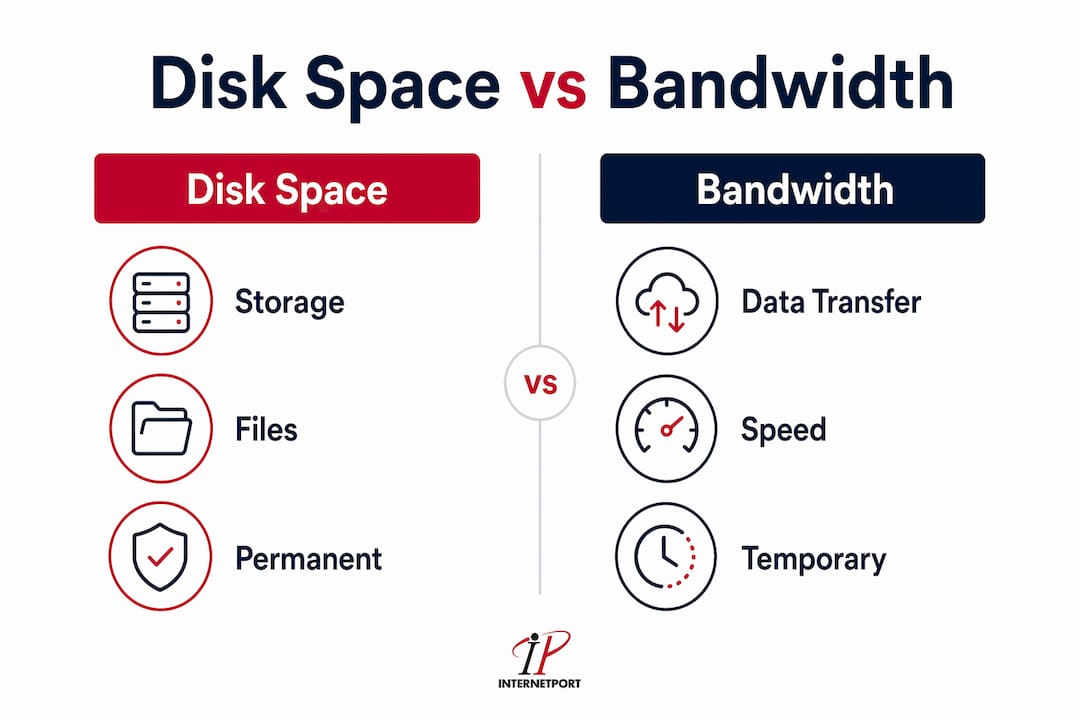
Disk space and bandwidth are the two hosting terms most often confused with each other. They serve completely different functions, and mixing them up leads to poor purchasing decisions.
Disk space is storage. It holds your files permanently on the server. Bandwidth is transfer capacity. It measures how much data moves between your server and your visitors' browsers each month. Think of disk space as a warehouse and bandwidth as the loading dock. A massive warehouse with a tiny loading dock cannot serve customers quickly, no matter how much inventory it holds.
Here is how each resource affects your site differently:
- Disk space determines what you can store: files, databases, emails, and backups.
- Bandwidth determines how many visitors can access your content before the monthly transfer limit is reached.
- RAM controls how many simultaneous processes your server can handle at once.
- CPU controls how fast those processes execute, including page rendering and database queries.
Large disk space alone does not guarantee fast loading if bandwidth or CPU resources are limited. A site with 50GB of storage but a 1GB monthly bandwidth cap will go offline for the rest of the month after a modest traffic spike. These four resources work together. Weakness in any one of them creates a bottleneck.
Pro Tip: Before upgrading storage, check your bandwidth and CPU usage in your hosting control panel. Storage is rarely the first resource a growing site exhausts. Bandwidth and RAM hit their limits first on most shared hosting plans.
How to choose the right disk space hosting plan
Choosing a hosting plan based on storage alone is a mistake. The right plan balances storage size, storage technology, bandwidth, uptime guarantees, and backup policies against your actual website requirements.
Key factors to evaluate
- Content type. Image and video-heavy sites need more raw storage. Text-based sites need faster storage more than larger storage.
- Traffic volume. High-traffic sites burn through bandwidth faster, which indirectly affects how much cached data the server needs to store.
- Backup policy. Providers offering automated incremental backups on separate storage volumes protect you from data loss without consuming your primary disk allocation.
- Uptime guarantee. A 99.9% uptime commitment means less than nine hours of downtime per year. Anything below that threshold is a risk for a business-critical site.
- Storage technology. Fast SSD or NVMe storage delivers better SEO performance and user experience than a larger HDD allocation. Speed beats size every time.
- Scalability path. Confirm that your provider lets you upgrade storage without migrating to a new server. Downtime during a forced migration is avoidable if you plan ahead. A guide on how to choose web hosting covers this evaluation in detail.
Storage technology comparison
| Storage type | Speed | Best for |
|---|---|---|
| HDD | Slowest | Archive storage, low-traffic sites |
| SATA SSD | Fast | Small business sites, blogs |
| NVMe SSD | Fastest | E-commerce, databases, high-traffic sites |
Upgrading to NVMe-driven VPS hosting can dramatically improve database performance, which is the single biggest bottleneck for e-commerce sites. The performance gain from switching storage technology typically exceeds the gain from doubling storage capacity.
Managing disk space over time
Disk space consumption grows steadily with content, user-generated data, caches, and system logs. Quarterly maintenance prevents surprises. Check your usage in your hosting control panel, delete unused files and old log entries, and clear expired cache files. Most control panels display a real-time usage meter. Set a personal alert at 75% capacity so you have time to act before hitting the limit. For a deeper look at keeping costs in check as you grow, Internetport's guide on optimizing hosting costs is worth reading.
You should also consider how scalable SEO practices interact with your storage needs. As your content library grows to support search rankings, so does your disk usage. Planning both together avoids the situation where SEO success creates a storage crisis.
Key Takeaways
Disk space hosting is the foundation of every website, and choosing the right storage type and size determines both performance and long-term reliability.
| Point | Details |
|---|---|
| Storage type beats storage size | 10GB NVMe SSD outperforms 50GB HDD for speed, SEO, and user experience. |
| Know your usage categories | Files, databases, emails, and backups all draw from the same disk allocation. |
| Disk space and bandwidth differ | Storage holds data permanently; bandwidth controls how much data transfers to visitors monthly. |
| Plan for growth, not just today | Choose a plan with room for 18 months of content and traffic growth to avoid forced migrations. |
| Backups need separate storage | Storing backups on the same server as your live site doubles consumption and creates a single failure point. |
Why disk space is the hosting decision most small businesses get wrong
Small business owners consistently underestimate disk space needs at launch and overestimate them when panicking after a traffic spike. I have seen both mistakes cause real damage.
The underestimation problem is straightforward. A new site owner picks the cheapest shared plan, uploads a few pages, and forgets about storage entirely. Then they add a blog, start collecting email subscribers, install a backup plugin that saves to the same server, and wonder why the site crashes six months later. The crash is not a mystery. It is math.
The overestimation panic is subtler. After a traffic spike, owners assume they need more storage when they actually need more bandwidth or RAM. Buying a 100GB storage plan when you are using 4GB does nothing for a site that is slow because its CPU is maxed out. The resource you buy has to match the resource you are actually running short on.
The trend worth watching in 2026 is the shift toward NVMe-based VPS plans at price points that used to only buy shared hosting. That shift changes the calculus for small business owners. You can now get dedicated resources, NVMe speed, and a clear upgrade path for roughly the same monthly cost as a mid-tier shared plan from two years ago. The role of backups in hosting is also getting more attention, and rightly so. Automated, off-server backups are no longer a premium feature. They are a baseline expectation.
My honest advice: pick a provider that shows you exactly what storage technology you are getting, gives you a real uptime guarantee in writing, and lets you scale without a full server migration. Everything else is secondary.
— Peter
Internetport's hosting plans for growing websites
Internetport offers web hosting plans built around SSD and NVMe storage, with clear upgrade paths from shared hosting to VPS and dedicated servers. Every plan includes uptime guarantees and backup options stored on separate volumes, so your primary disk allocation stays available for your actual site content.
For sites that have outgrown shared hosting, Internetport's VPS hosting delivers dedicated NVMe resources without the cost of a full dedicated server. Plans are priced for small businesses and individuals, with technical support available when you need it. If you are ready to match your storage choice to your actual growth plan, Internetport's hosting options give you the technology and flexibility to do that without overcommitting on day one.
FAQ
What is disk space in web hosting?
Disk space in web hosting is the amount of server storage allocated to your website for permanently storing files, databases, emails, and backups. Every piece of content your site holds occupies a portion of that allocation.
How much disk space does a small business website need?
Most small business websites fit comfortably within 10GB of SSD storage. E-commerce sites with large product catalogs and customer databases typically need 10–20GB or more.
What happens when disk space runs out?
When disk space is fully used, the server cannot write new data. This causes website crashes, email delivery failures, and the loss of any ability to publish new content or accept form submissions.
Is disk space the same as bandwidth?
No. Disk space is permanent storage for your website's files. Bandwidth is the monthly data transfer capacity that delivers those files to your visitors' browsers. Both are separate resources with separate limits.
Does storage type affect website speed?
Yes, significantly. NVMe SSD storage delivers 3x–10x faster database response times than traditional HDD storage. For SEO and user experience, the type of storage matters more than the total size of the allocation.