
TL;DR:
- Most businesses rely on hosting backups assuming they are sufficient, but many backups are unreliable without proper testing and off-site storage. Relying solely on provider backups is risky, as they often carry no guarantees and can fail silently or be compromised in the same environment. Implementing a layered 3-2-1 backup strategy, regularly testing restore procedures, and selecting providers with verified, secure backup infrastructures are essential for true data protection.
Most businesses assume their hosting backups are quietly protecting them in the background. They are often wrong. The role of backups in hosting goes far beyond clicking an "enable" checkbox in your control panel. Untested configurations, same-server storage, and vague "best effort" commitments from hosting providers create gaps that only become visible at the worst possible moment. This guide cuts through the assumptions, explains what hosting backups actually do, where they commonly fail, and how your business can build a backup strategy that holds up under real-world pressure.
Table of Contents
- Key Takeaways
- The role of backups in hosting, explained
- Why you cannot rely on hosting backups alone
- Backup strategies that actually protect your business
- How to evaluate hosting providers on backup quality
- My take on why "set it and forget it" backups will eventually fail you
- Hosting with backups you can actually rely on
- FAQ
Key Takeaways
| Point | Details |
|---|---|
| Backups are not passive protection | Without regular testing and off-site storage, most backups cannot reliably recover your data when it matters. |
| Most hosting backups carry no guarantee | Backup services are often "best effort," placing full responsibility on the website owner, not the provider. |
| The 3-2-1 rule is your baseline | Maintain three copies of data across two different media types, with one stored off-site, to guard against multiple failure scenarios. |
| Frequency must match business risk | Daily backups limit loss to 24 hours, but high-transaction sites need near real-time backup schedules to protect revenue-critical data. |
| Hosting providers must be evaluated critically | Ask every provider about retention periods, restore processes, storage locations, and whether backup verification is included in their SLA. |
The role of backups in hosting, explained
Before evaluating whether your current setup is adequate, you need a precise understanding of what hosting backups actually are, and what they are not.
A backup in a hosting context is a copy of your data stored separately from your live environment so it can be restored if the original is damaged, deleted, or compromised. That sounds straightforward. Where businesses get into trouble is assuming that one type of backup covers all scenarios, or that any backup is automatically a good backup.
The main backup types you will encounter
Full backups copy everything: files, databases, configurations, and all associated data. They take the most storage and time but provide the most complete restore option. Full backups are typically run less frequently, often weekly, with faster backup types filling the gaps.
Incremental backups only capture changes made since the last backup of any kind. They are fast and storage-efficient but require the full chain of previous backups to restore successfully. If one backup in the chain is corrupted, the whole restore can fail.
Differential backups capture changes since the last full backup. Restores are simpler than incremental because you only need the last full backup plus the most recent differential. They use more storage than incremental but are more reliable in recovery scenarios.
Beyond these structures, hosting environments also rely on server snapshots, which capture the entire state of a virtual machine at a specific point in time. Snapshots are fast and useful for reverting after a botched update, but they live in the same environment as your server. They do not protect you if the entire hosting account is compromised or the physical infrastructure fails.
Database backups deserve special attention. Many business-critical systems, from e-commerce platforms to CRM tools, rely on databases that change far more frequently than static files. A file backup without a synchronized database backup can leave you with a functional-looking website that shows data from two weeks ago.
Pro Tip: If your site runs on a CMS like WordPress, run both file and database backups on the same schedule. A mismatch between the two is a common and quietly catastrophic failure mode.
The hosting business continuity impact of getting this right extends beyond just technical recovery. Data loss affects customer trust, compliance standing, and revenue in ways that are rarely fully recovered.
Why you cannot rely on hosting backups alone
This is where businesses most frequently miscalculate. The existence of a backup does not mean that backup will work when you need it.
"Backup services are often 'best effort' with no guarantee; responsibility for backups lies with the website owner." — WordPress Hosting Backup Myth
That quote deserves a careful read. The majority of shared hosting providers include language in their terms of service that explicitly disclaims responsibility for backup completeness or availability. The word "backup" appears prominently in their marketing. The disclaimers appear in the fine print.
The silent failure problem
Between 55% and 60% of backup restorations encounter issues of some kind. That statistic should fundamentally change how you think about your current setup. More than half of all restoration attempts run into problems, ranging from partial file recovery to complete failure. The unsettling part is that automated backup systems can report "success" even when the resulting backup file is incomplete, corrupted, or missing critical database tables.
This is what practitioners call a silent failure. The backup runs on schedule, the log shows green checkmarks, and you have no idea the file is unusable until you actually try to restore it.
Same-server storage: a critical vulnerability
Backups stored on the same hosting account protect against almost nothing in the scenarios that matter most. If your server is compromised, wiped, or suffers a hardware failure, backups stored in the same environment go down with it. A ransomware attack that encrypts your live files will typically encrypt local backup directories too.

This is not a theoretical risk. The effects of data loss in hosting environments that involve account-level compromises are severe precisely because businesses discover too late that their backups were stored in the path of the attack.
Retention gaps and outdated data
Retention period problems are another underestimated risk. Many default hosting backup configurations keep only the last seven days of backups. If your site is compromised through a slow-moving attack or a vulnerability that was introduced three weeks ago, your entire retention window could contain only infected copies. GDPR recommends a minimum 30-day retention period for business-critical hosting environments. Many providers offer far less unless you specifically request or pay for extended retention.
Restoring from an outdated backup also creates a different kind of damage. You may recover your files while losing weeks of customer orders, content changes, or transaction records. The longer the gap between your last clean backup and the incident, the more painful the effects of data loss in hosting become.
Backup strategies that actually protect your business
Good backup strategy is not complicated, but it requires deliberate decisions rather than default settings.
The 3-2-1 rule in a hosting context
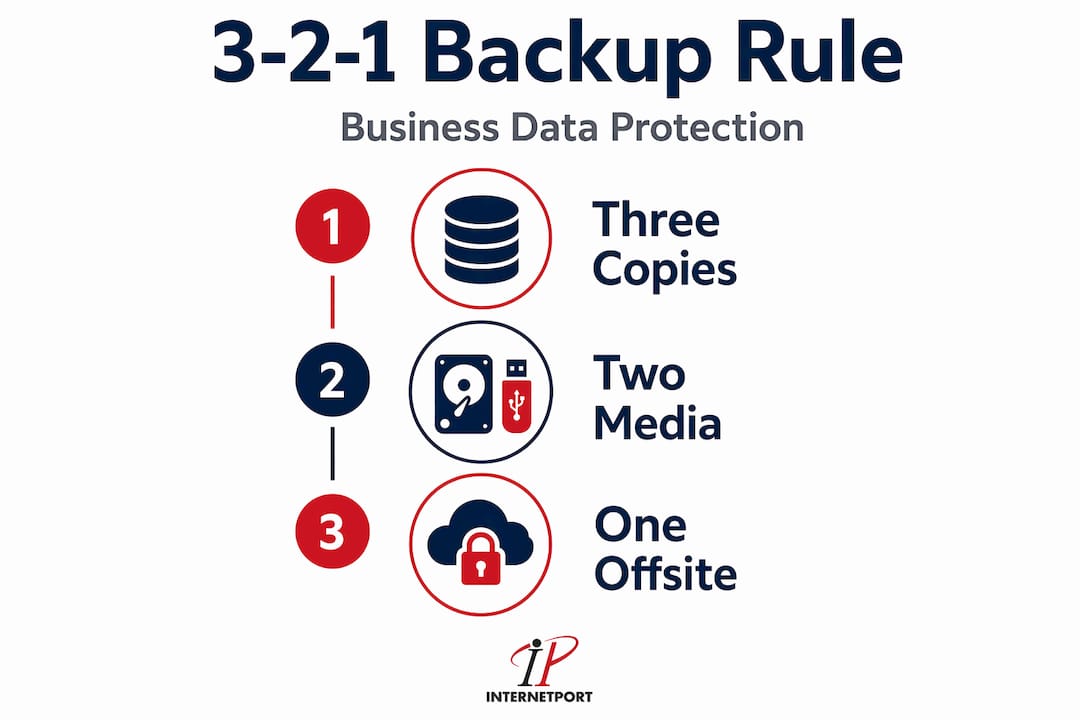
The 3-2-1 rule is the foundational framework for backup design:
- Keep three copies of your data.
- Store them on two different types of media or locations.
- Keep one copy off-site, completely separate from your primary hosting environment.
In practice, for a hosted website, this means your live server, a hosting-level snapshot, and a copy pushed to external cloud storage such as a separate S3-compatible bucket or dedicated backup service. None of these three copies should be accessible from the same credential set.
Backup frequency recommendations by business type
| Business Type | Recommended Frequency | Minimum Retention |
|---|---|---|
| Informational / blog sites | Daily backups | 14 days |
| E-commerce (low volume) | Daily backups | 30 days |
| E-commerce (high transaction volume) | Every 4-6 hours or real-time | 60 days |
| SaaS or data-heavy applications | Real-time or continuous replication | 90 days |
| Regulated industries (finance, health) | Real-time, with compliance audit logs | 12 months or per regulation |
A daily backup schedule limits maximum data loss to 24 hours for typical businesses. That is acceptable for a company blog. It is not acceptable for a business processing hundreds of orders per day, where 24 hours of lost transaction data could mean significant financial and legal exposure.
The hybrid approach
Practitioners advocate a hybrid backup strategy combining local fast restores with secure off-site cloud copies. The logic is straightforward: local backups restore quickly because there is no bandwidth bottleneck, while off-site copies protect against total environment failures. Cloud-only strategies can create painful delays when you need to pull gigabytes of data over a network connection during an already stressful recovery situation.
Understanding hybrid cloud infrastructure helps businesses visualize how local and cloud backup tiers work together within a larger IT architecture.
Immutability and encryption
Ransomware specifically targets backup infrastructure. Modern ransomware variants are designed to find and encrypt or delete backup directories before executing their main payload. This makes immutable backups, files that cannot be altered or deleted for a defined period, a non-negotiable layer of protection for any business that takes security seriously. Pair immutability with encryption both at rest and in transit, and you have a backup that survives even a sophisticated attack.
Pro Tip: Store at least one backup copy in an immutable, write-once format using a dedicated backup service or cold cloud storage tier. This copy should be completely isolated from your administrative credentials.
Testing is not optional
A backup that is never tested by actual restoration is not a backup. It is an assumption. Testing restore processes regularly to a separate staging environment reveals hidden issues like incomplete backups or encoding problems well before you face a real emergency. Schedule restore drills at least quarterly, and document what you find. Businesses that skip this step are essentially practicing hope as a disaster recovery plan.
Aligning your backup schedule and retention policy with GDPR and other applicable data protection standards is also a legal requirement in many jurisdictions, not just a best practice. A minimum 30-day retention period is the recommended standard for business-critical data under GDPR guidance.
How to evaluate hosting providers on backup quality
When you assess a hosting provider, backup-related questions should be among the first you ask, not an afterthought you check after signing a contract.
Questions worth asking directly
- Does the provider offer automated daily backups, or is scheduling your responsibility?
- Where are backup files stored physically? Are they on the same server, same datacenter, or genuinely off-site?
- What is the default retention period, and can it be extended?
- Are backups encrypted in transit and at rest?
- Does the provider offer one-click restores from their control panel, or is restoration a manual process requiring a support ticket?
- What does the SLA say about backup availability and restoration time? Is there any guarantee at all?
That last point matters more than most businesses realize. Business stakeholders must define their Recovery Time Objective (RTO) and Recovery Point Objective (RPO) before evaluating any hosting solution. Your RTO is the maximum acceptable downtime. Your RPO is the maximum acceptable data loss measured in time. If your RTO is four hours and your provider's manual restore process takes six hours minimum, you already have a mismatch before a single incident has occurred.
Comparing backup approaches
A backup approach integrated at the hosting provider level is convenient but carries the risks outlined earlier: shared infrastructure, same-environment storage, and limited guarantees. Plugin-based backups for CMS platforms give you more control but require maintenance, storage configuration, and testing discipline. Managed cloud backups from dedicated services offer the most control and off-site separation but add cost and complexity.
The right answer for most businesses is a layered approach. Use your hosting provider's built-in backup as one layer, not your only layer. A high availability hosting workflow treats backups as one component in a broader resilience system rather than a single point of protection.
Recovery plans in web hosting also need to account for non-technical factors: who has access to backup credentials, who initiates a restore, and whether those people know the process before a crisis, not while one is unfolding.
My take on why "set it and forget it" backups will eventually fail you
I have spent years watching organizations treat backups as an infrastructure checkbox rather than a living process. The pattern is consistent. A business enables automated backups, receives no alerts or errors, and assumes everything is working. Then a server fails, or someone deletes a critical database table, or ransomware hits. They go to restore, and that is when they discover the backup has been silently failing for six months, or the files exist but the database backup is three weeks old, or the restore process requires expertise nobody on the current team has.
What genuinely surprises me is how rarely businesses factor the true cost of a restore failure into their risk calculations. The hidden costs of restore failures and downtime consistently exceed what a solid backup program would have cost by a significant margin. A single day of downtime for a mid-sized e-commerce operation can easily cost more than a year of premium managed backup services.
My position is straightforward: an untested backup is not an asset. It is a liability dressed up as security. The only way to know whether your backup works is to restore it. Not in production, not under pressure, but deliberately, on a schedule, to a staging environment where you can verify that every file, database record, and configuration is intact.
Investing in tested, off-site, encrypted backups with clear recovery documentation is not a cost center. It is the floor of any serious approach to business continuity. If your current hosting setup does not support that standard out of the box, it is worth asking what you are actually paying for.
— Peter
Hosting with backups you can actually rely on

If the gaps described in this article sound uncomfortably familiar, the answer is not just better policies. It is a hosting provider that builds verified backup infrastructure into the service itself. Internetport offers automated daily backups with off-site storage and a minimum 30-day retention period built into its hosting plans, covering web hosting, VPS, and dedicated servers. One-click restores from the control panel mean your team does not need to open a support ticket and wait hours to begin recovery.
Every Internetport hosting environment supports GDPR-aligned data handling and complies with PCI DSS standards for businesses operating in regulated industries. Backup storage is maintained separately from your primary server environment, removing the single-environment vulnerability that puts so many businesses at risk. For businesses that want to integrate managed IT security alongside their hosting stack, Internetport's infrastructure is designed to work with layered security approaches from the ground up.
Whether you need shared hosting with solid baseline protection or dedicated infrastructure with enterprise-grade backup controls, Internetport provides the technical foundation to match backup strategies to your actual business risk tolerance.
FAQ
What is the role of backups in hosting?
Backups in hosting protect your data from loss caused by hardware failures, cyberattacks, accidental deletion, or software errors. They allow your business to restore operations without losing critical files, databases, or configurations.
How often should website backups run?
Daily backups are the standard minimum for most businesses, limiting data loss to a 24-hour window. High-transaction or data-intensive sites should back up every few hours or use continuous replication.
Are hosting provider backups enough on their own?
No. Most hosting providers offer backups on a "best effort" basis with no restoration guarantee. Businesses should layer hosting backups with independent off-site copies and test restore processes regularly.
What is the 3-2-1 backup rule?
The 3-2-1 rule means maintaining three copies of your data, stored on two different types of media, with one copy kept off-site and separate from your primary hosting environment.
How does GDPR affect backup requirements for businesses?
GDPR guidance recommends a minimum 30-day retention period for business-critical data, automated daily backups, and secure off-site storage. Non-compliance can result in regulatory penalties beyond the operational damage of data loss itself.