
TL;DR:
- Many business leaders overlook hosting as a vital business continuity asset, ignoring its impact on recovery speed and data loss. Proper assessment of RTO and RPO, aligned with tiered hosting architectures, is essential for resilient and cost-effective continuity planning. Secure hosting features like monitoring, isolation, and automated recovery are critical to contain security threats and ensure operational resilience.
Most business leaders treat hosting as an IT expense, not a continuity asset. That framing is exactly what leaves companies exposed when disruptions hit. The role of hosting in business continuity is far more than keeping a website online. It determines how quickly you recover, how much data you lose, and whether critical operations survive an outage, attack, or regional failure. Yet many small to medium-sized enterprises build continuity plans without ever examining their hosting architecture. This guide cuts through the confusion around RTO, RPO, and secure hosting design so you can make decisions grounded in actual business risk.
Table of Contents
- Understanding key business continuity metrics: RTO and RPO
- Hosting architectures and their trade-offs for business continuity
- The critical role of secure hosting features in business continuity
- Testing and maintaining your hosting-based business continuity plan
- Rethinking hosting's role in business continuity: Beyond uptime to resilience
- Empower your business continuity with Internetport's hosting solutions
- Frequently asked questions
Key Takeaways
| Point | Details |
|---|---|
| Understand RTO and RPO | Recovery Time Objective and Recovery Point Objective guide how quickly you must resume operations and how much data loss you can tolerate. |
| Choose hosting architecture wisely | Active-active, warm standby, and cold standby setups offer different speed-cost trade-offs suited to your business impact analysis. |
| Secure hosting is essential | Monitoring, isolation, and failover features reduce risk of full outages caused by security incidents. |
| Regular testing is critical | Without ongoing functional and tabletop exercises, continuity plans may fail despite costly hosting redundancy. |
| Design continuity from business impact | Start with your critical business processes, then set IT recovery targets and hosting roles accordingly. |
Understanding key business continuity metrics: RTO and RPO
Before you evaluate any hosting solution for business continuity, you need two numbers: your Recovery Time Objective and your Recovery Point Objective. These are not IT concepts. They are business decisions.
Recovery Time Objective (RTO) is the maximum amount of time your business can tolerate being offline before the impact becomes unacceptable. If your e-commerce platform going down for four hours costs you more than the month's hosting bill, your RTO is well under four hours. Recovery Point Objective (RPO) is the maximum amount of data loss your business can absorb, measured backward from the moment of failure. If you run hourly backups but your RPO is 15 minutes, you have a gap, and that gap is a risk.
Key continuity targets for hosting and disaster recovery design are RTO and RPO: RTO is the maximum acceptable downtime to resume a function, and RPO is the maximum acceptable data loss measured backward from the failure point. These two metrics directly determine what kind of infrastructure you need. An RTO of 4 hours might be fine with a warm standby environment. An RTO of 5 minutes requires fully redundant, always-on infrastructure.
This is where a Business Impact Analysis (BIA) earns its keep. A BIA forces you to rank your business processes by criticality and then assign realistic RTO and RPO targets to each. Not every function is equally urgent. Your billing system may need a 30-minute RTO while your internal knowledge base can wait 24 hours.
- Identify each core business process (order processing, customer communications, financial systems)
- Assign a financial and operational impact for each hour of downtime
- Set RTO and RPO targets based on that impact, not on IT convenience
- Map those targets to specific hosting requirements before purchasing infrastructure
One misconception worth addressing directly: zero data loss is technically achievable, but the cost is significant. Continuous synchronous replication across geographically separate data centers is expensive. If your business can accept a 15-minute RPO rather than zero, you may cut infrastructure spend considerably. The BIA helps you make that call with business evidence instead of gut feeling.
Pro Tip: Run your BIA before you talk to a hosting provider. If you arrive knowing your RTO and RPO for each workload tier, you will get far more relevant proposals and avoid being upsold on infrastructure you do not actually need.
Now that we understand the critical continuity metrics, let's explore how hosting architecture designs align with these targets.
Hosting architectures and their trade-offs for business continuity
There are three primary hosting architectures used in business continuity planning. Each trades cost against recovery speed in a distinct way, and choosing the wrong one for a given workload is one of the most common and expensive mistakes SMBs make.
- Active-active: Both environments run simultaneously and share live traffic. Failover is nearly instantaneous because no "switch" is required. This gives you the lowest possible RTO, often under one minute, and an RPO approaching zero. The cost is real: you are running two full environments at all times.
- Warm standby: A secondary environment is kept running at reduced capacity and updated continuously. During a failure, it scales up and takes over. Typical RTO ranges from 15 to 60 minutes. Cost is lower than active-active because the secondary environment does not carry production load under normal conditions.
- Cold standby (pilot light): Infrastructure is defined and backed up, but not running. Recovery means provisioning, restoring data, and starting services. RTO can range from several hours to a full day. This is the least expensive option and appropriate only for non-critical workloads.
| Architecture | Typical RTO | Typical RPO | Relative cost |
|---|---|---|---|
| Active-active | Under 1 minute | Near zero | Highest (near 2x base) |
| Warm standby | 15 to 60 minutes | 5 to 30 minutes | Moderate |
| Cold standby | 4 to 24 hours | 1 to 24 hours | Lowest |
Design choices for cloud continuity trade cost directly for recovery speed. Near-zero data loss and sub-15-minute RTO require running duplicate infrastructure continuously. That is the honest math behind active-active. It is the right answer for your most critical workloads. It is rarely the right answer for everything.
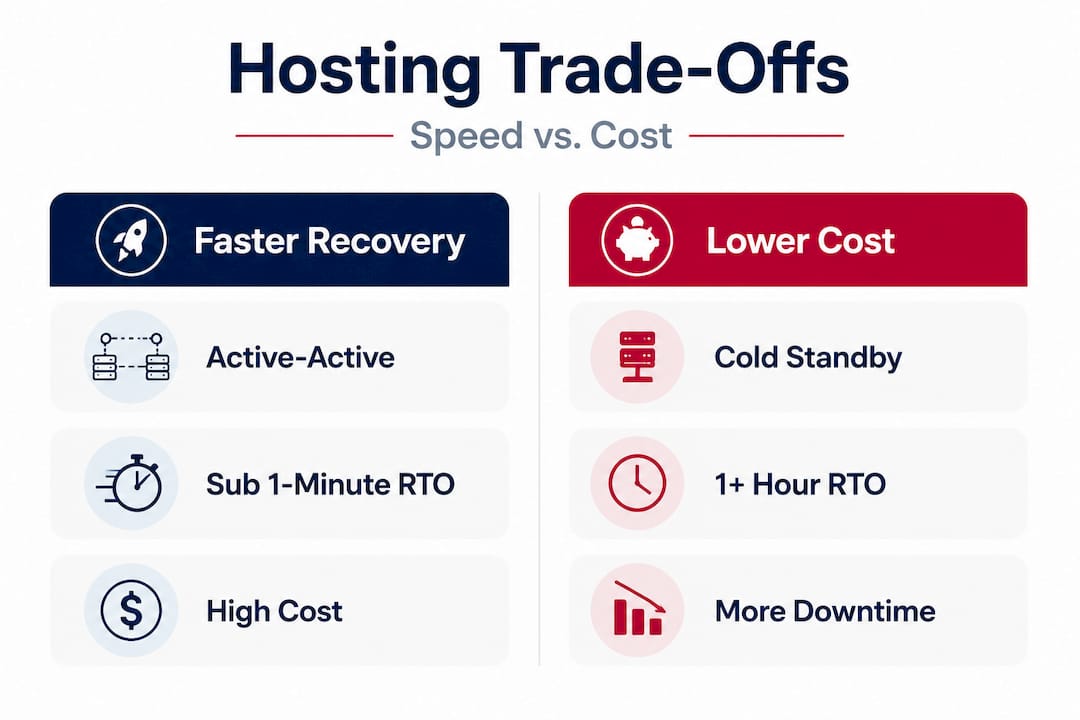
Here is where workload tiering becomes essential. Most SMBs underestimate that continuous replication and failover architectures can approach total "double-run" infrastructure costs. The professionals who manage this well split workloads into tiers: tier one gets active-active treatment, tier two gets warm standby, and tier three gets cold standby. Your BIA results map directly to these tiers.
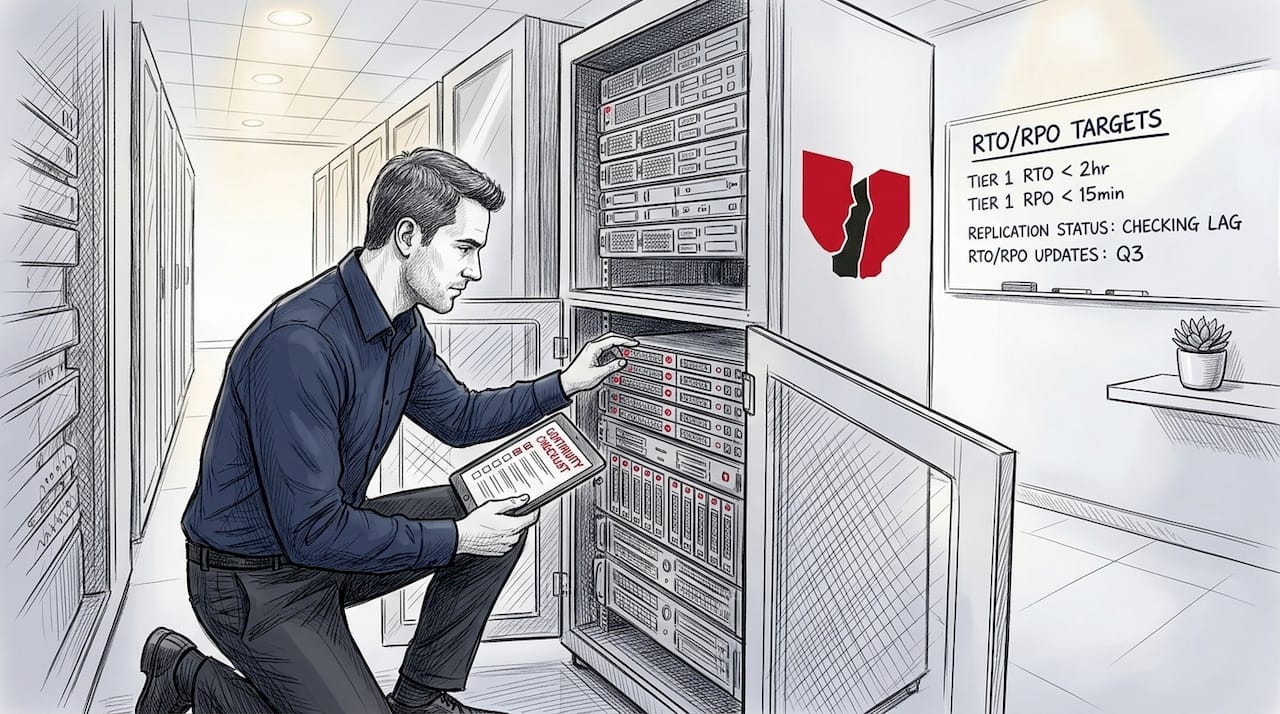
The hidden cost of blanket over-provisioning is real. Treating every application as tier one inflates your hosting bill without proportionate benefit. Treating everything as tier three exposes critical revenue-generating systems to recovery windows your business cannot survive. The discipline is in the sorting.
Pro Tip: When evaluating cloud-hosting migration options for your continuity plan, ask potential providers to specify which architecture each pricing tier actually delivers. "High availability" is a marketing phrase. Active-active with geographic redundancy is a technical specification. Know which one you are buying. Consider using a structured hosting solution evaluation process to compare providers on these exact terms.
With hosting architectures and their trade-offs clear, let's see why secure hosting features are essential to realizing these continuity goals.
The critical role of secure hosting features in business continuity
Most people picture business continuity threats as hardware failures or natural disasters. The reality in 2026 is that the majority of significant business interruptions originate from security incidents. A ransomware attack that encrypts your production data is a continuity failure. A credential compromise that brings down your customer portal is a continuity failure. No amount of geographic redundancy protects you if both environments trust the same compromised account.
Business continuity and disaster recovery in practice depend on secure hosting features, including monitoring, isolation, redundancy and failover, and recoverable infrastructure, because many continuity failures are security-related and occur when an organization cannot keep operating after an incident. This reframes how you should assess any hosting provider. You are not just buying uptime. You are buying the ability to contain and survive security events.
"Secure hosting isn't just about uptime; it's about reducing the chance that a security incident escalates into total business interruption via isolation, least-privilege access, and infrastructure-layer detection and mitigation."
The specific features that matter for continuity are not complicated, but they need to be present at the infrastructure level, not bolted on as afterthoughts:
- Continuous monitoring: Real-time alerting on anomalous traffic, failed access attempts, and configuration drift. Threats caught at 2 AM cause far less damage than threats found at 9 AM when someone notices the website is down.
- Micro-segmentation and network isolation: Individual workloads or application layers operate in separate network segments. If one segment is compromised, the blast radius is contained. Your payment processing environment does not fall because your marketing site was breached.
- Least-privilege access controls: Every user, service account, and automated process has access only to what it needs. This limits what an attacker can reach even after gaining initial access.
- Automated mitigation: The window between detection and containment is where damage is done. Infrastructure-level automation that quarantines suspicious instances or blocks anomalous traffic reduces that window from hours to seconds.
- Immutable backups with verified recovery: Backups that cannot be altered or deleted by ransomware, stored separately from production environments, and regularly tested for actual restorability. A backup you have never restored is just a hope, not a plan.
Understanding hosting security fundamentals at the infrastructure level is what separates a business that weathers a security incident from one that shuts down for days. Isolation is the single most underrated continuity control available at the hosting layer.
Knowing which features secure hosting must provide leads us to how you can keep continuity plans effective with regular testing and upkeep.
Testing and maintaining your hosting-based business continuity plan
Having a continuity plan documented is not the same as having a continuity plan that works. Ready.gov recommends creating and testing a business continuity plan as part of a structured process covering preparation, definition, identification, development, team and task assignment, and testing. Most organizations complete the first five steps and stop.
Most organizations have never tested their BCP. Testing is where you close the gap between having a plan and knowing it works. The testing sequence should escalate in complexity:
- Tabletop exercise: Gather IT, operations, and business stakeholders and walk through a simulated incident scenario verbally. No systems are touched. The goal is to surface gaps in roles, communication, and decision authority.
- Functional drill: Test specific components in isolation. Restore a backup to a clean environment. Trigger a failover in a non-production context. Measure actual RTO against your target.
- Full-scale exercise: Simulate a real disruption as closely as possible. Fail over production traffic, activate your continuity team, and measure recovery from end to end. This is the test that finds the surprises.
- After-action review: Document what failed, what took longer than expected, and what gaps need addressing. Update the plan before the next test cycle.
- Scheduled re-testing: Any significant infrastructure change, new application deployment, or shift in business process criticality should trigger a new round of relevant testing.
- Continuous monitoring alignment: Integrate test findings with your ongoing hosting reliability management practices so that operational improvements feed back into your continuity posture.
Untested restore and failover paths are where continuity programs fail, despite hosting redundancy. Assuming cloud hosting redundancy guarantees recovery is a specific and common mistake. Redundant infrastructure means the hosting provider keeps services available under normal failure conditions. It does not mean your application will restart correctly, your database will restore to a clean state, or your team knows what to do when the alert fires.
A critical pitfall many SMBs miss is testing only the IT recovery side. Can the infrastructure fail over? Good. Can your operations team actually run the business in that state? Do they know which manual workarounds to activate? Are customer communications prepared? Those questions require business process testing, not just infrastructure testing. Bring your department heads into tabletop exercises, not just your IT team.
You can also get professional guidance on recovery planning through an IT support consultation to validate your testing approach against real-world continuity scenarios.
Pro Tip: Schedule your first failover test during low-traffic hours in a staging environment before ever attempting it in production. The goal is to discover failure modes in a controlled setting, not during an actual incident.
Having explored the core concepts and practical steps, let's now consider a unique perspective on common misconceptions business leaders face around hosting and continuity.
Rethinking hosting's role in business continuity: Beyond uptime to resilience
Here is the uncomfortable truth most hosting conversations avoid: a 99.9% uptime SLA does not guarantee your business survives a disruption. SLA credits compensate you after downtime occurs. They do not restart your database, restore corrupted files, or keep your team operational while systems are down. Mixing up SLA uptime with actual continuity outcomes is a non-obvious pitfall. Provider uptime does not guarantee recovery during outages or cyberattacks.
The framing that needs to change is this: hosting is not a vendor relationship you manage annually at contract renewal. It is the operational foundation your continuity strategy depends on, and it deserves the same ongoing attention you give to revenue-generating systems.
What we have seen consistently is that the businesses with the strongest continuity postures did not start with a hosting decision. They started with a clear understanding of which business processes generate the most value and which failures would be most damaging. Building continuity around IT preferences is the wrong direction. Start with business process criticality and vulnerability, set RTO and RPO targets from that analysis, then select hosting architecture accordingly.
The other pattern worth naming: resilience is not a feature you purchase once. Static redundancy gives you protection against the failure scenarios that existed when you designed your architecture. Your business changes. New applications are deployed, new vendors are integrated, new regulatory requirements emerge. Each change potentially shifts your risk profile without touching your hosting configuration. The answer is not paranoia. It is a standing rhythm where IT, security, and business operations review continuity posture together, not in separate silos.
For SMBs specifically, the practical wisdom is to be very deliberate about active redundancy budgets. Spend that money on the two or three systems that would genuinely cripple the business if they went down. Accept warm or cold standby for everything else. Blanket approaches either burn budget unnecessarily or create a false sense of coverage. The tiered model, driven by real BIA data, is where cost and resilience actually align.
We explore this further in our hosting reliability insights resource, which covers how to build infrastructure that holds up under both operational pressure and security incidents.
Empower your business continuity with Internetport's hosting solutions
Now that you understand how hosting underpins business continuity, Internetport can help make your continuity strategy real and reliable. Since 2008, we have built hosting infrastructure specifically for businesses that cannot afford ambiguity in their uptime and recovery capabilities. Our data centers in Sweden and international locations are designed with redundancy at every layer, and our network delivers up to 10 Gbps bandwidth so your critical workloads perform under pressure, not just under ideal conditions.

Whether you need webhosting services for operational continuity, a VPS hosting environment for workload isolation and faster recovery, or dedicated server options for your highest-priority systems, we have configurations built around real business continuity requirements. Our support team works with you to align hosting architecture to your RTO and RPO targets from day one. If your team needs additional IT expertise, our partner remote IT support can help bridge the gap between your continuity plan and its daily execution.
Frequently asked questions
What is the difference between business continuity and disaster recovery in relation to hosting?
Disaster recovery restores IT systems after an event, while business continuity keeps the entire organization operational during a disruption. Hosting supports both through infrastructure configurations, automated failover, and verified recovery processes.
How do RTO and RPO affect hosting choices for SMBs?
Lower RTO and RPO targets require more expensive architectures. Active-active configurations that achieve RTO values under 15 minutes require running duplicate infrastructure continuously, which can approach 100% of base infrastructure spend. Higher tolerances open the door to lower-cost warm or cold standby options.
Why is testing important for a business continuity plan that involves hosting?
Testing verifies that your recovery and failover processes actually work when needed. Untested restore and failover paths are where continuity programs fail, regardless of how well-designed the hosting architecture appears on paper.
What secure hosting features directly support business continuity?
Isolation, monitoring, redundancy, failover, and recoverable infrastructure are the features that prevent total shutdowns. They contain incidents at the infrastructure layer before a security event or hardware failure escalates into a full business interruption.