

TL;DR:
- Uptime percentages do not fully capture actual business impact, which relies on recovery speed and transparency during outages. Reliable hosting involves architectural decisions, operational processes, and meeting specific RTO and RPO targets aligned with each workload's criticality. Operational discipline, multi-region design, independent monitoring, and support quality are essential to truly ensure business continuity beyond basic SLA promises.
Uptime percentages are everywhere in hosting contracts, but they tell only a fraction of the story. A provider can hit 99.9% uptime on paper while your team loses hours of productive work during poorly timed, poorly communicated outages that slip under the SLA threshold. For IT decision-makers running lean operations, that gap between promised availability and real-world impact is where business continuity risk actually lives. As hosting reliability research confirms, outage recovery speed and transparency determine operational impact just as much as the raw uptime number. This guide cuts through the noise to show you what reliable hosting genuinely requires.
Table of Contents
- What reliable hosting actually means for business operations
- Myth vs. reality: Interpreting uptime guarantees, SLAs, and hidden risks
- Mapping workload needs to real reliability: RPO, RTO, SLOs, and recovery
- Designing for resilience: Multi-region, automation, and operational best practices
- When cloud isn't the answer: Workload-driven infrastructure decisions
- What most SMBs miss about hosting reliability: A practical rethink
- Take control of your business continuity with Internetport solutions
- Frequently asked questions
Key Takeaways
| Point | Details |
|---|---|
| Uptime isn’t enough | True hosting reliability depends on tested recovery processes, RTO/RPO alignment, and resilience design—not just SLA percentages. |
| Map needs to business goals | Effective reliability starts with linking specific workload requirements to measurable operational targets and prepared response plans. |
| Test and monitor regularly | Ongoing independent monitoring, DR drills, and incident reviews are essential to maintaining and improving reliability. |
| The right solution is workload-driven | Choose infrastructure and hosting models that best fit your workloads, not just the latest trend, for optimal availability and continuity. |
What reliable hosting actually means for business operations
Now that you're questioning conventional uptime wisdom, let's break down what "reliable hosting" should really mean for your business. Most IT leaders treat reliability as a single number. In practice, it is a combination of architectural decisions, contractual commitments, and operational processes working together continuously.
True reliable hosting, in the context of enterprise hosting benefits, covers at least three distinct layers: day-to-day availability, business continuity planning, and disaster recovery readiness. Business continuity and high availability are distinct disciplines, and your hosting environment must support both to protect real operations. High availability (HA) refers to engineering your systems so that no single failure takes everything offline. Business continuity goes further, covering the processes, people, and plans that keep your organization functional even when infrastructure fails.
Two metrics determine whether your hosting arrangement actually supports continuity: Recovery Time Objective (RTO) and Recovery Point Objective (RPO).
- RTO is the maximum time your business can tolerate being without a service before the impact becomes unacceptable. For an e-commerce operation, this might be 15 minutes. For an internal reporting tool, it might be several hours.
- RPO is how much data loss your business can absorb. If your RPO is one hour, your backup or replication strategy must ensure no more than one hour of data is at risk at any given time.
These targets are not abstract. They translate directly into how you design your storage, replication frequency, failover architecture, and even your vendor selection criteria. Without them, you are essentially buying hosting on faith.
| Metric | What it measures | Business example |
|---|---|---|
| Uptime SLA | Percentage of time service is available | 99.9% = ~8.7 hrs/year downtime |
| RTO | Max acceptable recovery time | 15 minutes for payment systems |
| RPO | Max acceptable data loss window | 1 hour for transactional databases |
| MTTR | Mean time to repair after failure | How fast the provider restores service |
| SLO | Internal reliability goal | 99.95% availability for customer portal |
Understanding these distinctions helps you ask the right questions when evaluating providers. A vendor who offers 99.9% uptime but cannot tell you their mean time to repair (MTTR) is leaving a critical gap in your scalable hosting options. Reliability is not a feature. It is an outcome engineered deliberately across every layer of your infrastructure.
"Measuring uptime alone is like checking a car's top speed but never testing how fast it brakes. The stop matters as much as the go."
Myth vs. reality: Interpreting uptime guarantees, SLAs, and hidden risks
Understanding what reliability means is step one. Next, it's vital to decode how provider promises translate to your actual risk exposure. SLA language is often written to protect the provider, not to protect your operations.
Let's start with a concrete look at what uptime percentages actually permit:
| Uptime guarantee | Downtime per year | Downtime per month | Downtime per week |
|---|---|---|---|
| 99% | 87.6 hours | 7.3 hours | 1.68 hours |
| 99.9% | 8.76 hours | 43.8 minutes | 10.1 minutes |
| 99.95% | 4.38 hours | 21.9 minutes | 5 minutes |
| 99.99% | 52.6 minutes | 4.38 minutes | 1 minute |
| 99.999% | 5.26 minutes | 26.3 seconds | 6 seconds |
That 99.9% guarantee most SMBs consider "good" permits nearly nine hours of downtime annually. Spread those hours across a few peak business days and the impact scales dramatically. A single four-hour outage during a product launch or end-of-quarter close is catastrophic regardless of where it falls in an annual percentage calculation.
The deeper problem is how providers define downtime in their SLA documents. Many SLAs count downtime only when the entire service is unavailable. Partial outages, degraded performance, or regional failures that affect your users but not all users worldwide may not count. You could experience broken checkout flows, failed API calls, or inaccessible admin panels without your provider ever registering a formal "downtime" event.
Consider these common hidden risks:
- Provider-side monitoring only. If the provider measures uptime from their own monitoring infrastructure, they may not detect user-facing issues that originate at edge or network layers outside their direct observation.
- Session drops and partial failures. A database that responds intermittently can cause transaction failures without triggering an SLA event. Users experience failure; the SLA shows 100% availability.
- Exclusions buried in fine print. Scheduled maintenance, DNS propagation delays, and DDoS mitigation periods are frequently excluded from SLA calculations.
- Credit-based compensation. Most SLA penalties offer service credits, not compensation for lost revenue. A credit that covers one month of hosting costs rarely offsets an hour of lost sales.
As hosting reliability analysis shows, recovery speed and transparency after an outage often determine real operational impact more than the raw duration. And critically, transient faults that harm users may not even register in SLA downtime definitions unless those definitions are carefully aligned to your actual failure modes.
Pro Tip: Before signing any hosting contract, map your critical business functions to the SLA's exact definition of "downtime." If session drops, degraded performance, or regional failures affecting your users are not covered, negotiate explicit language or supplement with independent monitoring.
Providers using hosting reliability strategies that include multi-region design, automated failover, and independent monitoring close these gaps significantly. The question to ask any provider is not "what is your uptime guarantee?" but "how do you measure, report, and recover from failures that affect my specific workload?"
Mapping workload needs to real reliability: RPO, RTO, SLOs, and recovery
Once you spot the gaps in SLAs, the next move is to match your workload's unique needs with measurable reliability metrics. This requires working backward from your business operations, not forward from a provider's feature sheet.
The right starting point is an inventory of your critical business processes. Not all workloads carry the same downtime cost. Your payment gateway is not equivalent to your internal wiki. Treating them with the same reliability target wastes money on low-risk systems and dangerously under-protects high-risk ones.
Here is a practical workload classification approach:
- Tier 1 (critical): Revenue-generating or customer-facing systems where downtime directly costs money or damages customer trust. Examples include e-commerce platforms, SaaS dashboards, and payment processors. Target RTO: under 15 minutes. Target RPO: under 1 hour.
- Tier 2 (important): Internal tools or partner-facing systems where downtime reduces productivity but does not immediately affect revenue. Examples include CRM systems, inventory management, and internal portals. Target RTO: 1 to 4 hours. Target RPO: 4 hours.
- Tier 3 (standard): Non-critical systems where some downtime is acceptable and easily communicated. Examples include development environments, archival systems, and internal knowledge bases. Target RTO: same business day. Target RPO: 24 hours.
Translating business impact into RTO and RPO constraints is the foundation of any meaningful resilience plan. Focusing only on availability percentages leaves the most important questions unanswered. What happens when you fail? How fast can you recover? How much do you lose?
Service Level Objectives (SLOs) sit between the SLA your vendor promises and the internal targets your engineering or IT team owns. An SLO might state that your customer portal must respond in under 500 milliseconds for 99.5% of requests. If the hosting environment cannot support that consistently, the SLA percentage is irrelevant. Defining measurable SLOs and SLIs then backing them with hosting and disaster recovery mechanisms that meet your RTO and RPO is the most actionable methodology available to IT leaders today.
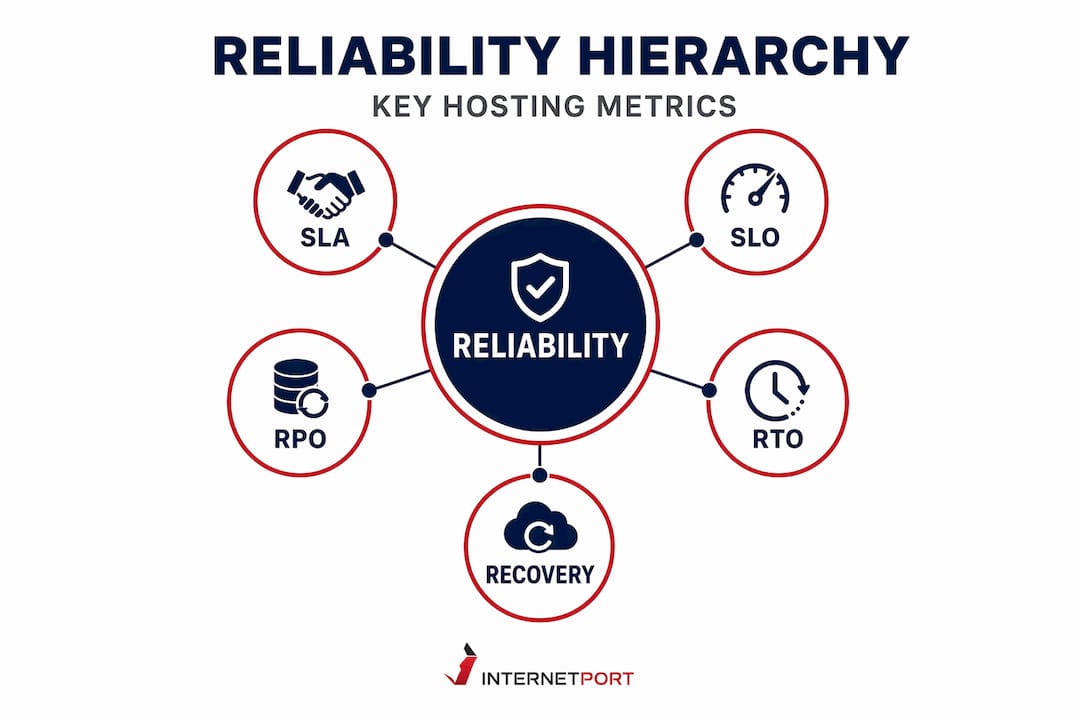
This framing also has a direct impact on cost. When you quantify your recovery targets, you can justify the right level of infrastructure spend without overspending on redundancy for low-priority systems. Understanding IT management empowerment through measurable reliability goals helps SMBs punch above their weight against larger competitors with bigger infrastructure budgets.
Pro Tip: Set a reminder to review your RTO and RPO targets every six months. Business operations change, new workloads appear, and yesterday's Tier 2 system may have quietly become Tier 1 as your product line expanded.
The practical output of this exercise should be a recovery matrix that lives alongside your hosting contracts and is reviewed by both your IT team and operations leadership. Think of it as your scalable cloud infrastructure shopping list, grounded in what your business actually needs rather than what a sales sheet promises.
Designing for resilience: Multi-region, automation, and operational best practices
Having set the right targets, focus shifts to building resilience into your infrastructure and daily operations. Technical targets without supporting architecture are just wishful thinking.

Multi-region and multi-cloud design are the most impactful structural choices you can make. By distributing workloads across two or more geographic locations, you ensure that a failure in one data center does not take down your entire operation. This is not exclusively a large-enterprise option. Many hosting providers now offer high availability hosting workflows that enable SMBs to configure active-active or active-passive setups at a reasonable cost.
Key operational resilience practices worth implementing include:
- Automated failover. When a primary server or region fails, traffic should redirect automatically without requiring manual intervention. Every minute of manual triage during an outage is a minute of unnecessary downtime.
- Independent monitoring. Do not rely solely on your provider's status page. Deploy synthetic monitoring from a third-party service that tests your application from multiple geographic locations. This catches failures the provider may not see or disclose immediately.
- Runbooks for common failure scenarios. A runbook is a documented, step-by-step procedure for responding to specific incident types. Without them, every outage involves your team improvising under pressure, which extends recovery time significantly.
- Regular incident drills. Test your failover and recovery processes before a real crisis forces you to. Annual or quarterly fire drills that simulate an outage reveal gaps in your runbooks and surface dependencies you didn't know existed.
- Security integrated into resilience. Hosting security practices are inseparable from reliability. A compromised server that requires emergency shutdown is functionally equivalent to hardware failure from a continuity standpoint.
SRE-style measurement and automation combined with practical recovery mechanisms like runbooks and automated failover represent the modern standard for reliable infrastructure management. This is not theoretical engineering philosophy. It is operational discipline that reduces recovery time, limits data loss, and keeps your team from firefighting every time something breaks.
| Practice | Reliability benefit | Implementation complexity |
|---|---|---|
| Multi-region failover | Eliminates single-region failure risk | Medium |
| Automated backups + replication | Supports RPO targets | Low to medium |
| Independent monitoring | Catches issues before users report them | Low |
| Runbooks | Reduces MTTR significantly | Low |
| DR drills | Validates recovery plans work under pressure | Medium |
| SLO dashboards | Tracks performance trends proactively | Medium |
Multi-cloud migration case studies show that transparent methodology matters when evaluating benchmarks. Ensure any case study or vendor reference aligns with your risk profile before treating it as a universal guide.
Pro Tip: Start your resilience improvement with monitoring and runbooks. Both have low implementation complexity and deliver immediate visibility and response time improvements before you tackle more complex architectural changes.
When cloud isn't the answer: Workload-driven infrastructure decisions
Reliability isn't just "cloud by default." Sometimes, alternative infrastructure may better fit your workload's needs. Cloud platforms offer genuine advantages in elasticity and geographic distribution, but defaulting to cloud without evaluating the workload is a decision pattern that often creates hidden reliability risks and unexpected costs.
Consider these scenarios where dedicated servers, colocation, or hybrid models may outperform a pure cloud approach:
- Stable, predictable workloads. A manufacturing ERP system with consistent load and no seasonal spikes does not benefit from cloud elasticity. Placing it on a dedicated server often delivers more predictable performance, lower latency, and better cost efficiency.
- Data sovereignty requirements. Organizations subject to strict data residency regulations may need their infrastructure in a specific jurisdiction. Dedicated servers or colocation in a compliant facility eliminate ambiguity about where data physically resides.
- Latency-sensitive applications. Financial trading platforms, real-time analytics, or industrial control systems where milliseconds matter often perform more reliably on dedicated hardware with direct, low-latency network paths.
- High-security environments. Shared cloud infrastructure, by its nature, involves some degree of multi-tenancy. Dedicated servers eliminate this concern entirely for workloads where hardware-level isolation is a compliance or security requirement.
As workload-aligned infrastructure evaluation illustrates, stable and predictable workloads can achieve better operational outcomes when infrastructure choice is matched to the workload rather than defaulting to cloud elastic scaling. The cloud is not always the most reliable or cost-effective option. It is the most flexible option, and flexibility only has value when your workload actually needs it.
"Choosing infrastructure based on industry trend rather than workload characteristics is the operational equivalent of buying a sports car to drive off-road. The tool doesn't fit the terrain."
Your web hosting checklist should include an honest assessment of workload stability, growth trajectory, compliance requirements, and latency sensitivity before defaulting to any single infrastructure model. The most reliable infrastructure is the one designed around your actual needs.
What most SMBs miss about hosting reliability: A practical rethink
With the practical strategies outlined, let's step back and challenge what reliability really means for SMBs today. After working with organizations across many different infrastructure maturity levels, a clear pattern emerges: most IT leaders over-focus on SLA numbers and under-invest in the operational processes that actually determine how well the business survives disruption.
The trap looks like this. You compare providers, find one with 99.99% uptime in their contract, sign, and move on. The SLA is filed and forgotten. Then an outage hits. The provider's status page shows a brief "incident" that technically falls within SLA parameters. Your team scrambles because nobody has run a recovery drill in two years. Your runbook is outdated. Half your critical systems weren't on the monitoring dashboard. The recovery takes hours instead of minutes, and the SLA credit arrives six weeks later covering a fraction of the cost.
Infrastructure reliability is shaped as much by dependencies and operational practice as it is by provider uptime claims. The Bank of England's framework on operational resilience defines it as the ability to prevent, adapt to, respond to, recover from, and learn from disruptions. That definition covers far more than a percentage in a contract.
What actually moves the reliability needle for SMBs is the combination of technical architecture and operational discipline. Redundant infrastructure without tested runbooks is unreliable. Excellent runbooks pointed at single-point-of-failure hosting are equally fragile. The organizations that handle outages best are the ones who treat recovery as a skill, not an emergency reaction.
This means investing in support quality from your hosting provider just as seriously as you evaluate infrastructure specs. A technically excellent platform with slow, uncommunicative support during an incident is operationally equivalent to a weaker platform. Speed of information during an outage directly affects your ability to make good decisions. Providers who maintain proactive, transparent communication during incidents are genuine reliability partners. Those who go quiet until the status page updates are not.
The reframe for SMBs is straightforward: stop treating reliability as a vendor specification and start treating it as an organizational capability. Your team's ability to detect, communicate, execute, and recover from disruptions is as important as the infrastructure underpinning your applications. Both deserve investment.
Take control of your business continuity with Internetport solutions
To ensure your reliability journey is backed by expert infrastructure support, explore what proven solutions can offer.

Internetport has been building dependable hosting infrastructure since 2008, with data centers engineered for the kind of resilience this article describes. Whether your workload needs the performance isolation of dedicated server solutions, the flexibility of scalable cloud infrastructure, or an entry point with room to grow through dependable webhosting options, the infrastructure is designed around measurable reliability rather than marketing promises. With redundant data centers, SSD storage, up to 10 Gbps bandwidth, and PCI DSS compliance, Internetport gives IT decision-makers the technical foundation to back their RTO, RPO, and SLO targets with real infrastructure. Connect with the team to align your hosting choice with your business continuity requirements.
Frequently asked questions
What is the difference between uptime and reliability in hosting?
Uptime measures what percentage of time a service is available, while reliability covers the full picture including how fast a system recovers, how much data is protected, and whether business operations stay functional through disruptions.
How much downtime is allowed with a 99.9% uptime guarantee?
A 99.9% uptime SLA permits nearly nine hours of downtime per year, which can include multiple incidents clustered at the worst possible business moments rather than spread evenly across low-traffic periods.
What are RTO and RPO, and why do they matter?
RTO and RPO represent the maximum tolerable downtime and maximum acceptable data loss after a failure, giving your team concrete targets for designing backup, replication, and failover systems that match actual business risk.
Can cloud hosting guarantee zero downtime?
No provider can guarantee zero downtime, and high availability design combined with tested recovery plans is what actually minimizes impact when failures occur, regardless of which infrastructure model you choose.
What should IT leaders look for beyond uptime guarantees?
IT leaders should evaluate operational resilience capabilities including how the provider defines and measures downtime, how fast they restore service, how transparently they communicate during incidents, and whether independent monitoring supports their claims.