
TL;DR:
- Support quality involves incident detection, response, escalation, and ongoing monitoring, not just helpdesk responses.
- Choosing the right hosting support model depends on application criticality, internal IT capacity, and downtime costs.
- Strong support enhances uptime, ensures compliance, and transforms infrastructure into a strategic operational advantage.
Your most critical business application just went offline at 9:00 AM on a Monday. Orders are stacking up, your team is idle, and your hosting provider's support queue says "estimated response time: 4 hours." That scenario plays out for hundreds of SMBs every year, and the damage goes far beyond the immediate downtime. Lost revenue, compliance violations, and eroded customer trust compound quickly. Most IT decision-makers evaluate hosting on price, storage, and processing power, but the support framework behind those specs is what separates a resilient infrastructure from a liability. This guide breaks down exactly how modern hosting support works, how to compare support models honestly, and how to use support quality as a strategic lever for uptime and compliance.
Table of Contents
- What does 'support' really mean in hosting?
- Comparing support models: Basic, partner, and managed hosting
- How does effective support improve uptime and compliance?
- Support challenges: The reality of edge cases and escalation
- Our perspective: What most guides miss about support's real value
- Find hosting solutions built on true support
- Frequently asked questions
Key Takeaways
| Point | Details |
|---|---|
| Support frameworks matter | The right support methodology is critical to uptime, business continuity, and compliance. |
| Model impacts outcomes | Basic, partner, and managed hosting support models have significant operational and cost differences. |
| Scrutinize SLAs | Always review and verify SLA terms, exclusions, and escalation policies before committing. |
| Independent validation | Use third-party monitoring to confirm provider uptime and support performance. |
What does 'support' really mean in hosting?
Support in hosting is far more than a helpdesk you call when something breaks. For IT teams running mission-critical applications, support methodologies in hosting represent a continuous operational layer that sits between your business and potential disaster. It covers incident detection, response, escalation, resolution, and post-incident review. Understanding that distinction is the first step toward making smarter infrastructure decisions.
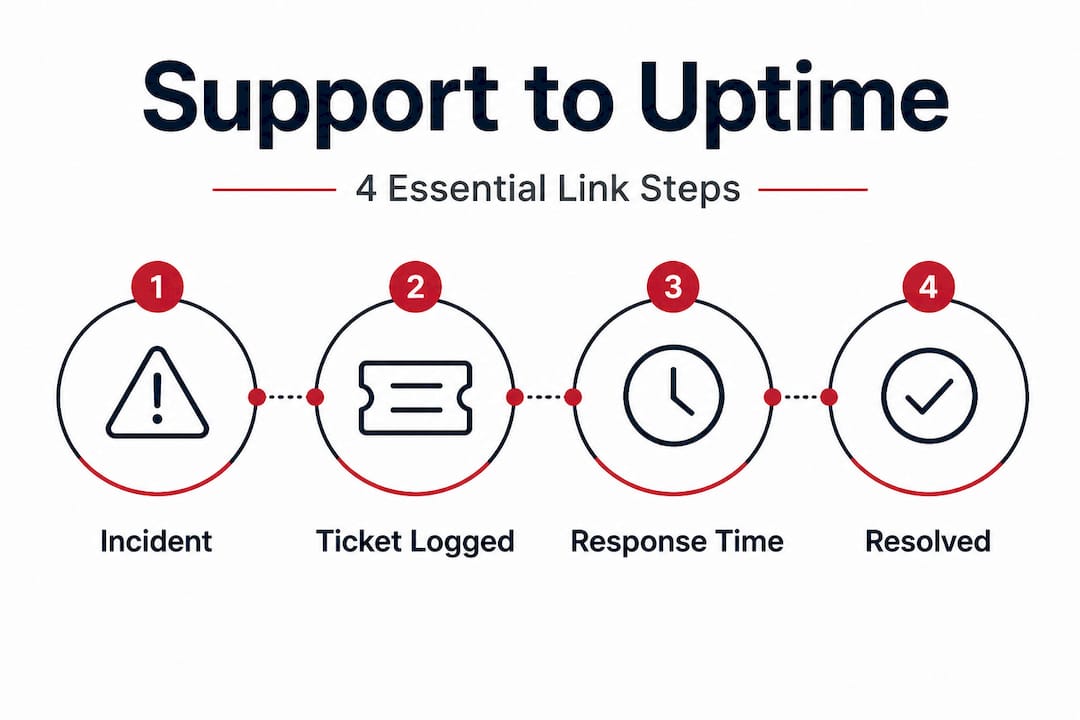
At the foundation of any credible hosting support framework is a structured ticketing system. When you submit an issue, it does not simply land in an inbox. It gets classified, prioritized, assigned a severity level, and routed to the right team. IT ticketing best practices show that methodologies include ticketing systems with severity levels ranging from 1 to 4, covering catastrophic to minimal impact, along with automated acknowledgments, classification, prioritization, routing, escalation processes, and continuous monitoring. That structure is what separates a reactive support desk from an ITSM-aligned (IT Service Management) operation.
Severity level 1 issues, such as a complete server outage or a security breach, demand immediate attention and often trigger automated alerts before you even submit a ticket. Severity level 4 issues, like a minor UI glitch or a low-priority configuration question, follow a slower track. The granularity matters because it means your provider's best engineers focus on your worst problems first.
Continuous monitoring is the piece most businesses overlook when comparing providers. A hosting partner who waits for you to report an issue is operating reactively. A partner who detects an anomaly in network traffic or disk health before it causes downtime is operating proactively. The difference between those two postures can be measured in hours of availability per year. Understanding types of hosting support explained helps IT managers ask the right questions before they sign a contract, not after an incident.
Learning the web hosting basics is useful context, but experienced IT managers need to go further. You should be asking providers for their specific escalation matrix, their on-call rotation for Severity 1 incidents, and their documented mean time to acknowledge (MTTA) and mean time to resolve (MTTR) for each severity tier.
Pro Tip: Before signing any hosting agreement, request the provider's service catalog in writing. A legitimate enterprise-grade provider will document exactly which services are in scope, who handles escalations, and what communication cadence you can expect during an active incident. If they cannot produce this document, that is a red flag.
Comparing support models: Basic, partner, and managed hosting
Now that we have defined what support in hosting encompasses, let's explore the practical differences between the major support models available to SMBs. The choice of model has direct consequences for your team's workload, your operational risk, and your total cost of ownership.
Web hosting providers vs infrastructure partners highlights a critical distinction: basic hosting minimizes support costs but shifts operational burden to your team, while infrastructure partners provide proactive optimization, and managed services reduce overhead but risk vendor lock-in.
| Support model | Typical response time | Who manages incidents | Cost profile | Best for |
|---|---|---|---|---|
| Basic hosting | Hours to days | Your IT team | Lowest | Startups, low-criticality apps |
| Partner/co-managed | 30 min to 4 hours | Shared responsibility | Moderate | Growing SMBs with some IT staff |
| Fully managed | Minutes to 1 hour | Provider's team | Highest | Mission-critical apps, lean IT teams |
Consider a realistic example. A 50-person e-commerce company runs its storefront on a basic shared hosting plan. When a plugin conflict takes the site offline on Black Friday, the company's single IT generalist spends three hours troubleshooting while the provider's basic support team sends templated email responses. That same company on a managed hosting plan would likely see the provider's monitoring system flag the plugin conflict during staging, preventing the outage entirely.
The trade-offs are real, though. Fully managed hosting means handing over significant operational control. Your provider makes decisions about patching schedules, configuration changes, and performance tuning. If your team has strong preferences or regulatory reasons to control those decisions internally, managed hosting may create friction rather than relief. Understanding SMB hosting support comparison and reviewing hosting types for business can help you map your operational maturity to the right model.
Here is a practical framework for evaluating which model fits your operation:
- Audit your internal IT capacity honestly. How many staff hours per week can you dedicate to hosting management without pulling people from strategic projects?
- List your application criticality tiers. Not every application needs managed hosting. Separate mission-critical systems from lower-priority tools.
- Calculate your real cost of downtime. Include lost revenue, labor costs during recovery, and any compliance penalties. This number often changes the conversation entirely.
- Ask providers for sample incident reports. Real post-incident reviews reveal more about a provider's competence than any marketing claim.
- Evaluate contract flexibility. Can you scale your support tier up during high-traffic periods, such as product launches or fiscal year-end reporting?
Pro Tip: Vendor lock-in is a legitimate concern with managed and partner hosting. Before committing, ask specifically: "What does our data portability look like if we decide to switch providers?" A provider that cannot answer clearly may be counting on the friction of switching to keep you as a customer longer than you should stay.
How does effective support improve uptime and compliance?
Understanding the options is only part of the solution. The quality of support dramatically determines uptime, compliance, and ultimately your operational resilience. Let's connect the dots between support quality and real business outcomes.

Uptime is the most visible metric, but it is also the most misleading if you read it uncritically. Real uptime data shows that 99.99% availability is achievable, but you should verify provider claims with third-party monitors, because higher SLA tiers cost more and are essential for critical applications. The math is simple: 99.9% uptime allows 8.7 hours of downtime annually, while 99.99% allows only 52 minutes. For a business processing payments around the clock, that gap is enormous.
| SLA tier | Annual downtime allowed | Monthly downtime allowed | Suitable for |
|---|---|---|---|
| 99.0% | 87.6 hours | 7.3 hours | Development, testing |
| 99.9% | 8.76 hours | 43.8 minutes | Low-criticality production apps |
| 99.95% | 4.38 hours | 21.9 minutes | Standard business applications |
| 99.99% | 52 minutes | 4.4 minutes | Mission-critical, payment processing |
| 99.999% | 5.25 minutes | 26 seconds | High-frequency trading, healthcare |
Faster incident response times (IRT) directly reduce your exposure in each of those tiers. If a Severity 1 issue takes 45 minutes to acknowledge versus 5 minutes, you have already consumed a significant portion of your monthly downtime budget before a single line of recovery work begins. Providers who invest in incident handling in hosting support build those response-time commitments into contractual language, not just marketing copy.
Compliance is where support quality becomes genuinely non-negotiable. If your business handles payment card data, you are working within PCI DSS requirements. If you manage health records, HIPAA considerations apply. In both cases, your hosting provider's support practices are part of your compliance posture. A support team that lacks documented change management procedures or does not maintain audit logs is a liability in your next compliance review.
Key compliance considerations tied to strong support frameworks:
- Change management documentation: Every configuration change should be logged, authorized, and reversible.
- Incident reporting timelines: Regulations like GDPR require breach notification within 72 hours. Your provider's incident response speed directly affects your ability to meet this.
- Access control and audit logs: Providers should demonstrate that support personnel access is logged, role-limited, and auditable.
- Backup verification: Regular, tested backups are not just good practice. They are required under many regulatory frameworks.
- Business continuity planning: Can your provider demonstrate tested failover? Documentation matters as much as capability here.
Examples of resilient hosting show how providers with mature support frameworks treat compliance as an ongoing operational discipline, not a checkbox activity. For SMBs building toward enterprise clients or regulatory audits, that maturity is a competitive differentiator.
Cloud SLA exclusions are another critical area: edge cases include exclusions for maintenance windows, customer-caused errors, force majeure events, and scope limits like code development or SEO, along with partner support escalation challenges. Knowing these exclusions before you need support means fewer unpleasant surprises during a crisis.
Support challenges: The reality of edge cases and escalation
Even with excellent frameworks and well-worded SLAs, there are common edge cases and real-world exceptions that can catch teams off guard. This section equips you to anticipate and mitigate those risks before they affect your business.
The most dangerous moment in any SLA relationship is when you actually need to invoke it. Cloud SLA edge cases frequently include exclusions for scheduled maintenance, customer-introduced errors, and force majeure events. Scope limits can also exclude code-level troubleshooting and SEO-related issues, while partner support escalation challenges can create frustrating delays. That last point catches many SMBs completely off guard. If your hosting provider is reselling infrastructure from a larger cloud platform, their ability to resolve your issue is limited by their access to that upstream provider's escalation process.
Common support limitations to verify in your contract before signing:
- Maintenance window exclusions: Planned maintenance periods often void SLA credits, even if the downtime affects your business.
- Customer-error exclusions: If your team's misconfiguration causes an outage, the provider is typically not liable under the SLA.
- Third-party software: Issues originating in your CMS, application framework, or third-party APIs may fall outside the provider's support scope entirely.
- Network path issues: Connectivity problems between your end users and the data center that originate outside the provider's network are usually excluded.
- Force majeure clauses: Natural disasters, widespread power failures, and similar events remove provider liability. Understand your own business continuity obligations here.
"We don't support custom code or application-level issues. Our team will confirm your server is running correctly, but troubleshooting your specific application falls outside our managed services scope."
That kind of statement, buried in a service agreement, can create an operational cliff. An SMB that interprets "managed hosting" as "someone else handles everything" will be blindsided when their provider correctly declines to debug a WordPress plugin conflict or optimize a poorly written database query.
Escalation issues in hosting become particularly problematic when your provider must route your issue through a partner network to reach the team with actual infrastructure access. Each handoff adds time, reduces accountability, and creates information loss. Cloud infrastructure challenges document real difficulties encountered when escalating support between hosting partners and providers, which can leave your incident unresolved during exactly the moments it matters most.
The best mitigation strategies are largely pre-contractual. Negotiate explicit escalation timelines into your agreement. Require that the provider document their escalation path in writing, including named contacts or defined on-call roles at each level. If a provider cannot tell you who handles a Severity 1 escalation at 2:00 AM on a Saturday, that is not acceptable for mission-critical infrastructure. Additionally, maintain your own monitoring independent of your provider so you have objective data for any SLA credit discussion.
Our perspective: What most guides miss about support's real value
Most articles about hosting support focus on response times, ticket systems, and SLA percentages. Those metrics matter, but they describe the mechanics of support without addressing its strategic function. Here is a perspective shaped by observing what actually differentiates good providers from great ones over years of working with SMBs on infrastructure decisions.
The most valuable thing a hosting provider can do is not fix problems faster. It is help you anticipate them. A provider who reviews your infrastructure quarterly and flags an emerging capacity constraint three months before it causes an incident is delivering exponentially more value than one who resolves that same incident in record time. Prevention does not appear in SLA statistics, which is exactly why most buyers undervalue it.
There is also a cultural dimension to support quality that rarely appears in vendor comparisons. A provider willing to tell you clearly what they do not support, and to put that in writing, is demonstrating a form of integrity that matters enormously during a crisis. Providers who oversell their scope to win your business will create confusion and frustration at exactly the wrong moment.
Hosting that empowers IT teams changes how your internal team operates. When your team trusts that the infrastructure layer is genuinely managed and monitored, they stop spending cognitive energy on reactive troubleshooting and start spending it on architecture improvements, automation, and strategic projects. That shift in focus compounds over time. The ROI is not just in avoided downtime. It is in the strategic output of an IT team that is not constantly firefighting.
The uncomfortable truth for many SMBs is that they are buying support based on price and feature lists when they should be buying it based on provider accountability culture. The questions to ask are not "What is your uptime guarantee?" but rather "What happens if you miss your SLA, and can I see examples of how you handled that for other customers?" Providers with strong accountability cultures have answers. Providers with weak cultures have deflections.
Treat support as a strategic relationship. Demand regular communication, not just incident updates. Ask for quarterly reviews. Expect your provider to bring you insights about your own infrastructure, not just wait for you to report problems. That posture transforms support from a cost center into a genuine operational advantage.
Find hosting solutions built on true support
With all this in mind, you are equipped to seek solutions that turn support from a pain point into a strategic asset.

At Internetport, we have built our infrastructure and service model around the belief that SMBs deserve enterprise-grade support without enterprise-grade complexity. Our webhosting services are designed with structured incident response, proactive monitoring, and transparent support scopes so your team always knows where we stand. For businesses with more demanding requirements, our dedicated hosting solutions provide isolated, high-performance environments backed by defined SLAs and experienced technical staff. If you need physical infrastructure presence with full control, our colocation options combine your hardware with our redundant, PCI DSS-compliant data centers and connectivity up to 10 Gbps. Explore the options and start treating hosting support as the strategic investment it genuinely is.
Frequently asked questions
What is a hosting support ticket and how are severity levels managed?
A hosting support ticket logs an incident or request in a structured system. Severity levels range from 1 (catastrophic, requiring immediate response) to 4 (minimal, handled in normal queue), ensuring critical issues reach the right engineers first.
Do most hosting providers guarantee that all support issues are covered in their SLAs?
No. SLA exclusions commonly include maintenance windows, customer-caused errors, force majeure events, and issues outside the provider's defined scope, so reviewing the full agreement before signing is essential.
How can I verify a hosting provider's uptime and support claims?
Use independent third-party monitoring services to validate actual uptime data against provider claims, since third-party monitoring provides unbiased accuracy and reveals gaps between marketed and real performance.
What should I do if my support issue is not getting resolved due to provider escalation delays?
Document every interaction with timestamps, reference your SLA commitments in writing, and escalate through the defined chain. If delays persist, escalation documentation shows that switching to a provider with explicit, contractual escalation commitments is often the most effective long-term resolution.