

TL;DR:
- Reliable web hosting is essential for SMBs to ensure website uptime, fast load times, and security that support growth and customer trust. Upgrades from shared to cloud or VPS hosting are necessary as traffic increases, with redundancy and security features being critical for scalability. Choosing the right provider based on SLA, support, and infrastructure quality directly impacts revenue, SEO, and long-term business success.
Web hosting is the foundational infrastructure that determines whether a small or medium-sized business website stays online, loads fast, and converts visitors into paying customers. The role of hosting in SMB growth goes far beyond storing files on a server. Your hosting choice directly controls uptime, page speed, security posture, and the ability to scale when demand spikes. Providers like Amazon Web Services, Google Cloud Platform, and Internetport have demonstrated that infrastructure quality is inseparable from business outcomes. Get hosting wrong, and you lose customers before they ever see your product. Get it right, and your site becomes a growth engine that works around the clock.
How hosting reliability and uptime affect SMB revenue
Uptime is the percentage of time your website is accessible to visitors. At 99.9% uptime, your site is still down roughly 43 minutes every month. That number sounds small until you picture it happening during a Black Friday campaign, a product launch, or a paid ad window you spent thousands to activate. Every minute of downtime during a high-traffic event translates directly to missed conversions and damaged customer trust.
The business math is unforgiving. A retailer generating $10,000 per hour in online revenue loses that entire amount if their site goes dark for 60 minutes. But the damage extends beyond the immediate sale. Customers who hit a dead site rarely return. They find a competitor, and they remember the experience. Reliable hosting prevents this chain reaction by keeping your site accessible when it matters most.
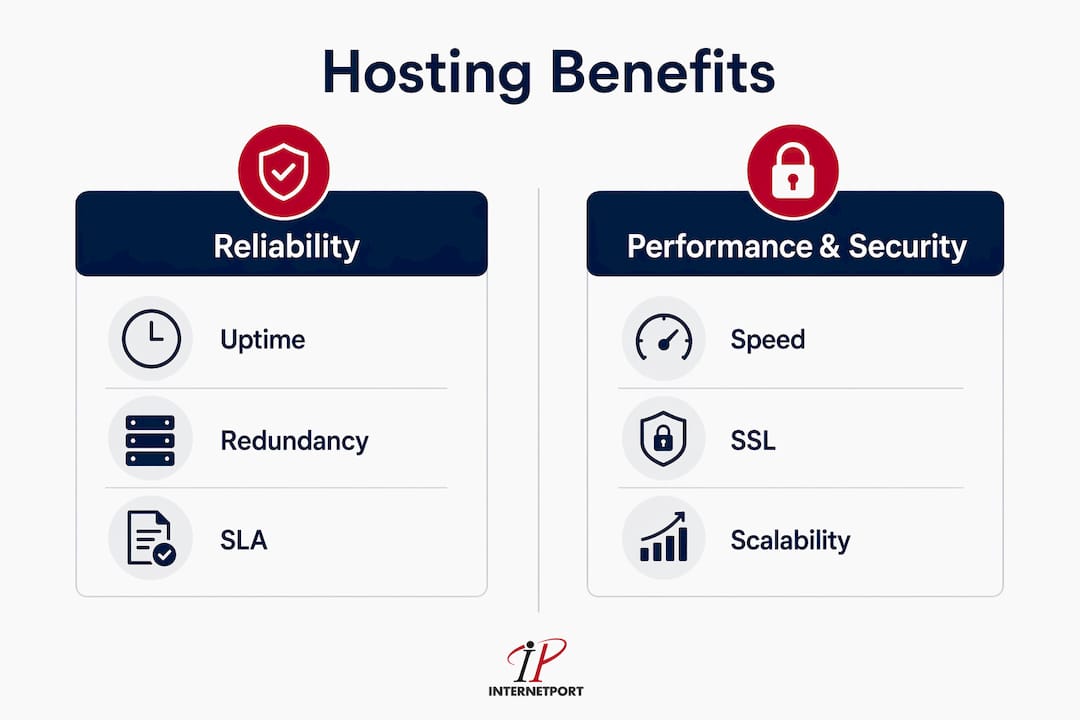
Service Level Agreements, commonly called SLAs, are the contractual commitments your hosting provider makes about uptime. A provider offering 99.9% uptime is not the same as one offering 99.99%. The difference is roughly 8 hours of downtime per year versus 52 minutes. For SMBs running time-sensitive promotions or serving customers across time zones, that gap is significant. Always read the SLA before signing, and ask specifically how the provider handles compensation when they fall short.
Redundancy is the technical strategy behind reliable uptime. It means your hosting environment has backup systems, duplicate servers, and failover mechanisms that activate automatically when something fails. Without redundancy, a single hardware failure takes your site offline. With it, traffic reroutes to a healthy server in seconds.
Pro Tip: Map your highest-traffic windows before choosing a hosting plan. If your business peaks on weekends, during seasonal sales, or after email campaigns, confirm that your provider can handle those surges without degrading performance. Capacity planning around your actual traffic calendar is more valuable than any generic uptime guarantee.
Key reliability factors to evaluate in any hosting provider:
- Uptime SLA percentage and the compensation policy when it is missed
- Redundant infrastructure including backup power, network paths, and server failover
- Monitoring and alerting so you know about issues before your customers do
- Geographic data center locations to minimize latency for your primary audience
- Support response time during critical outages, not just standard business hours
Does hosting speed affect SEO and conversion rates?
Yes, hosting speed directly affects both your search engine rankings and the percentage of visitors who complete a purchase or inquiry. The technical metric at the center of this relationship is Time to First Byte, or TTFB. TTFB measures how long it takes for a browser to receive the first byte of data from your server after making a request. Google evaluates TTFB using real-user field data from the Chrome User Experience Report, known as CrUX, at the 75th percentile. A poor TTFB score directly causes a poor Largest Contentful Paint score, which is one of Google's Core Web Vitals and a confirmed ranking signal.

The conversion data behind hosting speed is striking. Improving page load speed by just 0.1 seconds increases conversions by 10.1% in travel, 8.4% in e-commerce, and 3.6% in luxury retail. For an SMB generating $500,000 annually through its website, an 8% conversion lift from faster hosting is worth $40,000 in additional revenue. Walmart confirmed this relationship at scale, reporting a 2% conversion increase for every one-second improvement in page load time. Enterprise data consistently validates what smaller businesses experience daily.
Shared hosting is the most common entry point for SMBs, and it is also the most likely to create speed problems at scale. In a shared hosting environment, dozens or hundreds of websites compete for the same CPU and RAM. When a neighboring site gets a traffic spike, your site slows down. This resource contention is unpredictable and impossible to control from your end. VPS and cloud hosting solve this by allocating dedicated resources to your account, so your performance is not affected by what happens on other sites.
Two techniques have the greatest impact on TTFB without requiring a server upgrade. First, CDNs reduce latency by serving cached versions of your content from edge nodes located close to your visitors, rather than routing every request back to a central server. Second, in-memory caching platforms like Redis store frequently accessed data in RAM rather than retrieving it from disk on every request. Both approaches can move a site from a poor TTFB rating to a good one without changing your hosting plan.
Pro Tip: Use Google's PageSpeed Insights and the CrUX dashboard to measure your real-user TTFB, not just lab test scores. Lab tests simulate a single user under controlled conditions. Real-user data from CrUX reflects what your actual visitors experience across different devices and connection speeds, which is what Google uses for ranking.
Performance benchmarks worth knowing:
- Good TTFB: Under 800 milliseconds (Google's threshold)
- Needs improvement: 800ms to 1,800ms
- Poor TTFB: Over 1,800ms, which typically correlates with poor LCP scores
- CDN impact: Can shift TTFB from poor to good for geographically distributed audiences
- Redis caching: Reduces disk I/O and accelerates dynamic page generation for database-driven sites
What security and scalability features does hosting provide for SMBs?
Hosting security is the first line of defense for any SMB operating online. Half of UK businesses experienced a cyberattack in the past 12 months, with 90% facing phishing attempts. SMBs are disproportionately targeted because attackers assume smaller organizations have weaker defenses than enterprises. Your hosting provider's security infrastructure either closes that gap or leaves it wide open.
The security features that matter most at the hosting level include SSL certificates for encrypted data transmission, server-level firewalls that block malicious traffic before it reaches your application, malware scanning that detects compromised files automatically, automatic backups that allow recovery after an attack, and RAID data protection that prevents data loss from hardware failure. These are not optional add-ons. They are the baseline any credible hosting provider should include or offer as part of a managed plan.
Scalability is equally critical for growing SMBs. A hosting environment that works perfectly for 500 monthly visitors will collapse under 50,000. Cloud hosting solves this with on-demand resource allocation, meaning you can increase CPU, RAM, and storage as your traffic grows without migrating to a new server or experiencing downtime. Providers building on platforms like Microsoft Azure offer this flexibility natively, and it is one of the primary cloud hosting benefits for SMEs that justifies the higher cost compared to shared plans.
| Feature | Traditional/Shared Hosting | Cloud or VPS Hosting |
|---|---|---|
| Resource allocation | Shared with other sites | Dedicated to your account |
| Scalability | Manual upgrade, often requires migration | On-demand, often instant |
| Security control | Provider-managed, limited customization | Configurable firewalls and access controls |
| Performance under traffic | Degrades with neighbor spikes | Consistent, isolated resources |
| Cost structure | Fixed, low entry cost | Usage-based or tiered, higher floor |
| Best for | Early-stage sites with low traffic | Growing SMBs with variable or increasing demand |
Managed hosting is worth a separate mention for SMBs without dedicated IT teams. A managed provider handles server configuration, security patching, performance monitoring, and backups on your behalf. You pay more per month, but you eliminate the technical overhead that would otherwise require a full-time systems administrator. For most SMBs, the cost of managed hosting is far lower than the cost of a security breach or a prolonged outage caused by an unpatched vulnerability.
How to choose the right hosting for SMBs
Choosing the right hosting for SMBs starts with understanding the five main models and where each fits in a growth trajectory. Shared hosting places your site on a server with many others and costs the least, but delivers the least control and the most performance risk. VPS hosting partitions a physical server into isolated virtual environments, giving you dedicated resources at a moderate price point. Dedicated servers give you an entire physical machine, maximum control, and the highest performance ceiling. Managed hosting wraps any of these models with provider-handled administration. Cloud hosting distributes your site across multiple servers for redundancy and on-demand scaling.
The right hosting model depends on three variables: your current traffic volume, your projected growth rate, and your internal technical capacity. A startup with 1,000 monthly visitors and no IT staff has different needs than a 50-person company running an e-commerce store with seasonal traffic spikes. Matching the hosting model to your actual situation prevents both overspending on capacity you do not need and underinvesting in infrastructure that cannot support your growth.
Two emerging trends are reshaping how SMBs evaluate hosting providers. AI-enabled hosting uses machine learning to predict traffic patterns and pre-allocate resources before demand spikes occur, rather than reacting after performance degrades. Green hosting, offered by providers who power data centers with renewable energy, is becoming a procurement criterion for SMBs with sustainability commitments or ESG reporting requirements. Neither trend is a gimmick. Both reflect real shifts in how infrastructure is built and how businesses evaluate vendors.
When evaluating providers, prioritize these criteria in order:
- Uptime SLA with a clear compensation policy and a track record to back it up
- Support quality including 24/7 availability, response time guarantees, and technical depth
- Security baseline covering SSL, firewalls, backups, and malware scanning as standard
- Scalability path so you can grow without migrating to a new provider mid-growth
- Data center location relative to your primary customer base to minimize latency
- Pricing transparency with no hidden fees for bandwidth overages or support tickets
Pro Tip: Before committing to a provider, test their support. Submit a pre-sales technical question and measure how long it takes to get a substantive answer. The quality and speed of that response tells you more about their support culture than any marketing page. A provider who cannot answer a technical question before you are a customer will not perform better after you sign.
Assessing your hosting needs before you shop prevents the most common mistake SMBs make: choosing based on price alone and then paying far more in lost revenue when the infrastructure fails to perform.
Key takeaways
Hosting quality is a direct determinant of SMB revenue, SEO performance, and growth capacity, making it a strategic infrastructure decision rather than a commodity purchase.
| Point | Details |
|---|---|
| Uptime determines revenue exposure | At 99.9% uptime, your site is still offline 43 minutes monthly, which can cost significant revenue during peak windows. |
| Speed drives conversions and rankings | A 0.1-second load improvement lifts e-commerce conversions by 8.4% and signals quality to Google's Core Web Vitals algorithm. |
| Security starts at the server level | SSL, firewalls, malware scanning, and automatic backups are baseline requirements, not premium add-ons, for any SMB hosting plan. |
| Cloud hosting enables growth without disruption | On-demand resource scaling prevents performance degradation as traffic grows, eliminating the need for disruptive server migrations. |
| Match hosting model to growth stage | Shared hosting suits early-stage sites; VPS and cloud hosting serve SMBs with growing traffic and higher reliability requirements. |
Why I think most SMBs undervalue their hosting decision
I have watched SMB leaders spend weeks debating CRM platforms and marketing tools, then spend 10 minutes picking a hosting plan based on the lowest monthly price. That imbalance is a strategic error, and it shows up in the data. The businesses I have seen struggle most with online growth almost always have a hosting problem underneath the surface. Slow load times they attribute to their website design. Ranking drops they blame on algorithm changes. Conversion problems they try to solve with better copy. The actual cause is infrastructure that cannot support the traffic they are trying to attract.
The uncomfortable truth is that cheap hosting is not cheap. It is expensive in a way that does not show up on your invoice. It shows up in bounce rates, in lost ad spend, in customers who never come back after hitting a slow or broken page. Hosting as a growth investment reframes the decision entirely. You are not paying for server space. You are paying for the reliability, speed, and security that make every other marketing and sales investment work properly.
My practical advice: treat your hosting provider the way you treat any critical vendor. Evaluate them on performance, not price. Demand SLA accountability. Review your hosting setup at least once a year as your business grows, because the plan that worked at launch will not serve you at 10x the traffic. The SMBs I have seen grow consistently online share one habit: they treat infrastructure as a growth enabler, not a background expense.
— Peter
How Internetport supports SMB growth with reliable hosting
Internetport delivers web hosting and cloud infrastructure built specifically for businesses that cannot afford downtime, slow load times, or security gaps. Their data centers in Sweden and internationally provide the geographic redundancy and low-latency connectivity that growing SMBs need to serve customers reliably across markets.

Internetport's service range covers shared web hosting for early-stage businesses, VPS solutions for SMBs requiring dedicated resources and predictable performance, and dedicated servers for organizations with advanced control and security requirements. PCI DSS compliance, expert technical support, and private networking options make Internetport a credible partner for SMBs that take infrastructure seriously. If your current hosting is a constraint on your growth rather than an enabler of it, Internetport's team can help you identify the right solution for where your business is headed.
FAQ
What is the role of hosting in SMB growth?
Hosting provides the infrastructure that keeps your website online, fast, and secure, which directly affects customer experience, SEO rankings, and conversion rates. Poor hosting limits growth by causing downtime, slow load times, and security vulnerabilities that drive customers away.
How much does downtime actually cost a small business?
The cost depends on your revenue per hour, but even at 99.9% uptime, a site is offline roughly 43 minutes per month. For SMBs running paid campaigns or seasonal promotions, that downtime during peak windows can represent a disproportionate share of lost revenue.
When should an SMB upgrade from shared to VPS or cloud hosting?
Upgrade when you notice consistent slowdowns during traffic spikes, when your site's performance metrics are degrading, or when your business depends on reliable uptime for revenue-generating activities. Shared hosting suits low-traffic sites; VPS and cloud hosting serve businesses with growing or variable demand.
How does hosting affect Google search rankings?
Reliable hosting improves SEO by reducing bounce rates, improving crawlability, and maintaining stable site availability. Google's Core Web Vitals, particularly TTFB and LCP, are directly influenced by server response time, which is determined by your hosting infrastructure.
What security features should SMB hosting include as standard?
Any credible SMB hosting plan should include SSL certificates, server-level firewalls, malware scanning, automatic backups, and RAID data protection. These features address the most common attack vectors targeting small businesses and should not require a premium upgrade to access.