

TL;DR:
- High-speed connectivity is defined as internet speeds of at least 100 Mbps download and 20 Mbps upload, according to the FCC's 2026 standards. It includes factors like latency and internal network hardware, which significantly impact real-world performance for businesses and individuals. Upgrading internal infrastructure and understanding technology options like fiber, cable, or 5G are essential for optimizing connection quality and supporting digital workloads.
High-speed connectivity is defined as an internet connection capable of transmitting data at or above the FCC's 2026 benchmark of 100 Mbps download and 20 Mbps upload speeds. This standard replaced the older 25/3 Mbps threshold to reflect the real demands of cloud computing, video conferencing, and remote work. For businesses, the gap between a fast connection and a slow one is measured in lost productivity, failed transactions, and degraded customer experience. For individuals, it determines whether a video call freezes or flows. Technologies like fiber optics, cable, DSL, and 5G each deliver high-speed internet differently, and choosing the right one requires understanding what actually drives performance.
What is high-speed connectivity, and how is it defined technically?
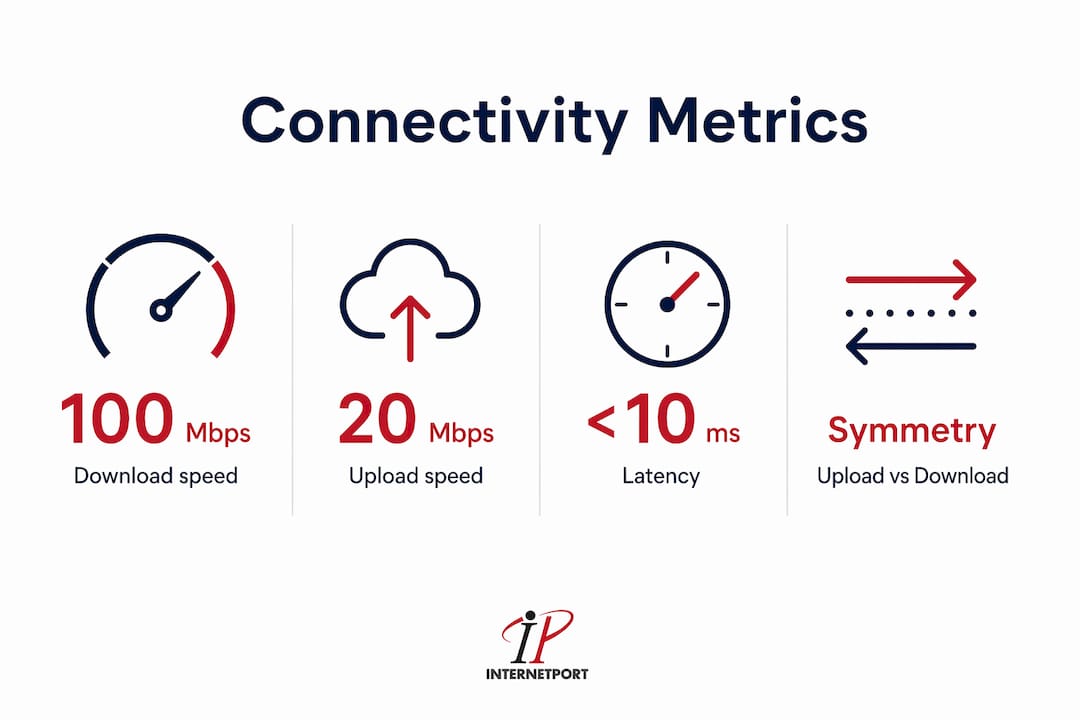
High-speed connectivity refers to internet access that meets or exceeds defined speed thresholds while maintaining low latency and consistent reliability. Speed alone does not tell the full story. Three distinct metrics define a connection's real-world quality.
Speed, bandwidth, and latency explained:
- Download speed measures how fast data travels from the internet to your device, expressed in Mbps or Gbps. The FCC sets 100 Mbps as the current minimum for broadband.
- Upload speed measures the reverse flow. The FCC's 20 Mbps upload standard matters enormously for video calls, cloud backups, and file sharing.
- Bandwidth is the total capacity of a connection, not its speed at any given moment. Think of it as the width of a highway, not the speed of a single car.
- Latency is the time in milliseconds it takes for a data packet to travel from your device to a server and back. Low latency (under 20 ms) is critical for real-time applications. High latency above 100 ms makes video calls choppy and cloud apps sluggish.
The difference between symmetrical and asymmetrical speeds matters more than most users realize. Fiber-optic connections provide equal upload and download speeds, which is why they suit cloud-heavy business workflows. Cable and DSL connections are asymmetrical, meaning upload speeds lag significantly behind download speeds. A business uploading large files to a cloud server on a cable connection will hit that ceiling fast.
Pro Tip: Run a speed test at peak hours (7–9 PM for residential, 9–11 AM for business) to see your real-world speeds, not just the advertised maximum.

| Metric | Definition | Business Impact |
|---|---|---|
| Download speed | Data received from internet | Streaming, browsing, cloud app loading |
| Upload speed | Data sent to internet | Video calls, cloud backups, file sharing |
| Latency | Round-trip packet time (ms) | Real-time apps, VoIP, remote desktop |
| Bandwidth | Total connection capacity | Number of simultaneous users and devices |
Regional variation adds another layer of complexity. Urban areas in the United States typically access fiber and Gigabit cable, while rural regions still rely on DSL or fixed wireless with lower baseline speeds. The FCC's evolving benchmarks reflect this gap and push providers to close it.
What are the economic and operational benefits of high-speed connectivity?
Fast internet is not a convenience. It is infrastructure. A 10% increase in broadband adoption correlates with GDP growth of up to 2% and raises individual employment probability by up to 13%. That data from the World Bank positions digital connectivity alongside roads and power grids as a driver of economic output.
For businesses, the operational case is direct:
- Cloud computing requires consistent high throughput to run workloads on platforms like Microsoft Azure, AWS, or Google Cloud without latency-driven slowdowns.
- Remote work depends on reliable VPNs and video conferencing tools like Zoom and Microsoft Teams. Poor upload speeds are the single most common cause of degraded call quality.
- Disaster recovery and offsite backups require fast upload speeds to keep recovery point objectives realistic. A slow connection means hours of data exposure during an outage.
- AI-driven workflows now demand low latency of roughly 20–50 ms for real-time collaboration tools and model inference tasks.
For individuals, the benefits extend beyond entertainment. Telehealth appointments require stable two-way video. Online education platforms like Coursera and Khan Academy deliver video-heavy content that stalls on slow connections. Remote learning for students in bandwidth-constrained households creates measurable academic gaps.
High-speed connectivity functions as human capital infrastructure. Its value is only unlocked when paired with digitally ready environments that integrate technology into daily workflows. — LSE Blogs
The business case for investing in faster connectivity compounds over time. Reduced downtime, faster file transfers, and the ability to scale cloud resources without hitting network ceilings all translate to measurable cost savings. Businesses that treat connectivity as a fixed utility rather than a performance variable leave efficiency gains on the table.
How does high-speed connectivity work across different technologies?
Fiber-to-the-premises (FTTP), Gigabit DOCSIS cable, and 5G wireless are the three dominant high-speed technologies in 2026, each with distinct trade-offs in speed, latency, cost, and geographic availability.
Fiber optic
Fiber optic cables transmit data as pulses of light through glass or plastic strands. This makes them immune to electromagnetic interference and capable of symmetrical gigabit speeds. Latency on fiber typically falls below 5 ms. The trade-off is infrastructure cost. Laying fiber to every building requires significant capital investment, which is why fiber availability remains uneven across the United States.
Cable (DOCSIS)
Cable internet uses the same coaxial infrastructure built for television. DOCSIS 3.1 and the emerging DOCSIS 4.0 standard push cable speeds into gigabit territory for downloads. Upload speeds remain asymmetrical, typically capping at 35–50 Mbps on older DOCSIS 3.1 deployments. Latency runs between 10–30 ms, which is acceptable for most business tasks but not ideal for latency-sensitive applications.
DSL
DSL (Digital Subscriber Line) runs over copper telephone lines. Maximum speeds rarely exceed 100 Mbps and degrade with distance from the provider's central office. DSL is widely available but increasingly inadequate for modern business demands. It remains relevant in areas where fiber and cable have not yet reached.
5G wireless
5G networks deliver theoretical peak speeds above 1 Gbps with latency as low as 1 ms in ideal conditions. Real-world performance varies significantly based on spectrum band, tower density, and building penetration. 5G fixed wireless access is expanding as a viable alternative to wired connections in suburban and rural markets.
Satellite
Low-Earth orbit satellite services like Starlink have changed the satellite category. Latency has dropped from 600 ms on traditional geostationary systems to 20–40 ms on LEO networks. Speeds range from 50–200 Mbps, making Starlink a genuine option for remote locations with no wired alternatives.
Pro Tip: For business-critical applications, always prioritize a connection type that offers a service level agreement (SLA) guaranteeing uptime and latency. Consumer-grade plans rarely include SLAs.
| Technology | Max download | Typical latency | Upload symmetry | Availability |
|---|---|---|---|---|
| Fiber (FTTP) | 1–10 Gbps | Under 5 ms | Symmetrical | Urban, expanding |
| Cable (DOCSIS) | 1 Gbps | 10–30 ms | Asymmetrical | Broad |
| DSL | Up to 100 Mbps | 20–50 ms | Asymmetrical | Wide but declining |
| 5G wireless | Up to 1 Gbps | 1–20 ms | Near symmetrical | Growing |
| Satellite (LEO) | 50–200 Mbps | 20–40 ms | Asymmetrical | Remote areas |
Last-mile infrastructure is the final physical link between a provider's network and your building. Even a fiber backbone loses its advantage if the last mile runs over aging copper. Internal network hardware compounds this further. A gigabit fiber connection feeding into a Wi-Fi 5 router and decade-old switches will never deliver gigabit performance to end users. Understanding how server location affects latency adds another dimension to this picture for businesses running hosted applications.
What performance factors affect real-world high-speed connectivity?
Advertised speeds are peak figures measured under ideal conditions. Real-world performance depends on several factors that ISPs rarely highlight in their marketing.
Peak Mbps rates advertised by ISPs do not guarantee consistent performance. Business-grade connections include SLAs that specify minimum uptime, maximum latency, and acceptable jitter levels. Consumer plans offer no such guarantees. During peak usage hours, shared cable infrastructure can see speeds drop by 50% or more as neighbors compete for the same bandwidth.
Factors that determine real-world performance:
- Contention ratio: How many users share the same network segment. Dedicated business lines have lower contention than residential plans.
- Jitter: Variation in latency over time. High jitter destroys voice and video call quality even when average latency looks acceptable.
- Packet loss: Even 1% packet loss causes noticeable degradation in video conferencing and VoIP applications.
- Internal network limits: Routers, switches, and Wi-Fi access points all impose their own speed ceilings. A Wi-Fi 6 router handles concurrent device loads far better than older 802.11ac hardware.
Latency is the most overlooked performance metric in consumer internet decisions. Users focus on download speed because it is the number ISPs advertise. But a 500 Mbps connection with 80 ms latency will feel slower for video calls and cloud applications than a 200 Mbps connection with 8 ms latency. This is especially true for AI-driven tools, real-time web applications, and remote desktop sessions where every keystroke and click depends on round-trip response time.
The impact of latency on real-time applications like video conferencing and collaborative cloud tools is measurable and direct. Businesses running hybrid workforces need to audit latency, not just bandwidth, when evaluating their connectivity.
Network reliability matters as much as speed for businesses. A connection that delivers 500 Mbps 95% of the time but drops entirely for 30 minutes each week creates more operational damage than a consistent 200 Mbps connection with 99.9% uptime. For cloud-hosted workloads, even brief outages can trigger cascading failures across dependent services.
How to assess and optimize your high-speed connectivity
Testing and auditing your connection takes less than an hour and reveals exactly where performance gaps exist.
- Run a baseline speed test. Use Speedtest by Ookla or Fast.com to measure download speed, upload speed, and latency. Run the test three times at different hours, including peak usage times, and average the results.
- Test from multiple points. Run the speed test directly from a device connected via Ethernet to your router, then again over Wi-Fi. A large gap between the two indicates internal network limitations, not ISP performance issues.
- Audit your internal hardware. Check the age and specifications of your router, switches, and access points. Hardware older than five years likely caps performance below your ISP plan's maximum. Wi-Fi 6 (802.11ax) hardware handles multiple simultaneous devices significantly better than older standards.
- Review your SLA or service plan. Business users should confirm whether their plan includes guaranteed uptime and latency commitments. If it does not, consider upgrading to a business-grade tier. Explore data center connectivity options if your workloads require dedicated network access.
- Plan for scalability. Bandwidth supports multiple high-demand tasks simultaneously, including 4K streaming, cloud backups, and video calls. Calculate your current peak usage and add 30–40% headroom for growth over the next two years.
Pro Tip: Many businesses discover that upgrading internal switches and access points delivers more real-world speed improvement than upgrading their ISP plan. Fix the internal network before paying for a faster external connection.
Many businesses fail to realize connectivity gains because last-mile bottlenecks inside their own buildings cancel out the ISP upgrade. Routers, cabling, and switches are the invisible ceiling on network performance. Addressing them first is the highest-return investment in most office environments.
Key takeaways
High-speed connectivity delivers its full value only when speed, latency, upload capacity, and internal network infrastructure are all optimized together.
| Point | Details |
|---|---|
| FCC benchmark in 2026 | The current standard is 100 Mbps download and 20 Mbps upload for broadband classification. |
| Latency matters as much as speed | Low latency (under 20 ms) is critical for video calls, cloud apps, and AI workflows. |
| Fiber leads on symmetry | Fiber optic provides equal upload and download speeds, making it the best fit for cloud-heavy businesses. |
| Internal networks are the hidden bottleneck | Upgrading routers, switches, and cabling often delivers more real-world gain than a faster ISP plan. |
| Economic impact is measurable | A 10% rise in broadband adoption correlates with up to 2% GDP growth and 13% higher employment probability. |
The metric most businesses get wrong
I have spent years watching businesses upgrade their ISP plan and then wonder why nothing feels faster. The answer is almost always the same: they fixed the highway but ignored the on-ramp.
The fixation on download speed is understandable. It is the number on the marketing page. But in practice, the businesses I see struggling most with connectivity are not bandwidth-starved. They are latency-blind. A legal firm running document management software on a cloud server 800 miles away does not need 1 Gbps. It needs 10 ms latency and a connection that does not jitter. Those are different products, and most ISP sales conversations never get there.
The AI era is making this worse. Tools that run inference in real time, collaborative platforms that sync state across distributed teams, and remote desktop environments for developers all punish high latency in ways that raw throughput cannot fix. I have seen teams abandon otherwise excellent cloud tools because the connection made them feel broken, when the actual problem was a consumer-grade router with a 40 ms baseline.
My honest recommendation: audit before you upgrade. Run Speedtest from Ethernet and from Wi-Fi. Check your router's age. Look at your upload speed, not just your download. If you are a business running cloud workloads, ask your ISP for the SLA document. If they cannot produce one, you are on a consumer plan regardless of what they call it. The scalability of your server infrastructure and your network need to grow together, or one will always throttle the other.
— Peter
How Internetport supports your high-speed connectivity needs

Internetport operates data centers in Sweden and internationally, built specifically for businesses that cannot afford connectivity gaps. Whether you need a dedicated server with guaranteed bandwidth and low-latency access, a cloud VPS that scales with your workload, or web hosting backed by PCI DSS compliance and expert technical support, Internetport delivers infrastructure designed around real business demands. Every plan includes flexible private networking options and the kind of SLA-backed reliability that consumer ISPs simply do not offer. If your business is ready to stop guessing about connectivity performance and start guaranteeing it, Internetport is worth a close look.
FAQ
What is the FCC's current definition of high-speed internet?
The FCC defines high-speed broadband in 2026 as a minimum of 100 Mbps download and 20 Mbps upload. This replaced the previous 25/3 Mbps standard to reflect modern digital demands.
Why does upload speed matter for businesses?
Upload speed determines how fast your business sends data to cloud servers, video conferencing platforms, and remote storage. Asymmetrical connections with slow upload speeds create bottlenecks for cloud backups, video calls, and file sharing.
What is the difference between bandwidth and latency?
Bandwidth is the total capacity of your connection, measured in Mbps or Gbps. Latency is the time in milliseconds it takes data to travel to a server and back. High bandwidth with high latency still produces poor performance for real-time applications.
Is fiber optic always the best choice for businesses?
Fiber optic is the top choice when symmetrical speeds and low latency are priorities, which covers most cloud-heavy business environments. Where fiber is unavailable, Gigabit DOCSIS cable or 5G fixed wireless are strong alternatives depending on location and use case.
How do I know if my internal network is limiting my speed?
Run a speed test via Ethernet directly from your router, then run the same test over Wi-Fi. A significant drop on Wi-Fi points to internal hardware limits. If both tests fall well below your ISP plan's advertised speed, the issue may be your router, switches, or cabling rather than the ISP connection itself.