
TL;DR:
- Infrastructure as a Service (IaaS) allows businesses to rent virtualized computing resources managed by providers like AWS, Microsoft Azure, and Google Cloud. Clients retain control over operating systems, applications, and security, but must handle configuration, security, and cost monitoring. Effective use requires understanding shared responsibilities, managing operational tasks, and aligning cloud deployment with workload demands.
Infrastructure as a Service (IaaS) is a cloud computing model where a provider manages physical hardware, power, cooling, and virtualization, while you retain full control over operating systems, applications, data, and security settings. Major providers like Amazon Web Services (AWS), Microsoft Azure, and Google Cloud deliver these virtualized computing resources over the internet on demand. IaaS sits alongside Platform as a Service (PaaS) and Software as a Service (SaaS) as one of three primary cloud delivery models. For small and medium-sized businesses, the core appeal is straightforward: rent the infrastructure you need, pay only for what you use, and skip the capital expense of owning physical servers.
What is infrastructure as a service and how does it work?
IaaS delivers virtual machines, storage options, virtual networks, load balancers, and security groups through self-service portals and APIs. You provision resources on demand through a web console or command-line interface, configure them to your specifications, and pay by the hour or second. The provider handles everything below the operating system: physical servers, networking cables, power redundancy, and the hypervisor layer that creates virtual machines. You handle everything above it.

The shared responsibility model
The shared responsibility model defines exactly where the provider's job ends and yours begins. The provider secures physical infrastructure and networks, while you are fully responsible for software-layer security, including virtual firewall configuration, access control, and patches. This division is not a technicality. Failures in configuring security settings are the most frequent cause of cloud-based data breaches. Understanding this boundary before you deploy a single virtual machine is non-negotiable.
Core IaaS components
The building blocks of any IaaS environment break down into four categories:
- Compute: Virtual machines (VMs) with configurable CPU and RAM, available in dozens of size profiles. AWS EC2, Azure Virtual Machines, and Google Compute Engine are the most widely used examples.
- Storage: Three types serve different needs. Block storage acts like a traditional hard drive attached to a VM. Object storage (like AWS S3) holds unstructured data such as backups and media files. File storage provides shared network drives across multiple VMs.
- Networking: Virtual private clouds (VPCs), subnets, load balancers, and DNS services let you architect a network topology that mirrors what you would build on-premises.
- Security groups and firewalls: Software-defined rules that control inbound and outbound traffic at the VM or subnet level.
Pro Tip: Start with the smallest VM size that meets your workload requirements, then scale up. Overprovisioning on day one is the fastest way to waste your IaaS budget.
IaaS customers pay for what they use, shifting IT costs from capital expenditures to operational expenditures. This payment model suits SMBs and startups that need financial flexibility without committing to hardware depreciation cycles of three to five years.
What are the benefits and challenges of IaaS for SMBs?
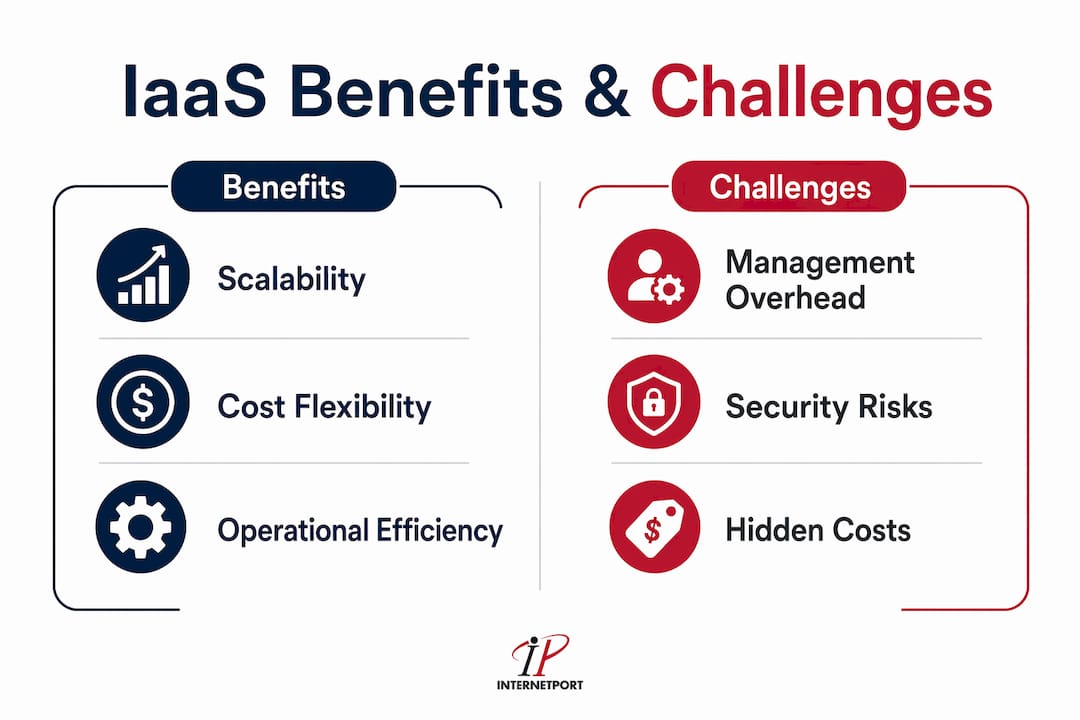
IaaS changes the economics of IT infrastructure in ways that favor smaller organizations. The benefits are real, but so are the operational demands that catch unprepared teams off guard.
Benefits worth knowing
The scalability argument is the most compelling for growing businesses. You can add ten virtual machines this afternoon and remove eight of them next week without a procurement process or a hardware refresh. Disaster recovery becomes accessible at a fraction of traditional costs, since geo-redundant storage and failover environments no longer require a second physical data center. Rapid deployment is another concrete advantage: IaaS can reduce migration timelines from quarters to weeks compared to traditional on-premises hardware refreshes.
The OpEx model also changes how your finance team thinks about IT. Instead of a $200,000 server purchase that sits on the balance sheet for five years, you have a monthly line item that scales with actual usage. That predictability, combined with the ability to spin up development environments for a few days and then shut them down, gives SMBs a financial agility that was previously reserved for enterprises with large IT budgets.
Challenges that catch teams off guard
The biggest misconception for new IaaS users is treating it as merely someone else's hardware. It requires new skills in virtualization management, automation, and cloud-specific security.
Hidden labor cost is the primary reason IaaS projects exceed budgets. Patching, OS configuration, security hardening, and backups are tasks that shift from hardware vendors to your team. If your staff has never managed virtual environments at scale, that learning curve has a real cost in time and potential downtime.
Data egress is the other budget trap. Moving large data volumes out of the cloud generates charges that are easy to miss in initial ROI calculations. A business running nightly database exports to an on-premises analytics system can accumulate hundreds of dollars per month in egress fees that never appeared in the original cost model.
IaaS is also not a set-and-forget model. Without auto-scaling policies or scheduled shutdowns of non-production environments, you pay for idle resources around the clock. The cost benefits that made IaaS attractive disappear quickly if no one is actively monitoring utilization.
Pro Tip: Set billing alerts at 80% of your monthly budget threshold in your provider's cost management console. You will catch runaway workloads before they become a finance conversation.
How does IaaS compare to PaaS and SaaS?
Choosing the right cloud model depends on how much control you need and how much management overhead you are willing to accept. The three models sit on a spectrum from maximum control (IaaS) to minimum management (SaaS).
Platform as a Service (PaaS) abstracts the operating system and runtime environment. You deploy your application code, and the platform handles patching, scaling, and infrastructure configuration. Azure App Service and Google App Engine are typical examples. PaaS is the right choice when your team wants to focus on writing code rather than managing servers.
Software as a Service (SaaS) delivers a complete application over the internet. Salesforce, Microsoft 365, and Google Workspace are SaaS products. You configure the software, but you manage nothing below the application layer. SaaS requires the least technical overhead and suits business functions like CRM, email, and collaboration tools.
The table below shows where each model places management responsibility:
| Layer | IaaS (e.g., AWS EC2) | PaaS (e.g., Azure App Service) | SaaS (e.g., Salesforce) |
|---|---|---|---|
| Physical hardware | Provider | Provider | Provider |
| Virtualization | Provider | Provider | Provider |
| Operating system | Customer | Provider | Provider |
| Runtime and middleware | Customer | Provider | Provider |
| Application code | Customer | Customer | Provider |
| Data and access control | Customer | Customer | Customer |
IaaS is the correct choice when you need OS-level access, custom network configurations, or workloads that do not fit a managed platform. PaaS wins when developer velocity matters more than infrastructure control. SaaS wins when you need a business application without any infrastructure involvement.
For SMBs evaluating cloud infrastructure services, the practical question is not which model is best in theory. It is which model matches your team's current skills and your workload's actual requirements.
What are the most practical IaaS use cases for SMBs?
IaaS solves specific infrastructure problems efficiently. The following scenarios represent the highest-value applications for small and medium-sized businesses in 2026.
-
Data center migration. Replacing aging on-premises racks with cloud-hosted virtual machines removes hardware refresh cycles and reduces physical footprint. IaaS providers offer migration tools that replicate existing server images directly into virtual machines, cutting transition time significantly. A detailed step-by-step migration approach helps teams avoid common pitfalls during this process.
-
Development and testing environments. Developers can spin up a full replica of a production environment in minutes, run tests, and terminate the environment when done. This eliminates the "it works on my machine" problem and removes the need for dedicated test hardware that sits idle 80% of the time.
-
Disaster recovery and backup. IaaS enables geo-redundant storage and automated VM snapshots at a cost that was previously out of reach for SMBs. Storing backups in a geographically separate region means a regional outage does not take down both your primary environment and your recovery copy simultaneously.
-
Handling seasonal or unpredictable workloads. A retail business that sees 10x traffic during the holiday season can scale compute capacity up in November and back down in January. On-premises hardware would require provisioning for peak load year-round, paying for capacity that sits idle for nine months.
-
High-performance computing for analytics and batch processing. Tasks like large-scale data processing, machine learning model training, or financial simulations require significant compute power for short periods. IaaS lets you rent a cluster of high-CPU or GPU-optimized instances for a few hours, complete the job, and shut everything down. The real-world IaaS scenarios across industries show how this model applies from e-commerce to healthcare analytics.
Each of these use cases shares a common thread: the workload either has variable demand, a finite lifespan, or a cost profile that makes permanent hardware ownership inefficient.
Key takeaways
IaaS delivers the most value when your team actively manages it, understands the shared security model, and monitors costs from day one.
| Point | Details |
|---|---|
| IaaS definition | A cloud model where providers manage hardware and virtualization; customers control OS, apps, and security. |
| Pay-as-you-go pricing | IT costs shift from capital expenditure to operational expenditure, giving SMBs financial flexibility. |
| Shared security responsibility | Customers must configure firewalls, access controls, and patches. Provider breaches are rare; misconfiguration is not. |
| Hidden cost risks | Egress fees and idle resources are the two most common reasons IaaS budgets overrun projections. |
| Best-fit use cases | Migration, dev/test environments, disaster recovery, seasonal scaling, and batch computing deliver the clearest ROI. |
Why most SMBs underestimate the management side of IaaS
I have watched teams adopt IaaS with genuine enthusiasm, cut their hardware costs in the first quarter, and then quietly struggle for the next two years. The pattern is almost always the same: the financial case was solid, but no one planned for the operational shift.
The moment you move to IaaS, your team becomes responsible for tasks that a hardware vendor or a managed hosting provider previously handled. OS patching, security group audits, backup verification, and cost monitoring are not optional extras. They are the job now. Teams that develop skills in automation and cloud-native security early on consistently outperform those that treat IaaS as a simple hardware replacement.
The egress cost issue deserves more attention than it typically gets. I have seen businesses architect perfectly reasonable data pipelines without realizing that pulling data out of a cloud region costs money every single time. Map your data flows before you deploy, not after your first bill arrives.
My honest advice for any SMB starting with IaaS: migrate one workload, learn the cost and management patterns on that workload, and then expand. The temptation to lift and shift everything at once is real, but the operational debt from doing it too fast is worse than a slower, deliberate approach. Use cloud security best practices as a reference point while you build internal competency, not as a checklist you complete once.
IaaS is not a shortcut to cheaper IT. It is a trade: you give up the simplicity of physical hardware for flexibility and scale, and you take on the responsibility of managing a virtual environment well. Teams that accept that trade with clear eyes get enormous value from it.
— Peter
Ready to build your cloud infrastructure with Internetport?
If you are evaluating IaaS options and want infrastructure that does not require you to manage a global hyperscaler relationship, Internetport offers a practical alternative built for SMBs.

Internetport operates data centers in Sweden and internationally, delivering scalable VPS hosting and dedicated server solutions with PCI DSS compliance and expert technical support included. Whether you need a virtual private server for a development environment, a dedicated server for a production workload, or flexible web hosting for your business applications, Internetport provides the infrastructure with the support team to back it up. For SMBs that want cloud infrastructure performance without the complexity of managing a hyperscaler account, Internetport is worth a direct conversation.
FAQ
What does IaaS mean in simple terms?
IaaS stands for Infrastructure as a Service. It is a cloud model where you rent virtualized servers, storage, and networking over the internet instead of buying and maintaining physical hardware.
What are the most common infrastructure as a service examples?
AWS EC2, Microsoft Azure Virtual Machines, and Google Compute Engine are the most widely used IaaS products. Each delivers on-demand virtual machines, storage, and networking through a self-service console.
How is IaaS different from PaaS?
IaaS gives you control over the operating system and everything above it, while PaaS manages the OS and runtime for you. Choose IaaS when you need OS-level access; choose PaaS when you want to focus on deploying application code.
What are the main benefits of IaaS for small businesses?
The primary benefits are cost flexibility through pay-as-you-go pricing, the ability to scale resources up or down on demand, and faster deployment compared to procuring physical hardware. SMBs avoid large upfront capital expenditures and only pay for active usage.
What security risks should SMBs know about with IaaS?
The provider secures physical hardware and the network layer, but you are responsible for configuring firewalls, managing access controls, and applying patches. Misconfigured security settings are the leading cause of cloud data breaches, so active security management is required from day one.