
TL;DR:
- IT environment hosting involves managing an entire infrastructure ecosystem, including hardware, software, and networks, beyond simple server rental. SMEs must understand deployment models—on-premises, cloud, and hybrid—that balance control, cost, security, and compliance based on their specific needs. Effective resource management and ongoing evaluation are essential to avoid costly outages, overspending, and vendor lock-in, ensuring scalable and compliant IT operations.
IT environment hosting is one of those terms that sounds straightforward until you actually have to make a purchasing decision based on it. Many IT managers at small to medium-sized enterprises treat it as a synonym for renting server space, then discover too late that they've built their operations on an incomplete mental model. The consequences range from surprise budget overruns to compliance failures and outages that cascade through business operations. This guide cuts through the noise, defining what IT environment hosting really is, comparing the major models side by side, and giving you a practical framework for choosing and optimizing the right setup for mission-critical workloads.
Table of Contents
- Defining IT environment hosting: Beyond servers and storage
- Types of IT environment hosting: On-premises vs. cloud vs. hybrid
- The mechanics: Resource allocation, scaling, and security
- Service models: IaaS, PaaS, SaaS, and what SMEs should choose
- Real-world scenarios: Choosing and optimizing IT environment hosting for SMEs
- What most IT decision-makers miss: The real cost of environment hosting
- Explore scalable IT hosting solutions purpose-built for SMEs
- Frequently asked questions
Key Takeaways
| Point | Details |
|---|---|
| Comprehensive hosting | IT environment hosting covers all infrastructure elements for SMEs, not just servers. |
| Model selection matters | The right hosting type—on-premises, cloud, or hybrid—depends on your organization's needs and risks. |
| Dynamic resource allocation | Scaling and right-sizing resources can save significant costs and enhance reliability. |
| Choose the right service model | IaaS, PaaS, and SaaS offer different balances of control, convenience, and security responsibility. |
| Continuous optimization | Regular evaluation and flexible architecture are essential to optimize hosting investments. |
Defining IT environment hosting: Beyond servers and storage
The phrase "server rental" captures only a fraction of what IT environment hosting actually involves. When you host an IT environment, you're not just reserving compute power. You're provisioning and managing an entire operational ecosystem that includes hardware, software, network connectivity, identity management, storage tiers, backup processes, and the service agreements that tie them together.
IT environment hosting refers to the provision and management of infrastructure, including servers, storage, and networks, for an organization's IT ecosystem, often through cloud services built for scalability and security. That definition matters because it shifts the conversation from "where does our data live?" to "how is every dependency in our stack managed, secured, and monitored?"
The core components of any hosted IT environment include:
- Infrastructure layer: Physical or virtual servers, storage arrays, and network hardware, whether owned, leased, or abstracted through cloud APIs.
- Operating environment: The operating systems, middleware, and runtime frameworks your applications need to run correctly.
- Integration fabric: The network connections, APIs, and data pipelines that let different systems talk to each other reliably.
- Service level framework: SLAs for uptime, latency, backup frequency, recovery time, and support response times.
"The hosting layer doesn't just hold your workloads. It defines the upper limit of what your applications can do, how fast they can recover, and how confidently you can promise customers that their data is safe."
A common misconception is that hosting security is primarily the provider's problem. In practice, security responsibilities are split, and organizations that don't understand that split end up with dangerous gaps. Another misconception is that higher cost automatically means better fit. You can overspend dramatically on infrastructure that's mismatched to your workload profile. Understanding the full scope of what you're buying is the only way to avoid these traps.
Understanding cloud infrastructure fundamentals early in the evaluation process helps IT managers ask better vendor questions, structure contracts more effectively, and avoid signing up for capabilities they'll never use or lacking ones they desperately need.
Types of IT environment hosting: On-premises vs. cloud vs. hybrid
Once you have a solid definition in place, the next step is understanding the three primary deployment models and the meaningful trade-offs each one creates for SME IT leaders. Each model represents a different balance between control, cost, flexibility, and compliance exposure. There's no universally right answer, but there are clearly right answers for specific situations.
On-premises hosting means your organization owns and operates the physical infrastructure inside your own facilities. You control every layer, from hardware to software configuration. The trade-off is significant upfront capital expenditure, ongoing maintenance burden, and limited ability to scale quickly during demand spikes. For organizations with tightly regulated data or very low latency requirements, that control can be worth the cost.
Cloud hosting abstracts the physical infrastructure entirely. You provision resources through an API or dashboard, pay for what you consume, and rely on the provider for hardware maintenance, physical security, and baseline network management. Cloud environments shine for bursty workloads, mission-critical applications that need geographic redundancy, and organizations that want to shift from capital to operational expenditure. The cloud and hybrid environments model has matured significantly, and SMEs can now access enterprise-grade reliability without owning a single server.
Hybrid hosting combines on-premises and cloud infrastructure, letting you run sensitive or latency-critical workloads locally while offloading scalable, variable workloads to the cloud. This model is particularly relevant for SMEs in gradual migration phases or those subject to data residency regulations.
According to an infrastructure guide covering cloud vs. on-premises, latency-sensitive and regulated data often belongs on-premises, bursty and mission-critical workloads belong in the cloud, and hybrid is the right choice for gradual migration and compliance-driven architectures.
Here's how the three models compare across the dimensions that matter most to SME IT leaders:
| Dimension | On-premises | Cloud | Hybrid |
|---|---|---|---|
| Upfront cost | High | Low | Medium |
| Ongoing cost | Predictable, high | Variable, scalable | Mixed |
| Scalability | Low | High | Medium to high |
| Security control | Full | Shared | Shared with on-prem anchor |
| Compliance flexibility | High | Provider-dependent | High |
| Maintenance burden | All in-house | Provider handles hardware | Split |
| Recovery speed | Slower without redundancy | Fast with geo-redundancy | Depends on architecture |
The table makes one thing obvious: no single column wins across every dimension. Your organization's regulatory requirements, internal IT capacity, and growth trajectory will determine which trade-offs are acceptable. A fintech SME processing card payments needs a very different conversation than a software development shop running staging environments.
When evaluating your path, consult a cloud hosting migration guide that covers dependency mapping and phased cutover strategies. Skipping that homework is one of the most reliable ways to turn a smooth migration into an expensive incident.
The mechanics: Resource allocation, scaling, and security
Understanding which hosting model fits your organization is necessary but not sufficient. You also need to understand how resources are actually allocated and adjusted inside each model, because those mechanics determine your real-world cost efficiency and reliability. This is where many SMEs make expensive mistakes.
On-demand provisioning, resource pooling, and elasticity are the three foundational mechanics of cloud resource allocation. On-demand provisioning means you request resources when you need them rather than pre-purchasing fixed capacity months in advance. Resource pooling means the provider maintains a shared infrastructure layer, serving multiple customers from the same physical hardware through virtualization. Elasticity means the system can scale up or down automatically in response to workload signals.
The contrast between dynamic provisioning and static provisioning is critical:
| Characteristic | Static provisioning | Dynamic provisioning |
|---|---|---|
| Resource assignment | Fixed at deployment | Adjusts in real time |
| Cost model | Pay for peak, always | Pay for actual usage |
| Risk | Over-provisioning waste | Under-provisioning spikes |
| Best suited for | Predictable, steady workloads | Variable or growing workloads |
Right-sizing your cloud resources can save 25 to 40 percent on cloud spending, simply by matching provisioned capacity to actual demand rather than planning for theoretical maximums. For an SME running 20 to 50 virtual machines, that's a meaningful budget line.
Here's a practical sequence for getting resource allocation right:
- Baseline your workloads. Use monitoring tools to capture actual CPU, memory, storage, and network utilization over at least 30 days before making any provisioning decisions.
- Segment by profile. Group workloads by type: steady-state applications, batch jobs, development environments, and peak-driven services each have different optimal allocation strategies.
- Set auto-scaling thresholds. Define scale-out triggers at around 70 to 75 percent utilization rather than waiting for performance degradation at 95 percent.
- Build in headroom for security processes. Vulnerability scanning, logging agents, and backup jobs consume real resources. Many organizations forget to account for these in their capacity plans.
- Review allocation monthly. Cloud environments change fast. A quarterly review cycle is too slow to catch cost drift before it becomes significant.
Pro Tip: Learning to manage VPS resources effectively is a foundational skill for any SME running cloud workloads. Even if you're mostly on cloud, the mental model of CPU shares, memory limits, and disk I/O queuing applies directly to how you size and tune any virtual environment.
Security mechanics deserve equal attention. In hosted environments, infrastructure security follows a shared responsibility model. The provider secures the physical data center, the network fabric, and the hypervisor layer. You are responsible for operating system patching, application configuration, access control, and data encryption. Blurring that line is how organizations end up with unpatched application servers sitting on top of a certified, compliant cloud platform, creating a security gap that an audit or an attacker will find before you do.
For SMEs running dedicated hardware, dedicated server management practices like regular firmware updates, BIOS-level security configurations, and out-of-band management access become your direct responsibility. That's a higher operational bar but one that comes with maximum control and predictable performance.
Service models: IaaS, PaaS, SaaS, and what SMEs should choose
The three service model acronyms appear constantly in vendor materials, but they describe genuinely different relationships between your organization and your provider. Getting this wrong means either buying too much infrastructure to manage or losing visibility into a layer that matters for compliance.
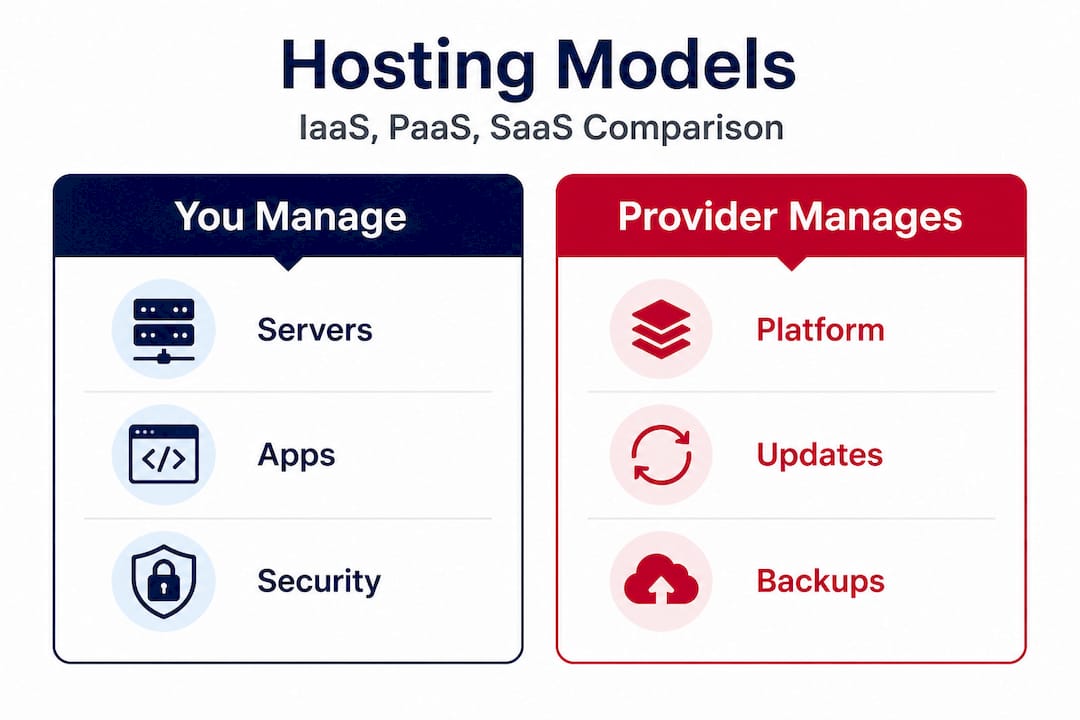
IaaS delivers virtual servers, PaaS provides a managed development platform, and SaaS delivers ready-to-use applications, each with a corresponding split in security and management responsibility.
Here's what each model means in practice:
- IaaS (Infrastructure as a Service): You get virtual machines, storage, and networking. You install and manage the operating system, middleware, runtime, application, and data. Maximum control, maximum responsibility. Right for organizations with strong in-house IT who need specific configurations or compliance control at the OS level.
- PaaS (Platform as a Service): The provider manages the underlying infrastructure and OS. You bring your application code and data. Right for development teams that want to deploy faster without managing servers. Less control over the environment but significantly lower operational overhead.
- SaaS (Software as a Service): The provider manages everything through the application layer. You configure and use the software. Minimal IT burden, minimal control. Right for productivity tools, CRM, email, and applications where customization at the infrastructure level isn't needed.
The shared security responsibility shifts significantly across these three models. With IaaS, you own almost everything above the hypervisor. With PaaS, you own the application and data. With SaaS, you own only your data and access management. Many SMEs underestimate their responsibilities in IaaS environments and overestimate them in SaaS, creating both security gaps and unnecessary operational overhead in the wrong places.
Pro Tip: Start evaluating your hosting stack against an enterprise hosting guide before signing long-term contracts. Understanding what security controls are included versus what you must build yourself will save you from expensive surprises during your first audit.
When should SMEs choose each model? A common pattern: start with SaaS for commodity functions like email, collaboration, and HR software. Use IaaS for applications that need specific configurations, compliance controls, or performance tuning. Adopt PaaS when your development team is spending more time managing servers than writing code.
The biggest pitfall is over-buying IaaS when SaaS would have been sufficient. Organizations often feel more "in control" with IaaS, but that control comes at the price of permanent operational overhead. Conversely, some SMEs underestimate support needs in IaaS, assuming the vendor handles more than they actually do. Map your in-house IT capacity against the responsibility model before choosing.
Real-world scenarios: Choosing and optimizing IT environment hosting for SMEs
Frameworks are useful. Real scenarios are more useful. Let's look at how actual SME hosting decisions play out and what the lessons are for IT managers evaluating their options.
Scenario 1: The hidden dependency outage. A mid-sized logistics company migrates its order management system to the cloud without fully mapping application dependencies. During cutover, a background service that synchronizes data with a legacy on-premises database fails silently. Undiscovered dependencies cause outages in a significant percentage of cloud migrations, and this company loses six hours of order processing. The fix takes two days. The lesson: dependency mapping is not optional prep work. It's the migration itself.
Scenario 2: The cost blowout from poor resource fit. A SaaS company running on cloud IaaS provisions all workloads at peak capacity because the engineering team is nervous about performance during product launches. Eighteen months later, the CTO realizes 60 percent of their cloud spend goes to idle capacity outside of launch windows. Right-sizing cloud resources saves between 25 and 40 percent of cloud spend. In this case, auto-scaling policies and scheduled scale-down events recover more than 30 percent of the annual infrastructure budget.
Scenario 3: The regulatory headache. A healthcare technology SME stores patient-adjacent data in a multi-tenant public cloud environment without reviewing data residency requirements. A compliance audit reveals that data crosses jurisdictional boundaries in ways that violate contractual obligations with clients. The remediation involves a partial migration to a Swedish data center with explicit data sovereignty controls, at significant cost and with reputational damage.
These scenarios aren't edge cases. They're the standard SME hosting experience when evaluation is rushed or incomplete.
"The organizations that get IT environment hosting right treat it as an ongoing operational discipline, not a one-time procurement event. The environment you build today has to be flexible enough for the requirements you'll have in 18 months."
Here's a practical decision framework for SME IT leaders evaluating or optimizing their environment hosting:
- Document current workloads and dependencies before evaluating any model or vendor. No migration succeeds without this baseline.
- Define compliance and data sovereignty requirements up front. Regulatory constraints will eliminate some options and mandate specific geographies.
- Pilot in a non-production environment to discover configuration issues before they affect live systems.
- Evaluate scalable hosting options that can grow with your business without requiring a full re-architecture every 24 months.
- Build ongoing optimization into your operations calendar. Monthly resource reviews, quarterly security assessments, and annual vendor reviews prevent slow drift into inefficiency.
- Plan your exit before you enter. Understanding what migration looks like before you're locked in is the most underrated due diligence step in any hosting decision.
Working with experienced cloud and server management partners can accelerate this process, particularly for SMEs without large in-house infrastructure teams. A structured migration guide for SMBs helps you sequence workloads, manage risk, and avoid the dependency traps that derail poorly planned projects.
What most IT decision-makers miss: The real cost of environment hosting
Here's a perspective that vendor marketing rarely offers: the sticker price of IT environment hosting is almost never the real cost. The actual cost includes every hour of outage, every compliance remediation, every migration you have to redo because you chose a platform that didn't fit your architecture, and every engineering hour spent managing infrastructure that should have been managed by a provider.
Most SMEs calculate hosting cost as a monthly invoice. The organizations that consistently get better ROI think in terms of total cost of ownership over 36 months, including switching costs, internal labor, and the indirect cost of downtime. A cheaper plan that requires three additional IT hours per week to maintain is often more expensive than a premium managed offering.
Vendor lock-in is the second underappreciated risk. Cloud providers offer compelling proprietary services, managed databases, container orchestration layers, and serverless platforms, that are genuinely useful but gradually bind your architecture to their ecosystem. Migration complexity grows quietly every month you deepen that integration. By the time pricing changes or service quality slips, the cost to switch providers can exceed years of savings. Building on secure scalable solutions that prioritize open standards and portability is not a technical nicety. It's a strategic hedge.
The best ROI in IT environment hosting comes from three disciplines: continuous evaluation (not set-and-forget procurement), hybrid architectures that keep optionality open, and forward-compatible infrastructure choices that don't bet everything on a single vendor's roadmap. The organizations that practice all three spend less, recover faster from incidents, and handle regulatory changes with significantly less disruption.
Explore scalable IT hosting solutions purpose-built for SMEs
After mapping out all the complexity of IT environment hosting, the practical next question is: where do you find a provider that can handle the full scope?

Internetport has been building hosting infrastructure since 2008, with a focus on exactly the challenges this guide covers: security, scalability, compliance, and the kind of technical depth that SME IT managers actually need. Whether your workload fits a dedicated server for maximum performance and control, a cloud VPS for elastic, cost-efficient scaling, or colocation hosting that lets you own your hardware while leveraging our data center infrastructure, there's a solution that matches your architecture rather than forcing your architecture to match a product catalog. Our Swedish data centers, redundant connectivity up to 10 Gbps, and PCI DSS compliance make us a serious option for organizations where "good enough" isn't an acceptable standard.
Frequently asked questions
What does IT environment hosting include?
It includes the infrastructure, software, networks, and data management needed for an organization's IT operations, covering hardware, software, networks, and data in a provider-managed or self-managed arrangement.
How do I choose between cloud, on-premises, or hybrid hosting?
Base your choice on specific workload requirements: cloud for scalable and bursty workloads, on-premises for maximum control and low-latency needs, and hybrid for compliance and gradual migration scenarios.
What are the biggest risks with IT environment hosting?
The main risks are outages triggered by undiscovered dependencies causing outages and budget overruns from poor resource sizing, both of which are preventable with structured evaluation and ongoing monitoring.
What is the difference between IaaS, PaaS, and SaaS?
IaaS provides virtual servers, PaaS offers a managed development platform, and SaaS delivers ready-to-use applications, with each model carrying a different split of security and operational responsibility between provider and customer.
Why do SMEs often start with SaaS or IaaS?
SMEs often start with SaaS or IaaS because both models minimize the need for deep in-house infrastructure expertise while delivering immediate, scalable capabilities suited to smaller IT teams managing multiple priorities at once.