
TL;DR:
- Hybrid cloud is a unified environment that connects private infrastructure and public cloud platforms through centralized management and orchestration. It offers SMBs flexibility, compliance, and cost advantages by strategically placing workloads based on sensitivity, scalability, and regulatory needs. Successful implementation requires addressing complexity, security, and governance through deliberate planning, automation, and continuous oversight.
Many IT leaders at small and medium-sized businesses invest time comparing "hybrid cloud" to public and private options, only to realize mid-project that they were working from an incomplete or flat-out wrong definition. The term gets used loosely, everything from spinning up a virtual machine on AWS while keeping a file server in the basement to sophisticated, orchestrated environments where workloads move automatically based on cost or compliance requirements. This guide cuts through that confusion and walks you through what hybrid cloud actually is, why it matters for growing businesses, how it stands apart from multicloud, and what practical steps you need to take to adopt it with confidence.
Table of Contents
- What is hybrid cloud? Core definition and essential components
- Why hybrid cloud matters for SMBs: Motivations and real benefits
- Hybrid cloud vs. multicloud: What's the difference and why does it matter?
- Managing complexity: Security, governance, and best practices for hybrid cloud
- Real-world hybrid cloud: Choosing platforms and orchestrating for business impact
- Why 'hybrid' isn't a shortcut—And what seasoned IT leaders get right
- How Internetport helps you build reliable and flexible hybrid cloud
- Frequently asked questions
Key Takeaways
| Point | Details |
|---|---|
| Hybrid cloud defined | Hybrid cloud connects private and public environments with unified management for flexible, secure IT. |
| SMB benefits | It enables small to medium businesses to control sensitive resources and scale efficiently using cloud power. |
| Hybrid vs. multicloud | Hybrid cloud integrates public and private systems, unlike multicloud which uses separate public clouds. |
| Complexity matters | Managing security and governance is critical in hybrid cloud and requires careful planning for success. |
| Right tools and strategy | Choosing the right platforms and orchestrating workloads delivers real business impact from hybrid cloud adoption. |
What is hybrid cloud? Core definition and essential components
Before you can make a sound IT investment decision, you need a precise definition, not a marketing pitch. Hybrid cloud is a unified computing environment that spans both private infrastructure (on-premises servers or a private cloud) and one or more public cloud platforms, all managed and orchestrated as a single system. The operative word is unified. You're not just using two different environments side by side. You're connecting them.
As TechTarget puts it, hybrid cloud operates as a single environment using a centralized management and orchestration approach, so workloads can be placed and sometimes moved based on business requirements. That means workloads don't just live in one bucket or the other. They move, or they're deliberately placed, based on latency, cost, compliance rules, or load.
The core components of a hybrid cloud environment are:
- Private infrastructure: On-premises servers, a dedicated private cloud, or a private cloud network hosted at a colocation facility. This is where sensitive, regulated, or latency-sensitive workloads typically live.
- Public cloud resources: Scalable compute, storage, and services from providers like AWS, Azure, or Google Cloud. These handle burst traffic, development environments, and workloads that benefit from elastic capacity.
- Centralized orchestration and management: The layer that ties everything together. This includes APIs, automation tools, identity management, and monitoring platforms that create a consistent operational view across both environments.
- Network connectivity: Secure, reliable interconnects (VPNs, private links, or dedicated connections) that allow data and workloads to move between private and public components without exposing them to unnecessary risk.
Here's how hybrid cloud stacks up against public-only and private-only strategies:
| Feature | Public cloud only | Private cloud only | Hybrid cloud |
|---|---|---|---|
| Scalability | Very high | Limited by hardware | High, elastic bursting |
| Control | Low | Very high | High, configurable |
| Cost model | Variable, pay-per-use | High capital expenditure | Balanced, optimizable |
| Compliance fit | Varies by provider | Strong | Strong, by design |
| Complexity | Low | Medium | Higher |
| Workload flexibility | Moderate | Moderate | Very high |
One persistent myth worth addressing: hybrid cloud is not simply using a public cloud and a private server somewhere. If those environments don't share orchestration, API integration, and policy governance, you don't have a hybrid cloud. You have two separate IT systems that happen to run at the same company. The distinction matters enormously when you're designing for security, compliance, and operational efficiency.
"Hybrid cloud is typically operated as a single environment using a centralized management/orchestration approach so workloads can be placed (and sometimes moved) based on business requirements." — TechTarget
Why hybrid cloud matters for SMBs: Motivations and real benefits
Understanding the definition is one thing. Understanding why it should matter to your organization is another. Small and medium-sized businesses face a specific combination of pressures that make hybrid cloud particularly compelling, and those pressures are different from what drives enterprise adoption.
Most SMBs can't afford to run 100% of their infrastructure on private hardware. The capital expenditure is too high, and the utilization is uneven. You buy for peak load and then pay for idle capacity for months at a time. But going fully public introduces a different problem: you lose control over where sensitive data lives, which creates compliance headaches, particularly if you operate in healthcare, finance, or any industry with data residency regulations.

Common SMB motivations for hybrid cloud include keeping sensitive or critical systems on-premises or in private environments while using public cloud for scalability, flexibility, and cost optimization. That's the core value proposition in a sentence.
Here's what hybrid cloud directly solves for growing businesses:
- Regulatory compliance: Keep financial records, customer data, or health information on controlled infrastructure while using cloud for everything else.
- Elastic scalability: Handle seasonal traffic spikes, product launches, or acquisition-driven growth without over-provisioning hardware.
- Cost predictability: Fix costs for stable baseline workloads while keeping variable costs for unpredictable ones.
- Disaster recovery: Use the public cloud as a failover target for private infrastructure without the cost of a full secondary data center.
- Development and testing agility: Spin up environments in the public cloud quickly, test against production-like conditions, then tear down when done.
- Geographic reach: Deliver applications closer to users in different regions using public cloud nodes, while core data stays in a controlled location.
Understanding which workloads belong where is one of the most important decisions you'll make. The benefits of cloud hosting for growth become clear when you match workload characteristics to environment strengths.
Pro Tip: Before designing your hybrid environment, classify your workloads into three buckets: "must stay private" (regulatory or security reasons), "can be public" (stateless, scalable, low-sensitivity), and "depends on load" (candidates for cloud bursting). This classification directly informs your architecture.
For SMBs exploring their options, public cloud for SMBs offers a useful baseline comparison, and private cloud advantages covers the case for on-premises control. Hybrid cloud sits at the intersection of both.
Industry data supports this trajectory. Adoption of hybrid models among mid-market and smaller organizations has accelerated significantly over the past several years, with more businesses citing compliance, cost control, and flexibility as the top reasons for choosing a mixed environment over a single-mode strategy.
Hybrid cloud vs. multicloud: What's the difference and why does it matter?
This is where confusion really runs deep. The terms "hybrid cloud" and "multicloud" are frequently used interchangeably, even by vendors who should know better. They describe fundamentally different strategies, and mixing them up can lead to architecture decisions that don't match your actual business requirements.
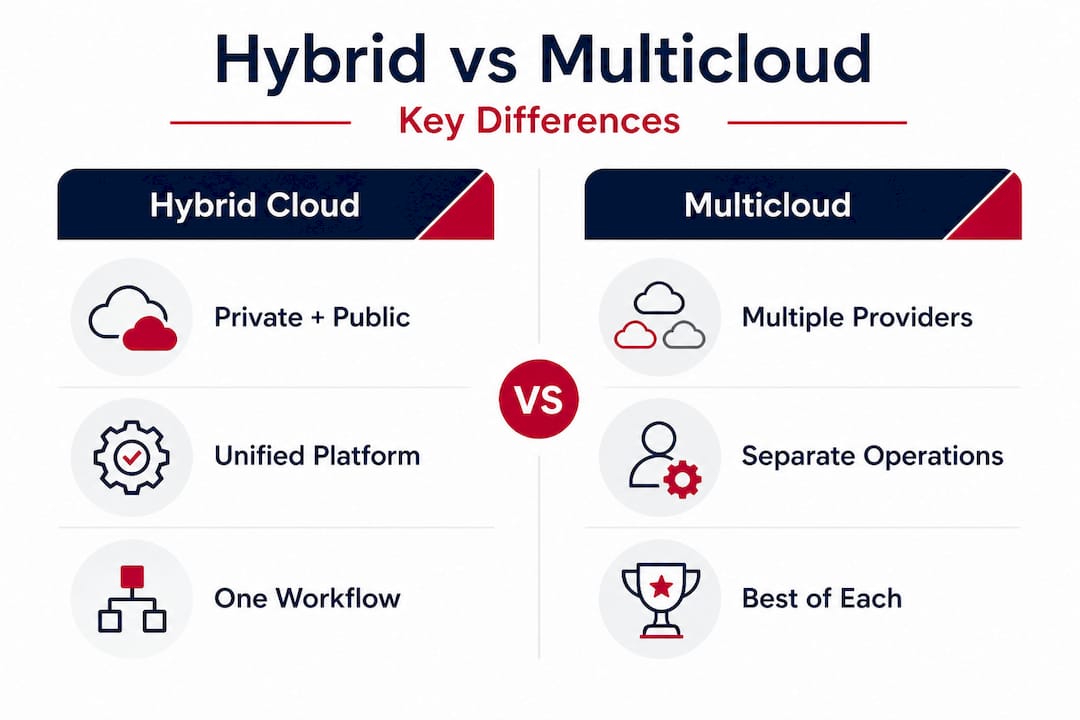
Hybrid cloud differs from multicloud in a critical way: hybrid combines private and public infrastructure into one connected, orchestrated environment, while multicloud generally refers to using multiple public cloud providers for different services or workloads, without necessarily integrating them into a unified system.
Here's a side-by-side comparison to make the distinction concrete:
| Dimension | Hybrid cloud | Multicloud |
|---|---|---|
| Definition | Private + public, unified | Multiple public clouds, often separate |
| Integration | Centralized orchestration required | Can operate independently |
| Primary driver | Control, compliance, flexibility | Avoiding vendor lock-in, best-of-breed |
| Management complexity | High but unified | Can be fragmented |
| Data movement | Designed for workload portability | May not be seamless |
| Best fit | Regulated, mixed-sensitivity workloads | Diverse app needs, vendor diversification |
Real-world example for hybrid: A healthcare company keeps patient records and billing systems on a private cloud at a colocation facility for GDPR and data residency compliance, but runs its patient portal and analytics platform on AWS for speed and scalability. The environments are connected, policies are consistent, and the IT team manages both through a single control plane.
Real-world example for multicloud: A retail business uses AWS for its e-commerce platform, Google Cloud for analytics and machine learning workloads, and Azure for its Active Directory integration. Each environment is managed separately with its own billing, monitoring, and access controls.
When choosing between them, ask yourself these questions:
- Do any of my workloads involve regulated data that must stay on controlled infrastructure?
- Am I primarily concerned with vendor flexibility, or with combining private and public capacity?
- Does my IT team have the bandwidth to manage multiple control planes, or do I need a unified view?
- Are my compliance requirements location-based (data residency) or provider-based (certifications)?
- Do I need workloads to move dynamically between environments, or do they stay in one place?
Your answers will quickly narrow down which model fits. Cloud infrastructure for SMBs gives additional context on how to think through infrastructure choices from a practical standpoint.
The right model isn't hybrid or multicloud. It's the one that matches your actual workload requirements, compliance obligations, and team capabilities, not the one your vendor demos most confidently.
Managing complexity: Security, governance, and best practices for hybrid cloud
Here's the part that vendor slide decks tend to gloss over. Hybrid cloud is genuinely powerful, but it is not simpler than running a single environment. If anything, it adds a meaningful layer of architectural and operational complexity that you need to plan for from day one, not fix after something breaks.
A key architectural reality of hybrid cloud is that it is not automatically "better" or "simple." It adds complexity that must be addressed through governance, consistent policy and security controls, and system design built specifically for distributed operation. Ignoring this leads to environments where the right hand doesn't know what the left hand is doing, and that's where breaches, outages, and compliance failures happen.
Best practices for hybrid cloud security and governance include:
- Unified identity and access management (IAM): Use a single identity provider that enforces consistent authentication and authorization policies across both your private and public environments. Fragmented IAM is one of the most common sources of hybrid cloud security gaps.
- Consistent network segmentation: Apply the same network isolation logic in your private infrastructure and your public cloud VPC (virtual private cloud). Don't assume that public cloud defaults are secure enough.
- Data classification and encryption: Know what data lives where. Encrypt data in transit and at rest across both environments, using key management solutions that you control.
- Centralized logging and monitoring: Aggregate logs from both environments into a single SIEM (Security Information and Event Management) platform. Blind spots in either environment create risk across the whole system.
- Policy-as-code: Automate governance policies using tools like Terraform or AWS Config so that infrastructure is deployed consistently, not configured differently by different team members in different environments.
- Regular compliance audits: For regulated industries, audit both environments against the same compliance framework (PCI DSS, ISO 27001, GDPR) together, not separately.
Pro Tip: Harmonize your identity layer first. Before you connect private and public infrastructure, ensure your directory services, multi-factor authentication, and role-based access control policies are identical across both sides. Identity mismatches are the fastest route to privilege escalation in hybrid environments.
Cloud solution security practices offers a detailed look at how to approach security in complex cloud environments, which applies directly to hybrid architectures.
"The temptation is to treat hybrid cloud as 'good enough security' because you kept the sensitive stuff on-premises. But connected environments share risk. If your public cloud component is compromised and your IAM is not air-tight, your private environment is exposed too."
The governance piece goes beyond security. You also need to think about cost governance (who approves new cloud spend?), operational runbooks (how does your team respond to an incident that spans both environments?), and change management (how do you test updates that affect both sides?). These are solvable problems, but they require deliberate design, not afterthought.
Real-world hybrid cloud: Choosing platforms and orchestrating for business impact
Knowing the theory is useful. Knowing how to actually build a hybrid cloud environment is what gets results. Let's look at how experienced IT teams approach platform selection and integration in practice.
The first decision is whether to go homogeneous or heterogeneous. A homogeneous hybrid approach uses a single cloud provider's tooling across both private and public components, for example, running VMware on-premises with VMware Cloud on AWS. This simplifies management but ties you to one vendor's ecosystem. A heterogeneous approach mixes platforms (like running OpenStack on-premises with Azure in the public cloud), offering more flexibility but requiring more integration work.
The core requirement in either case is that private and public components work together with orchestrated workload and data placement. The tooling choices matter less than the integration outcome.
Critical features to look for in any hybrid orchestration platform:
- Workload mobility: Can you move VMs or containers between environments without manual re-configuration?
- Unified monitoring: Can you see performance, cost, and security metrics for both environments in one dashboard?
- Automated scaling: Does the platform support bursting to the public cloud automatically when private capacity is exhausted?
- Storage integration: Can workloads access shared data stores regardless of which environment they're running in?
For businesses looking at practical cloud solution examples, it helps to see how other organizations have mapped specific workloads to specific environments before making architecture commitments.
Here is a practical roadmap for planning your hybrid cloud adoption:
- Audit your current infrastructure. Inventory every workload, its data sensitivity, performance requirements, and compliance classification. This is your starting point.
- Define your target architecture. Based on the audit, decide which workloads stay private, which move to public cloud, and which need portability.
- Choose your orchestration platform. Select tools that support your target architecture, whether that's VMware, Kubernetes, Terraform, or a provider-native solution.
- Design your network interconnects. Establish secure, high-bandwidth connections between private and public environments before you start moving workloads.
- Implement unified IAM and security policies. Get your identity layer, encryption standards, and monitoring in place before the first production workload crosses environments.
- Start with low-risk workloads. Migrate development, testing, or disaster recovery workloads first. Build operational confidence before moving business-critical systems.
- Measure and iterate. Track cost, performance, and compliance metrics continuously. Hybrid cloud is not a one-time project but an ongoing operational model.
Why 'hybrid' isn't a shortcut—And what seasoned IT leaders get right
After years of working with businesses navigating cloud strategy, a pattern emerges among organizations that struggle with hybrid cloud. They treat it as a transitional phase. The thinking goes: "We'll start hybrid to ease migration, then eventually move everything to public cloud." This mindset consistently leads to underinvestment in governance, orchestration, and integration, because those feel like temporary costs for a temporary state.
But the most successful hybrid cloud deployments are built by teams that treat hybrid as a strategic, permanent choice, not a stepping stone. The reality is that many workloads belong on private infrastructure indefinitely. Data sovereignty laws aren't loosening. Latency requirements for core systems don't disappear just because a cloud vendor has new regions. Compliance obligations in finance and healthcare are getting more stringent, not less.
What seasoned IT leaders do differently is address governance and policy alignment early, not after the first security incident. They build unified operations teams that understand both environments rather than having a "cloud team" and a "data center team" that barely communicate. They invest in automation and policy-as-code so that governance doesn't depend on individual heroics.
The cloud migration guide outlines how to approach the move to cloud infrastructure systematically, which applies directly to hybrid planning.
Another hard-won lesson: hybrid cloud surfaces gaps in your IT organization that were previously hidden by simpler architectures. Skills gaps, process gaps, and tooling gaps all become visible when you're managing distributed, connected environments. The businesses that succeed see this visibility as an asset, not a problem, because it lets them fix underlying issues rather than paper over them.
The uncomfortable truth is that hybrid cloud done well is demanding. It requires more architectural thinking upfront, more cross-functional collaboration, and more investment in monitoring and automation than either a pure private or pure public approach. But it also delivers something neither of those alternatives can match: genuine flexibility to put every workload exactly where it performs best, costs least, and complies fully. That's not a buzzword. That's a strategic advantage.
How Internetport helps you build reliable and flexible hybrid cloud
If you're ready to put hybrid cloud strategies into practice, Internetport provides the solutions and expertise to support your journey.

Internetport has supported growing businesses since 2008 with infrastructure built specifically for demanding IT requirements. Whether you're starting with web hosting services for customer-facing applications or need the raw power of dedicated servers for your private cloud foundation, Internetport's Swedish data centers deliver high availability, PCI DSS compliance, and network speeds up to 10 Gbps. For businesses that want to place their own hardware in a secure, connected facility, colocation server solutions give you physical control with premium connectivity. And when your workloads need elastic cloud capacity, VPS solutions scale quickly without the overhead of managing full dedicated hardware. Talk to the Internetport team to map your workloads to the right infrastructure combination.
Frequently asked questions
Is hybrid cloud more secure than public or private cloud?
Hybrid cloud can enhance security by allowing critical data to stay on-premises while leveraging cloud flexibility, but it requires consistent controls, including identity management, encryption, and monitoring, across both environments to stay effective.
Does hybrid cloud cost more than using a single environment?
Hybrid cloud can optimize costs by letting you use scalable public resources for variable workloads while managing predictable, fixed workloads in-house, but operational complexity may add expenses if governance and automation aren't properly managed.
Can I start hybrid cloud with just one provider?
Yes, many hybrid clouds start with a single provider integrating private and public systems through their own tooling, as long as you maintain seamless workload and data orchestration between the two sides.
What are the main risks of hybrid cloud?
The main risks are increased architectural complexity, potential security gaps from inconsistent policy enforcement, and governance breakdowns when the private and public sides are managed separately without unified oversight.
Recommended
- Cloud infrastructure explained: Scalable hosting for SMBs
- Best cloud solution examples for enterprise IT in 2026
- What is private cloud? Complete guide for secure, scalable IT
- What is cloud computing? Key benefits for growing businesses
- What Is Hybrid Cloud? Simple Guide by Re-Solution Experts
- Cloud hosting: 99.99% uptime, faster speed, lower costs