

TL;DR:
- Public cloud offers scalable, cost-effective resources managed by third-party providers without upfront hardware costs.
- It is ideal for SMBs with fluctuating workloads, needing rapid deployment, and seeking managed services.
- Strategic management and understanding of workloads are essential to avoid cost overruns and ensure optimal infrastructure use.
Public cloud is often dismissed as something only tech giants like Amazon or Google actually need. That assumption costs small and medium-sized businesses real money and real agility every year. The truth is that public cloud delivers computing resources including servers, storage, and applications over the internet on a pay-per-use basis, making it one of the most accessible and cost-effective infrastructure choices available to any business today. This guide breaks down what public cloud is, how it works under the hood, and how your team can use it to grow faster without blowing your IT budget.
Table of Contents
- What is public cloud? The fundamentals explained
- How does public cloud work? Mechanics and architecture
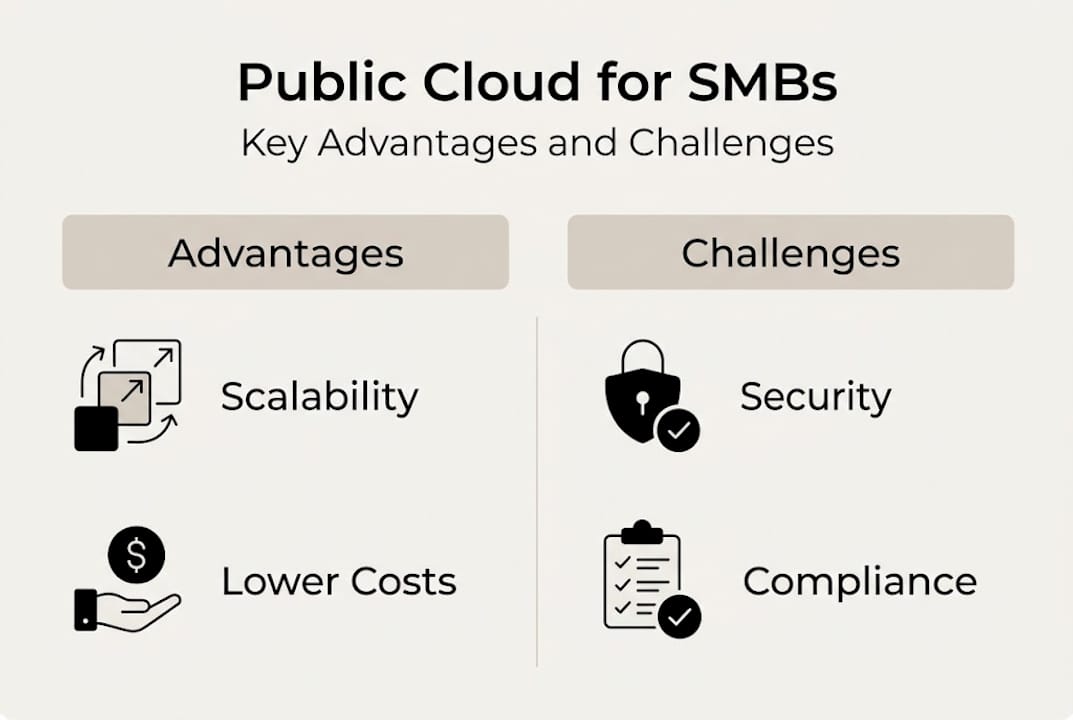
- Advantages and potential challenges of public cloud for SMBs
- Key use cases and practical tips for deploying public cloud
- The uncomfortable truth: One-size-fits-all rarely works in the cloud
- Ready to harness public cloud? Simplify with flexible solutions
- Frequently asked questions
Key Takeaways
| Point | Details |
|---|---|
| Simple cloud access | Public cloud gives SMBs immediate access to powerful IT resources without big capital costs. |
| Flexible and scalable | You can adjust public cloud use as your business scales, only paying for what you use. |
| Be cost and security smart | Monitor your usage and set clear security practices to avoid surprises. |
| Hybrid can be best | For some businesses, blending public with private cloud offers the best mix of flexibility and control. |
What is public cloud? The fundamentals explained
With so much noise around cloud technology, it helps to start with a clear, jargon-free definition. Public cloud is a deployment model where a third-party provider owns and manages the physical infrastructure, and you access computing resources over the internet. You pay only for what you use. No hardware purchases. No data center leases. No weekend maintenance calls.
The multi-tenant shared infrastructure is what makes this model unique. Multiple organizations share the same physical servers, but virtual machines and containers create strict logical separation between each customer's data and workloads. Think of it like apartments in a building: you share walls, but your space is private and locked.
This is fundamentally different from a private cloud, where the infrastructure is dedicated to a single organization, or an on-premises setup, where your team owns and runs every piece of hardware. Public cloud shifts IT spending from capital expenditure (CapEx) to operational expenditure (OpEx), meaning you pay as you go rather than buying assets upfront.
Here is a quick overview of the core elements:
| Element | Public cloud |
|---|---|
| Provider | Third-party (AWS, Azure, Google Cloud) |
| Access | Over the internet |
| Pricing | Pay-as-you-go |
| Users | Multiple organizations (multi-tenant) |
| Management | Handled by the cloud service provider |
Key traits that define public cloud:
- Scalability: Add or remove resources in minutes, not weeks
- Managed externally: The provider handles hardware, patching, and uptime
- Global reach: Data centers around the world, available on demand
- Elastic pricing: You only pay for what you actually consume
"Public cloud is a deployment model providing computing resources over the internet from third-party providers on a pay-per-use basis in a multi-tenant environment." Understanding this definition is the first step to making a smart infrastructure decision.
If you want to understand how this fits into a broader IT strategy, the cloud computing benefits for growing businesses are worth exploring before you commit to any specific model.
How does public cloud work? Mechanics and architecture
Now that you know what public cloud is, let's look behind the scenes at how it actually works for your business.
The process follows a straightforward flow:
- You make a request: Your team logs into a web console or uses an API to request a resource, such as a virtual server or additional storage.
- The provider allocates resources: The cloud service provider (CSP) instantly provisions the requested compute, storage, or networking capacity from its shared pool.
- Service is delivered: You access the resource over the internet, often within seconds. No waiting for hardware to arrive or be configured.
- Usage is tracked: Every minute, gigabyte, or API call is metered automatically.
- You are billed: At the end of the billing cycle, you pay only for what you consumed.
The pay-as-you-go OpEx model is a genuine game-changer for SMBs. Instead of buying servers that sit idle 60% of the time, you spin up capacity during a product launch and scale back down when traffic normalizes.

Multi-tenancy is worth understanding clearly. When you share infrastructure with other organizations, the CSP uses hypervisors and container orchestration to keep workloads isolated. Your data does not mix with another company's data, even though you share the same physical hardware. Security is enforced at the virtualization layer.
Public cloud services come in three main flavors:
- IaaS (Infrastructure as a Service): Raw compute, storage, and networking. You manage the operating system and above. Best for IT teams that want control.
- PaaS (Platform as a Service): A managed environment for developers to build and deploy applications without managing the underlying infrastructure.
- SaaS (Software as a Service): Ready-to-use applications delivered via browser. Think email, CRM, or project management tools.
Pro Tip: Set up budget alerts and usage dashboards from day one. Most CSPs offer native cost monitoring tools, but third-party platforms give you a clearer picture across multiple services. For more on building the right foundation, check out cloud infrastructure for SMBs and practical scalability and security tips that apply directly to growing teams.
Advantages and potential challenges of public cloud for SMBs
Understanding how the public cloud operates leads to the logical next question: What do you gain, and what do you need to watch out for?
The advantages are real and significant:
- No upfront CapEx: You avoid large hardware investments, freeing budget for product development or hiring
- Speed: Launch a new server environment in minutes instead of weeks
- Built-in resilience: Most CSPs offer redundancy and uptime SLAs that would cost a fortune to replicate on-premises
- Managed services: Security patches, hardware failures, and firmware updates are handled by the provider
- Flexibility: Scale up during peak periods and scale down when demand drops
But the risks are equally real. Public cloud is ideal for SMBs needing scalability without CapEx, but you must actively manage security configuration, compliance, and costs.
| Factor | Public cloud | Private cloud | On-premises |
|---|---|---|---|
| Upfront cost | None | High | Very high |
| Scalability | Instant | Limited | Very limited |
| Security control | Shared | Full | Full |
| Compliance flexibility | Moderate | High | High |
| Management burden | Low | Medium | High |
When public cloud is the right fit:
- Your workloads fluctuate significantly month to month
- You need to launch fast without waiting for hardware procurement
- Your team lacks dedicated infrastructure staff
- You want access to managed databases, AI tools, or global CDN networks
When it may not be the best choice:
- You handle highly regulated data (healthcare records, financial transactions) with strict data residency rules
- Predictable, high-volume workloads make reserved capacity more cost-effective
- Your compliance framework requires dedicated hardware
Pro Tip: Always map your data types before migrating. Know which workloads are compliance-sensitive and which are not. You can learn more about the tradeoffs by reading about private cloud advantages and reliable hosting for SMBs. For teams operating across regions, global hosting advantages add another dimension worth considering.
Key use cases and practical tips for deploying public cloud
Having weighed the pros and cons, you're ready to explore what public cloud can do for your actual business needs.
The most common and proven use cases for SMBs include:
- Website and application hosting: Public cloud handles traffic spikes automatically, keeping your site fast during promotions or media coverage
- File storage and backup: Offload backups to cloud object storage for low-cost, geographically redundant protection
- Rapid scaling for seasonal demand: Retail businesses, event platforms, and SaaS companies benefit enormously from elastic compute
- Disaster recovery: Replicate critical systems to the cloud so you can restore operations quickly after an outage
- Development and testing environments: Spin up isolated environments for QA, tear them down when done, and pay only for the hours used
A practical migration checklist for SMBs:
- Audit your current workloads and categorize by sensitivity and performance needs
- Identify which applications are cloud-ready versus which need refactoring
- Choose a service model (IaaS, PaaS, SaaS) that matches your team's technical capacity
- Set up identity and access management (IAM) policies before migrating any data
- Enable logging, monitoring, and alerting from the start
- Run a pilot workload before committing your entire infrastructure
For SMBs needing scalability without large upfront investment, starting with a single non-critical workload is the smartest move. It gives your team hands-on experience without exposing core systems to risk.
For businesses with regulated data, a hybrid approach works well. Keep sensitive workloads on a private or dedicated environment and move everything else to the public cloud. Understanding VPS hosting for SMBs helps clarify where a managed virtual server fits into this picture. And if you're thinking about hybrid architectures, private cloud networks explain how to connect the two environments securely.
The uncomfortable truth: One-size-fits-all rarely works in the cloud
Here is something most cloud guides won't tell you: the biggest mistakes SMBs make aren't technical. They're strategic. Teams get excited about public cloud, migrate everything at once, and then discover that their compliance requirements, latency needs, or cost structure doesn't actually fit the model they chose.
We've seen businesses spend more on public cloud than they ever spent on on-premises hardware, simply because nobody set up cost governance from the start. The pay-as-you-go model is flexible, but flexibility without discipline becomes expensive very quickly.
The most successful SMBs we work with treat cloud as a tool, not a destination. They use public cloud where it excels, private infrastructure where control matters, and they revisit that mix as their business evolves. A complete guide to private cloud is worth reading alongside this article to understand the full spectrum of options. The goal isn't to be a "cloud company." The goal is to run a better business with the right infrastructure.
Ready to harness public cloud? Simplify with flexible solutions
If you're weighing your cloud options as an SMB or IT team, the next step is finding a provider that gives you flexibility without complexity.

At Internetport, we've been building reliable hosting and cloud infrastructure since 2008. Whether you need web hosting services for your business site, scalable VPS options with SSD storage and daily backups, or robust dedicated server packages for demanding workloads, we have a solution that fits your actual needs. Our team helps you match the right infrastructure to your workload, compliance requirements, and budget. No guesswork, no overselling.
Frequently asked questions
What makes public cloud different from private cloud?
Public clouds are shared by multiple organizations using the same physical infrastructure, while private clouds are dedicated to a single company, giving that company more control over security and configuration.
How secure is the public cloud for business data?
Public cloud providers invest heavily in physical and network security, but the shared responsibility model means you are still accountable for access control, configuration, and monitoring on your side.
Can I switch from public to private cloud later?
Yes, many businesses start on public cloud and migrate workloads to private or hybrid environments as their needs grow, but planning your architecture with portability in mind from the start makes hybrid workload migration significantly easier.
What are common public cloud services used by SMBs?
SMBs most often use public cloud for web hosting, storage, and backup, along with collaboration tools, development environments, and disaster recovery solutions.