
TL;DR:
- Server scalability involves more than hardware upgrades; it encompasses software architecture, operational processes, and cost management to handle increasing workloads effectively. Vertical scaling improves capacity by upgrading a single server, while horizontal scaling distributes load across multiple servers, with each approach offering distinct advantages and challenges. Implementing scalability requires technical components like load balancers, stateless application design, caching, and autoscaling, with careful attention to bottlenecks, complexity, and early optimization.
Most IT professionals assume server scalability means buying more hardware or adding extra servers when things slow down. That framing misses almost everything that actually matters. What is server scalability, really? It is an end-to-end property spanning software architecture, data models, operational processes, and cost constraints. Getting it wrong costs companies far more than an overloaded server ever would. This guide cuts through the confusion and gives you a working model for building infrastructure that grows with your business without collapsing under its own weight.
Table of Contents
- Key takeaways
- What server scalability actually means
- Vertical vs. horizontal scaling
- Core components that make scaling work
- Challenges and trade-offs in scaling
- Practical steps for implementing scalability
- My honest take on scalability misconceptions
- Scale confidently with Internetport
- FAQ
Key takeaways
| Point | Details |
|---|---|
| Scalability is architectural | True scalability spans software design, operations, and cost management, not just hardware upgrades. |
| Two main scaling types | Vertical scaling adds resources to one server; horizontal scaling distributes load across many. |
| Stateless design unlocks scale | Applications must be stateless before horizontal scaling can work effectively and reliably. |
| Fix bottlenecks first | Adding servers without resolving underlying bottlenecks makes performance problems worse, not better. |
| Scale in stages | Progress from caching and read replicas through CDN and partitioning before attempting sharding. |
What server scalability actually means
The formal definition is straightforward: server scalability is the ability of a system to handle increasing workloads while maintaining acceptable performance and reliability. But that one sentence hides a lot of depth.
When engineers and architects talk about scalability in servers, they measure it across three core dimensions. First, throughput, which is the number of requests or transactions a system can process per unit of time. Second, latency, which is how long a single request takes to complete under increasing load. Third, availability, which is the percentage of time the system remains operational. A truly scalable system keeps all three in balance as demand grows, not just one.
Here is where most organizations go wrong. They treat scalability as a hardware problem. Their response to a slowdown is to provision a bigger machine or spin up more instances. Sometimes that works short-term. But scalability is a holistic discipline that involves software architecture, operational processes, and cost management. You can double your server capacity and still see degraded performance if your database queries are unoptimized, your application holds session state, or your code serializes work that could run in parallel.
Three related concepts are worth knowing alongside the core definition:
- Elasticity refers to a system's ability to scale up and back down automatically in response to real-time demand, not just scale up manually.
- Cost scalability means the expense of running your infrastructure grows proportionally to usage rather than exponentially. A system that costs ten times more to handle twice the traffic is not cost-scalable.
- Consistency trade-offs become relevant the moment you distribute data across multiple nodes. Distributed systems often have to choose between consistency and availability during a network partition, a concept formalized in the CAP theorem.
Understanding these distinctions sets the foundation for every architectural decision you make as your infrastructure grows.
Vertical vs. horizontal scaling
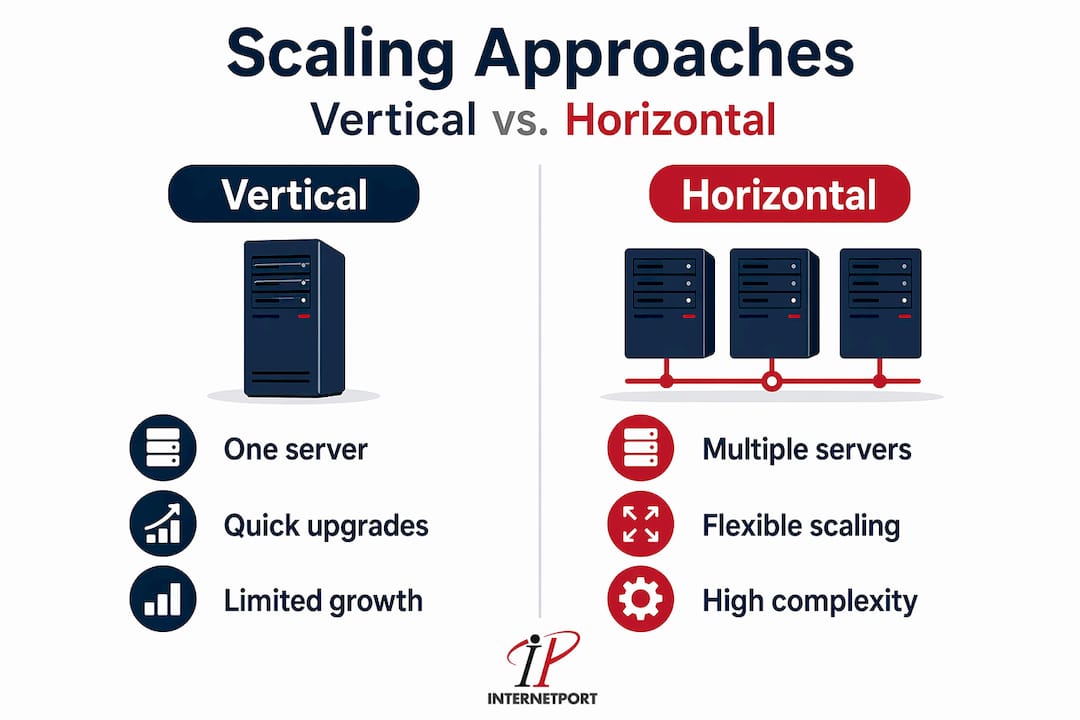
Server scalability types break down into two fundamental approaches. Every scaling strategy you will ever encounter is a variation of one of these two, or a combination of both.
Vertical scaling (scale-up)
Vertical scaling increases capacity by upgrading the CPU, RAM, or storage of a single server. Your application keeps running exactly as it is. You add resources, restart if necessary, and your system handles more load. That simplicity is the main appeal.
Vertical scaling works well in the early stages of growth, when your application was not designed for distribution, or when you are running stateful workloads that are genuinely difficult to split across machines. Databases like PostgreSQL or legacy enterprise applications often benefit most from a well-timed vertical upgrade before any architectural changes are made.
The downsides are real, though. Every physical server has a ceiling. You cannot add RAM indefinitely. And a vertically scaled server is a single point of failure. If it goes down, everything goes down.
Horizontal scaling (scale-out)
Horizontal scaling distributes workload across multiple servers running in parallel. Instead of one powerful machine, you have many cooperating machines. This approach has no theoretical upper limit on capacity, which is why every major web platform runs on it.
The catch is architectural complexity. Your application needs to be designed to work in this environment. Load balancers must route traffic across nodes. Data must be accessible from any node, which typically means shared storage or replication. Sessions must not be tied to a single server.
| Factor | Vertical scaling | Horizontal scaling |
|---|---|---|
| Implementation complexity | Low | High |
| Cost to start | Moderate | Higher upfront |
| Upper capacity limit | Hard hardware ceiling | Theoretically unlimited |
| Fault tolerance | Low (single point of failure) | High (distributed failure domains) |
| Best for | Stateful apps, early growth | High traffic, distributed workloads |
| Downtime for upgrade | Often required | Typically none |
Pro Tip: Start with vertical scaling and only move to horizontal once you have exhausted simpler optimizations. Premature horizontal scaling adds coordination complexity without proportional benefit.
Core components that make scaling work
Knowing the two scaling types is not enough. Scaling at any meaningful level requires specific technical components working together. Here is how the pieces fit.
Load balancers
Load balancers distribute incoming requests evenly across your pool of servers, preventing any single machine from becoming overloaded. They also detect unhealthy nodes and stop routing traffic to them, which is the foundation of fault tolerance in distributed systems. Without a load balancer, horizontal scaling is just a collection of servers with no coordination.

Stateless service design
This is the prerequisite most teams skip, and it causes scaling failures. Stateless services can be replicated and load balanced easily because any server in the pool can handle any request. Stateful services, where session data or user context lives on one specific server, cannot be distributed without special handling like sticky sessions or shared session stores.
If you are planning a horizontal scaling strategy, audit your application for statefulness first. Move session data to a shared cache like Redis or a distributed session store. Once your application is stateless, you can spin up replicas freely.
Caching, read replicas, and sharding
These three techniques target the most common scaling bottleneck: the database.
- Caching stores frequently requested data in memory, dramatically reducing database reads. Tools like Memcached or Redis can absorb the majority of read traffic before it ever reaches your database.
- Read replicas create copies of your database that serve read queries, offloading work from the primary instance and increasing read throughput significantly.
- Sharding partitions data across multiple database instances so that writes are distributed. It is powerful but complex. Sharding is a last-resort strategy that should follow caching, replication, and query optimization.
Autoscaling
Autoscaling dynamically adjusts compute resources based on demand metrics like CPU utilization, request queue depth, or response time. When traffic spikes, new instances spin up automatically. When traffic drops, instances are terminated to control costs. This is the practical definition of elasticity in modern cloud infrastructure. It requires well-configured monitoring and alerting, though. Poorly configured autoscaling can trigger runaway scaling events that inflate cloud bills with no corresponding performance benefit.
Pro Tip: Set both scale-up and scale-down thresholds with a time buffer of at least 5 minutes to avoid flapping, where your system oscillates between adding and removing instances with every traffic fluctuation.
Challenges and trade-offs in scaling
Scaling a server environment is not a straight line from small to large. Understanding the challenges ahead of time saves you from expensive mistakes.
-
Hardware limits in vertical scaling. A single server can only be upgraded so far. High-end machines with maximum RAM and CPU configurations are disproportionately expensive, and the performance gains do not scale linearly with price. At a certain point, the cost of the next vertical upgrade exceeds the cost of distributing the workload.
-
Coordination overhead in distributed systems. Every server you add to a horizontally scaled system introduces new coordination requirements. Horizontal scaling improves fault tolerance since failure domains are smaller, but it adds complexity in state management and consistency. A bug in your session handling logic that goes unnoticed on one server becomes a widespread inconsistency problem across ten.
-
Bottlenecks that scaling cannot fix. Replicating servers without addressing bottlenecks like database saturation or slow queries can worsen overall system performance. When you add more application servers pointing at an already-overloaded database, you increase query pressure and make the bottleneck more severe. The bottleneck has to be resolved, not scaled around.
-
Failure modes in distributed architecture. Distributed systems fail in ways that monolithic servers do not. Partial failures, network partitions, clock skew between nodes, and cascading timeouts are all real scenarios you need to design for. Fault tolerance requires explicit patterns like circuit breakers, retries with backoff, and health checks.
-
Premature sharding. Many teams reach for database sharding too early. It splits your data across multiple instances, making cross-shard queries expensive and joins nearly impossible. Reserve sharding for when you have genuinely exhausted read replicas, caching, and query optimization. Introducing it before that point creates complexity without delivering proportional gains.
Practical steps for implementing scalability
Improving server scalability in a real environment follows a predictable progression. Here is the sequence that works in practice, drawn from incremental scaling stages that balance cost, risk, and performance at each step.
-
Optimize before you scale. Before adding any resources, profile your application. Find slow queries. Remove N+1 query patterns. Add database indexes. Compress payloads. These changes often deliver better results than infrastructure additions, and they cost almost nothing.
-
Add caching at the application layer. Introduce an in-memory cache for read-heavy data. Even a modest caching layer can cut database load by 50 to 80 percent in typical web applications. This is your first and best line of defense against database saturation.
-
Scale up vertically to buy time. If your current hardware is under-provisioned, upgrade it. This buys time for architectural improvements without requiring immediate redesign. A well-timed vertical upgrade is often the fastest path to stability during a growth phase.
-
Introduce read replicas and a CDN. Once your primary database is under pressure from reads, add a read replica. Route all read queries to the replica and reserve the primary for writes. For static assets and cacheable content, a content delivery network (CDN) offloads traffic geographically and reduces server load from edge.
-
Make your application stateless, then scale horizontally. After addressing the database layer, audit your application for statefulness. Move sessions and user context to shared stores. Once stateless, you can add application servers behind a load balancer and scale write capacity with confidence.
-
Partition data vertically before sharding. Vertical partitioning splits your database by feature or domain (for example, user data in one database, product data in another). This is far simpler than sharding and often sufficient. Only reach for horizontal sharding when vertical partitioning and all earlier steps have been exhausted.
Monitoring matters at every stage. Set up metrics for CPU, memory, disk I/O, query latency, and request error rates before you scale, not after. If you cannot measure it, you cannot manage it. For IT teams building cloud-first environments, reviewing cloud infrastructure best practices alongside this process will give you a solid operational framework.
My honest take on scalability misconceptions
I have reviewed dozens of scaling architecture decisions over the years, and the same mistake shows up repeatedly. Teams treat scalability as a procurement problem rather than a design problem. When performance degrades, the reflex is to open the cloud console and increase instance size or count. Sometimes that resolves the symptom for a few weeks. Then the pressure returns, costs climb, and the team is back in the same conversation.
What I have actually seen work is treating scalability as a constraint that informs design from the beginning. The most resilient systems I have encountered were not the ones with the biggest servers. They were the ones with the simplest stateless application layers, the cleanest data models, and the most aggressively cached read paths.
The obsession with horizontal scaling also deserves scrutiny. Yes, horizontal scaling offers better fault tolerance and no hardware ceiling, and that matters at scale. But I have seen businesses spend months re-architecting applications for horizontal scaling when a well-indexed database and a Redis cache would have solved the problem for the next two years. The architectural complexity of distributed systems is real, and it has a cost in developer time, debugging difficulty, and operational overhead.
My advice: exhaust the simple solutions before reaching for distributed architecture. Fix your queries. Cache aggressively. Scale up vertically. Only when those tools are genuinely insufficient should you commit to the complexity of full horizontal distribution. And when you do go horizontal, invest seriously in stateless design. It is not optional. An application that holds state on individual servers will fight you at every step of the scaling process.
The teams that scale well are not the ones that moved fastest to microservices or Kubernetes. They are the ones that understood their bottlenecks first.
— Peter
Scale confidently with Internetport

If your business is at the point where server scalability is a real operational concern, the hosting infrastructure underneath your applications matters enormously. Internetport's dedicated servers give you the raw processing power needed for vertical scaling without shared resource contention, backed by data centers in Sweden and internationally for guaranteed availability. When your architecture is ready to scale horizontally, Internetport's cloud VPS solutions let you spin up additional instances quickly, with flexible networking and private connectivity options that support distributed architectures. For teams managing significant IT workloads, Internetport combines PCI DSS compliance, expert technical support, and scalable web hosting options that grow alongside your business without forcing you into costly overprovisioning from day one.
FAQ
What is server scalability in simple terms?
Server scalability is a system's ability to handle growing workloads while keeping performance and reliability stable. It spans software architecture, infrastructure, and operational design, not just hardware capacity.
What are the two main server scalability types?
The two main types are vertical scaling, which adds resources to a single server, and horizontal scaling, which distributes load across multiple servers. Most production environments use a combination of both depending on workload type.
How does server scalability work in practice?
Scalability works by identifying bottlenecks, optimizing queries and caching, then progressively adding capacity through read replicas, additional application servers behind load balancers, and eventually data partitioning. The staged scaling approach balances cost and complexity at each step.
Why is stateless design important for scaling?
Stateless applications allow any server to handle any request without relying on local session data, which makes it possible to add or remove servers freely behind a load balancer without user-facing disruption.
What is the difference between server scalability vs performance?
Performance refers to how fast a system responds under a fixed load. Scalability refers to how well performance holds up as load increases. A system can perform well at low traffic but fail to scale, or scale broadly while delivering mediocre per-request speed. Both matter, but they require different solutions.