
TL;DR:
- Server downtime is a costly disruption that SMBs must mitigate through reliable, fault-tolerant infrastructure. Reliability encompasses consistent performance, quick recovery, and proactive maintenance, not just uptime percentages. Investing in designed redundancy and documented recovery plans enhances operational resilience and protects reputation and compliance.
Most people think server downtime is an inconvenience. System administrators know it's a financial disaster. Business downtime costs can run between $300,000 and $1 million per hour, adding up to $1.4 trillion in annual global losses. For system administrators in small to medium-sized businesses, the stakes are no different. You're managing infrastructure with fewer resources and less redundancy than enterprise IT teams, which makes understanding why system administrators need reliable servers not just useful knowledge. It's the foundation of every decision you make.
Table of Contents
- Key takeaways
- Why system administrators need reliable servers
- The real cost of unreliable servers
- Infrastructure strategies to strengthen server reliability
- Cost and scalability for SMB system administrators
- Monitoring, maintenance, and documentation
- My take: server reliability as a career-defining choice
- Build on infrastructure you can trust
- FAQ
Key takeaways
| Point | Details |
|---|---|
| Downtime carries real financial weight | Every minute of unplanned outage directly costs money and damages customer trust. |
| Reliability requires design, not luck | Redundancy, failover, and fault tolerance must be built in from the start. |
| Dedicated vs. virtualized servers matter | Physical isolation of dedicated servers improves diagnostics and uptime stability. |
| Proactive maintenance prevents crises | Automating patches, backups, and monitoring keeps servers from failing quietly. |
| SMBs need to balance cost and control | Choosing between on-premise, VPS, and cloud requires matching workload to infrastructure. |
Why system administrators need reliable servers
Server reliability is not the same thing as uptime. This distinction trips up a lot of people, including some experienced administrators. Uptime is a percentage, a number that tells you how often a server is technically "on." Reliability is a broader measure of whether that server performs consistently, recovers quickly from failures, and behaves predictably under load.
A server can show 99.9% uptime on paper and still cause serious operational problems if it crashes at peak hours, takes 40 minutes to recover, or drops database connections intermittently. What sysadmins actually need is a combination of high availability, fault tolerance, and fast mean time to recovery.
What reliability actually covers:
- Availability reflects how often the system is accessible and functional during expected operating hours
- Fault tolerance describes the system's ability to keep running even when individual components fail
- Redundancy means duplicate components, whether hardware, power supplies, or network paths, standing by to take over
- Recovery time objective (RTO) defines the maximum acceptable time to restore service after failure
Reliable systems are designed around an uncomfortable truth: failure is not a possibility you plan against. It's a certainty you design for. Disk drives fail. Power supplies degrade. Network interfaces drop packets. A system built for true reliability treats all of this as expected behavior and routes around it automatically.
Pro Tip: When evaluating a server's reliability, look at the mean time between failures (MTBF) rating for hardware components and request historical uptime data from your hosting provider. Marketing-level "99.9% uptime" claims often exclude scheduled maintenance windows.

The real cost of unreliable servers
The financial numbers around downtime are jarring regardless of company size. Every minute of downtime can cost large enterprises between $14,056 and $23,750. SMBs absorb these costs differently, since they lack the cash reserves to absorb prolonged outages, but the proportional impact on revenue and customer relationships is often worse.
The effects go well beyond the immediate revenue hit:
- Customer trust erodes faster than most SMBs expect. One study found that users who experience site errors or slow load times rarely return, and server uptime directly affects search rankings through Google's performance criteria.
- Security vulnerabilities increase during unstable server conditions. Unplanned restarts can bypass security controls, leave patches incompletely applied, or create gaps in audit logs.
- Data loss during unexpected shutdowns, particularly on servers without proper journaling file systems or battery-backed RAID controllers, can corrupt databases and application state in ways that take days to untangle.
- Regulatory compliance failures follow closely behind. For SMBs operating under GDPR, HIPAA, PCI DSS, or similar frameworks, an undocumented outage or a data integrity incident can trigger audit findings and fines.
- Internal productivity collapses when internal tools, shared drives, or authentication systems go down, even briefly. Staff cannot work, customers cannot transact, and you spend your entire day answering "is the system back up yet?"
The reputational damage compounds over time. A business that experiences repeated outages starts losing customers to competitors before the servers even come back online. The importance of reliable servers is not a theoretical argument. You feel it the moment your on-call phone rings at 2 AM.
Infrastructure strategies to strengthen server reliability
This is where understanding converts into action. Improving server reliability for system administrators is not about buying the most expensive hardware. It's about designing systems that assume failure and respond to it gracefully.
Redundancy at every layer
Physical hardware redundancy means more than having a spare server in a closet. Production environments should use redundant power supplies, RAID storage configurations, and dual network interface cards. At the service level, load balancers distribute requests across multiple nodes so that a single server failure does not bring down an application. DNS failover can redirect traffic to a backup IP in seconds without user intervention.
Redundancy, failover, and fault tolerance are the three pillars that separate infrastructure that recovers automatically from infrastructure that requires a 2 AM restart. Build all three into your architecture before you need them.
Dedicated vs. virtualized: choosing the right server type
One of the most impactful decisions a sysadmin makes is choosing between dedicated servers and virtualized or cloud-hosted environments.
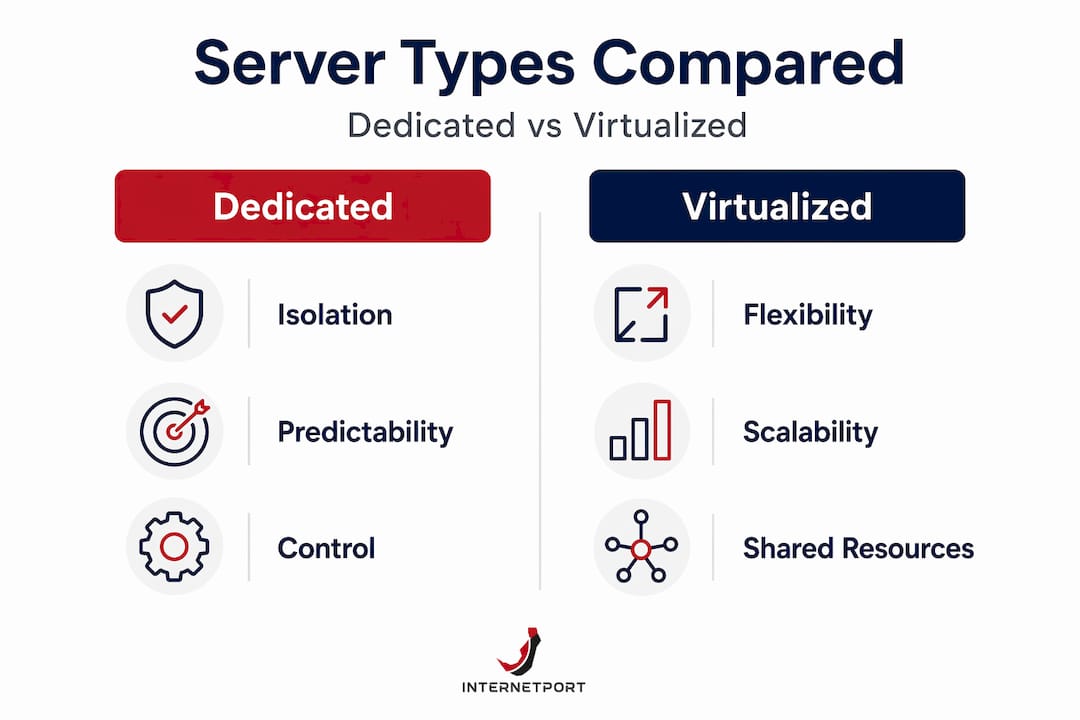
| Feature | Dedicated server | VPS or cloud |
|---|---|---|
| Hardware isolation | Full physical isolation | Shared physical resources |
| Uptime predictability | High, no noisy neighbor effect | Variable under peak loads |
| Diagnostic visibility | Full hardware logs and telemetry | Limited by provider access |
| Cost model | Fixed monthly, predictable | Variable, can escalate |
| Scalability | Manual, requires planning | Rapid provisioning |
| Best for | Stable, high-performance workloads | Variable or bursty demand |
Dedicated servers provide physical isolation that removes the unpredictability caused by shared tenants. When a neighboring VM on shared infrastructure runs a memory-intensive batch job, your workloads can degrade even though nothing is wrong on your side. Dedicated hardware eliminates that variable entirely.
For SMBs with predictable workloads, such as line-of-business applications, internal ERP systems, or databases with consistent traffic, a dedicated server setup often outperforms cloud alternatives on both reliability and total cost.
Pro Tip: Before committing to dedicated hardware, run a 30-day workload analysis to characterize your CPU, RAM, and I/O patterns. Spiky, unpredictable workloads favor cloud scaling. Steady, high-throughput workloads almost always justify dedicated hardware.
Failover, backups, and immutable storage
Backups are not a reliability strategy on their own. A backup that has never been tested is just a file on a disk you hope works. Effective reliability planning includes regular restore testing, offsite or cloud backup copies, and immutable storage configurations that prevent ransomware from encrypting your recovery data.
Failover planning means defining, in writing, which systems activate when which failures occur. That documentation must exist before the failure happens, not be written during it.
Core reliability practices every sysadmin should have in place:
- Automated daily backups with weekly restore tests
- Out-of-band server access (IPMI, iDRAC, or equivalent) for recovery when the OS is unresponsive
- A documented runbook for every critical system failure scenario
- Separate monitoring infrastructure that operates independently from the servers it watches
Cost and scalability for SMB system administrators
Budget pressure is the permanent context for SMB infrastructure decisions. The good news is that reliability and cost control are not opposites. Choosing the right server model for your actual workload often saves more money than cutting corners on hardware quality.
On-premise dedicated servers offer lower total cost of ownership and better budget predictability than cloud for SMBs with stable, consistent workloads. When cloud services scale dynamically, so do the bills. A predictable monthly cost for dedicated hardware makes financial planning straightforward.
| Infrastructure model | Upfront cost | Monthly predictability | Suitable workload type |
|---|---|---|---|
| On-premise dedicated | High | Very high | Stable, high-throughput |
| Hosted dedicated server | Low to medium | High | Stable, managed needs |
| Cloud VPS | Very low | Medium | Variable or growing |
| Public cloud | None | Low (usage-based) | Highly elastic demand |
The right answer depends on your growth trajectory. If you expect your infrastructure needs to grow 3x in the next 18 months, a hosted VPS solution with easy upgrade paths avoids the planning pain of provisioning dedicated hardware ahead of demand. If your workloads are mature and predictable, dedicated hardware delivers better performance per dollar.
The most common SMB pitfall is choosing cloud infrastructure for all workloads because it feels flexible, then being surprised when monthly costs exceed the price of owned or hosted dedicated servers. Match your server type to your actual usage pattern. Flexibility costs money when you do not need it.
Learn more about making this decision in the cloud vs. dedicated server comparison for SMBs to see how different infrastructure types match different business needs.
Monitoring, maintenance, and documentation
Reliable servers do not stay reliable on their own. The operational practices you build around your infrastructure determine whether reliability holds over months and years.
Proactive system administration focuses on preventing issues rather than reacting to them. When you shift from firefighting to proactive monitoring, you free yourself to work on architecture improvements instead of emergency repairs. That shift is one of the most significant quality-of-life improvements a sysadmin can make.
A practical maintenance workflow for sysadmins:
- Deploy real-time monitoring with alerting thresholds for CPU load, disk usage, memory pressure, and network saturation. Tools like Prometheus with Alertmanager, Zabbix, or commercial equivalents should notify you before a resource reaches critical levels.
- Automate routine tasks. Automating server maintenance reduces human error and prevents catastrophic failures from missed tasks. Log rotation, certificate renewal, disk health checks, and backup jobs should all run on schedule without manual initiation.
- Apply security patches on a defined schedule. Ad hoc patching creates gaps. A weekly or biweekly patch window with pre-production testing reduces vulnerability exposure without introducing update-related instability.
- Maintain documentation continuously. Every configuration change, every new service, every firewall rule should be recorded in your change management log. This documentation supports compliance audits, shortens incident response time, and helps the next administrator who works on your systems.
- Test your recovery procedures quarterly. Run a real restore from backup. Simulate a server failure in your staging environment. Confirm your failover DNS actually switches. Untested recovery procedures are assumptions, not plans.
Pro Tip: Set up a simple weekly server health report that emails you a summary of disk growth trends, patch status, and backup completion. Spotting a disk filling at 15% per week lets you expand capacity in a planned change window instead of an emergency.
Dedicated servers provide hardware-level logs and telemetry that let you diagnose failures in minutes rather than hours. On shared or cloud infrastructure, you often depend on the provider's support queue to get equivalent information. That diagnostic visibility alone is a strong argument for dedicated hardware in business-critical environments.
My take: server reliability as a career-defining choice
I've spent years watching SMB system administrators make the same avoidable mistake. They treat server reliability as a budget line item to negotiate down rather than a foundational requirement. Then something breaks, and suddenly the cost of that decision becomes very visible to everyone in the organization, including leadership.
Here's what I've found to be true after working through enough of these situations: unreliable servers harm SMBs disproportionately because the reputational and financial recovery is slower. An enterprise with 10 redundant data centers absorbs a regional failure and keeps operating. An SMB with one server room and no failover loses its ability to serve customers entirely.
The most reliable systems I've seen in SMB environments share one characteristic. The administrators running them stopped thinking of reliability as hardware purchasing and started treating it as operational discipline. They automated the boring stuff, documented obsessively, and tested their recovery assumptions instead of trusting them.
My advice is blunt: do not wait for a serious outage to justify investing in reliable server infrastructure. The post-incident budget approval is always larger than the proactive investment would have been, and the cost in credibility never fully appears in a spreadsheet.
The administrators who build genuinely reliable infrastructure do not just protect their organizations. They build the kind of track record that makes them indispensable.
— Peter
Build on infrastructure you can trust
If you're a system administrator at an SMB evaluating your server infrastructure, Internetport offers solutions designed around the requirements this article covers, not marketing checklists.

Internetport's dedicated server plans give you full physical isolation, hardware-level telemetry, and predictable pricing with no shared-tenant performance risk. For workloads that benefit from elastic scaling, VPS hosting plans provide reliable performance on SSD-backed infrastructure with up to 10 Gbps network capacity. SMBs that need managed web presence without complexity will find Internetport's web hosting service includes strong uptime guarantees backed by redundant Swedish data centers. Whether you're standardizing on dedicated hardware or planning a phased move toward cloud infrastructure, Internetport's team supports the transition with real technical expertise, not a generic ticket queue.
FAQ
What does server reliability mean for system administrators?
Server reliability refers to how consistently a server performs its expected functions over time, including recovery speed after failure, not just percentage uptime. For sysadmins, this means evaluating fault tolerance, redundancy, and mean time to recovery alongside availability metrics.
How much does server downtime cost an SMB?
Downtime costs vary widely but range from $300,000 to $1 million per hour for significant outages. Even small businesses experience revenue loss, reputational damage, and compliance risk during unexpected outages.
When should an SMB choose a dedicated server over a VPS or cloud?
Dedicated servers are the better choice when workloads are stable and predictable, since they offer better performance per dollar and full hardware isolation. VPS or cloud options make more sense when demand is variable or when rapid provisioning matters more than cost efficiency.
How does server reliability affect security?
Unstable servers create security gaps through incomplete patch application, disrupted audit logging, and system states that bypass access controls during unplanned restarts. Consistent uptime and proactive maintenance are core parts of any security posture.
What is the single most important step to improve server reliability?
Automating routine maintenance tasks, including backups, patching, and health checks, is the most effective single step. Automation reduces human error and prevents the gradual drift that causes most preventable server failures.