

TL;DR:
- Unplanned downtime can cost businesses tens of thousands of dollars per hour in lost revenue and damaged trust. High availability hosting requires defining recovery objectives, eliminating single points of failure, and testing failover regularly to ensure resilience. Achieving the industry-standard four or five nines uptime involves balanced redundancy, automated failover, and thorough monitoring based on actual business needs.
Every hour of unplanned downtime costs businesses an average of tens of thousands of dollars in lost revenue, damaged customer trust, and emergency IT labor. If your hosting setup has a single web server, one database, or one load balancer with no redundant counterpart, you already have a problem waiting to happen. This guide to high availability hosting walks you through what HA hosting actually means, what you need to prepare before building it, how to architect it correctly, what pitfalls to watch for, and how to measure whether it's working. By the end, you'll have a clear framework to make informed decisions about your infrastructure.
Table of Contents
- Key takeaways
- Your guide to high availability hosting: prerequisites and planning
- Building a high availability hosting architecture
- Common challenges in high availability hosting
- Measuring success in high availability hosting
- My honest take on high availability hosting
- How Internetport supports your high availability goals
- FAQ
Key takeaways
| Point | Details |
|---|---|
| Define RTO and RPO first | Set concrete recovery objectives before choosing any HA architecture or technology stack. |
| Redundancy alone isn't enough | True HA requires automated failover, load balancing, and replicated storage working together. |
| Test failover regularly | Scheduled failover drills catch problems before real outages do. |
| "Nines" have real cost implications | Each additional nine of uptime requires exponentially more design complexity and budget. |
| HA is not fault tolerance | High availability allows brief recovery windows; fault tolerance means zero interruption. |
Your guide to high availability hosting: prerequisites and planning
Before you write a single configuration file, you need to define what "available enough" actually means for your business. This is where most teams skip ahead and pay for it later.
Start with RTO and RPO
Two terms anchor every HA design decision. Recovery Time Objective (RTO) is how long your system can be offline before the business suffers serious harm. Recovery Point Objective (RPO) is how much data you can afford to lose. A payment processing platform might have an RTO of two minutes and an RPO of zero. A content site might tolerate 15 minutes of downtime and 30 minutes of data loss. Multi-zone HA configurations can achieve a 15-minute RTO and zero RPO during zonal failures, but only when designed explicitly for those targets. Define your numbers before touching the architecture.
Audit for single points of failure
Walk your current infrastructure and identify every component where a single failure brings down your service. Common culprits include a single web server, one database instance with no replica, a network switch with no redundant path, and a load balancer that isn't itself redundant. Document each one. This inventory becomes your HA roadmap.
Determine your redundancy scope
Redundancy exists at multiple levels: multi-node within a single data center, multi-zone across availability zones in the same region, and multi-region across geographically separate facilities. Each level adds resilience and cost. Geographic redundancy significantly increases resilience but introduces replication latency bounded by physical distance, which matters for latency-sensitive applications. Match the redundancy level to your actual risk exposure, not to what sounds most impressive.
Check regulatory and compliance requirements
Certain industries face mandatory requirements around data residency, failover location, and audit logging that directly shape HA design. Healthcare organizations under HIPAA, payments companies under PCI DSS, and financial institutions under various national regulations may have constraints on where replicated data can live. Internetport operates data centers in Sweden and international locations with PCI DSS compliance built in, which simplifies this step for many regulated businesses.
HA preparation checklist
| Checklist item | Why it matters |
|---|---|
| Define RTO and RPO | Anchors all architecture decisions |
| Map single points of failure | Identifies what needs redundancy |
| Choose redundancy level | Balances cost against risk |
| Confirm compliance requirements | Prevents costly redesigns later |
| Assess network and storage needs | Ensures infrastructure supports HA traffic |
| Budget for ongoing testing | Failover drills are not optional |
Building a high availability hosting architecture
With your prerequisites in place, you can move to construction. HA architecture follows recognizable patterns, and choosing the right one depends on your RTO, budget, and application behavior.

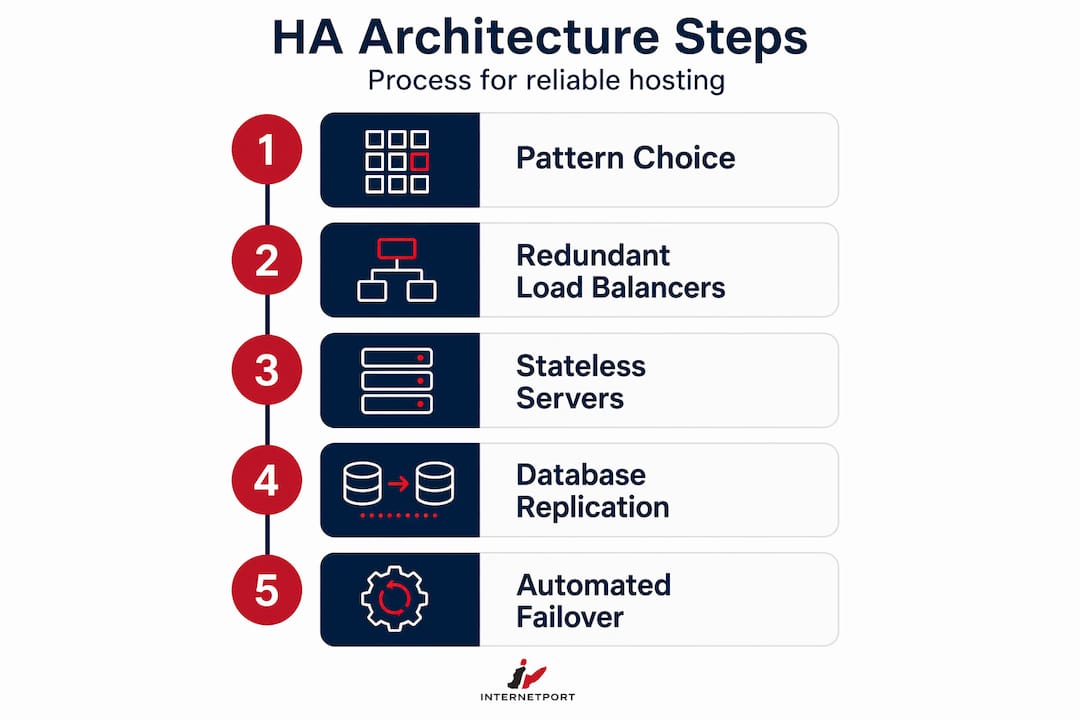
Step 1: Choose an architectural pattern
The two primary patterns are active-active and active-passive. In an active-active setup, multiple nodes handle live traffic simultaneously. If one fails, the others absorb its load with no interruption. This pattern suits high-traffic applications with stateless components. In active-passive, one node handles all traffic while a standby node waits to take over. Failover happens automatically but introduces a brief recovery window. HA hosting typically uses load balancers, multiple application servers, replicated databases, and automatic traffic rerouting to keep services running through failures. Multi-region extends either pattern across geographic locations for maximum resilience.
Step 2: Deploy redundant load balancers
Load balancers distribute incoming traffic across your application servers. The problem: a single load balancer is itself a single point of failure. Load balancers need redundancy to avoid becoming the weak link in an otherwise solid HA design. Deploy them in pairs with automatic health checks and failover. Most cloud platforms offer managed load balancing with built-in redundancy, which removes this complexity from your plate.
Step 3: Design stateless application servers
Stateless application servers are the foundation of horizontal scaling and HA. If no server stores session data locally, any server can handle any request. Session state belongs in a shared, redundant data store such as Redis or a managed session service. This design means losing one application server is transparent to the end user.
Step 4: Configure database replication and failover
Databases are where HA gets complicated. Synchronous replication ensures zero data loss but adds write latency because the primary must wait for the replica to confirm each write. Asynchronous replication reduces latency but risks losing recent writes if the primary fails before the replica catches up. Your RPO determines which tradeoff is acceptable. For zero RPO, use synchronous replication and accept the latency cost.
One critical detail most teams miss: cloud-managed database services do not enable HA by default. Multi-AZ deployment in AWS RDS is an opt-in feature. The same is true on most platforms. Assume nothing is redundant until you have verified it explicitly.
Step 5: Implement automated failover
Automated failover reduces recovery time but introduces its own complexity. The system needs reliable fault detection, a quorum mechanism to confirm a node is actually down (not just temporarily unreachable), and a promotion process to bring the standby into service. Automatic failover reduces recovery time objectives but requires quorum mechanisms to prevent split-brain scenarios where two nodes both believe they are the primary.
Step 6: Test before you trust it
Documenting your architecture is not the same as knowing it works. Scheduled failover drills and runbooks are the difference between an HA system and an HA plan. Run simulated failures in staging, then controlled tests in production during low-traffic windows. Track your actual RTO against your target. Gaps between the two are where your next engineering investment goes. For a detailed walkthrough of automating this process, the HA hosting workflow guide from Internetport covers the operational tooling in depth.
Pro Tip: Document a runbook for every critical failure scenario before you run your first drill. Teams that improvise during failover tests consistently take 3 to 4 times longer to recover than teams working from a written procedure.
Common challenges in high availability hosting
Understanding high availability in theory is easier than operating it in practice. The gap between the two is where most HA failures actually happen.
The most underestimated problem is replication-induced latency. Synchronous acknowledgment can create replication lag that reduces throughput and increases response times, especially under write-heavy workloads. Teams that add HA to an existing architecture without load testing often discover this problem in production.
A second common mistake is confusing high availability with high traffic handling. Your application might survive a surge in concurrent users but still have a single database with no replica. Traffic capacity and availability are separate concerns that require separate solutions.
- Overengineering: Building multi-region active-active for a small business application creates complexity with no proportional benefit. Start at the redundancy level your RTO and RPO require.
- Split-brain scenarios: When network partitions cause two nodes to both assume they are primary, data corruption or inconsistency follows. Quorum-based voting or STONITH (Shoot the Other Node in the Head) mechanisms prevent this.
- False failovers: A healthy node that appears temporarily unreachable due to a network hiccup can trigger unnecessary failover. Tune health check thresholds carefully to distinguish transient from real failures.
- Monitoring gaps: HA infrastructure that fails silently is worse than infrastructure that fails loudly. Instrument every layer: server health, replication lag, load balancer status, and database connection pools.
The best practices for high availability also include reviewing your monitoring alerts regularly. Alerts that fire constantly become noise. Alerts that never fire mean your monitoring is misconfigured. Both conditions leave you blind when something real goes wrong. For a broader look at building scalable, secure infrastructure, the patterns translate directly to HA environments.
Pro Tip: Run a "chaos engineering" session once per quarter. Deliberately terminate an instance, block a network path, or simulate a database replica failure and measure your system's response. This is far less disruptive than discovering the same failure at 2 AM on a Friday.
Measuring success in high availability hosting
High availability hosting explained simply: you get credit for uptime, not for architecture diagrams. Measuring what you actually achieve is how you know whether your investment is working.
Understanding the "nines"
The hosting industry measures availability in "nines" of uptime. Here is what those numbers mean in real terms:
| Availability | Annual downtime allowed | Typical use case |
|---|---|---|
| 99.9% ("three nines") | ~8.7 hours | Internal tools, dev environments |
| 99.95% | ~4.4 hours | Mid-tier web applications |
| 99.99% ("four nines") | ~52.6 minutes | E-commerce, SaaS platforms |
| 99.999% ("five nines") | ~5.26 minutes | Financial systems, healthcare |
Industry standard HA targets sit at four nines (99.99%) or five nines (99.999%), with annual downtime budgets of roughly 52.6 minutes and 5.26 minutes respectively. Achieving five nines requires fully automated recovery, elimination of every single point of failure, and extensive architectural planning. That level of investment makes sense for payment systems. It is often overkill for a marketing website.
Service Level Indicators and Service Level Objectives
An SLI is what you measure: request success rate, latency percentiles, error rates. An SLO is the target you set for that measurement. Defining clear SLIs and SLOs transforms abstract uptime goals into engineering targets your team can actually hit. Without them, "high availability" is just a phrase on a slide deck.
What to track operationally
- Mean Time Between Failures (MTBF): How often your system fails. Higher is better.
- Mean Time to Recovery (MTTR): How fast you recover. Lower is better.
- Replication lag: How far behind your replica database is. Spikes indicate a problem.
- Failover frequency: How often automated failover fires. Frequent failovers signal an underlying instability issue.
- Actual RTO vs. target RTO: The gap between these is your engineering backlog.
Combine these metrics with multi-zone cloud infrastructure tips to build a capacity planning discipline that adjusts resources before demand outpaces them.
My honest take on high availability hosting
I've spent years watching businesses overspend on HA infrastructure they don't need and underspend on the parts that actually matter. The pattern is almost predictable. A team gets serious about uptime, brings in a consultant, and ends up with a multi-region active-active architecture for a workload that gets 200 concurrent users on its busiest day.
The uncomfortable truth is that fault tolerance and high availability are not the same thing, and most businesses do not need fault tolerance at all. Fault tolerance means the system continues operating through a failure with zero interruption. HA means the system recovers quickly. For almost every business application I've seen, a well-designed HA setup with a 30-second to 2-minute failover window is entirely acceptable and costs a fraction of a fault-tolerant design.
What I've learned matters far more than the architecture itself is the culture around testing. I've seen architecturally beautiful HA systems fail in production because no one had ever actually triggered a failover. The runbook was three years old. The monitoring alerts had been silenced because they were too noisy. The replica database had silently fallen behind by six hours.
My advice: start with a simple active-passive setup that matches your actual RTO and RPO. Instrument it thoroughly. Test it on a schedule. Then grow the architecture as your traffic and business requirements demand. High availability is not a destination you reach once. It's a practice you maintain.
— Peter
How Internetport supports your high availability goals

Internetport has built its infrastructure specifically for businesses that cannot afford extended downtime. Their web hosting plans are backed by redundant data centers in Sweden and international locations, SSD storage, and network capacity up to 10 Gbps, giving you the physical foundation that HA architecture requires. For workloads needing more control, their dedicated server options deliver the isolated resources and configuration flexibility that enterprise HA deployments demand. Their VPS platform suits teams scaling from single-node setups toward multi-zone redundancy. Internetport's team is available to help you plan your HA architecture from day one, not just hand you a server and a username.
FAQ
What is high availability hosting?
High availability hosting is an infrastructure design where redundant components, automated failover, and load balancing work together to minimize service interruptions. The goal is to keep applications running even when individual components fail.
How does high availability work in practice?
When one server or database node fails, automated failover routes traffic to a healthy replica within seconds to minutes, depending on the configuration. Load balancers detect the failure via health checks and redirect requests without user intervention.
What is the difference between high availability and fault tolerance?
High availability allows brief recovery windows but minimizes downtime through fast automated recovery. Fault tolerance keeps a system operating continuously through failures with zero interruption, requiring significantly more redundant hardware and cost.
What uptime does high availability hosting deliver?
Most high availability hosting solutions target four nines (99.99%) or five nines (99.999%) of annual uptime, which translates to roughly 52.6 minutes and 5.26 minutes of allowable downtime per year respectively.
How often should you test failover in an HA environment?
Test failover at minimum once per quarter using documented runbooks. Regular drills reduce recovery time and surface configuration drift before a real failure exposes it.