

TL;DR:
- Most SMBs fail at security due to prioritizing endpoint protection over protecting their identity provider.
- A tested security program and regular backup restores are essential for effective incident response.
Infrastructure security is the process of protecting IT systems, networks, and physical assets from unauthorized access and cyber threats through layered controls, identity management, and continuous monitoring. For IT managers at small to medium-sized businesses, this is not an abstract concern. The NIST Cybersecurity Framework and CIS Controls both define clear, repeatable steps that any organization can follow regardless of team size. Regulatory expectations, including PCI DSS compliance requirements, are pushing SMBs toward the same security standards once reserved for enterprise environments. The good news is that a structured approach to infrastructure security makes the process manageable, not overwhelming.
How to conduct an infrastructure security audit
A security audit is the foundation of every effective infrastructure protection program. Without a complete picture of what you own and who can access it, every other control you implement has gaps.
Build your asset inventory first
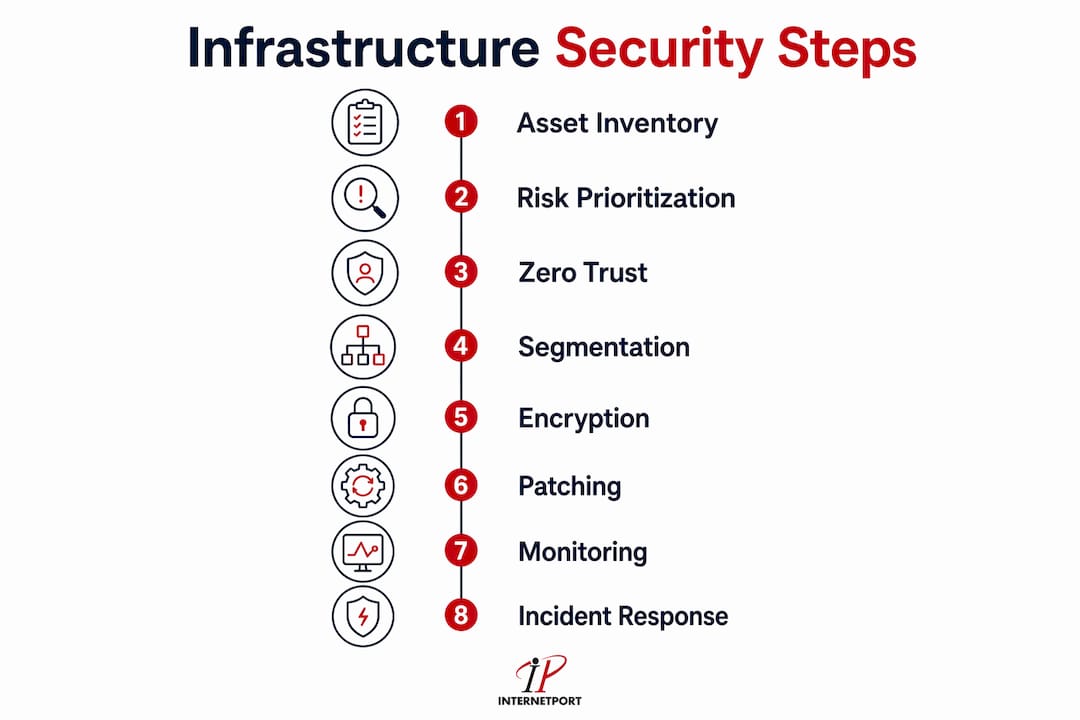
Start by cataloging every device, application, and access point in your environment. This includes servers, endpoints, network switches, printers, cloud accounts, and any device with an IP address. Many SMBs discover shadow IT during this step, meaning software or hardware that employees added without IT approval. A spreadsheet works for small environments, but a dedicated IT asset management tool gives you a live, queryable record.

A comprehensive audit must map all assets and access points before any remediation begins. That mapping becomes your attack surface baseline, and you update it every time something changes.
Prioritize your audit by risk
Not all systems carry equal risk. Audit your controls in this order:
- Identity provider (your central authentication system, such as Active Directory or a cloud IdP)
- Email platform (the most common entry point for phishing and credential theft)
- VPN and remote access systems (often exposed directly to the internet)
- Administrative consoles (cloud management portals, server management interfaces, and network device dashboards)
After you cover those four, extend the audit to endpoints, storage systems, and third-party integrations. Each layer you audit should produce a list of findings ranked by severity.
Techniques for vulnerability assessment
Three methods give you the clearest picture of your actual exposure:
- Network scans: Tools like Nmap or Nessus map open ports, running services, and misconfigured systems across your network.
- Penetration testing: A controlled simulated attack reveals how far an attacker could move after gaining an initial foothold. Schedule this at least once per year.
- Configuration reviews: Compare your current device and software settings against a known-good baseline, such as CIS Benchmarks, to find deviations.
Pro Tip: Run your vulnerability scans from both inside and outside your network. Internal scans catch misconfigurations; external scans show what an attacker sees before they even touch your perimeter.
For data center security audits, physical access controls and environmental monitoring belong on the same checklist as your digital controls. Physical and digital security failures often compound each other.
How to implement Zero Trust architecture for your infrastructure
Zero Trust is the most effective architecture for modern hybrid and multicloud environments. The core principle is simple: no user, device, or network segment receives automatic trust. Every access request gets authenticated and validated, every time.
Why the perimeter model fails SMBs
The traditional approach assumed that anything inside the corporate network was safe. That assumption collapsed when remote work, cloud services, and mobile devices made the network boundary meaningless. Identity is now the security perimeter, and your identity provider is the most critical system you operate. A compromised identity provider gives an attacker access to everything that identity can reach, bypassing firewalls entirely.
Steps to implement Zero Trust in practice
- Centralize identity management. Use a single identity provider, such as Azure Active Directory or Okta, to control all authentication. Federate every application and service to that provider so access decisions happen in one place.
- Enforce multi-factor authentication on every privileged account. Hardware tokens using FIDO2 or WebAuthn are the recommended standard. SMS one-time passwords are vulnerable to SIM-swapping attacks and should not be used for admin accounts. For a broader view of authentication method types and their security tradeoffs, the differences between hardware tokens, app-based TOTP, and SMS OTP matter significantly at the privileged access level.
- Apply least-privilege access. Every user and service account should have only the permissions needed for their specific role. Role-based access controls (RBAC) make this manageable at scale.
- Use ephemeral credentials for service accounts. Static, long-lived passwords on service accounts are a persistent risk. Dynamic secrets that expire after a short window reduce the damage if those credentials are ever exposed.
- Validate device health before granting access. Require that devices meet a minimum security posture, such as current patches and enabled disk encryption, before they can connect to sensitive systems.
Pro Tip: Start Zero Trust with your most privileged accounts, not your entire user base. Securing ten admin accounts correctly delivers more risk reduction than rolling out basic MFA to 200 standard users.
For SMBs running hybrid cloud environments, Zero Trust principles apply equally to on-premises and cloud-hosted workloads. Treat every connection as untrusted regardless of where it originates.
How to manage network segmentation, encryption, and patching
Network segmentation, encryption, and patch management form the technical backbone of any infrastructure security framework. Each addresses a different attack vector, and all three must work together.
Network segmentation and firewall rules
Segmentation limits how far an attacker can move after breaching one system. Divide your network into zones based on function and sensitivity: production servers, development environments, user workstations, and management interfaces should all sit in separate segments with controlled traffic between them.
A default-deny firewall approach blocks all traffic by default and permits only what is explicitly required. This is the opposite of how many SMBs configure their firewalls, where everything is permitted unless specifically blocked. Restrict management interfaces, such as SSH, RDP, and web-based admin portals, to a dedicated administrative network zone accessible only from trusted IP addresses.
Securing the management plane deserves special attention. Routers, switches, and other network devices are often managed through legacy protocols with weak credentials. Use TACACS+ for command authorization on network devices and restrict management access to a dedicated out-of-band network segment.
Encryption standards you must enforce
The table below shows the encryption requirements that current industry standards mandate:
| Data state | Required standard | What to disable |
|---|---|---|
| Data at rest | AES-256 | Unencrypted storage volumes |
| Data in transit | TLS 1.2 or higher | TLS 1.0, TLS 1.1, SSL 3.0 |
| Cloud storage | Encryption at creation | Post-deployment encryption attempts |
AES-256 at rest and TLS 1.2 or higher in transit are the current baseline. Older protocols like TLS 1.0 and SSL must be explicitly disabled, not just deprecated. Cloud storage encryption is a creation-time setting. Enabling it after a bucket or volume already exists does not protect data that was written before encryption was turned on.
Patch management that covers everything
Most SMBs patch their servers and workstations but miss network devices, printers, and firmware. Every device with an IP address belongs in your patch management program. A switch running outdated firmware is as much an attack vector as an unpatched Windows server.
Build a patch cycle that covers four categories: servers, endpoints, network devices, and firmware. Automate patch deployment where possible using tools like Windows Server Update Services, Ansible, or a dedicated patch management platform. Test patches in a staging environment before pushing to production, and document every change for your audit trail.
Pro Tip: Firmware updates for hardware like routers and switches often require manual steps. Schedule a quarterly firmware review for all network devices and treat it with the same urgency as your monthly server patching cycle.
For practical server security management guidance specific to SMBs, server hardening checklists and patch automation scripts can cut the time your team spends on routine maintenance significantly.
How to deploy monitoring, incident response, and backup strategies
Detection and recovery capabilities determine how quickly you contain a breach and how much damage it causes. Building these capabilities before an incident happens is the only way they work when you need them.
Continuous monitoring with SIEM and EDR
SIEM platforms aggregate logs from endpoints, networks, cloud services, and applications into a single view. That aggregation lets your team spot patterns that no single log source would reveal on its own. A SIEM paired with a 24/7 security operations function gives you real-time alerting on suspicious activity.
Endpoint Detection and Response (EDR) tools monitor individual devices for behavioral anomalies, not just known malware signatures. This matters because signature-based detection misses novel attacks. For cloud workloads, Cloud Security Posture Management (CSPM) tools continuously check your cloud configuration against security benchmarks and flag drift.
Key monitoring priorities for SMB environments:
- Authentication events: Failed logins, unusual login times, and access from unexpected locations
- Privilege escalation: Any account gaining elevated permissions outside a change window
- Lateral movement: Internal traffic patterns that suggest an attacker moving between systems
- Data exfiltration signals: Large outbound transfers, especially to unfamiliar destinations
- Configuration changes: Firewall rule modifications, new admin accounts, and policy changes
For cloud infrastructure security posture, native tools like AWS Config and Microsoft Defender for Cloud can automate compliance checks and alert on misconfigurations before they become incidents.
Building and testing your incident response plan
An incident response plan defines exactly what your team does when something goes wrong. Without a written plan, decisions get made under pressure by whoever happens to be available. The plan should define four phases: detection and analysis, containment, eradication and recovery, and post-incident review.
Run tabletop exercises at least twice per year. A tabletop exercise walks your team through a simulated scenario, such as a ransomware infection or a credential compromise, without touching live systems. These exercises reveal gaps in your plan and build muscle memory for the real event.
Pro Tip: Assign a specific incident commander role in your plan. When an incident happens, the first ten minutes are chaotic. Knowing exactly who makes decisions and who communicates with leadership eliminates the hesitation that lets breaches spread.
Backup strategy that survives ransomware
Immutable backups following the 3-2-1 rule are the most reliable defense against ransomware. Keep three copies of your data on two different media types, with one copy stored offsite in an immutable format. AWS S3 Object Lock is one example of a cloud storage feature that prevents backup files from being modified or deleted, even by an administrator.
Test your backups by restoring from them regularly. A backup you have never tested is not a backup. Schedule quarterly restore tests for your most critical systems and document the recovery time so you know what to expect during an actual incident.
Key Takeaways
A layered infrastructure security program built on identity-centric controls, continuous monitoring, and tested recovery plans gives SMBs the strongest defense against modern threats.
| Point | Details |
|---|---|
| Audit before you act | Map every asset, access point, and configuration before applying any security control. |
| Identity is your perimeter | Secure your identity provider first; a compromised IdP bypasses every other defense you have. |
| Hardware MFA over SMS | Use FIDO2 hardware tokens for privileged accounts; SMS OTP is vulnerable to SIM-swapping. |
| Patch everything with an IP | Include network devices and firmware in your patch cycle, not just servers and workstations. |
| Test backups and response plans | Untested backups and unexercised incident plans fail when you need them most. |
Where SMB infrastructure security actually breaks down
Peter's take on this is direct: most SMBs do not fail at security because they lack tools. They fail because they secure the wrong things first.
The pattern I see repeatedly is teams that invest in endpoint protection and firewall licenses while leaving their identity provider configured with weak passwords and no MFA. That is backwards. An attacker who owns your identity provider owns your environment, regardless of how good your endpoint detection is. The shift to treating identity as the primary security perimeter is not a trend. It is a correction to a decade of misplaced priorities.
The second blind spot is the management plane. Routers, switches, and out-of-band management interfaces run on legacy protocols and default credentials far more often than IT managers realize. I have seen environments where the production servers were hardened to a high standard while the network switches managing all that traffic were accessible with factory-default passwords. Securing only the data plane while ignoring the management plane is like installing a vault door and leaving the back window open.
The third issue is the gap between having a security program and having a tested security program. Policies that exist only in documents do not protect you. Incident response plans that have never been exercised fall apart under real pressure. Backups that have never been restored often turn out to be corrupted or incomplete. The organizations that recover quickly from incidents are the ones that practiced recovery before they needed it.
For SMBs in 2026, the practical path forward is not buying more tools. It is closing the gaps in what you already have, starting with identity, then the management plane, then testing everything you rely on.
— Peter
Internetport's secure infrastructure services for SMBs
SMBs that want to build on a foundation that already meets current security standards have a clear starting point with Internetport.
Internetport operates data centers in Sweden and internationally, with infrastructure built for PCI DSS compliance and high availability. Their web hosting, cloud VPS, and dedicated server options give IT managers the flexibility to match their workload requirements to the right level of dedicated resources and security controls. Private networking options reduce your public attack surface without adding complexity. Expert technical support means your team is not solving infrastructure problems alone. For organizations that need maximum control over their hardware environment, Internetport's colocation and dedicated server options provide the physical security and network reliability that SMB IT teams need without building their own data center.
FAQ
What is infrastructure security?
Infrastructure security is the practice of protecting IT systems, networks, and physical assets from unauthorized access, cyberattacks, and operational failures through layered technical and procedural controls.
What should I audit first in an infrastructure security review?
Audit your identity provider first, then email, VPN, and administrative consoles. These four systems represent the highest-risk access points in most SMB environments.
Why is SMS-based MFA considered insecure for privileged accounts?
SMS one-time passwords are vulnerable to SIM-swapping attacks, where an attacker convinces a carrier to transfer your phone number to a device they control. Hardware tokens using FIDO2 or WebAuthn eliminate this risk.
What is the 3-2-1 backup rule?
The 3-2-1 rule means keeping three copies of your data on two different media types, with one copy stored offsite in an immutable format. This structure ensures ransomware cannot destroy all copies simultaneously.
How often should SMBs run penetration tests?
SMBs should run penetration tests at least once per year, with additional tests after major infrastructure changes such as cloud migrations, new application deployments, or significant network reconfigurations.