
TL;DR:
- Server redundancy involves duplicating critical components to ensure continuous operation during failures, reducing downtime and safeguarding data. Implemented through various architectures like N+1, 2N, or multi-region setups, it requires regular testing, monitoring, and alignment with risk tolerance and compliance standards. Overcomplexity can introduce new risks; thus, pragmatic, automated, and service-specific redundancy strategies are essential for resilient infrastructure.
Server redundancy is the deliberate duplication of critical server components to maintain continuous operation when hardware, software, or power failures occur. For IT managers and business owners, why server redundancy matters comes down to one unavoidable fact: any single component in your infrastructure will eventually fail. The question is whether that failure takes your business down with it. Compliance frameworks like PCI DSS, HIPAA, and SOC 2 treat redundancy as a mandatory control, not an optional upgrade. Organizations running mission-critical workloads cannot afford to treat uptime as a best-effort goal.
Why server redundancy matters for preventing downtime
Server redundancy works by eliminating single points of failure across every layer of your infrastructure. When one component fails, a pre-configured backup takes over automatically, often within seconds, without any manual intervention required. This automatic handoff is called failover, and it is the core mechanism that separates a resilient system from one that collapses under pressure.
There are two primary failover models IT teams deploy in practice:
- Active-standby: One server handles all traffic while a secondary server sits idle, ready to take over if the primary fails. The standby server mirrors the primary's state continuously. Recovery time is fast, but the standby capacity sits unused during normal operation.
- Active-active: Multiple servers share the workload simultaneously. If one fails, the remaining servers absorb its traffic. This model delivers both redundancy and performance benefits, since you are using all available capacity at all times.
- Compute redundancy: Duplicate processors or virtual machines handle workloads if a primary compute node fails.
- Power redundancy: Dual power supply units and uninterruptible power supplies protect against electrical failures. Power supply failure without redundancy causes downtime that application software cannot recover from on its own.
- Storage redundancy: RAID arrays and replicated storage volumes protect data integrity during disk failures.
- Network redundancy: Multiple network interface cards, switches, and upstream providers prevent connectivity loss from a single network failure.
Monitoring sits at the center of any redundancy strategy. Health checks, heartbeat signals, and automated alerting detect faults before they escalate. Without monitoring, your failover system may not trigger until a human notices something is wrong, which defeats the purpose entirely.
Pro Tip: Test your failover process on a scheduled basis, at minimum quarterly. Many organizations discover their redundancy setup has drifted out of sync only when an actual failure occurs, which is the worst possible time to find out.

What are the business benefits of redundant server systems?
The financial and operational case for redundancy is concrete. Downtime costs money directly through lost transactions, and indirectly through damaged customer trust and regulatory penalties. The math on uptime targets makes this clear: moving from 99.9% to 99.99% availability reduces annual downtime from roughly 8 hours to 52 minutes. That difference can represent hundreds of thousands of dollars in recovered revenue for a mid-size e-commerce operation.
"Redundancy is not a luxury for large enterprises. It is the baseline expectation for any organization that depends on digital services to generate revenue or serve customers."
Compliance is another non-negotiable driver. PCI DSS, HIPAA, and SOC 2 all require organizations to eliminate single points of failure in systems that handle sensitive data. Failing an audit because your infrastructure lacks redundancy is not a technical problem. It is a business risk with direct legal and financial consequences.
The table below summarizes the business impact across key dimensions:
| Dimension | Without redundancy | With redundancy |
|---|---|---|
| Annual downtime (99.9% uptime) | ~8.76 hours | ~52 minutes (99.99%) |
| Compliance posture | High audit risk | Meets PCI DSS, HIPAA, SOC 2 requirements |
| Data loss exposure | High during hardware failure | Minimized through replication |
| Customer trust | Eroded by visible outages | Maintained through transparent uptime |
| Revenue impact | Direct loss during outages | Protected through continuous availability |
One distinction worth making explicit: backups and redundancy serve different purposes. Backups restore data after a loss event, which can take hours or days. Redundancy keeps services running during a failure, with near-zero interruption. Relying on backups alone as your recovery strategy means accepting significant downtime as an outcome. For most businesses in 2026, that trade-off is no longer acceptable.
For IT managers building the business case internally, the argument is straightforward. The cost of implementing redundancy is predictable and one-time. The cost of a major outage is unpredictable, potentially catastrophic, and always arrives at the worst possible moment.
What are the main server redundancy architectures?
Choosing the right architecture depends on how much downtime your business can tolerate and how much you are willing to spend. The relationship between uptime targets and cost is not linear. Achieving 99.999% availability requires multi-region active-active deployment costing 10 to 50 times more than a single-server setup. That cost scaling forces a deliberate, risk-based decision rather than a blanket "more is better" approach.
| Architecture | Redundancy level | Cost multiplier | Best for |
|---|---|---|---|
| Single server | None | 1x | Development, non-critical workloads |
| N+1 (one spare) | Basic | 2x | Internal tools, low-traffic sites |
| 2N (full duplication) | High | 3-5x | Business-critical applications |
| Active-active multi-region | Maximum | 10-50x | Financial services, healthcare, SaaS |
N+1 redundancy adds one extra component beyond what is needed to run the system. If you need three servers to handle peak load, you deploy four. One failure is covered without service degradation. This is the most cost-efficient entry point for redundancy.
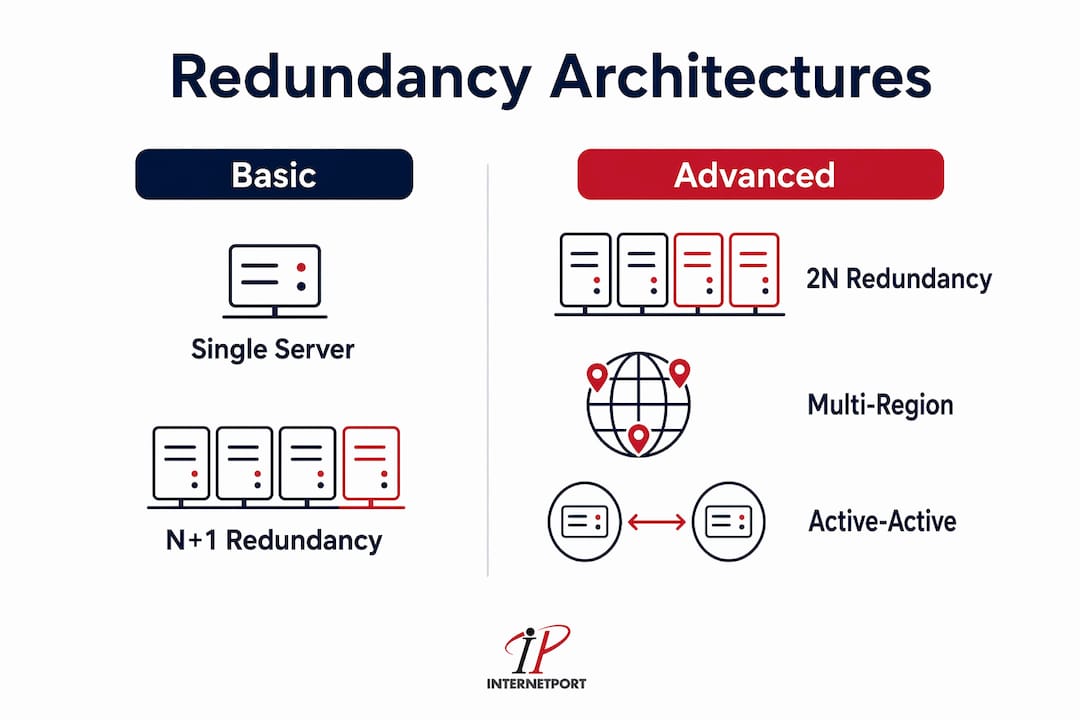
2N redundancy doubles every component. If the primary system fails entirely, the secondary system takes over with full capacity. This is the standard for data centers that promise high availability SLAs.
Multi-region redundancy distributes workloads across geographically separate data centers. Regional and provider-level redundancy is mandatory to mitigate outages beyond local hardware failures, including cloud provider platform failures that affect entire availability zones.
One architectural pitfall that catches teams off guard is split-brain syndrome. In a dual-node cluster, if the network link between two nodes fails, both nodes may believe the other is down and declare themselves the active primary. The result is two systems writing conflicting data simultaneously. Triple redundancy with quorum voting prevents this by requiring a majority decision before any node assumes leadership. A minority partition steps down rather than risk data corruption.
The stateless versus stateful distinction also shapes your architecture choices significantly. Stateless services like API servers are easily replaced through load balancing because they hold no session data. Stateful systems like databases require synchronous or asynchronous replication to prevent data loss during a failover. Getting this wrong means your redundancy setup protects availability but not data integrity, which is a dangerous gap.
Pro Tip: For database redundancy, synchronous replication guarantees zero data loss but adds latency. Asynchronous replication is faster but accepts a small replication lag. Choose based on your recovery point objective, not just your recovery time objective.
You can find a detailed breakdown of how geographic and cloud provider diversity fits into this picture in Internetport's data center redundancy workflow guide for IT managers.
How to apply server redundancy principles effectively
Effective redundancy planning starts with a criticality assessment, not a technology selection. Map every service in your infrastructure and assign it a tier based on business impact. A payment processing system and an internal wiki have fundamentally different downtime tolerances. Spending the same on redundancy for both is a poor allocation of budget.
Here is a practical framework for applying redundancy based on service criticality:
- Identify your stateful components first. Databases, session stores, and file systems are where data loss actually happens. These require replication, not just failover. Prioritize redundancy investment here before anywhere else.
- Set explicit uptime targets per service tier. Define what 99.9%, 99.99%, and 99.999% mean in hours of acceptable downtime per year. Then match your architecture to those targets rather than defaulting to the highest tier for everything.
- Implement redundancy at every infrastructure layer. Compute, power, storage, and network redundancy each address different failure modes. A redundant server with a single power supply is still a single point of failure. Power redundancy is typically the first critical layer to address.
- Automate failover and health monitoring. Manual failover processes introduce human delay and human error. Automated monitoring with predefined thresholds triggers failover before users notice a problem. Tools like Prometheus, Nagios, and Zabbix provide the visibility needed to catch faults early.
- Test redundancy regularly and document results. A failover system that has never been tested is a hypothesis, not a guarantee. Schedule chaos engineering exercises or planned failover drills. Document what worked, what did not, and what needs adjustment.
- Evaluate managed provider options. Cloud providers and managed hosting services often include built-in redundancy features that would cost significantly more to build in-house. For many mid-market businesses, a high availability hosting workflow through a managed provider delivers better uptime at lower total cost than self-managed infrastructure.
One common mistake IT managers make is treating redundancy as a one-time project. Infrastructure changes over time. New services get added, traffic patterns shift, and hardware ages. Redundancy that was adequate two years ago may have gaps today. Build redundancy reviews into your quarterly infrastructure audits rather than treating them as a completed checkbox.
The cost-versus-benefit calculation also deserves honest scrutiny. Excessive redundancy can introduce complexity that creates new failure points and increases costs without proportional value. A system with ten redundancy layers that no one fully understands is more dangerous than a well-tested system with three. Simplicity and testability matter as much as redundancy depth.
Key takeaways
Server redundancy is the single most effective control for preventing unplanned downtime, protecting data integrity, and meeting compliance requirements across PCI DSS, HIPAA, and SOC 2.
| Point | Details |
|---|---|
| Failover is the core mechanism | Automatic failover eliminates manual recovery delays and keeps services running during component failures. |
| Uptime targets drive architecture | Moving from 99.9% to 99.99% uptime cuts downtime from 8 hours to 52 minutes but increases costs significantly. |
| Stateful systems need replication | Databases and session stores require data replication, not just failover, to prevent data loss during failures. |
| Compliance requires redundancy | PCI DSS, HIPAA, and SOC 2 mandate elimination of single points of failure in systems handling sensitive data. |
| Test and review regularly | Untested failover systems are assumptions. Quarterly drills and infrastructure audits keep redundancy effective over time. |
The uncomfortable truth about redundancy complexity
I have worked with IT teams that spent months designing elaborate multi-region redundancy architectures, only to discover their failover had never been tested end-to-end. When an actual outage hit, the system did not behave as designed. The lesson was not that redundancy failed. The lesson was that complexity without validation is theater.
The instinct to add more redundancy layers is understandable. Every failure mode you can imagine feels like a justification for another backup system. But excessive complexity introduces new risks and costs that often outweigh the protection they provide. I have seen organizations spend three times their original budget on redundancy for systems that generate a fraction of their revenue, while their payment infrastructure ran on a single server with no failover.
The right approach is ruthlessly pragmatic. Spend heavily on redundancy for systems where failure has direct revenue or compliance consequences. Accept more risk on internal tools and development environments where downtime is inconvenient but not catastrophic. Match your architecture to your actual risk profile, not to an idealized version of what enterprise infrastructure should look like.
Automation is where the real value of redundancy is realized. Monitoring that detects a fault in seconds and triggers failover automatically is worth more than a manually operated backup system that requires a 3 a.m. phone call to activate. Invest in observability and automated response before you invest in additional redundancy layers. The combination of well-tested failover and real-time monitoring is what high availability actually looks like in practice.
Finally, redundancy belongs inside your broader disaster recovery strategy, not alongside it. Redundancy handles component-level failures in real time. Disaster recovery handles catastrophic events that take down entire systems or regions. Both are necessary, and neither replaces the other.
— Peter
How Internetport supports resilient, redundant infrastructure

Internetport builds redundancy into its hosting infrastructure at every layer, from power and network to compute and storage, across data centers in Sweden and internationally. For businesses that need dedicated resources without the overhead of managing physical hardware, Internetport's dedicated servers deliver the performance and isolation that mission-critical workloads require. For teams that need scalable capacity with built-in failover options, cloud VPS plans provide flexibility without sacrificing availability. Internetport's infrastructure meets PCI DSS compliance standards, making it a practical choice for organizations in regulated industries. If you are evaluating your redundancy options, Internetport's team provides direct technical guidance to match your uptime requirements to the right hosting architecture.
FAQ
What is server redundancy?
Server redundancy is the deliberate duplication of critical server components, including compute, power, storage, and network, so that a backup takes over automatically when a primary component fails. The goal is continuous service availability with minimal or zero interruption.
How does server redundancy differ from backups?
Redundancy keeps services running during a failure in real time, while backups restore data after a loss event that may take hours or days to recover from. Relying on backups alone means accepting significant downtime as an outcome.
What uptime level does server redundancy provide?
The uptime level depends on the architecture. N+1 redundancy typically supports 99.9% uptime, while active-active multi-region deployments can achieve 99.999% uptime. Moving from 99.9% to 99.99% reduces annual downtime from roughly 8 hours to 52 minutes.
Is server redundancy required for compliance?
PCI DSS, HIPAA, and SOC 2 all require organizations to eliminate single points of failure in systems that handle sensitive or regulated data. Redundancy is a mandatory control under these frameworks, not an optional enhancement.
What is split-brain syndrome in redundant systems?
Split-brain syndrome occurs when two nodes in a redundant cluster both declare themselves active simultaneously, leading to conflicting data writes and corruption. Triple redundancy with quorum voting prevents this by requiring a majority decision before any node assumes leadership.