

TL;DR:
- Business email hosting provides custom domain addresses with security tools and scalable storage.
- Choosing a provider requires attention to renewal rates, DNS setup, privacy features, and support quality.
Email hosting for businesses is defined as a managed service that provides professional email addresses on a company's custom domain, separate from generic free accounts. A name@yourcompany.com address signals credibility in a way that a free webmail account never can. Beyond appearances, business email hosting delivers security controls, storage management, and authentication protocols like SPF, DKIM, and DMARC that protect your domain's reputation. This guide covers what features matter, how pricing actually works, what privacy trade-offs exist, and how to set everything up without landing in spam folders.
What features should small businesses look for in email hosting plans?
The right email hosting plan does more than deliver messages. It protects your domain, supports your team's workflow, and grows with your business without requiring a full IT department to manage it.

Custom domain and professional addresses
Every business email hosting plan must support custom domain email addresses. A contact@yourbusiness.com address builds trust with clients and partners in a way that free accounts cannot replicate. Most providers handle domain verification through DNS records, and the best plans walk you through that process automatically.
Storage and scalability
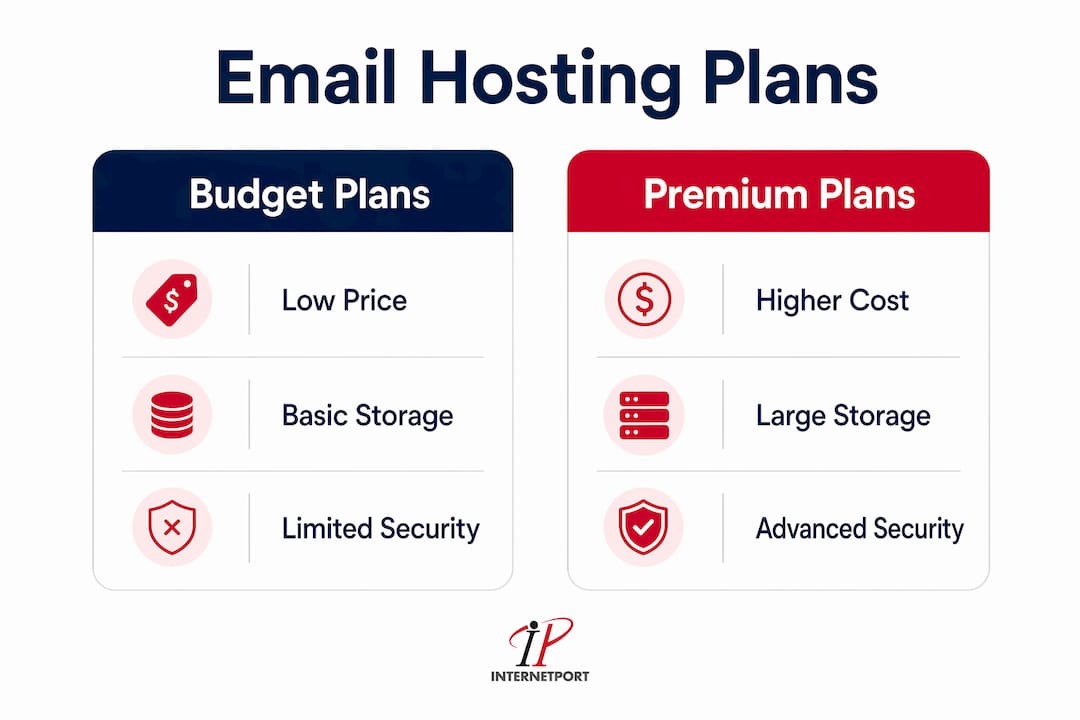
Storage allocation varies widely across plans. Budget-tier plans typically offer 5–10 GB per mailbox, while premium suites provide 50–100 GB. A small team of five people generating moderate email volume will rarely exhaust 10 GB per user, but businesses that archive contracts, invoices, and large attachments need more headroom. Choose a plan that lets you add storage or upgrade individual mailboxes without migrating your entire account.
Security features that actually matter
Spam filtering, TLS encryption in transit, and multi-factor authentication (MFA) are the baseline for any credible business email solution. MFA alone blocks the vast majority of unauthorized access attempts. Look for plans that include these by default rather than as paid add-ons. Some providers also offer advanced threat protection that scans attachments and links before they reach your inbox.
Collaboration tools and shared mailboxes
Shared mailboxes for addresses like support@ or billing@ let multiple team members manage a single inbox without sharing passwords. Shared calendars and contact directories matter for teams that coordinate schedules. These features are standard in ecosystem-integrated plans but often absent from budget-tier options.
DNS authentication and setup support
SPF, DKIM, and DMARC records are not optional. They tell receiving mail servers that your domain is legitimate, and misconfigured DNS records can cause up to 90% of your outbound emails to land in spam. The best providers offer guided DNS setup or auto-configuration tools that handle these records for you.
Pro Tip: Before signing up for any plan, ask the provider whether SPF, DKIM, and DMARC setup is included in onboarding support or whether you are expected to configure them yourself. That single question separates genuinely SMB-friendly providers from those built for IT teams.
How do pricing models and cost structures vary across business email hosting?
Business email hosting prices start at $1 per user per month for budget plans and climb to $6–$12.50 per user per month for premium suites that bundle productivity tools. That range looks manageable until you factor in renewal rates, storage upgrades, and support tiers.
Introductory pricing vs. renewal rates
The most common pricing trap in professional email hosting is the gap between introductory and renewal rates. A plan advertised at $1 per user per month may renew at $3 or $4. Renewal rate increases catch many SMB owners off guard, especially when they have already migrated their team and set up DNS records. Always check the renewal price before committing, not just the promotional rate.
What drives the cost difference
The table below shows how plan categories typically differ across the features that matter most to SMBs.
| Feature | Budget plans | Ecosystem-integrated plans | Privacy-focused plans |
|---|---|---|---|
| Price range | $1–$3/user/month | $6–$12.50/user/month | $3–$8/user/month |
| Storage per mailbox | 5–10 GB | 50–100 GB | 1–10 GB |
| Productivity tools | Email only | Full suite (docs, calendar, video) | Email and calendar |
| Encryption | TLS in transit | TLS in transit | End-to-end by default |
| Support | Ticket or chat | 24/7 human | Ticket or community |
Hidden costs to watch for
Domain registration is sometimes bundled into a first-year price and billed separately at renewal. Setup fees, migration assistance, and premium support tiers add to the total cost of ownership. A plan that looks affordable at $2 per user per month can cost significantly more once you add domain management, extra storage, and a support upgrade. Managing hosting costs for small businesses requires reading the full pricing page, not just the headline number.
Pro Tip: Calculate your total annual cost per user before signing up. Multiply the renewal rate by 12, add domain fees, and factor in any storage upgrades your team will realistically need within 12 months. That number is your true cost.
What privacy and security considerations should businesses prioritize?
Privacy in business email is not a single setting. It is a combination of encryption standards, data storage location, and the provider's own policies on how they use your data.
End-to-end encryption vs. TLS
Most business email services use TLS encryption, which protects messages in transit between servers. TLS does not protect messages at rest on the provider's servers. End-to-end encrypted email means only the sender and recipient can read the message, not even the provider. This distinction matters most for businesses in legal, medical, or financial sectors where confidentiality is a legal requirement.
Data sovereignty and GDPR compliance
Where your email data is stored determines which laws govern it. Businesses operating in the European Union or serving EU customers must comply with GDPR. Storing email data on servers outside the EU creates legal exposure. Providers that operate data centers within the EU and publish clear data processing agreements give you the documentation you need for compliance audits.
The trade-off with Big Tech ecosystems
Ecosystem-integrated platforms offer convenience and deep collaboration tools. The trade-off is that some of these providers scan email content to serve advertising or train AI models. For most SMBs, this is an acceptable trade-off. For businesses handling sensitive client data, it is not. Privacy-focused providers offer stronger confidentiality guarantees but typically lack the deep integrations that teams relying on shared documents and video calls depend on.
Key privacy criteria to evaluate before choosing a provider:
- Data center location: Confirm servers are in a jurisdiction that matches your compliance requirements.
- Encryption at rest: Ask whether stored messages are encrypted and who holds the decryption keys.
- AI and data scanning policies: Read the terms of service for any clause allowing the provider to process email content.
- Two-factor authentication: Verify it is available and whether it is enforced by default or optional.
- Incident response and breach notification: Check whether the provider commits to notifying you within a specific timeframe after a security incident.
What technical steps are required to set up business email hosting?
Getting email hosting running correctly takes more than creating an account and adding users. The technical setup determines whether your emails reach inboxes or disappear into spam folders.
Step 1: Configure your DNS records immediately
Set up SPF, DKIM, and DMARC records within 24–48 hours of activating your email hosting account. Proper DNS configuration prevents the majority of outbound emails from being flagged as spam. SPF tells receiving servers which IP addresses are authorized to send mail from your domain. DKIM adds a cryptographic signature to each message. DMARC tells receiving servers what to do when a message fails SPF or DKIM checks.
Step 2: Create user accounts and aliases
Add individual mailboxes for each team member using their real name or role. Create aliases for shared functions like info@, support@, and billing@. Aliases route messages to one or more real mailboxes without requiring a separate paid account for each address.
Step 3: Set up shared mailboxes and access controls
Shared mailboxes work differently from aliases. They have their own storage and allow multiple users to send from the shared address, not just receive. Assign access permissions carefully. Not every team member needs full access to every shared mailbox.
Step 4: Configure backup and retention policies
| Retention need | Recommended approach |
|---|---|
| General business records | 30-day deleted item recovery minimum |
| Legal or financial records | 7-year archiving with tamper-proof storage |
| Client communications | Provider-level backup plus local export quarterly |
| Compliance-regulated industries | Dedicated email archiving service with audit logs |
Step 5: Separate bulk email from business email
Business email services impose daily sending limits of around 2,000 messages and prohibit mass marketing campaigns. Sending bulk newsletters or product announcements through your business email account risks suspension and damages your domain's sender reputation. Use a dedicated transactional email platform or SMTP relay for marketing campaigns and automated notifications.
Pro Tip: Audit your SPF, DKIM, and DMARC records every six months. DNS entries can become outdated when you change hosting providers or add new sending services. Regular DNS auditing keeps your domain reputation intact and your emails out of spam.
How can business owners evaluate and choose the right email hosting provider?
Choosing a provider is not just about price per mailbox. The right choice depends on your team's existing tools, your compliance requirements, and how much technical management you are willing to handle.
Ecosystem compatibility
Teams already working inside a Microsoft or Google environment benefit from using the corresponding email hosting suite. Switching to a familiar ecosystem reduces training time and keeps productivity tools connected. Teams without a strong existing ecosystem have more flexibility and can prioritize price or privacy without sacrificing workflow continuity.
Evaluation criteria that matter most
- Uptime SLA: Look for a provider that guarantees at least 99.9% uptime in writing. Email downtime during a client negotiation or contract deadline is a real business risk.
- 24/7 human support: Support quality directly affects hosting reliability. Ticket-only support means waiting hours for help when email goes down. Human support available around the clock is worth paying for.
- Migration assistance: Moving email from one provider to another without losing messages or misconfiguring DNS is technically demanding. Providers that offer migration support reduce the risk of data loss and downtime.
- Renewal pricing transparency: Ask for the renewal rate in writing before signing up. Providers that publish renewal pricing clearly are easier to budget for long-term.
- Vendor lock-in risk: Some platforms make it difficult to export your email history or transfer your domain. Confirm that you can export your data in standard formats like MBOX or PST before committing.
Scalability and domain management flexibility
A five-person team today may be a fifty-person team in three years. Your email hosting provider should let you add mailboxes, upgrade storage, and manage multiple domains without requiring a plan migration. Scalable cloud hosting gives SMBs room to grow without the disruption of switching providers at a critical growth stage. Providers that offer flexible hosting for SMBs with clear upgrade paths are worth prioritizing over those with rigid plan structures.
Key Takeaways
The best email hosting for businesses combines custom domain support, proper DNS authentication, and a pricing model that stays predictable at renewal.
| Point | Details |
|---|---|
| DNS setup is non-negotiable | Configure SPF, DKIM, and DMARC within 48 hours to protect deliverability. |
| Renewal rates matter more than intro pricing | Always check the renewal rate before signing up to avoid budget surprises. |
| Privacy needs vary by industry | End-to-end encryption is required for legal and medical sectors, optional for others. |
| Separate bulk email from business email | Use a dedicated platform for marketing campaigns to protect your domain reputation. |
| Support quality affects uptime risk | Choose providers with 24/7 human support and a written uptime SLA. |
Why most SMBs get email hosting wrong from the start
The single most common mistake I see SMB owners make is choosing an email hosting plan based on the introductory price and the feature list on the signup page. Neither tells you what the service actually costs after year one, and neither tells you how the provider behaves when something breaks.
I have watched businesses migrate their entire team to a budget platform, spend two weeks getting DNS records configured correctly, and then discover at renewal that the price doubled. The migration cost in staff time and the disruption to client communication far exceeded any savings from the cheaper plan. The math only works if you calculate total cost over two or three years, not just the first invoice.
The privacy trade-off is the other area where I think conventional wisdom fails SMBs. Most articles tell you to use whichever ecosystem your team already knows. That advice is sound for productivity, but it glosses over the fact that some of the most widely used platforms process your email content in ways that create real risk for businesses handling sensitive client data. A law firm or a financial advisory practice has different privacy obligations than a retail shop. The right answer is not the same for both.
The technical side, specifically SPF, DKIM, and DMARC, is where I see the most preventable damage. These records are not complicated to set up, but they are easy to forget about after the initial configuration. A provider change, a new marketing tool, or a third-party integration can silently break your authentication records. Emails start landing in spam, client responses drop off, and the business owner has no idea why. A quarterly DNS audit takes fifteen minutes and prevents months of deliverability problems.
— Peter
Internetport's business email hosting options for SMBs
Internetport offers web hosting plans built for SMBs that need reliable email hosting without the complexity of managing their own mail servers. Plans include support for custom domains, DNS configuration assistance, and the security infrastructure that business communication requires.
Internetport operates data centers in Sweden and internationally, which matters for businesses with GDPR compliance requirements. The team provides technical support to help with migration from existing providers, DNS record setup, and ongoing account management. For SMBs that want email hosting backed by a provider with real infrastructure and people who answer the phone, Internetport is worth a direct conversation about your specific setup.
FAQ
What is business email hosting?
Business email hosting is a service that provides professional email addresses on a custom domain, managed on dedicated mail servers with security and storage controls. It differs from free webmail accounts by offering custom branding, authentication protocols, and business-grade reliability.
How much does business email hosting cost per user?
Prices range from $1 per user per month for budget plans to $12.50 per user per month for premium suites with full productivity tools. Always check the renewal rate, as introductory pricing often increases significantly after the first year.
Why do SPF, DKIM, and DMARC records matter?
These DNS records authenticate your domain as a legitimate email sender. Without them, up to 90% of your outbound emails can be flagged as spam by receiving mail servers, directly harming your business communication.
Can I use business email hosting for marketing campaigns?
Standard business email accounts impose daily sending limits and prohibit bulk marketing. Use a dedicated transactional email platform or SMTP relay for newsletters and automated campaigns to protect your domain's sender reputation.
What should I look for in a secure email provider?
Look for TLS encryption in transit, multi-factor authentication, a clear data processing agreement, and data centers in a jurisdiction that matches your compliance requirements. Businesses in regulated industries should also require end-to-end encryption and a written breach notification policy.