

TL;DR:
- Reliable websites depend on layered infrastructure, monitoring, and recovery systems for consistent performance. Most SMB failures stem from untested updates and poor recovery plans, not external attacks. Investing in comprehensive disaster recovery and deployment discipline enhances uptime and protects revenue.
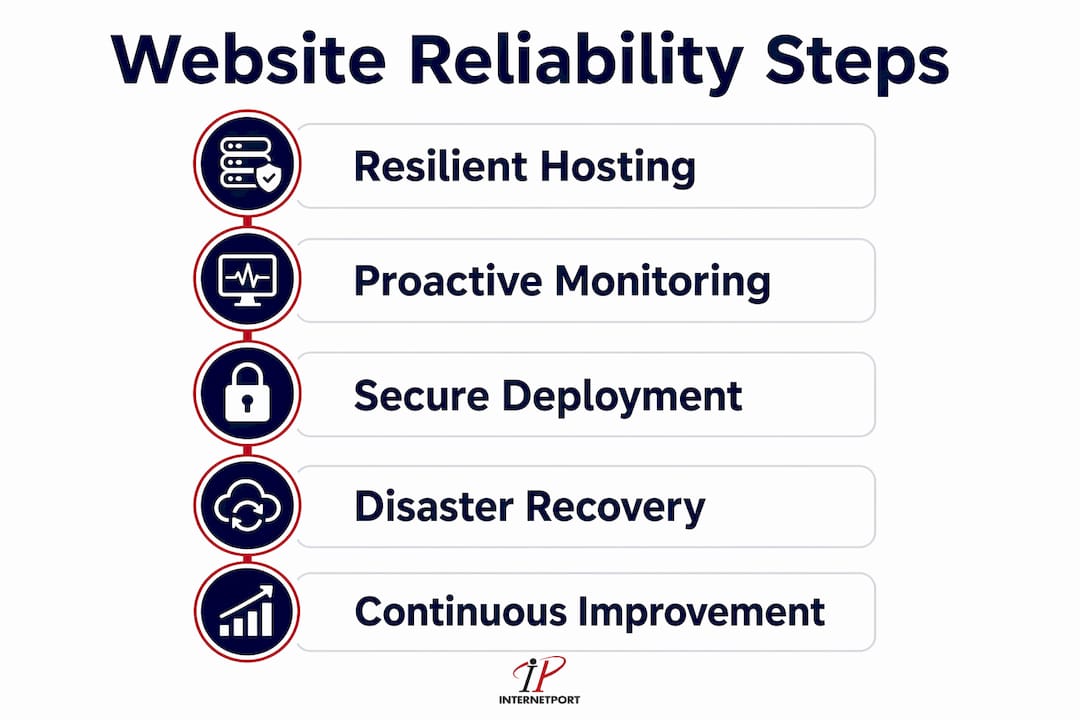
Website reliability is the measure of your site's ability to consistently deliver expected performance with minimal downtime, and enhancing it requires a multi-layered approach spanning technology, process, and culture. For small and medium-sized businesses, a single outage can erase hours of revenue and permanently damage customer trust. Downtime costs exceed $300,000 per hour for enterprises, and even at smaller scale, the financial and reputational damage is real. The strategies in this guide cover hosting architecture, monitoring, deployment discipline, security, and disaster recovery. Each section gives you concrete steps you can act on today.
How to enhance website reliability through resilient hosting
The foundation of any reliable website is the infrastructure underneath it. A single server in a single location is a single point of failure. When that server goes down, your site goes down with it.

The most effective architecture for improving website uptime is one designed to fail safely rather than designed to never fail. Systems built with redundancy and horizontal scaling achieve 99.99% uptime more consistently than systems that rely on one powerful machine staying healthy. That means distributing your workload across multiple servers and locations so that any single failure triggers automatic failover rather than a full outage.
Key hosting architecture decisions
- Multi-location hosting and failover. Deploy your application across at least two geographic regions. If one data center loses power or connectivity, traffic routes automatically to the other. Internetport operates data centers in Sweden and internationally, giving businesses this kind of geographic redundancy without building it from scratch.
- Load balancing. A load balancer distributes incoming requests across multiple servers. This prevents any one server from becoming a bottleneck during traffic spikes, and it removes unhealthy servers from the rotation automatically.
- Horizontal scaling. Adding more servers to handle demand is more reliable than upgrading a single server. Cloud VPS environments make this straightforward because you can spin up additional instances in minutes.
- CDN integration. A content delivery network caches your static assets at edge locations close to your users. CDN edge caching with load balancing absorbs traffic spikes and reduces the load on your origin server, which directly reduces outage risk during product launches or viral traffic events.
Pro Tip: When evaluating hosting providers, ask specifically about availability zone separation. Two servers in the same physical building do not count as redundancy. True failover requires geographic separation.
Performance is also part of reliability. A site that loads slowly is functionally unreliable even if it is technically "up." Aim for a Largest Contentful Paint under 2.5 seconds and a Lighthouse performance score of 85 or higher. These benchmarks reflect the point at which users begin abandoning pages. For a deeper look at scaling server infrastructure to meet these goals, the architecture decisions involved go well beyond simply buying more RAM.
What does proactive website monitoring actually require?
Most businesses discover outages the same way their customers do: by accident. Proactive monitoring changes that equation entirely. The goal is to detect failures within seconds and alert the right person before users notice anything wrong.
A complete monitoring setup covers more than just "is the server responding?" Basic ping checks miss the failures that matter most. Monitoring key transactions and content reveals functional failures that simple uptime checks cannot detect. For example, your checkout flow could break while your homepage stays perfectly accessible.
Here is how to build a monitoring setup that actually works:
- Monitor uptime at short intervals. Set your monitoring tool to check critical pages every 30–60 seconds. Monitoring intervals of 30 to 60 seconds for critical pages represent the industry standard for rapid failure detection.
- Require multiple consecutive failures before alerting. A single failed check is often a network blip. Requiring 2–3 consecutive failures before sending an alert reduces false positives without meaningfully delaying your response to real outages.
- Monitor from multiple geographic locations. A check from Stockholm might succeed while users in New York see errors. Multi-location monitoring catches regional failures that single-location checks miss entirely.
- Track SSL certificate expiration separately. SSL auto-renewal is not foolproof. Set up independent alerts at 30, 14, and 7 days before expiration. A lapsed certificate kills your site and destroys user trust simultaneously.
- Monitor DNS health. DNS failures are invisible to most uptime monitors because the check never reaches your server. A DNS monitoring layer catches propagation failures and misconfigured records before they cause outages.
- Publish a status page. A public status page lets customers check your system health themselves during incidents. This reduces support ticket volume and signals that you take reliability seriously.
Pro Tip: Alert fatigue is a real operational risk. If your team starts ignoring alerts because too many are false positives, you will miss the one that matters. Tune your thresholds ruthlessly and route critical alerts to a dedicated channel, not a shared inbox.
A thorough website health check covers all of these dimensions and gives you a baseline to measure improvement against over time.
Deployment discipline and secure site operation
The most overlooked cause of downtime is the team itself. Most website outages result from internal changes rather than external attacks. Untested updates pushed directly to production, missing rollback plans, and rushed deployments account for a significant share of preventable outages.
Fixing this requires process discipline, not just better technology.
- Use a staging environment that mirrors production. Every update should run in a staging environment before it touches your live site. The staging environment must use the same database structure, server configuration, and third-party integrations as production. A staging environment that differs from production gives you false confidence.
- Automate your test suite. Run automated tests on every deployment. Tests should cover critical user flows: login, checkout, form submission, and any API integrations your business depends on. A failed test blocks the deployment automatically.
- Build in one-click rollback. If a deployment breaks something, your team needs to revert within minutes, not hours. Blue-green deployments keep your previous version running in parallel so you can switch back instantly. Canary deployments release changes to a small percentage of traffic first, limiting the blast radius of any failure.
- Apply DDoS protection and a web application firewall (WAF). Security is integral to uptime. Effective DDoS protection and WAFs prevent malicious traffic from overwhelming your servers and causing outages. Rate limiting adds another layer by blocking abusive request patterns before they reach your application.
- Automate patching and vulnerability scanning. Unpatched software is both a security risk and a reliability risk. Automated patching keeps your stack current without requiring manual intervention for every update.
- Manage SSL and DNS proactively. Treat SSL auto-renewal as a backup, not a primary control. Manual verification and independent alerting are the only reliable way to prevent silent certificate expiration. For DNS, document your records and review them after any infrastructure change.
For a complete checklist of website maintenance tasks that support secure, stable operation, the items above form the core of what any SMB should review monthly.
Understanding how DNS reliability fits into your overall architecture is also worth the time. DNS failures are fast, silent, and often misdiagnosed as server problems.
How do you design an effective disaster recovery plan?
Every site will eventually go down. The difference between a five-minute outage and a five-hour one is almost always preparation. A disaster recovery plan is not a document you write once and forget. It is a set of tested, practiced workflows your team can execute under pressure.
- Automate backups and test restoration regularly. Backups that have never been restored are not backups. They are hopes. Schedule automated backups daily at minimum, and run a full restoration drill at least quarterly. Time the restoration process so you know exactly how long recovery takes.
- Write runbooks for every failure scenario. A runbook is a step-by-step guide for handling a specific type of incident. Your on-call engineer at 2:00 AM should not need to think. They should follow a documented procedure. Cover database failures, server crashes, DDoS attacks, and deployment rollbacks at minimum.
- Configure DNS failover. DNS failover automatically reroutes traffic to a backup server when your primary goes down. Combined with health checks, this can reduce effective downtime to under a minute for many failure types.
- Communicate during incidents. Update your status page within the first five minutes of a confirmed outage. Customers who can see that you are aware of the problem and working on it are far more forgiving than customers left in silence.
- Run blameless post-mortems after every significant incident. Blameless post-mortems focus on systemic failures rather than individual mistakes. The goal is to identify what process or architecture change prevents the same failure from recurring. Teams that practice this consistently improve their reliability over time in ways that teams focused on blame never do.
A well-tested recovery plan is the single most underinvested area in SMB reliability programs. Most businesses spend money on prevention and almost nothing on recovery speed.
Key Takeaways
Reliable websites require layered investment across infrastructure, monitoring, deployment process, security, and recovery planning.
| Point | Details |
|---|---|
| Redundant hosting architecture | Deploy across multiple locations with load balancing to eliminate single points of failure. |
| Proactive monitoring coverage | Check uptime, transactions, SSL, and DNS every 30–60 seconds from multiple geographic locations. |
| Deployment discipline prevents outages | Use staging environments, automated tests, and rollback capability before every production change. |
| Security protects uptime | DDoS protection, WAF, and automated patching prevent attacks from causing outages. |
| Tested recovery plans cut downtime | Automated backups, documented runbooks, and DNS failover reduce outage duration from hours to minutes. |
Where most SMBs get website reliability wrong
I have worked with enough small and medium-sized businesses to spot the pattern quickly. They invest in a decent hosting plan, set up a basic uptime monitor, and then assume reliability is handled. It is not.
The biggest gap I see is the absence of tested recovery plans. Businesses spend real money on prevention and almost nothing on how fast they can recover when prevention fails. That is the wrong ratio. A five-minute outage with a fast recovery plan does less damage than a two-hour outage with no plan at all.
The second gap is deployment discipline. I have seen more outages caused by a developer pushing an untested update on a Friday afternoon than by any external attack. The fix is not complicated. A staging environment and a one-click rollback capability eliminate most of this risk. The barrier is usually organizational, not technical. Teams skip the staging step because they are in a hurry, and then they spend hours recovering from the consequences.
The third thing I would push back on is the idea that reliability is primarily a technology problem. It is a business decision. Uptime is revenue protection. When you frame it that way, the investment in reliable hosting infrastructure and monitoring tools stops looking like an IT expense and starts looking like insurance with a measurable return. The businesses that treat reliability as a cost center consistently underinvest in it until an outage forces the conversation.
— Peter
Internetport's hosting solutions for site reliability
Internetport builds its infrastructure around the same principles this article covers: geographic redundancy, high availability, and security built into the stack rather than bolted on afterward.

Internetport's web hosting plans are hosted in Swedish and international data centers with PCI DSS compliance and DDoS protection included. For businesses that need more control, cloud VPS options provide the horizontal scaling and failover architecture that site stability demands. Dedicated server configurations are available for operations with the highest performance and security requirements. Internetport's technical support team works directly with clients on monitoring integrations and disaster recovery planning, so you are not building these systems alone.
FAQ
What is website reliability?
Website reliability is the ability of a site to consistently deliver expected performance and availability with minimal unplanned downtime. It spans hosting architecture, monitoring, security, and recovery processes.
How do I improve website uptime quickly?
The fastest wins come from adding a CDN, configuring uptime monitoring with alerts, and verifying your SSL certificate status. These three steps address the most common causes of unplanned downtime without requiring infrastructure changes.
How often should I monitor my website?
Monitor critical pages every 30–60 seconds and require 2–3 consecutive failures before triggering an alert. This interval catches real outages quickly while filtering out transient network errors that would otherwise cause alert fatigue.
What causes most website downtime for SMBs?
Internal changes are the leading cause. Untested updates pushed directly to production, missing rollback plans, and lapsed SSL certificates account for the majority of preventable outages at small and medium-sized businesses.
How does security affect website uptime?
DDoS attacks and application-layer exploits directly cause downtime by overwhelming servers or crashing applications. A web application firewall, rate limiting, and automated patching are the core controls that keep security failures from becoming availability failures.