

TL;DR:
- Server provisioning involves preparing servers with hardware, software, network, and security configurations for production use. Automating this process with infrastructure as code ensures consistent, scalable, and auditable environments while reducing errors and costs.
Server provisioning is defined as the process of preparing a server with all required hardware, software, network, and security configurations so it can perform its designated function in a production environment. System administrators who skip or rush this process pay for it later through configuration drift, security gaps, and inconsistent environments. The discipline spans physical, virtual, and cloud servers, and the underlying principles remain consistent across all three. Tools like Ansible, Terraform, and Infrastructure as Code (IaC) practices have transformed what once took hours per machine into a repeatable, auditable workflow that scales across entire fleets.
What is the server provisioning process and its key components?
Server provisioning is the full lifecycle of bringing a server from bare metal or a blank virtual instance to a state where application teams can deploy workloads on it. The process covers far more than installing an operating system. Effective provisioning manages network permissions, user accounts, and security hardening, all of which are critical for secure growth.
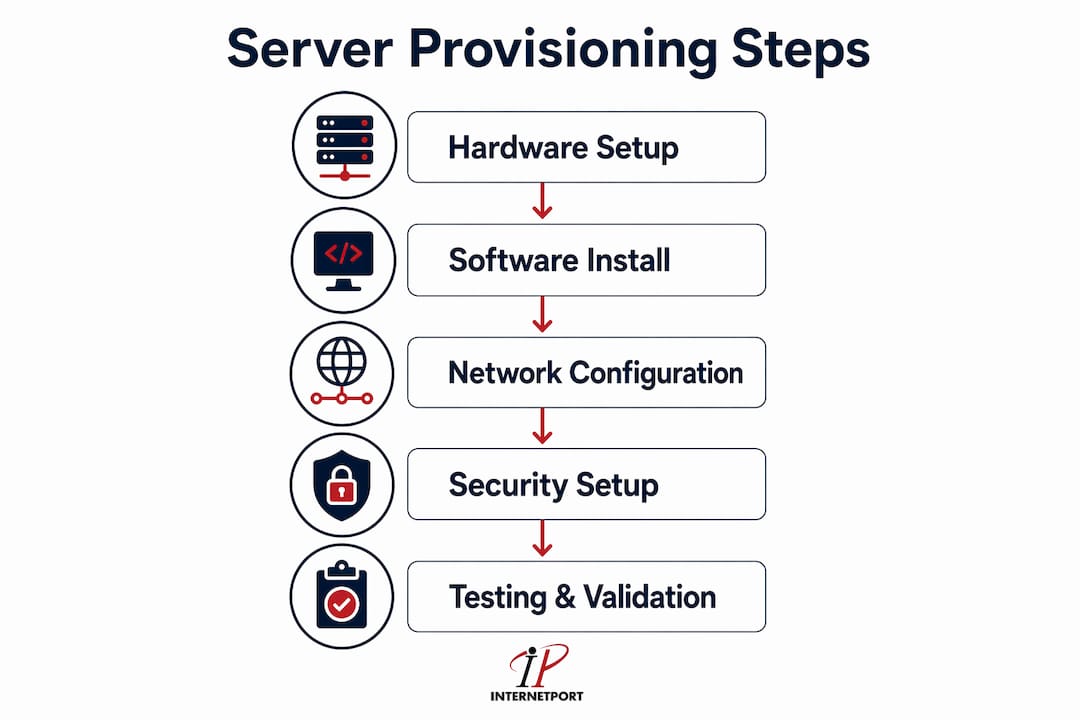
The major stages of the server provisioning process follow a logical sequence:
- Hardware allocation — Select and assign physical or virtual resources. This means choosing CPU count, RAM, storage type and size, and network interface capacity based on workload requirements, not worst-case guesses.
- Operating system deployment — Install and configure the base OS. Most teams use pre-built images or golden templates to speed this step and guarantee a known-good starting point.
- Base software installation — Apply runtime environments, monitoring agents, logging daemons, and any middleware the application stack requires.
- Network configuration — Assign IP addresses, configure DNS, set firewall rules, and define VLAN membership. This step determines how the server communicates with the rest of the infrastructure.
- Security hardening — Disable unused services, apply OS-level patches, configure SSH key authentication, and enforce access control policies aligned with your security baseline.
- Validation and testing — Run automated checks to confirm the server meets its defined state before handing it off to application teams.
The distinction between physical, virtual, and cloud provisioning matters for how you execute each stage. Physical servers require hands-on hardware setup or PXE boot automation. Virtual machines add a hypervisor layer and allow faster cloning. Cloud instances shift hardware allocation to API calls, which makes the process faster but requires tighter cost controls from the start.
Pro Tip: Always define your resource allocation based on measured workload data, not on what the application vendor recommends as a maximum. Vendor maximums are ceiling figures, not operational targets.

How does automation and infrastructure as code enhance server provisioning?
Manual server provisioning is a liability at scale. Automation runs workflows for 20 or more machines in parallel, while a human administrator working manually can spend hours on a single machine. That gap compounds fast when you are standing up a new environment or responding to a capacity event.
Infrastructure as Code is the practice of defining your server configurations in machine-readable files stored in version control. Tools like Ansible use declarative playbooks to describe the desired state of a server. Terraform handles resource provisioning at the cloud API level, creating instances, networks, and storage from code. The combination means your provisioning process becomes a Git repository, not a runbook in someone's head.
The core benefits of automation in the provisioning workflow include:
- Parallel provisioning — Spin up dozens of servers simultaneously without additional human effort.
- Repeatability — Every server built from the same template produces an identical result, eliminating "works on my machine" problems.
- Audit trails — IaC stored in Git enables audits and prevents divergence from the intended setup.
- Reduced human error — Automated steps do not mistype IP addresses or forget to disable a service.
- Pipeline integration — Provisioning can trigger automatically when a new environment is requested, feeding directly into CI/CD pipelines.
Golden images and configuration templates are the practical foundation of this approach. Standardized baselines and imaging speed builds and improve reliability across environments. A golden image captures a known-good OS state with base packages installed. Every new server starts from that image, and automation layers the environment-specific configuration on top.
Pro Tip: Store your Terraform state files in a remote backend with locking enabled. Local state files cause conflicts when multiple team members run provisioning jobs simultaneously.
The table below compares manual provisioning against an automated IaC approach across the dimensions that matter most to system administrators.
| Dimension | Manual provisioning | Automated IaC provisioning |
|---|---|---|
| Time per server | Hours | Minutes |
| Consistency | Variable, human-dependent | Identical across all instances |
| Audit capability | Difficult, relies on notes | Full version history in Git |
| Error rate | High for complex configurations | Low, deterministic execution |
| Scale | Linear with headcount | Near-unlimited parallelism |
What is the difference between server provisioning, configuration management, and deployment?
These three terms describe distinct phases of the server lifecycle. Conflating them leads to operational confusion and gaps in responsibility. Provisioning creates the foundational infrastructure resources. Configuration management maintains and adjusts those resources over time. Deployment installs and activates applications on the provisioned infrastructure.
Here is how each phase differs in practice:
- Server provisioning sets up the base environment. It runs once per server lifecycle, or again when a server is rebuilt. The output is a server in a known, defined state ready to receive workloads. Think of it as construction: you build the building before anyone moves in.
- Configuration management is the ongoing process of enforcing and updating system settings after provisioning. Tools like Puppet, Chef, and Ansible (in its ongoing-management mode) continuously check that the server matches its desired state. If someone manually changes a firewall rule, configuration management detects and corrects the drift.
- Deployment is the act of placing application code or services onto the provisioned and configured server. Deployment tools handle version management, rollback, and service restarts. Deployment assumes the server is already in the correct state.
Separating these three concepts gives your team clear ownership boundaries. The infrastructure team owns provisioning and configuration management. The application team owns deployment. When something breaks, you know exactly which layer to investigate. Configuration drift, one of the most common causes of production incidents, happens when configuration management is absent or inconsistently applied after provisioning.
The server hardware deployment guide from Internetport covers how these phases connect in physical server workflows, which is useful context if your environment includes bare-metal machines alongside cloud instances.
What are the best practices and common pitfalls in server provisioning?
The most effective provisioning programs share a common trait: they treat the provisioning configuration as the source of truth, not the running server. Experienced administrators store provisioning configuration in version control to prevent drift and audit infrastructure changes effectively. That single practice prevents more incidents than any monitoring tool.
Best practices to implement:
- Establish standardized baselines. Define a minimum security and configuration standard that every server must meet before it enters production. Document it, automate it, and enforce it without exceptions.
- Use lifecycle cost controls from day one. Infrastructure as code creates cost predictability by making infrastructure choices visible before deployment. Review resource allocations at provisioning time, not after the bill arrives.
- Integrate validation gates. Automated tests should confirm OS version, open ports, installed packages, and security settings before a server is marked ready. A server that passes validation is a server you can trust.
- Document your golden images. Every image should have a version number, a creation date, and a changelog. Teams that skip this step end up with a library of images nobody can identify.
- Apply VPS security practices at provisioning time. Security controls applied after the fact are weaker than controls baked into the provisioning template.
Common pitfalls to avoid:
- Oversized provisioning. Many cloud instances are 30–50% oversized, causing unnecessary costs because teams provision for worst-case estimates rather than measured demand. Right-size based on actual workload analysis.
- Skipping validation. Teams under time pressure skip the testing phase and ship servers that fail in production. Automated validation takes minutes and prevents hours of incident response.
- Ignoring configuration drift. A provisioned server that is not under active configuration management will drift from its baseline within weeks. Drift creates security vulnerabilities and makes troubleshooting unpredictable.
- Undocumented manual changes. Any manual change made directly to a running server that is not reflected in the provisioning code creates a hidden dependency. The next rebuild will not include that change, and the failure will be hard to diagnose.
Pro Tip: Schedule quarterly provisioning audits. Pull a random sample of servers and compare their running state against the provisioning template. The gap you find is your configuration drift score.
How does server provisioning adapt across on-premises, cloud, and hybrid environments?
Provisioning looks different depending on where the server lives, but the goals are identical: a consistent, secure, and documented starting state. Physical servers require hardware setup while cloud environments emphasize virtual resource allocation and orchestration. Hybrid environments combine both demands and require provisioning strategies that work across boundaries.
The table below maps the key provisioning characteristics across the three main environment types.
| Environment | Hardware control | Provisioning speed | Primary tools | Key challenge |
|---|---|---|---|---|
| On-premises | Full | Slow (days to weeks) | PXE boot, Ansible, imaging | Lead time for hardware |
| Cloud | None (API-driven) | Fast (minutes) | Terraform, cloud-native APIs | Cost control, overprovisioning |
| Hybrid | Mixed | Variable | Terraform + Ansible combined | Consistency across boundaries |
On-premises provisioning gives you full control over hardware but introduces procurement lead times. A server order can take days or weeks to arrive, which means capacity planning must happen well in advance. PXE boot automation and network-based OS deployment reduce the manual effort once hardware is racked.
Cloud provisioning removes hardware concerns entirely. You define resources in code, call an API, and the instance appears in minutes. The tradeoff is that the speed makes overprovisioning easy. Without workload analysis, teams default to large instance types and pay for capacity they never use.
Hybrid environments are the most complex. Containers and orchestration platforms like Kubernetes add another layer, because the provisioning of the underlying nodes must support the scheduling requirements of the container workload. A node provisioned with insufficient CPU or memory will cause pod scheduling failures that are difficult to trace back to the original provisioning decision. For teams managing multi-cloud setups, consistent provisioning templates across providers reduce the risk of environment-specific surprises.
Key Takeaways
Server provisioning is the foundational discipline that determines whether your infrastructure is consistent, secure, and cost-efficient from the moment a server enters production.
| Point | Details |
|---|---|
| Provisioning covers more than OS install | Network permissions, user accounts, and security hardening are all part of the provisioning scope. |
| Automation eliminates manual error at scale | Tools like Ansible and Terraform provision dozens of servers in parallel with identical, auditable results. |
| IaC prevents configuration drift | Storing provisioning templates in Git creates a source of truth and enables infrastructure audits. |
| Overprovisioning wastes budget | Size resources to measured workload demand, not worst-case estimates, to avoid 30–50% cost overruns. |
| Provisioning, configuration management, and deployment are distinct | Separating these phases gives teams clear ownership and makes incident response faster. |
Why I think most teams underestimate provisioning as a discipline
Most teams treat server provisioning as a one-time task. Get the server up, hand it off, move on. That mindset is where the problems start.
I have watched organizations invest heavily in monitoring and incident response while their provisioning process was still a mix of tribal knowledge and outdated runbooks. Every time a new server was built, it was slightly different from the last one. Those differences accumulated into a fleet of servers that were impossible to reason about at scale. When something failed, the investigation always circled back to "this server was set up differently."
The shift that actually changes outcomes is treating provisioning configuration as a living document stored in version control. When the provisioning template is the source of truth, every server is explainable. You can answer "what is on this server and why" without logging in and looking around. That capability is worth more than most monitoring dashboards.
The cost angle is equally underappreciated. Oversized provisioning is not a cloud-specific problem. It happens on-premises too, just more slowly. Teams that do workload analysis before provisioning consistently find they can run the same workloads on fewer or smaller resources. That finding pays for the analysis effort many times over.
My recommendation: treat provisioning as a product, not a task. Give it a backlog, a review cycle, and an owner. The teams that do this build infrastructure that is genuinely easier to operate, cheaper to run, and faster to recover when something goes wrong.
— Peter
Internetport's hosting infrastructure for modern provisioning workflows
IT teams that invest in solid provisioning practices need infrastructure that supports them without friction. Internetport provides dedicated servers, VPS solutions, and web hosting from data centers in Sweden and internationally, with PCI DSS compliance and private networking options built in.
Internetport's dedicated and virtual server options are built for teams that use Terraform, Ansible, and IaC workflows. The infrastructure supports automation-friendly deployment, consistent resource allocation, and the security controls your provisioning baseline requires. Whether you are running on-premises workloads, cloud VPS instances, or a hybrid mix, Internetport gives you the foundation to provision with confidence and scale without surprises.
FAQ
What is server provisioning?
Server provisioning is the process of setting up a server with all required hardware, software, network, and security configurations so it is ready to run workloads. It covers OS deployment, user accounts, network permissions, and security hardening.
How does server provisioning work in a cloud environment?
Cloud provisioning uses API calls and tools like Terraform to allocate virtual resources in minutes. The process replaces physical hardware setup with code-defined resource specifications that can be versioned and repeated.
What is the difference between provisioning and configuration management?
Provisioning creates the base server environment as a one-time setup. Configuration management continuously enforces and updates system settings after provisioning to prevent drift from the intended state.
What are the main benefits of server provisioning automation?
Automation enables parallel provisioning of many servers simultaneously, eliminates manual errors, and produces identical environments every time. Storing templates in version control also creates a full audit trail of infrastructure changes.
Why do cloud instances get overprovisioned so often?
Teams typically size cloud instances based on worst-case estimates rather than measured workload data. This practice results in instances that are 30–50% larger than necessary, which drives up costs without improving performance.