
TL;DR:
- Redundancy in hosting involves duplicating critical infrastructure components to ensure continuous website operation during failures. Implementing multiple layers, such as server, data, network, power, and geographic redundancy, significantly increases uptime and business continuity for SMBs. Regular testing and proper planning are essential to avoid misconceptions and maximize the benefits of high availability strategies.
Redundancy in hosting is defined as the deliberate duplication of critical infrastructure components so that a failure in any single system triggers an automatic switch to a working alternative, keeping your website online without manual intervention. The industry term for this architecture is high availability (HA) hosting, and understanding it is the difference between a business that survives a server crash and one that loses revenue for hours. Banks, stock exchanges, and e-commerce platforms like Amazon have built their entire infrastructure around HA principles because a single point of failure (SPOF) is an unacceptable risk. For small and medium-sized businesses (SMBs), the role of redundancy in hosting is no longer optional. Failover, load balancing, and data replication are the three mechanisms that make redundancy real, and this guide breaks down exactly how each one works for your budget and risk profile.
What types of redundancy exist in hosting?
Hosting redundancy operates across five distinct layers, and each layer addresses a different failure scenario. Treating any one layer as sufficient is a mistake. A server cluster with no power backup is still vulnerable to a data center outage.
Server redundancy
Server redundancy uses clustered nodes so that if one physical or virtual server fails, another node in the cluster picks up the workload automatically. This is the most common entry point for SMBs moving beyond a single server. SMBs typically move from single server hosting to clustered environments with load balancers to reduce downtime, though it increases monthly costs. The load balancer distributes incoming traffic across multiple nodes, so no single server carries the full load.
Data redundancy
Data redundancy means your data exists in more than one place at the same time. Replication copies data continuously across servers or data centers, so the secondary copy is always current. Backups, by contrast, capture a point-in-time snapshot and require manual or scheduled restoration. Redundancy ensures continuous uptime by eliminating single points of failure, while backups provide point-in-time recovery. Both are necessary, and confusing them is one of the most expensive mistakes an SMB can make.
Network redundancy
Network redundancy connects your hosting environment to multiple internet service providers (ISPs) and uses multiple physical paths between servers. If one ISP experiences an outage or a fiber line is cut, traffic automatically reroutes through the secondary path. Without this layer, even a perfectly redundant server cluster can go dark because the network path to it has failed.

Power redundancy
Power redundancy relies on uninterruptible power supplies (UPS) and diesel generators to maintain electricity during grid failures. Enterprise-grade data centers, including those operated by Internetport in Sweden, run N+1 or 2N power configurations, meaning there is always at least one full backup power source for every active circuit.
Geographic redundancy
Geo redundancy has become essential for SMBs, providing resilience against regional outages by replicating data across multiple data centers. A flood, a regional ISP failure, or a localized power grid collapse cannot take down a geographically distributed setup because traffic automatically redirects to the unaffected location.
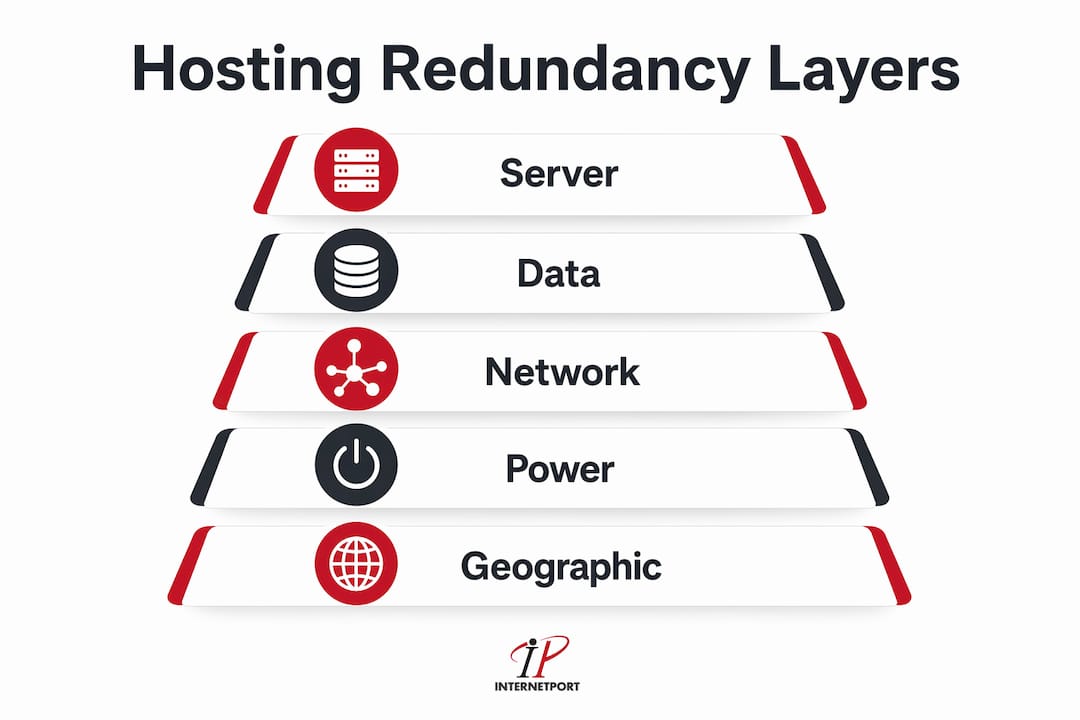
| Redundancy type | What it protects against | Typical mechanism |
|---|---|---|
| Server | Hardware failure, OS crashes | Clustering, load balancing |
| Data | Data loss, corruption | Replication, backups |
| Network | ISP outages, routing failures | Multi-ISP, BGP failover |
| Power | Grid failures, surges | UPS, generators |
| Geographic | Regional disasters, data center outages | Multi-site replication |
Pro Tip: When evaluating a hosting provider, ask specifically which of these five layers their infrastructure covers. A provider that only addresses server redundancy is leaving four failure scenarios unprotected.
How does redundancy improve uptime and business continuity?
The business case for redundancy becomes concrete when you translate availability percentages into actual downtime minutes. Increasing uptime from 99.9% to 99.99% reduces annual downtime from about 8 hours to 52 minutes, but increases infrastructure costs over 10-fold. That cost jump is significant, which is why SMBs need to match their availability target to the actual revenue impact of downtime rather than chasing the highest number by default.
| Availability tier | Annual downtime | Typical use case |
|---|---|---|
| 99.9% (three nines) | 8.77 hours/year | Low-traffic informational sites |
| 99.99% (four nines) | 52.6 minutes/year | E-commerce, SaaS applications |
| 99.999% (five nines) | 5.26 minutes/year | Financial platforms, critical APIs |
For most SMBs running e-commerce or customer-facing applications, 99.99% is the practical target. Reaching five nines requires infrastructure investment that only makes sense when the cost of 52 minutes of downtime per year exceeds the cost of the upgrade.
Active-Standby vs. Active-Active configurations
Two configurations dominate SMB redundancy planning. Active-Standby redundancy is resource efficient but carries a failover delay of seconds to tens of seconds, while Active-Active offers near-zero downtime but with greater complexity and synchronization challenges. In an Active-Standby setup, the secondary server sits idle until the primary fails. In Active-Active, both servers handle live traffic simultaneously, so a failure simply shifts load to the surviving node with no perceptible interruption.
Active-Standby is the right starting point for most SMBs because it is significantly cheaper and simpler to manage. Active-Active makes sense when your application cannot tolerate even a 10-second interruption, such as a payment processing gateway or a real-time booking system.
- Active-Standby: Lower cost, simpler configuration, seconds-long failover delay
- Active-Active: Higher cost, complex synchronization, near-zero downtime
- Load balancing: Distributes traffic across nodes, works with both configurations
- Geographic failover: Redirects traffic between data centers, requires DNS or anycast routing
Pro Tip: If you are running WooCommerce or a similar e-commerce platform, Active-Standby with a sub-30-second failover SLA is usually sufficient. Reserve Active-Active budgets for checkout and payment endpoints specifically, rather than your entire stack.
For a deeper look at building high availability workflows from the ground up, Internetport's technical blog covers the step-by-step process of identifying and eliminating SPOFs across your hosting environment.
What are the challenges of implementing hosting redundancy?
Redundancy is not a set-and-forget configuration. The most dangerous assumption in hosting is that because redundancy exists on paper, it will work during an actual failure. Automated monitoring, health checks, and failover tests are critical to ensure redundancy works effectively and failover happens within specified recovery time objectives (RTOs). Without regular testing, a failover mechanism can silently degrade for months before anyone notices.
The split brain problem
Split brain is one of the most technically damaging failure modes in redundant systems. It occurs when two nodes lose communication with each other and both believe they are the primary active node. Each node then accepts writes independently, creating two divergent data sets. When the network partition heals, the system has no clean way to reconcile which version is correct. Split brain scenarios in dual redundancy can cause data inconsistencies, and triple redundancy with quorum prevents this by requiring a majority vote to designate a single active leader node. This is why three-node clusters are the standard minimum for production HA environments rather than two.
Redundancy does not replace backups
Redundancy needs to be complemented by backups to protect against data corruption or hacks, because redundancy alone replicates corrupted states across all nodes. If a ransomware attack encrypts your primary database, your redundant secondary database receives the same encrypted data in real time. A backup from 24 hours earlier is the only way to recover clean data. The two systems solve different problems and must coexist.
"Redundancy keeps your site online. Backups keep your data recoverable. Treating them as interchangeable is how businesses lose both uptime and data in the same incident."
Over-provisioning and cost creep
Higher redundancy availability levels increase costs exponentially, and SMBs should carefully analyze the business cost of downtime to choose the right tier rather than defaulting to maximum redundancy. Over-provisioning a small marketing website to five-nines standards wastes budget that could fund better security or faster CDN delivery. The goal is proportional redundancy, not maximum redundancy.
For IT managers who need a structured approach, the data center redundancy workflow guide from Internetport clarifies the practical differences between backup systems and redundant infrastructure at the data center level.
How can SMBs choose the right hosting redundancy strategy?
Selecting the right level of redundancy starts with one calculation: what does one hour of downtime cost your business? Include lost sales, support costs, staff idle time, and reputational damage. That number determines which availability tier is financially justified and which is overkill.
-
Calculate your downtime cost. Multiply your average hourly revenue by the realistic probability of an outage. Add customer churn risk and SLA penalty costs if applicable. This gives you a ceiling for what redundancy investment makes sense.
-
Choose a redundancy model. N+1 redundancy means one backup component for every active one. 2N means a full duplicate of the entire system. N+1 is the standard for most SMBs. 2N is appropriate for financial services or healthcare applications where regulatory requirements demand it.
-
Assess geographic risk. If your customers are concentrated in one region and your data center is in the same region, a single weather event or ISP failure can affect both. Geographic redundancy is no longer just enterprise-level but is now crucial for SMBs to safeguard against power outages, ISP failures, and regional disasters.
-
Demand transparency from your hosting provider. Ask for documented failover procedures, not just marketing claims. Request the provider's tested RTO and recovery point objective (RPO) for each redundancy layer they offer.
-
Start with the highest-risk layer. If your business runs on a database-driven application, data redundancy and server clustering are your first priorities. Network and geographic redundancy can follow as budget allows.
Pro Tip: Ask any prospective hosting provider: "When did you last test a full failover, and what was the measured RTO?" A provider that cannot answer with a specific number and date has not tested it recently enough to trust.
The hosting and business continuity guide for SMB leaders covers how to map your specific application dependencies to the right hosting redundancy tier, which is a useful complement to the framework above.
Key takeaways
Redundancy in hosting is the single most effective infrastructure investment an SMB can make to protect revenue, because it eliminates the single points of failure that cause unplanned downtime.
| Point | Details |
|---|---|
| Five redundancy layers | Server, data, network, power, and geographic redundancy each address distinct failure scenarios. |
| Uptime tiers have real costs | Moving from 99.9% to 99.99% uptime cuts downtime from 8.77 hours to 52 minutes annually but raises infrastructure costs significantly. |
| Active-Standby vs. Active-Active | Active-Standby suits most SMBs; Active-Active is for applications that cannot tolerate even a 10-second failover delay. |
| Redundancy and backups are not the same | Redundancy replicates live state; backups recover from corruption or attack. Both are required. |
| Test failover regularly | Untested redundancy is not redundancy. Automated health checks and scheduled failover drills are non-negotiable. |
Why most SMBs get redundancy wrong the first time
I have worked with dozens of SMBs on their hosting infrastructure, and the pattern is almost always the same. They invest in server redundancy, feel confident, and then discover during an actual incident that their database had no replication, their DNS had a single point of failure, or their "redundant" setup had never been tested. The failover that was supposed to take 15 seconds took 8 minutes because a health check script had a misconfigured timeout.
The most common misconception I encounter is treating backups as a substitute for redundancy. A business owner tells me they back up nightly and considers that sufficient. It is not. A nightly backup means up to 24 hours of data loss in a worst-case scenario, plus however long restoration takes. Redundancy means your site stays online and your data stays current. They are not competing solutions. They are complementary ones, and you need both.
The second mistake is buying redundancy and never verifying it. Active-Active configurations offer performance benefits and near-zero downtime but require sophisticated data synchronization and conflict resolution strategies. I have seen Active-Active setups that looked correct in the architecture diagram but had a synchronization lag that caused transaction conflicts under load. The only way to find that is to test it under realistic conditions before an incident forces the issue.
My practical advice: start with N+1 server redundancy and daily replication, test your failover quarterly, and add geographic redundancy once your monthly revenue justifies the cost. Incremental implementation aligned to your actual risk profile is far more effective than an overbuilt system that nobody on your team fully understands or monitors.
— Peter
How Internetport builds redundancy into every hosting tier

Internetport designs its hosting infrastructure around the redundancy principles covered in this guide. Their data centers in Sweden and internationally support server clustering, load balancing, and geographic failover across their web hosting plans, making HA configurations accessible to SMBs without enterprise-level budgets. As your business grows, you can scale from a clustered web hosting environment to a cloud VPS with dedicated resources and configurable replication, or move to a dedicated server for mission-critical applications requiring maximum isolation and uptime guarantees. Internetport's technical support team monitors failover health and can walk you through RTO and RPO documentation before you commit to a plan.
FAQ
What is redundancy in server hosting?
Redundancy in server hosting means duplicating critical infrastructure components, including servers, storage, network paths, and power supplies, so that a failure in any one component triggers automatic failover to a working alternative without manual intervention.
How does redundancy improve uptime?
Redundancy eliminates single points of failure, which are the primary cause of unplanned downtime. By running clustered servers with load balancing and replicating data across nodes, a failure in one component does not interrupt service to end users.
What is the difference between redundancy and backups?
Redundancy aims for seamless continuity while backups are for restoring data after corruption, deletion, or attack. Redundancy keeps your site live in real time; backups recover a previous clean state when live data has been compromised.
What is the split brain problem in redundant hosting?
Split brain occurs when two nodes in a redundant cluster lose communication and both assume they are the active primary, causing divergent data writes. Triple redundancy with quorum prevents this by requiring a majority vote before any node can act as leader.
How much does hosting redundancy cost for an SMB?
Costs vary significantly by provider and configuration. Moving from a single server to a clustered N+1 setup typically multiplies hosting costs by two to four times, but moving from 99.9% to 99.99% uptime can increase infrastructure costs over 10-fold depending on the architecture required.