

TL;DR:
- Cloud migration involves strategic planning of application, data, and infrastructure transfer to cloud platforms.
- Successful migration follows phases like discovery, assessment, strategy selection, execution, testing, and optimization.
- Address organizational, technical, and cost challenges through stakeholder engagement and careful dependency mapping.
91% of businesses use some form of cloud service, yet a surprising number of IT teams treat migration as simply "moving files to the cloud." The reality is far more strategic. Cloud migration involves deliberate planning, phased execution, and careful methodology selection that can make or break your organization's digital future. This guide cuts through the noise and gives IT decision-makers a clear, practical framework covering what cloud migration actually is, the phases and methodologies involved, the technical challenges most guides skip, and the cost and risk factors that determine whether your migration succeeds or stalls.
Table of Contents
- Understanding cloud migration: Definition and basics
- Core phases of a successful cloud migration
- Cloud migration methodologies: The 6 Rs and beyond
- Technical challenges and edge cases in cloud migration
- Cost, risk, and optimization: Making migration decisions
- Why successful cloud migration requires more than technical planning
- Explore flexible cloud and hosting solutions for your migration
- Frequently asked questions
Key Takeaways
| Point | Details |
|---|---|
| Migration moves more than data | Cloud migration spans applications, workloads, and entire IT infrastructure—not just files. |
| Phased strategy is essential | Successful migration relies on careful planning across discovery, assessment, execution, and optimization. |
| Choose your methodology wisely | Matching the right framework (6 Rs, hybrid) to your needs prevents wasted effort and costs. |
| Pitfalls can be costly | Hidden dependencies, compliance, and overprovisioning are common mistakes when moving to the cloud. |
| More than just technology | Engage stakeholders and foster culture change to ensure full migration benefits are realized. |
Understanding cloud migration: Definition and basics
Cloud migration is not the same as buying a SaaS subscription or spinning up a hosted website. Cloud migration is the process of moving applications, data, workloads, and IT infrastructure from on-premises, legacy, or other cloud environments to a target cloud platform. That distinction matters enormously for IT leaders who need to scope, budget, and govern these projects.
The scope of what moves during a migration can include:
- Applications (custom-built or commercial off-the-shelf)
- Databases and structured data
- Virtual machines and server workloads
- Network configurations and security policies
- Storage systems and backup archives
Understanding your cloud infrastructure overview before migration is critical. Many organizations confuse "using cloud" with "migrating to cloud." Using a cloud-hosted email tool is not migration. Moving your legacy ERP system, customer database, and internal applications to AWS or Azure is.
"Cloud migration is not a destination. It is an ongoing transformation of how your organization consumes and manages IT resources."
Why does this matter strategically? Because true migration unlocks scalability, fault tolerance, and modernization that simple hosting never delivers. When your infrastructure lives in a well-architected cloud environment, you can scale compute resources in minutes, recover from hardware failures automatically, and deploy new services globally without physical constraints.
The 91% cloud adoption figure is often cited to suggest most businesses are "done" with cloud. In practice, many organizations are still running critical workloads on aging on-premises hardware while only using cloud for peripheral tools. That gap is exactly where strategic migration planning becomes essential for IT leaders who want real operational resilience.
For SMBs and large enterprises alike, migration is the bridge between legacy IT debt and a modern, scalable infrastructure. Getting the definition right is the first step toward planning a migration that actually delivers on its promise.

Core phases of a successful cloud migration
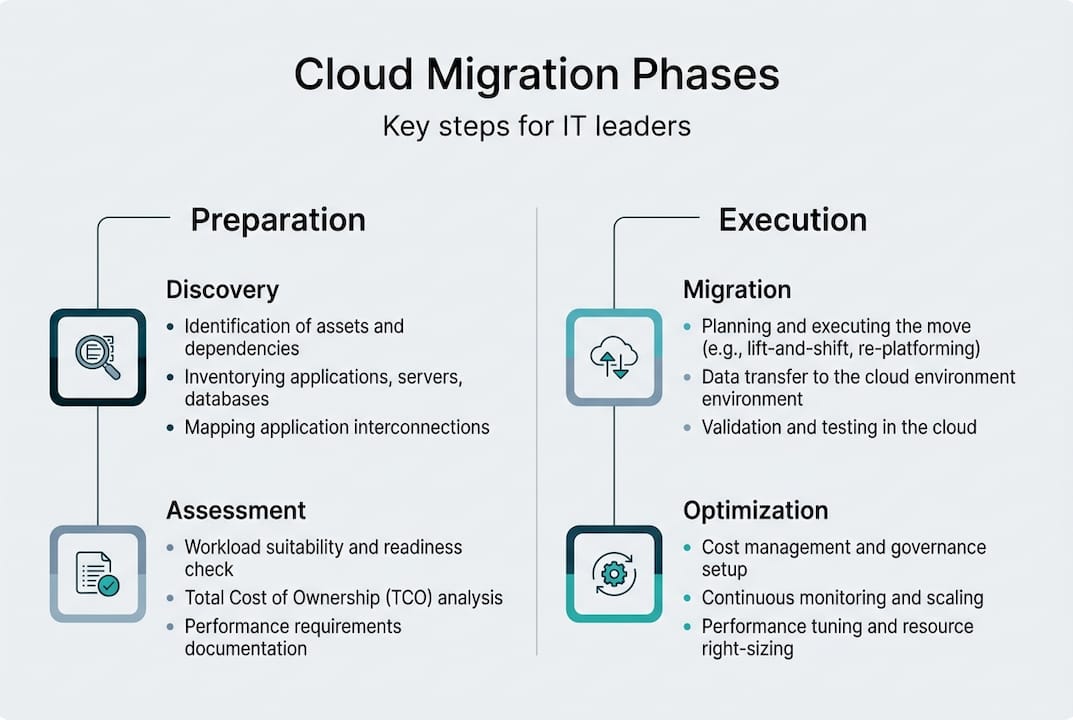
Once you understand what cloud migration means, the journey to the cloud follows a series of strategic phases tailor-made for IT leadership. Core phases include discovery and inventory, assessment and prioritization, strategy selection, execution, testing and validation, cutover, and post-migration optimization.
Here is how those phases unfold in sequence:
- Discovery and inventory — Catalog every application, database, and workload currently running in your environment.
- Assessment and prioritization — Evaluate complexity, dependencies, compliance requirements, and business criticality for each asset.
- Strategy selection — Choose the right migration methodology (covered in the next section) for each workload.
- Execution — Move workloads according to the selected strategy, typically in waves rather than all at once.
- Testing and validation — Verify performance, data integrity, and security in the new environment before going live.
- Cutover — Switch production traffic to the cloud environment with minimal downtime.
- Post-migration optimization — Right-size resources, eliminate waste, and tune performance using cloud scalability best practices.
| Phase | Primary goal | Key risk |
|---|---|---|
| Discovery | Complete asset visibility | Missing hidden dependencies |
| Assessment | Prioritize by value and risk | Underestimating complexity |
| Strategy selection | Match method to workload | Wrong fit increases cost |
| Execution | Move workloads safely | Downtime and data loss |
| Testing | Confirm integrity and performance | Skipping validation steps |
| Cutover | Go live with confidence | Rollback failure |
| Optimization | Reduce waste, improve speed | Overprovisioning costs |
Pro Tip: Investing time in discovery and assessment before a single workload moves will prevent the most expensive surprises. Organizations that skip this phase routinely discover hidden application dependencies mid-migration, which causes delays and budget overruns.
Each phase builds on the previous one. Rushing through assessment to get to execution faster is one of the most common and costly mistakes IT teams make.
Cloud migration methodologies: The 6 Rs and beyond
With the phases mapped out, IT leaders also need to select the right migration methodology for their organization's needs. Methodologies use frameworks like the 6 Rs (Rehost, Replatform, Refactor, Repurchase, Retire, Retain) or IBM's 7 Rs, which adds Relocate for hybrid cloud moves.
Here is a quick breakdown of each approach:
- Rehost (lift-and-shift): Move workloads as-is with no code changes. Fast and low-risk, but leaves optimization on the table.
- Replatform: Make minor adjustments to take advantage of cloud-managed services without redesigning the application.
- Refactor (re-architect): Redesign the application to be cloud-native. High effort, but the biggest long-term gains.
- Repurchase: Replace an existing application with a cloud-native SaaS alternative.
- Retire: Decommission applications that are no longer needed.
- Retain: Keep certain workloads on-premises temporarily, usually for compliance or dependency reasons.
- Relocate (IBM's addition): Move entire virtualized infrastructure to the cloud without converting to a different platform, useful for hybrid scenarios.
| Methodology | Speed | Cost impact | Best for |
|---|---|---|---|
| Rehost | Fast | Low upfront, higher long-term | Legacy apps, tight timelines |
| Replatform | Moderate | Medium | Managed services adoption |
| Refactor | Slow | High upfront, lower long-term | Core business applications |
| Repurchase | Fast | Varies by vendor | Commodity tools |
| Retire | Immediate | Cost savings | Redundant systems |
| Retain | N/A | Ongoing on-prem cost | Compliance-bound workloads |
| Relocate | Fast | Low | Hybrid cloud strategies |
For SMBs, rehost and replatform are often the most practical starting points. Explore cloud solution examples to see how different organizations apply these strategies. Enterprises with complex, business-critical applications typically benefit most from refactor, despite the higher investment. Understanding enterprise hosting approaches can help you match the right methodology to your organization's scale and risk tolerance.
Technical challenges and edge cases in cloud migration
Even with a clear methodology, IT leaders must stay vigilant. Cloud migration brings tough edge cases and technical obstacles you won't find in most overviews. Common edge cases include hidden dependencies, COTS licensing incompatibilities, overprovisioning leading to high costs, data residency and compliance requirements for regulated data such as HIPAA, and cloud-to-cloud API differences.
Here are the most impactful challenges to watch for:
- Hidden application dependencies: An application may silently rely on a local service, legacy protocol, or hardcoded IP address that breaks in the cloud.
- Licensing mismatches: Commercial software licensed for on-premises use often cannot be transferred to cloud VMs without renegotiation or additional fees.
- Overprovisioning: Teams often mirror their on-premises resource allocations in the cloud, paying for far more compute and storage than they actually need.
- Data residency rules: Regulated industries must ensure data stays within specific geographic boundaries, which limits cloud provider and region choices.
- API incompatibilities: Moving between cloud providers or from legacy systems to cloud-native services often exposes API differences that require code-level fixes.
"Unaddressed edge cases are the single largest driver of cloud migration budget overruns. Organizations that skip dependency mapping routinely spend 30-40% more than projected."
Data migration mechanics follow a structured process: source profiling, transformation and mapping, extraction using full-load or change data capture (CDC), loading into the target, validation through row counts and checksums, and final cutover. Each step requires careful planning, especially for large or regulated datasets.
Pro Tip: Map all application dependencies during the discovery phase, not after execution begins. A dependency discovered mid-migration can halt an entire wave and force costly rework. Using reliable hosting for migration as your foundation and understanding private cloud network solutions can help you design around these risks from the start.
Cost, risk, and optimization: Making migration decisions
As you prepare for migration, the most critical decisions often revolve around cost, risk, and how much optimization makes sense for your business. Lift-and-shift is fastest and lowest risk but delivers no optimization, resulting in higher long-term costs. Refactor maximizes benefits but demands significant effort and time. Big bang migrations move everything at once, which is risky but simpler to manage. Trickle migrations move workloads in waves, reducing risk but adding coordination complexity. Hybrid models retain some on-premises infrastructure for workloads that cannot or should not move.
The right balance depends on your organization's risk appetite, timeline, and budget. Here are the top best practices to minimize risk, manage cost, and optimize your migration outcomes:
- Start with low-risk, high-value workloads to build team confidence and validate your process before tackling critical systems.
- Right-size cloud resources from day one rather than mirroring on-premises allocations. Use cloud-native monitoring to adjust over time.
- Automate testing and validation at each migration wave to catch issues before they reach production.
- Build a rollback plan for every workload before cutover. Knowing how to reverse a migration is as important as knowing how to execute it.
- Track cost continuously using cloud cost management tools. Budget overruns in cloud migration are almost always caused by unchecked resource sprawl.
- Leverage migration optimization strategies and evaluate private cloud benefits for workloads where control and compliance are priorities.
The organizations that get the most value from migration are those that treat it as an iterative process, not a one-time event. Post-migration optimization is where the real return on investment compounds over time.
Why successful cloud migration requires more than technical planning
Here is the uncomfortable truth that most cloud migration guides avoid: technical execution is rarely the reason migrations fail. The real culprits are leadership misalignment, undertrained teams, and organizational resistance to change. We have seen technically flawless migrations stall for months because key stakeholders were not brought into the process early enough.
Cloud migration is a business transformation, not just an IT project. The teams who will use migrated systems need training. Executives need to understand the operational and financial implications. Department heads need visibility into timelines that affect their workflows. Reviewing enterprise hosting wisdom reinforces that the most resilient migrations combine technical rigor with strong internal communication.
Pro Tip: Treat stakeholder engagement as a parallel workstream to your technical phases. Schedule regular briefings, assign a migration communication lead, and document decisions in a shared space that everyone can access.
Over-focusing on tools and process while neglecting people is the fastest path to a migration that is technically complete but operationally broken.
Explore flexible cloud and hosting solutions for your migration
Planning a cloud migration is one thing. Having the right infrastructure partner to support it is another entirely.

At Internetport, we have been building reliable, high-performance hosting and cloud infrastructure since 2008. Whether you need dedicated hosting options to anchor your most critical workloads, scalable web hosting solutions for your public-facing applications, or flexible cloud solutions that grow with your migration roadmap, our infrastructure is built for exactly the kind of move you are planning. Two fully equipped data centers, PCI DSS certification, and daily backups give your team the foundation it needs to migrate with confidence.
Frequently asked questions
What are the critical first steps in a cloud migration?
Start with discovery, inventory, assessment, and strategy selection before moving a single workload. Skipping these steps is the leading cause of budget overruns and unexpected downtime.
Which cloud migration methodology should I use?
Choose from the 6 Rs framework, such as rehost, replatform, or refactor, based on each workload's complexity, business criticality, and your available resources. There is rarely a one-size-fits-all answer.
How do I avoid common pitfalls during cloud migration?
Identify hidden dependencies and licensing issues during discovery, and validate data integrity at every migration wave. Compliance requirements like HIPAA must be addressed before execution, not after.
What is the difference between lift-and-shift and refactor?
Lift-and-shift moves workloads quickly with minimal changes but leaves long-term cost savings on the table. Refactor redesigns applications for cloud-native efficiency, requiring more time and investment but delivering significantly better performance and lower operating costs over time.
How do I optimize costs after cloud migration?
Audit your cloud resource usage regularly, eliminate overprovisioned compute and storage, and use cloud-native monitoring tools to identify waste before it compounds into significant monthly expenses.