

TL;DR:
- Many SMBs outgrow shared hosting due to slow performance, limited control, and security risks. VPS offers scalable, isolated resources with full administrative control, making it ideal for growing businesses. Choosing managed or unmanaged VPS depends on your team's technical expertise and operational needs.
Shared hosting seems like the obvious starting point for a small business, but many companies quietly hit a wall long before they realize it. Pages slow to a crawl during traffic spikes, security incidents bleed over from neighboring accounts, and there's no room to install the tools your team actually needs. VPS sits in the middle ground between low-cost shared plans and expensive dedicated servers, offering more control, predictable performance, and room to scale without a dramatic jump in cost or complexity. This guide breaks down exactly why VPS has become the preferred hosting choice for SMBs that are serious about growth.
Table of Contents
- What is VPS and how does it fit SMB hosting needs?
- Core reasons SMBs choose VPS solutions
- Performance metrics: How VPS delivers for growing businesses
- Management models: VPS control and responsibility for SMBs
- When should SMBs choose VPS over other solutions?
- Our perspective: What most SMBs miss when choosing VPS
- Discover flexible VPS solutions for your SMB
- Frequently asked questions
Key Takeaways
| Point | Details |
|---|---|
| VPS is the SMB middle ground | A virtual private server balances affordability with control, ideal for businesses growing past shared hosting. |
| Scalability equals business agility | With VPS, your hosting grows with you, easily adding resources as website or application needs increase. |
| Performance impacts success | Real-world data shows that reliable VPS providers deliver the speed and reliability SMBs need. |
| Management model matters | Choosing managed vs unmanaged VPS affects your business’s security workload and long-term costs. |
What is VPS and how does it fit SMB hosting needs?
A virtual private server, or VPS, is a single physical server divided into multiple isolated virtual machines using software called a hypervisor. Each virtual machine gets its own dedicated slice of CPU, RAM, and storage, so your workload never competes with the business running on the same box. Think of it like owning a condo unit in a large building. You share the physical structure, but your space is locked, private, and fully yours to furnish as you like.
This architecture places VPS in a distinct position in the hosting market. As PCMag frames it, VPS occupies a clear tier between entry-level shared plans and premium dedicated hardware. For SMBs, that tier is where a lot of the practical value lives.
Shared vs VPS vs dedicated: A side-by-side comparison
| Feature | Shared hosting | VPS hosting | Dedicated server |
|---|---|---|---|
| Cost | Lowest | Moderate | Highest |
| Resource allocation | Shared pool | Dedicated slice | Full server |
| Performance consistency | Variable | Reliable | Best possible |
| Root/admin access | None | Full (on most plans) | Full |
| Scalability | Very limited | Easy to scale up/down | Requires hardware changes |
| Security isolation | Weak | Strong | Complete |
| Best for | Personal sites, startups | Growing SMBs, e-commerce | Large-scale enterprise apps |
This table makes the SMB case clear. You get real resource guarantees and administrative access without the cost of buying or leasing an entire physical machine.

Common hosting challenges during SMB growth
Growing businesses tend to hit specific friction points on shared hosting before they're ever ready for a dedicated server. Those friction points include:
- Traffic spikes that kill performance. A sudden marketing campaign or seasonal surge can tip a shared server's CPU limits and slow every tenant on the box, including you.
- Limited software freedom. Shared environments typically restrict which software you can install, which versions of PHP or Python you can run, and what server configurations you can change.
- Security concerns. One compromised site on a shared server can sometimes expose others to risk through misconfigured permissions or unpatched vulnerabilities.
- No real resource guarantees. On a shared plan, your neighbors' activity directly affects your uptime and response times.
Understanding how VPS hosting is structured helps SMBs recognize these limitations early and plan a smarter upgrade path. For teams already managing web applications or e-commerce, exploring Plesk web hosting tools for SMBs alongside VPS infrastructure can make server management significantly more practical.
Core reasons SMBs choose VPS solutions
Now that we've positioned VPS in the hosting landscape, here are the main reasons SMBs consistently opt for VPS services over other choices.
-
Scalability that matches your growth pace. VPS plans are designed for scalability and flexibility. Most providers let you add RAM, storage, or CPU allocation in minutes without migrating to a new server. That means your infrastructure scales in step with your business instead of forcing a disruptive platform change every time you land a big client or run a major campaign.
-
Administrative control and customization. VPS gives you root access or administrator-level control over the server environment. You choose your operating system, install your preferred software stack, configure security rules, and set up custom monitoring. That level of control is impossible on shared hosting and is exactly what development and operations teams need.
-
Cost-effectiveness at the right stage. A dedicated server gives you maximum performance, but it also comes with a price tag and management overhead that most SMBs don't need yet. A well-configured VPS from a quality provider delivers 80 to 90 percent of that performance for a fraction of the cost. VPS hosting advantages for business growth include this budget flexibility, which matters enormously when you're reinvesting revenue into product, marketing, or people.
-
Stronger security isolation. Your server environment is isolated from other customers at the hypervisor level. Even if another tenant's account gets compromised, your virtual machine stays protected. For businesses handling customer data, payment information, or internal records, this isolation is non-negotiable.
-
Reliable performance for customer-facing applications. A slow website or app doesn't just frustrate users; it directly affects conversion rates and brand perception. SSD VPS storage dramatically improves read and write speeds compared to older spinning disk solutions, giving every database query, file transfer, and page load a performance boost your customers actually feel.
"A growing e-commerce SMB with seasonal traffic can move from a $15/month shared plan to a modest VPS and immediately see checkout page load times drop by 40 to 60 percent, because they now have guaranteed CPU and RAM that doesn't get diluted by other tenants."
Pro Tip: When evaluating VPS providers, don't just compare sticker prices. Factor in the cost of downtime. A $10 per month savings means nothing if sluggish performance costs you two or three conversions per day.
Performance metrics: How VPS delivers for growing businesses
Understanding the "why" is important, but let's dig into how VPS platforms really perform and what metrics you should care about.
Why benchmarks matter for SMBs
Raw marketing specs, listed CPU cores and gigabytes of RAM, tell you very little about how a VPS will perform under your actual workload. What matters is how that hardware behaves when it's serving real web traffic, processing database queries, or handling file transfers simultaneously. That's why empirical benchmark testing across providers reveals significant differences in real-world performance, especially across web server throughput, CPU processing, disk I/O (how fast data is read and written), and network latency (the delay between a request and a response).
The four metrics every SMB should understand
Web server speed measures how many requests per second a VPS can handle under concurrent load. For a business running an online store, a content management system, or a customer portal, this number directly determines whether users experience smooth navigation or timeouts.
CPU performance is critical for any application that does real processing, such as image resizing, report generation, search indexing, or order processing. A VPS with burstable CPU (where you occasionally borrow capacity) behaves very differently from one with dedicated CPU allocation.
Disk I/O determines how fast your databases and file systems respond. On SSD-based VPS plans, sequential read speeds can reach 500 MB/s or higher, whereas a slow storage layer can turn a well-optimized application into a bottleneck. Managing VPS resources effectively often comes down to understanding how storage performance interacts with your application tier.
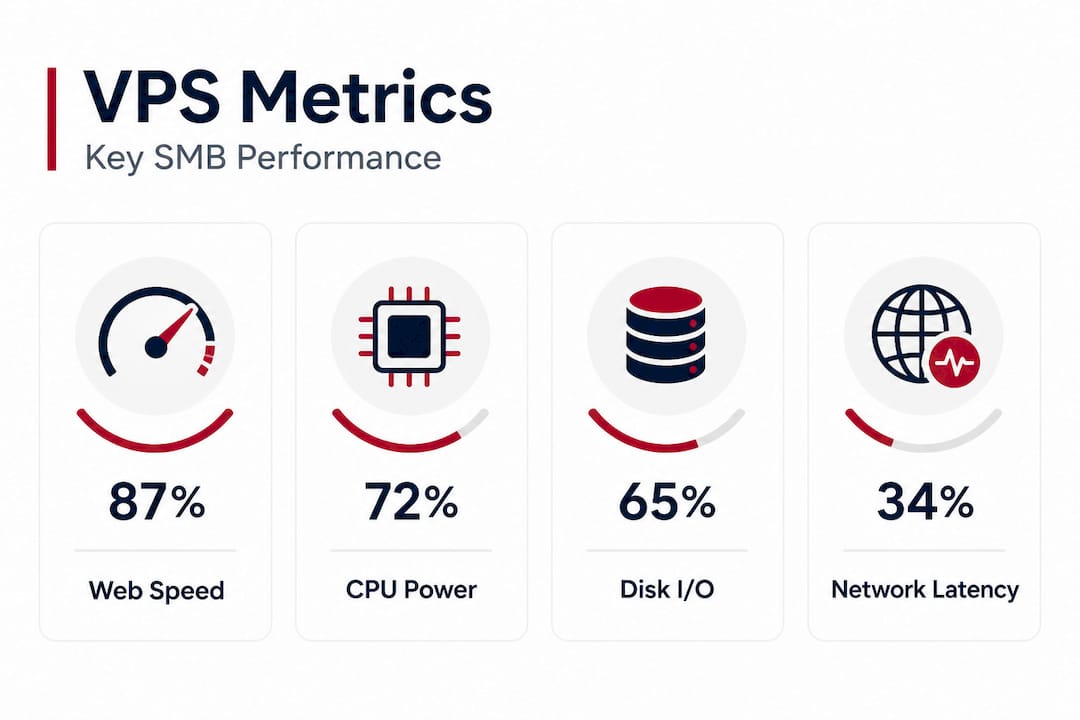
Network latency and throughput affect how quickly data moves between your server, your users, and any third-party APIs or services your application relies on. For businesses with customers in specific regions, choosing a data center location close to that audience can reduce latency by 30 to 80 milliseconds, a difference that is genuinely perceptible in interactive applications.
Sample benchmark comparison
| Metric | Entry-level shared | Mid-tier VPS | High-performance VPS |
|---|---|---|---|
| Web requests/sec | 200 to 400 | 1,200 to 2,500 | 4,000+ |
| Disk read speed | 80 to 120 MB/s | 400 to 600 MB/s | 800 MB/s+ |
| Network throughput | 100 Mbps | 1 Gbps | Up to 10 Gbps |
| Average latency (local) | 15 to 30 ms | 2 to 8 ms | Under 2 ms |
These aren't just numbers for engineers. They translate directly into page load times, shopping cart responsiveness, and whether your customers bounce or convert.
Statistic to note: Research consistently shows that a one-second delay in page load time can reduce conversions by 7 percent or more. For an SMB generating $500,000 per year online, that one second could cost $35,000 annually.
Pro Tip: Ask your potential VPS provider for their average disk I/O performance and whether their SSD storage is shared among multiple tenants or allocated specifically to your instance. The answer changes the real-world performance picture significantly.
Management models: VPS control and responsibility for SMBs
While raw performance matters, ongoing management and security responsibilities are just as critical for SMBs.
Managed vs unmanaged VPS: What the difference means in practice
The value of a VPS depends heavily on which management model you choose and your team's actual ability to handle security patching, backups, and server tuning. This is one of the most overlooked decisions in the VPS selection process.
Unmanaged VPS gives you a clean server and hands over full responsibility for everything that happens on it. You handle operating system updates, security patches, firewall configuration, backup schedules, and performance optimization. The cost is lower because the provider's responsibility ends at the physical layer.
Managed VPS means the hosting provider takes on those ongoing tasks. They monitor server health, apply OS and software patches, manage backups, and often provide a support line for server-level issues. You pay more, but you get time back and reduce the risk of a misconfigured firewall leaving your data exposed.
Common SMB mistakes when choosing a management model
- Choosing unmanaged to save money when you don't have the in-house skills. An unpatched server is a liability. A breach caused by an outdated software version costs far more than the monthly difference between managed and unmanaged plans.
- Assuming managed means the provider handles application-level security. Most managed plans cover the server infrastructure, not your CMS plugins, API endpoints, or custom code. That responsibility stays with you.
- Skipping a backup strategy because "the provider does it." Even on managed plans, you should verify how often backups are taken, how long they are retained, and how fast a restore takes. Test the restore process before you need it.
For teams evaluating their security posture, reviewing VPS security best practices is a useful starting point, and pairing that with solid server management strategies for SMBs helps you build a framework that scales without depending entirely on any single person.
How to decide which model fits your business
- Does your team include at least one person comfortable with Linux or Windows Server administration? If not, start with managed.
- Do you have a documented patching and backup process already? If not, managed removes that gap immediately.
- Are you subject to any compliance requirements, such as GDPR, PCI DSS, or HIPAA-equivalent regulations? Compliance almost always favors managed solutions because the audit trail and patch documentation are handled for you.
- Is the cost difference meaningful at your current stage? For most early-stage SMBs, the time saved by managed VPS is worth significantly more than the monthly price gap.
Pro Tip: If you're evaluating managed VPS, ask the provider for a concrete list of what their management scope actually includes. "Managed" can mean anything from "we monitor uptime" to "we handle everything except your application code." Get it in writing before you commit.
When should SMBs choose VPS over other solutions?
Ultimately, timing your move to VPS or beyond is about recognizing key signals in your growth or operations. VPS sits in the middle ground between shared and dedicated, designed for scalability and flexibility. But knowing when that middle ground is exactly right for you requires honest self-assessment.
Signs it's time to move from shared hosting to VPS
- Your site slows down during traffic spikes. If a product launch, email campaign, or seasonal surge regularly tanks your load times, you've outgrown shared hosting's resource pool.
- You're experiencing unexplained downtime. When neighbors on the same shared server consume excessive resources, everyone on that server pays the price in availability.
- Your application requires custom software or configurations. Shared hosts rarely let you install custom services, change PHP settings globally, or run background processes.
- You're handling sensitive customer data. Any business processing payment card data, health records, or personal information needs the security isolation that VPS provides.
- Your compliance requirements are evolving. Regulations like GDPR or PCI DSS often require documented controls over your server environment, which is difficult or impossible on shared hosting.
- Your development team is constrained by the hosting environment. If your developers regularly complain that they can't deploy certain frameworks, run specific services, or access server logs, VPS removes those blockers immediately.
When to consider going beyond VPS
VPS is the right move for the majority of SMBs at the growth stage. But there are situations where a dedicated server or a multi-server cloud architecture makes more sense. If you're consistently maxing out your VPS resources even after scaling up, if your application has strict compliance requirements that demand fully isolated hardware, or if you're running workloads that benefit from bare-metal processor access (such as video processing or large-scale database operations), a dedicated server deserves serious consideration.
For businesses ready to explore their options, taking the time to set up a VPS properly from the beginning avoids costly reconfiguration later. And if you're ready to compare concrete plans, reviewing available VPS solutions alongside your current hosting specs is a practical first step.
A quick decision checklist
- Are you hitting performance limits on shared hosting more than once per quarter? Move to VPS.
- Do you need root access or custom software? Move to VPS.
- Is your monthly traffic reliably above 50,000 page views? VPS is likely appropriate.
- Are you running a revenue-critical application? VPS or higher is the minimum viable choice.
- Are you processing transactions or storing regulated data? VPS at minimum; evaluate managed VPS or dedicated depending on compliance scope.
Our perspective: What most SMBs miss when choosing VPS
After years of helping businesses navigate hosting decisions, we've noticed a consistent pattern. SMBs do their research, compare RAM and CPU specs, read a few pricing pages, and then make a decision based almost entirely on the monthly cost. The problem is that cost alone is one of the least useful filters when evaluating VPS.
The businesses that get the most value from VPS don't choose it because it's cheaper than dedicated hosting. They choose it because they've honestly assessed what they need to run their operations reliably, and they've matched the hosting model to that reality. That sounds obvious, but it's genuinely rare.
What gets overlooked most often is the operational cost of managing the infrastructure. An unmanaged VPS that saves $40 per month means nothing if your lead developer is spending four hours a month on server maintenance that could go toward building product. For understanding VPS for SMBs correctly, you need to think about total cost of ownership, not just the invoice line item.
The second thing that gets missed is the security and compliance picture. Businesses often assume that moving to VPS automatically resolves their security concerns because they're isolated from other tenants. Isolation is a genuine benefit, but it's one layer of a much larger security posture. A VPS with no firewall rules, outdated software, default SSH credentials, and no backup schedule is not secure just because it's isolated. Security on VPS requires active effort or a managed provider who does that work on your behalf.
Our honest recommendation: think about where your business will be in 18 months, not just today. Choose a provider whose infrastructure and support model can scale with you. And if you're not sure whether managed or unmanaged is right, choose managed until your team has the operational maturity to handle server administration without it becoming a distraction from your actual business.
Discover flexible VPS solutions for your SMB
If the sections above resonated with where your business is right now, the logical next step is finding a hosting environment built to match those needs rather than force you to compromise.

At Internetport, our VPS hosting plans are designed specifically for businesses that need predictable performance, genuine security isolation, and the flexibility to scale without rebuilding from scratch. Our infrastructure runs on SSD storage, supports up to 10 Gbps network throughput, and operates from redundant data centers in Sweden and international locations. Whether you're looking for a fully managed solution that removes the operational burden, or a powerful unmanaged environment for your technical team, we have a configuration that fits. Explore our broader cloud solutions for SMBs or review our web hosting options to find the right starting point for your infrastructure strategy.
Frequently asked questions
What is the main advantage of VPS for SMBs over shared hosting?
VPS gives SMBs dedicated resources, stronger security isolation, and full administrative control compared to shared hosting, making it a far better fit for growing businesses with performance or compliance requirements. As PCMag notes, VPS occupies a clear tier above shared hosting in both capability and reliability.
How do SMBs know it's time to upgrade to VPS?
When your website experiences regular slowdowns, unexplained downtime, or you need software configurations that shared hosting won't allow, those are reliable signals that VPS is the right next step. VPS is designed for scalability precisely to bridge these gaps without requiring a full jump to dedicated hardware.
Do SMBs need technical expertise to use VPS?
Managed VPS requires minimal in-house expertise since the provider handles patching, security, and backups, but unmanaged VPS puts full responsibility for those tasks on the business itself, which requires real server administration skills.
Is VPS hosting cost-effective for small businesses?
Yes. VPS delivers significantly more performance and security than shared hosting while remaining well below the cost of a dedicated server. For most SMBs at the growth stage, it provides the best balance of cost and capability available.
Recommended
- VPS hosting explained: benefits, comparisons & SMB advantages
- Global hosting solutions: Key advantages for SMBs
- 5 key VPS hosting advantages for business growth
- Plesk web hosting: what SMBs need to know in 2026
- Why Professional VPS Hosting Drives Secure Business Growth
- Why fast hosting is critical for business website success